
Contents
- 1 Understanding Internal Link Hierarchy
- 2 Build a Search-Friendly Content Structure
- 3 Master Bidirectional Linking to Maximize Link Equity
- 4 Build Topical Authority Through Smart Content Siloing
- 5 Anchor Text Best Practices That Actually Move Rankings
- 6 Leverage Authority Pages for Better Rankings
- 7 Conducting a Regular Internal Link Audit
- 8 Conclusion
- 9 Frequently Asked Questions
- 9.1 What is internal link hierarchy in SEO?
- 9.2 Why is internal link hierarchy important for SEO?
- 9.3 How to Structure Internal Links on My Website?
- 9.4 What Should a Link Building Report Actually Include?
- 9.5 How does topical authority improve SEO performance?
- 9.6 What is link equity in internal linking?
- 9.7 What are topic clusters SEO strategies?
- 9.8 What are anchor text best practices for internal links?
- 9.9 What is an internal link audit?
- 9.10 How does a WordPress internal linking plugin help SEO?
Internal link hierarchy is the backbone of any strong SEO strategy. Yet it is often misunderstood or poorly implemented. Many sites scatter links randomly, rely on vague anchor text like “click here”, and then struggle to build authority around key pages.
Search engines don’t just crawl content. They map relationships between pages. Internal links signal what a site is about, which pages matter most, and how authority should flow. This idea comes from Google’s PageRank model by Larry Page and Sergey Brin. Links act as votes of importance within a site.
When structured correctly, internal linking does more than improve rankings. It builds a clear site architecture and strengthens topical authority. It also helps performance compound over time.
This guide breaks down how to build, audit, and optimize a strong internal link hierarchy from the ground up. This includes a simple way to review internal links and identify gaps in your existing structure
Understanding Internal Link Hierarchy
An internal link hierarchy creates a logical structure that guides authority throughout a website. It helps search engines understand content relationships. Meanwhile, this also makes pages easier to discover, crawl, and navigate. Each page has a clear purpose and connection to related content.
A well-built hierarchy does three things at once:
- It tells search engine crawlers which pages are most important
- It passes link equity efficiently from high-authority pages to newer or deeper content
- It creates a user experience that feels intuitive and keeps people on your site longer
A poorly structured hierarchy can limit SEO performance. Orphan pages and disconnected links make it harder for search engines to understand page importance. Every missed internal linking opportunity reduces the potential value of existing content.
Random Linking vs Strategic Hierarchy
Most sites link reactively. A writer mentions a topic, drops a link, moves on. That’s not a hierarchy, but that’s noise.
A strategic internal link hierarchy is deliberate. It’s planned before content is created and built into your site architecture. This is maintained through regular internal link audits.
A strong hierarchy supports growth, while a weak structure can limit SEO results.
Build a Search-Friendly Content Structure
The foundation of any effective internal link hierarchy is the pyramid model. This is how you organize your entire website into tiers that reflect the importance and breadth of each page.
Understanding the Three Tiers of Your Content Pyramid
Top Level: Homepage and Pillar Pages
Your homepage is the apex of your hierarchy. It links to your most important pillar pages, which represent your core topic categories. These pillar pages are broad, authoritative, and built to rank for high-volume head terms.
Think: “Complete Guide to Email Marketing” or “Everything You Need to Know About Cloud Security”.
Pillar content is the nucleus of your topic clusters SEO strategy. Each pillar page should link out to multiple supporting cluster pages. It receives links back from every single one of them.
Mid Level: Category Pages and Cluster Guides
These are your supporting pages. They go deeper into specific subtopics that fall under each pillar. A pillar on “Email Marketing” might have cluster pages covering subject line optimization, list segmentation, A/B testing, and deliverability.
Cluster pages target long-tail keywords, and they reinforce the topical authority of the pillar above them by linking upward.
Bottom Level: Individual Posts, Product Pages, and Local Service Pages
These are your most specific pages. They are tightly focused and highly targeted.
Examples include:
- How to Write Welcome Emails That Convert
- Best Time to Send Marketing Emails
- Common Email Deliverability Issues and Fixes
- Email A/B Testing Examples for Higher Open Rates
These pages pass authority to their relevant cluster pages. This in turn, strengthens the main email marketing pillar. This also creates a clear and scalable internal linking structure.
The 3-Click Rule: Keep Your Best Pages Accessible
Here’s a rule worth following without exception. Your most important pages should be reachable within 2–3 clicks from the homepage.
Every additional click a crawler has to take to reach a page signals lower importance. When a page is buried deep within your site, search engines may crawl it less frequently, index it later, and give it less ranking visibility.
Link Whisper uncovers valuable internal linking opportunities. It helps bring important pages closer to the surface.
Seeking clarity? Link Whisper’s features give you a transparent view of internal linking improvements.
Master Bidirectional Linking to Maximize Link Equity
One of the most overlooked principles in internal linking for SEO is the importance of two-way link flow. Most site owners link downwards from pillar to cluster. What they miss is the critical value of linking back upward.
Link Down from Parent Pages to Child Pages
Every pillar page should actively link out to its cluster pages. This isn’t just navigation, but it’s deliberate authority distribution. When a high-ranking pillar page links to a new cluster post, it passes PageRank down the hierarchy. This accelerates visibility and ranking potential for new pages.
Place these links high in the body content, not buried in footers or sidebars. Google assigns more weight to links that appear early in the page’s main content body. A link in the first 200 words carries significantly more equity than one placed in a right-rail widget.
Link Up from Child Pages to Parent Pages
Every cluster page, product page, and localized service page must link back to its parent pillar or category page. This is non-negotiable.
Why? Because authority flows in both directions. When your cluster pages link back to the pillar, they amplify that pillar’s topical authority. This makes it clearer to search engines that this page is the definitive resource on the topic.
Without upward links, you have a hierarchy in structure only. Link equity pools at the top and never circulates.
Breadcrumb navigation serves a dual purpose. For users, it provides a visual trail showing exactly where they are in the site. For search engines, it reinforces the hierarchical relationship between pages.
Implement breadcrumbs at the top of every category, subcategory, and post page. Use structured data markup to make those relationships machine-readable. Google uses this information in how it understands and displays your pages in search results.
Build Topical Authority Through Smart Content Siloing
Topical authority has become a key ranking factor in modern SEO. A single strong page is rarely enough. Search engines reward closely linked content clusters that demonstrate expertise.
Building a Topic Cluster That Drives SEO
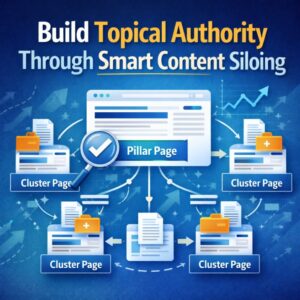
A topic cluster is a group of pages that are semantically related and structurally interconnected. One pillar page sits at the centre. Multiple cluster pages surround it, each covering a specific angle or subtopic. Every cluster page links to the pillar, and the pillar links to every cluster page.
This architecture does something powerful. It concentrates topical signals in one place. Rather than relying on scattered email marketing posts, a strong topic cluster creates a tightly connected content network.
This structure signals clear expertise and authority on the subject to search engines.
Siloing: Keep Your Link Equity Inside Relevant Topics
Siloing keeps internal links within related topic groups. A page about email list segmentation should link to content on deliverability, subject lines, and A/B testing.
Problems arise when unrelated topics are linked together. For example, linking an email marketing guide to a social media advertising article can weaken topical relevance.
There are exceptions. An email marketing post can link to a landing page optimization guide because both support campaign performance. Every internal link should feel natural and strengthen the topic being covered.
How Many Internal Links Per Page?
Link density matters. Too few internal links and you are leaving equity on the table. Too many, and you are diluting the value of each link.
A practical benchmark is 3 to 5 contextual internal links per 1,000 words of content. A 2,000-word article should typically include 6 to 10 relevant internal links. Navigation menus, footers, and sidebar links should not be included in this count.
Anchor Text Best Practices That Actually Move Rankings
Anchor text is the visible, clickable text of your internal link. It helps search engines understand the destination page’s topic. This also aligns with guidance in Google’s Search Quality Evaluator Guidelines. It is one of the strongest on-page signals for telling search engines what the destination page is about. Most sites waste this signal by defaulting to vague, generic labels.
Write Descriptive, Keyword-Rich Anchor Text
Every internal link provides context to search engines. Anchor text helps explain what the linked page is about.
Use clear, descriptive anchors whenever possible. For example, link with phrases like “email list segmentation strategies”, “email marketing best practices”, or “improving email deliverability”. Avoid generic anchors such as “click here”, “learn more”, or “this article”.
Descriptive anchor text strengthens topical relevance. It also helps search engines understand the relationship between pages.
The Link Whisper WordPress plugin makes this process easier. It identifies internal linking opportunities and suggests relevant anchor text based on the content. This helps maintain a stronger, more consistent internal linking structure.
Review internal links regularly and replace vague anchors with more specific ones. Even small updates can improve the visibility of existing pages.
Avoid These Anchor Text Mistakes
- Generic anchors such as “click here”, “read more”, and “learn more” provide little context. They miss an opportunity to tell search engines what the destination page covers.
- Avoid overusing exact-match anchors. If every link to an email marketing page uses “email marketing strategy”, the pattern can appear unnatural. A mix of relevant anchor variations is a safer approach.
- Naked URLs should also be avoided. A raw URL offers little value to readers and provides no topical context to search engines.
Leverage Authority Pages for Better Rankings
Every site has a handful of high-authority pages. These pages have earned quality backlinks, built authority over time, and attracted consistent organic traffic.
They act as key sources of link equity. Strategic internal links from these pages can help strengthen the visibility and authority of other content across the site.
Identify Your Highest-Authority Pages
High-authority pages often attract the most traffic, backlinks, and visibility. These pages serve as valuable sources of link equity within a site.
Their value goes beyond maintaining strong rankings. Strategic internal links from these pages can pass authority to newer or less visible content, helping those pages gain traction in search results.
The Link Whisper plugin can help identify opportunities to connect authority pages with relevant content. This makes it easier to distribute link equity across the site and strengthen overall SEO performance.
Strengthen Underperforming Pages With Internal Links
High-performing content can help lift weaker pages. Add a few relevant internal links from top-ranking articles to pages that need more visibility.
Place these links naturally within the main content, ideally in the first half of the page. This helps distribute authority where it can have the greatest impact.
The Link Whisper plugin makes this process easier by identifying relevant linking opportunities across existing content. It helps put already-earned authority to work across the site.
Maximize SEO With Strategic Link Placement
Not all internal links carry the same weight. Links placed within the main content body typically provide more value than those in footers, sidebars, or related post sections.
Place important links early in the content where they are most likely to be seen and crawled. This is especially important for links pointing to pillar pages or other high-priority content.
The WordPress internal linking plugin can help identify relevant linking opportunities, but placement should always feel natural and support the flow of the content.
Conducting a Regular Internal Link Audit
An internal link audit is how you keep your hierarchy clean, functional, and optimized as your site grows. Think of it as quarterly maintenance for your link structure.
What to Look for During an Internal Link Audit
Orphaned Pages: Pages with zero internal links pointing to them. Search engines may never find these pages. Your audit should flag every orphan and assign it a logical home in the hierarchy.
Broken Internal Links: 404 errors from internal links are crawl budget killers. Every broken link is a dead end for both users and bots. Fix or redirect immediately.
Thin Link Distribution: Pages with only one or two internal links pointing to them are under-supported. Especially for pillar content and key service pages, you want multiple links from multiple pages reinforcing their importance.
Link Chains: Redirect chains (Page A → Page B → Page C) waste crawl budget and dilute equity. If you have moved pages, update internal links to point directly to the final destination URL.
Streamline Internal Linking With Link Whisper
Internal linking often breaks down as content libraries expand. Important pages become buried, topic clusters weaken, and valuable linking opportunities go unnoticed.
The Link Whisper WordPress plugin helps solve this problem by continuously surfacing relevant internal link suggestions. Instead of manually searching through hundreds of posts, relevant connections can be identified directly within the workflow.
Link Whisper also makes it easier to strengthen pillar pages, support new content, and distribute authority across related topics. The result is a more connected website that is easier for both users and search engines to navigate.
How Often Should You Audit Your Internal Links?
Internal linking is not a one-time task. Regular reviews help keep site architecture clean and effective as new content is added.
A monthly check for orphaned pages, broken links, and missed linking opportunities can prevent issues from accumulating. A more detailed quarterly review can help assess anchor text diversity, link distribution, and topic cluster strength.
Link Whisper simplifies this by identifying orphaned content and suggesting internal links. This helps maintain a consistent internal linking strategy as a site grows.
Conclusion
A well-structured internal linking strategy does more than improve navigation. It helps search engines understand content relationships and strengthens topical authority. This ensures link equity reaches the pages that matter most.
The most successful websites treat internal linking as an ongoing SEO discipline rather than a one-time optimization. A strong internal linking strategy drives lasting ranking improvements.
For WordPress users, the Link Whisper plugin helps streamline this process. Link Whisper identifies relevant internal linking opportunities and highlights orphaned content. It helps maintain a scalable internal linking framework as a site grows.
Frequently Asked Questions
Why is internal link hierarchy important for SEO?
It helps search engines understand site structure. It improves crawling, indexing, and the ranking potential of key pages.
How to Structure Internal Links on My Website?
Start with pillar pages as the foundation. Connect cluster pages beneath them. Support with detailed subpages. Keep links logical and context-driven.
What Should a Link Building Report Actually Include?
A link building report should include backlinks, referring domains, anchor text distribution, and link quality. It should also reflect SEO impact over time.
Topical authority signals expertise to search engines. It is built through closely related, well-linked content across a topic.
What is link equity in internal linking?
Link equity is the value passed between pages through links. It strengthens important pages and supports overall rankings.
What are topic clusters SEO strategies?
Topic clusters organize content around a central pillar page. Supporting pages link back to it, creating strong topical relevance.
What are anchor text best practices for internal links?
Use clear and descriptive anchor text. Avoid generic terms. Keep it natural and relevant to the linked page.
What is an internal link audit?
An internal link audit reviews site links for structure and performance. It helps find broken links, orphan pages, and weak connections.
How does a WordPress internal linking plugin help SEO?
A WordPress internal linking plugin like Link Whisper suggests relevant links automatically. It improves structure and reduces manual effort.
Check if your site has the same issues.
Run a free audit right now. See your orphaned pages, broken links, and link health score in 60 seconds.
Check My Site

