
Contents
- 1 Key Takeaways
- 2 1. Build Your Site Architecture with Pillar Content Strategy
- 3 2. Automate Your Internal Linking with Smart WordPress Plugins
- 4 3. Master Anchor Text Optimization for Natural Link Profiles
- 5 4. Implement Deep Linking to Eliminate Orphan Pages
- 6 5. Monitor and Fix Broken Links Regularly
- 7 6. Place Links Strategically for Maximum Impact
- 8 7. Scale Your Linking Strategy as Your Content Grows
- 9 Conclusion
- 10 Frequently Asked Questions
- 11 1: What is WordPress internal linking and why does it matter?
- 12 2: How many internal links should I add to each WordPress post?
- 13 3. Can internal linking improve my WordPress SEO rankings?
- 14 4: What's the best internal linking structure for WordPress sites?
- 15 5: Should I use an internal link plugin for WordPress?
- 16 6: How do I find internal linking opportunities in WordPress?
- 17 7: What anchor text should I use for WordPress internal links?
- 18 8: What are orphan pages and how do they hurt SEO?
- 19 9: How often should I audit my WordPress internal links?
- 20 10: Can I automate internal linking without using plugins?
- 21
WordPress internal linking is one of the most powerful yet underutilized SEO strategies available to website owners today. When implemented correctly, internal links help search engines understand your site structure, pass authority between pages, and guide visitors to relevant content. Yet many WordPress users struggle with creating an effective internal link plugin WordPress strategy that delivers measurable results. This guide reveals seven essential tips that will transform your approach to WordPress internal linking, helping you build a stronger site architecture, improve SEO performance, and save hours of manual work.
Key Takeaways
- WordPress internal linking strengthens your site architecture, distributes page authority effectively, and helps search engines crawl and index content more efficiently.
- Automation tools eliminate time-consuming manual linking while maintaining natural, contextually relevant connections throughout your WordPress site.
- Strategic anchor text optimization, proper link placement, and regular link audits are critical for long-term SEO success.
1. Build Your Site Architecture with Pillar Content Strategy
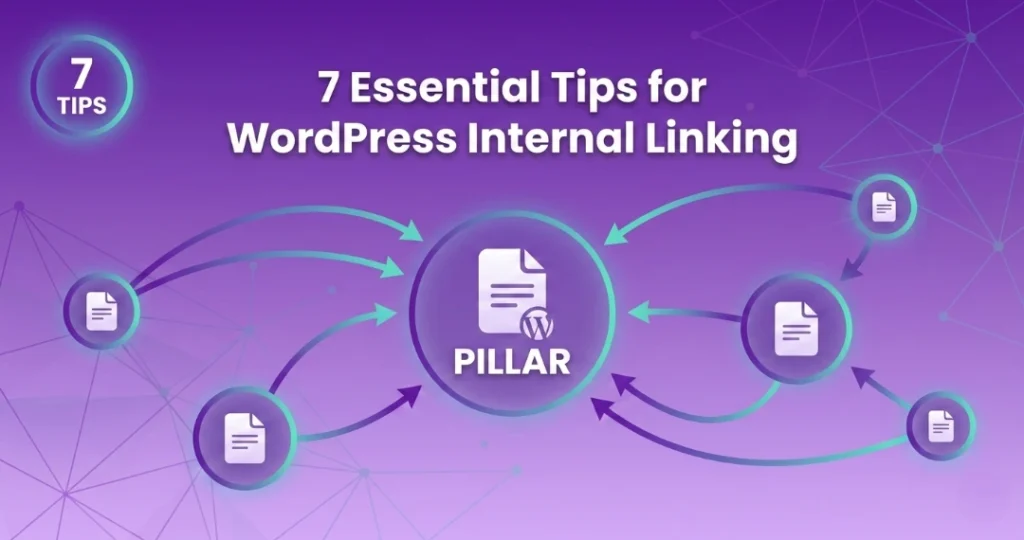
Creating a strong site architecture starts with pillar pages that serve as comprehensive guides on main topics, linking out to supporting articles that dive deeper into specific subtopics, creating a hierarchical content structure that search engines can easily understand and reward.
Think of your WordPress site as a library where pillar content acts as the main catalog, organizing related articles into logical clusters. For example, if you run a digital marketing blog, your pillar page on “Content Marketing” should link to detailed articles about blog writing, video marketing, and email campaigns. This approach helps search engines recognize your topical authority while making navigation intuitive for readers. Studies show that websites with clear content hierarchies experience up to 40% better crawl efficiency compared to sites with random linking patterns. Create 3-5 pillar pages covering your main topics, then build 8-10 supporting articles for each pillar. This structure also helps with internal linking for SEO, as it creates natural pathways between related content.
2. Automate Your Internal Linking with Smart WordPress Plugins
Manual internal linking becomes overwhelming as your site grows, but an internal link plugin WordPress solution can analyze your content, suggest contextually relevant links, and automatically add connections to older posts whenever you publish new content.
Modern automation tools have transformed how website owners approach internal linking. Instead of manually combing through hundreds of posts to find linking opportunities, plugins use AI-powered algorithms to match relevant content based on semantic relationships and keyword connections. Internal linking automation tools like LinkWhisper can scan your entire site in minutes, identifying opportunities you might miss manually. These plugins offer customizable rules that let you control link density, exclude specific pages, and set preferred anchor text patterns. The time savings are substantial what once took hours now happens automatically in the background. For sites with 100+ posts, automation isn’t just convenient; it’s essential for maintaining a healthy internal link structure without dedicating entire days to link building.
3. Master Anchor Text Optimization for Natural Link Profiles
Effective anchor text strategy requires balancing exact-match keywords with partial matches, branded terms, and descriptive phrases to create a natural-looking link profile that signals relevance to search engines without triggering over-optimization penalties.
Anchor text diversity is crucial for maintaining a natural WordPress internal linking profile. Avoid repeatedly using identical exact-match keywords, which can appear manipulative to search engines. Instead, vary your approach across different anchor text types. Research on anchor text optimization shows that natural link profiles typically include:
- Exact-match anchors (20-30%): “WordPress SEO tips
- Partial-match anchors (30-40%): “SEO strategies for WordPress
- Branded anchors (10-20%): “our WordPress guide”
- Generic anchors (10-20%): “click here” or “learn more”
- Naked URLs (5-10%): “linkwhisper.com
This distribution creates an organic pattern while still passing relevant topical signals. Remember, descriptive anchor text also improves user experience by setting clear expectations about where the link leads.
4. Implement Deep Linking to Eliminate Orphan Pages
Most websites over-prioritize homepage and top-level page links while neglecting deeper content, but strategic deep linking distributes authority throughout your entire site and prevents pages from becoming isolated orphans that search engines struggle to find.
Deep linking is the practice of linking to pages buried several clicks deep in your site structure. Many WordPress sites suffer from the homepage-heavy linking problem, where 80% of internal links point to the same few pages. This leaves valuable content stranded without adequate internal link support. To implement effective deep linking, start by identifying posts with fewer than 3 internal links using your analytics or an internal link analytics tool. Then strategically connect these under-linked pages to relevant content across your site. Don’t just link from new posts to old ones—revisit existing content quarterly to add links to newer, more comprehensive articles. According to research from major SEO platforms like Ahrefs, pages receiving just 5-10 quality internal links often see ranking improvements of 10-20 positions. Focus particularly on linking to posts targeting valuable keywords that aren’t getting enough internal support to rank competitively.
5. Monitor and Fix Broken Links Regularly
Broken internal links damage user experience, waste search engine crawl budget, and can negatively impact rankings, making regular link audits essential for identifying 404 errors, redirect chains, and outdated URLs before they accumulate.
Maintaining link health requires consistent monitoring and quick fixes. Use WordPress plugins or external tools to scan your site monthly for broken internal links. Common causes include deleted posts, changed URL structures, or moved content without proper redirects. When you delete or relocate content, always implement 301 redirects or update internal links pointing to old URLs. Check your link reports for patterns if you’re consistently finding broken links in specific categories, it might indicate systematic issues like changed permalink structures. Statistics show that sites with numerous broken internal links can lose up to 15% of their potential organic traffic. Set up automated alerts that notify you when broken links appear, allowing immediate fixes rather than quarterly cleanups. A well-maintained internal link profile signals professional site management to both users and search engines.
6. Place Links Strategically for Maximum Impact
Link placement significantly affects click-through rates and SEO value, with contextual links within body content performing far better than sidebar widgets or footer links, and links in the first few paragraphs receiving the highest engagement.
Where you place internal links matters as much as how many you include. Research from user behavior studies reveals compelling statistics about link positioning:
- First paragraph links: Receive 3x more clicks than mid-content links
- Contextual body links: Pass more SEO value than sidebar links
- Natural sentence integration: Gets 2x more engagement than isolated link sections
- Related post sections: Best placed at article end for logical next steps
Focus on placing your most important internal links within the first three paragraphs where they receive maximum visibility. Use contextual links naturally woven into sentences rather than obvious “link dumps” that readers skip. Balance SEO benefits with genuine helpfulness only link when it provides real value to readers seeking additional information. Consider adding “related articles” sections at the end of posts to suggest logical next steps without interrupting the main content flow.
7. Scale Your Linking Strategy as Your Content Grows
As your WordPress site expands to hundreds or thousands of posts, develop scalable systems through content templates, automated rules, and category-based linking approaches that maintain consistent internal link quality without overwhelming your workflow.
Growing from 50 posts to 500 requires a fundamental shift in how you approach WordPress internal linking. Manual linking becomes impossible at scale, so create systematic processes that grow with your content library. Develop internal link strategy templates for different content types product reviews need different linking patterns than tutorial posts or comparison articles. Set up automated rules that apply consistent principles across new content as you publish. For large sites, segment your linking approach by category or topic cluster, ensuring each section maintains proper internal connections. Review link distribution reports quarterly to identify under-linked categories or topic areas needing attention. As your site grows, prioritize updating cornerstone content with links to newer, more comprehensive articles that better serve reader needs. This systematic approach ensures your WordPress internal linking remains effective whether you have 100 posts or 10,000.
Conclusion
Implementing these seven essential tips for WordPress internal linking will transform your site from a collection of isolated posts into a cohesive, search-engine-friendly ecosystem. From building strategic content pillars to automating link management with smart plugins, each tip addresses a specific challenge in creating an effective internal linking strategy. Start by auditing your current link structure, then implement these best practices systematically. Whether you choose manual methods or leverage an internal link plugin WordPress solution, consistent execution of these strategies will improve your rankings, increase organic traffic, and enhance user engagement across your entire website.
Frequently Asked Questions
2: How many internal links should I add to each WordPress post?
Add 3-5 internal links per 1,000 words of content. The exact number depends on your post length and how many relevant linking opportunities exist. Focus on quality over quantity each link should provide genuine value and connect readers to helpful related content naturally.
3. Can internal linking improve my WordPress SEO rankings?
Yes, strategic WordPress internal linking significantly improves SEO by helping Google understand site structure, discover new content faster, and distribute ranking power. Proper WordPress SEO practices including internal linking can boost rankings by signaling content relationships and topical expertise to search engines effectively.
4: What's the best internal linking structure for WordPress sites?
The best structure uses a pyramid approach with cornerstone pillar pages at the top linking to supporting category content, which then connects to detailed subtopic articles. This hierarchical organization creates clear topical clusters, improves crawlability, and establishes authority across related subjects systematically.
5: Should I use an internal link plugin for WordPress?
Yes, an internal link plugin WordPress solution saves significant time as your site grows. Plugins automate link suggestions, identify relevant connections you might miss, and help maintain consistent linking across hundreds of posts, making link management scalable and efficient for busy website owners.
6: How do I find internal linking opportunities in WordPress?
Manually search existing posts for relevant keywords, use analytics to identify under-linked high-value pages, or leverage plugins that automatically scan content. Regular audits reveal 3 Simple Ways to Find Internal Linking Opportunities in 2023 internal linking opportunities by showing which pages need more connections to improve their ranking potential and visibility.
7: What anchor text should I use for WordPress internal links?
Mix exact-match keywords, partial matches, branded terms, and generic phrases. Aim for 30-40% partial matches, 20-30% exact matches, and 30-50% branded or generic anchors. This variation creates natural-looking link profiles that signal relevance without appearing over-optimized to search engines.
8: What are orphan pages and how do they hurt SEO?
What is an Orphan Page? (has no incoming internal links) Orphan pages have zero internal links pointing to them, making them nearly invisible to search engines and users. These pages waste crawl budget, miss ranking opportunities, and signal poor site structure. Regular audits identify orphans so you can add strategic connections.
9: How often should I audit my WordPress internal links?
Audit internal links monthly for sites under 100 posts and weekly for larger, frequently updated sites. Regular checks identify broken links, redirect chains, and under-linked pages. Quarterly comprehensive audits maintain How To Identify "Bad" Internal Links Quickly link quality and ensure your internal linking strategy remains effective as content grows.
10: Can I automate internal linking without using plugins?
Manual automation requires custom PHP code in your theme's functions.php file, which risks breaking your site if implemented incorrectly. Most WordPress users benefit from dedicated internal linking plugins that provide safer, more flexible automation with user-friendly interfaces, regular updates, and professional support options.
Check if your site has the same issues.
Run a free audit right now. See your orphaned pages, broken links, and link health score in 60 seconds.
Check My Site

