
Contents
- 1 Introduction
- 2 Key Takeaways
- 3 Why WordPress SEO Internal Links Matter for Your Site
- 4 How to Build Effective Internal Links in WordPress
- 5 Common Internal Linking Mistakes to Avoid
- 6 Best Practices for WordPress Internal Linking Structure
- 7 Automate Your Internal Linking Strategy
- 8 Measuring Internal Linking Success
- 9 Conclusion
- 10 Frequently Asked Questions
- 11 What are WordPress SEO internal links?
- 12 How many internal links should a WordPress blog post have?
- 13 Do internal links improve WordPress SEO rankings?
- 14 What is the best anchor text for internal links?
- 15 Can I automate internal linking in WordPress?
- 16 How do I find broken internal links in WordPress?
- 17 What are orphan pages in WordPress?
- 18 Should I use nofollow for internal links?
- 19 How do internal links affect page authority in WordPress?
- 20 Can too many internal links hurt my WordPress SEO?
- 21
Introduction
WordPress SEO internal links are one of the most underutilized strategies for improving search rankings. Many site owners focus heavily on backlinks while overlooking the power of strategic internal linking within their own content. Internal links help search engines understand your site structure, distribute page authority, and guide visitors to relevant content. In this guide, you’ll discover seven proven ways to leverage WordPress SEO internal links to boost your rankings, improve user experience, and maximize your content’s visibility in search results.
Key Takeaways
- WordPress SEO internal links improve site structure and help search engines crawl and index your content more effectively.
- Strategic internal linking distributes page authority across your site, boosting rankings for important pages.
- Automated internal linking software saves time while maintaining consistency and finding opportunities you might miss manually.
Why WordPress SEO Internal Links Matter for Your Site
WordPress SEO internal links serve as the foundation of your site’s architecture. When you link one page to another within your domain, you create pathways that search engines follow to discover and understand your content hierarchy. These connections tell Google which pages are most important and how different topics relate to each other.
Internal links also distribute link equity throughout your site. When a high-authority page links to other content, it passes some of that ranking power along. This means you can strategically boost newer or underperforming pages by connecting them with your strongest content. For WordPress users, this becomes especially valuable as your content library grows.
Beyond SEO benefits, internal links improve user experience by guiding visitors to related information. A well-structured internal link strategy keeps readers engaged longer, reduces bounce rates, and increases the likelihood of conversions. Studies show that sites with strong internal linking structures see up to 40% more page views per session.
How to Build Effective Internal Links in WordPress
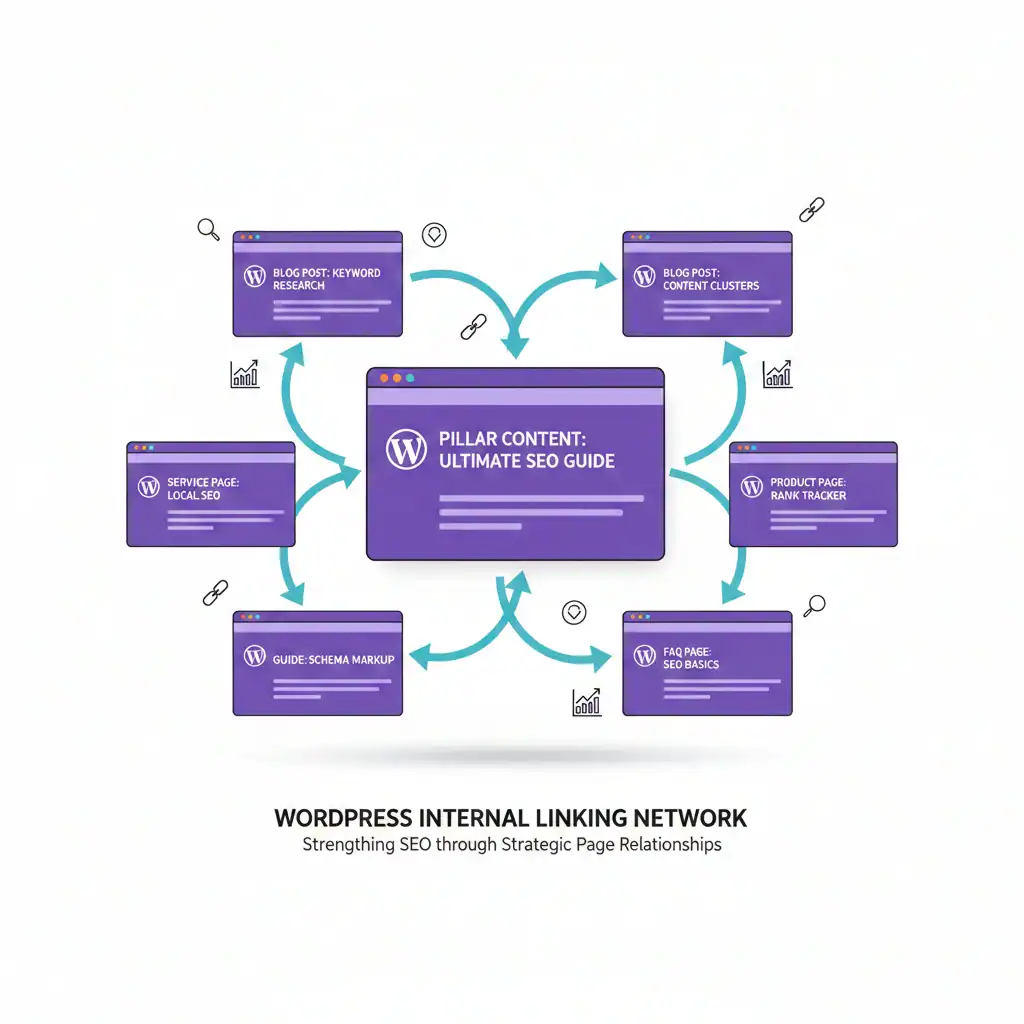
Building effective WordPress SEO internal links requires a systematic approach. Start by identifying your pillar content comprehensive guides or cornerstone articles that cover broad topics in your niche. These pages should receive the most internal links from related supporting content.
When creating new posts in WordPress, look for natural opportunities to link to existing content. The anchor text should be descriptive and include relevant keywords without over-optimization. For example, instead of “click here,” use phrases like “learn about internal linking for SEO” that tell both users and search engines what the linked page contains.
Link placement matters significantly. Links within the main content body carry more weight than those in sidebars or footers. Place your most important internal links early in your content, ideally within the first 100-200 words, to ensure they receive maximum visibility and authority transfer.
Consider using a WordPress plugin for internal linking to streamline the process. Internal linking software can automatically suggest relevant linking opportunities as you write, ensuring you never miss valuable connections between related content pieces.
Common Internal Linking Mistakes to Avoid
One of the biggest mistakes WordPress site owners make is creating orphan pages content with no incoming internal links. These pages become invisible to search engines and users alike. Regularly audit your site to identify and fix orphaned content by connecting it to relevant existing pages.
Another common error is using generic anchor text repeatedly. Phrases like “click here” or “read more” provide no SEO value and miss opportunities to reinforce keyword relevance. Each internal link should use unique, descriptive anchor text that accurately represents the destination page’s content.
Over-linking can also harm your SEO efforts. Stuffing 20+ internal links into a single post dilutes their value and creates a poor user experience. Instead, focus on quality over quantity typically 2-5 strategic internal links per 1,000 words provides the best balance. Make sure each link adds genuine value for your readers.
Many site owners also neglect to update internal links when content changes. Broken internal links damage user experience and waste crawl budget. Regular maintenance ensures all links point to active, relevant pages.
Best Practices for WordPress Internal Linking Structure
Creating a hierarchical site structure strengthens your WordPress SEO internal links strategy. Organize content into clear categories and subcategories, with your homepage linking to main category pages, which then link to individual posts. This pyramid structure helps search engines understand content relationships.
Example Structure:
- Homepage → Main Category → Subcategory → Individual Post
- Homepage → Services Page → Specific Service → Related Blog Post
- Pillar Content → Supporting Articles → Related Resources
Use contextual linking within your content body rather than relying solely on navigation menus. Contextual links receive more weight from search engines because they provide semantic relevance. When you mention a topic that you’ve covered elsewhere, that’s your opportunity to add an internal link.
Maintain consistency in your anchor text optimization for internal links. While you should vary anchor text to avoid over-optimization, maintaining semantic relevance helps search engines understand the relationship between linked pages. A good rule is to use exact-match anchors 30% of the time, partial-match 50%, and branded or generic anchors 20%.
Create content clusters by grouping related articles and linking them together. For instance, if you have a comprehensive guide on WordPress SEO, create supporting posts on specific subtopics and link them all back to the main pillar content. This cluster approach signals topical authority to search engines.
Automate Your Internal Linking Strategy
Manual internal linking becomes increasingly challenging as your WordPress site grows. Internal linking software solves this problem by automatically identifying relevant linking opportunities across your entire content library. These tools analyze your existing posts and suggest contextually appropriate links based on topic relevance and keyword matching.
Automation saves significant time while improving link consistency. Instead of manually reviewing hundreds of old posts to add links to new content, internal linking software can update your entire site in minutes. This ensures every new post receives links from relevant existing content immediately upon publication.
The best internal linking software for WordPress integrates directly with your editor, providing real-time suggestions as you write. This workflow makes internal linking a natural part of your content creation process rather than an afterthought. Features like bulk link editing, orphan page detection, and link reporting provide comprehensive control over your site’s linking structure.
WordPress automation tools can also help maintain link health by identifying broken internal links, suggesting anchor text improvements, and tracking which pages need more incoming links. This data-driven approach removes guesswork from your internal linking strategy.
Measuring Internal Linking Success
Tracking the impact of WordPress SEO internal links requires monitoring specific metrics. Start with Google Search Console to observe changes in impressions, clicks, and average position for pages you’ve improved through internal linking. Most sites see measurable improvements within 2-4 weeks of implementing strategic internal linking changes.
Use Google Analytics to track behavioral metrics like pages per session, average session duration, and bounce rate. Effective internal linking should increase page views per session by at least 20-30% as users navigate through related content. Monitor which internal links receive the most clicks to understand user interests.
Set up internal link analytics to track how link equity flows through your site. Advanced tracking reveals which pages serve as strong hubs distributing authority and which pages need more incoming links. This data helps you refine your linking strategy over time.
Monitor your site’s crawl efficiency through Google Search Console. Better internal linking helps search engines discover and index new content faster. Check your sitemap to ensure all important pages receive adequate internal links and aren’t being overlooked as orphan pages.
Conclusion
WordPress SEO internal links represent a powerful, often overlooked opportunity to improve your search rankings and user experience. By implementing strategic internal linking practices, building hierarchical site structure, using descriptive anchor text, avoiding common mistakes, and leveraging automation tools you can maximize your content’s visibility and authority. Remember that WordPress SEO internal links work best when combined with quality content and consistent optimization efforts. Start by auditing your current internal linking structure, identify opportunities for improvement, and consider using internal linking software to streamline the process. With dedication to these seven strategies, you’ll build a stronger site architecture that benefits both search engines and your visitors. Ready to take your internal linking to the next level? Explore proven internal linking opportunities and start implementing these tactics today.
Frequently Asked Questions
How many internal links should a WordPress blog post have?
A WordPress blog post should include 2-5 internal links per 1,000 words for optimal SEO results. Focus on quality over quantity by linking to highly relevant content. Too many internal links dilute their value, while too few miss opportunities to guide users and distribute page authority effectively.
Do internal links improve WordPress SEO rankings?
Yes, internal links significantly improve WordPress SEO rankings by helping search engines discover content, understand site structure, and distribute page authority. Strategic internal linking for SEO can boost rankings by 10-40%, especially when combined with quality content and proper anchor text optimization.
What is the best anchor text for internal links?
The best anchor text for internal links is descriptive, natural, and includes relevant keywords without over-optimization. Use exact-match keywords 30% of the time, partial-match variations 50%, and branded or generic anchors 20% to maintain diversity while signaling content relevance to search engines.
Can I automate internal linking in WordPress?
Yes, you can automate internal linking in WordPress using specialized plugins and internal linking software. These tools analyze your content, suggest relevant links, and can automatically insert links based on predefined rules, saving hours of manual work while ensuring comprehensive site-wide link coverage.
How do I find broken internal links in WordPress?
You can find broken internal links in WordPress using SEO plugins, Google Search Console, or dedicated link checking tools. Regular audits help maintain link health and prevent wasted crawl budget. Many WordPress SEO tools include built-in broken link detection features.
What are orphan pages in WordPress?
Orphan pages in WordPress are published pages or posts with no incoming internal links from other pages on your site. Search engines struggle to discover orphan pages, significantly reducing their visibility in search results. Regular site audits help identify and fix orphaned content through strategic internal linking.
Should I use nofollow for internal links?
Generally, you should not use nofollow for internal links in WordPress. Nofollow tags prevent search engines from passing link equity and can waste your site's crawling budget. Reserve nofollow only for specific cases like login pages, admin areas, or user-generated content sections that shouldn't receive ranking power.
Internal links distribute page authority throughout your WordPress site by passing link equity from high-authority pages to others. When authoritative content links to newer or weaker pages, it boosts their ranking potential. Strategic linking helps avoid common SEO problems and strengthens overall site performance.
Can too many internal links hurt my WordPress SEO?
Yes, excessive internal links can dilute their value and create poor user experience. WordPress posts should maintain a natural linking ratio of 2-5 links per 1,000 words. Overloading content with 20+ links appears spammy to search engines and reduces each link's individual impact on rankings and authority distribution.
Check if your site has the same issues.
Run a free audit right now. See your orphaned pages, broken links, and link health score in 60 seconds.
Check My Site

