
Contents
- 1 Why Your WordPress Site Needs an Internal Link Building Plugin
- 2 Table of Contents
- 3 What Is an Internal Link Building Plugin for WordPress?
- 4 Why Internal Linking Is Critical for WordPress SEO
- 5 Key Features to Look for in the Best WordPress Plugin for Internal Linking
- 6 How LinkWhisper Works as a WordPress Internal Linking Plugin
- 7 SEO Benefits of Using an Internal Linking Plugin
- 8 How Internal Link Building Plugins Support AI-Powered Search
- 9 Is Manual Internal Linking Still Worth It for WordPress Sites?
- 10 Advanced Internal Linking Strategies with WordPress Plugins
- 11 Conclusion
- 12 Frequently Asked Questions
- 12.1 What is the best internal link building plugin for WordPress in 2025?
- 12.2 How does an internal link building plugin improve SEO?
- 12.3 Can I use an internal linking plugin on a WooCommerce store?
- 12.4 How many internal links should each WordPress post have?
- 12.5 What is an orphaned page and how does a wordpress plugin for internal linking fix it?
- 12.6 Does an internal link building plugin work with Gutenberg and Elementor?
- 12.7 How does internal linking help with AI-powered search engines like ChatGPT and Perplexity?
- 12.8 Is automatic internal linking safe for SEO or can it hurt my site?
- 12.9 How long does it take to see SEO results from using an internal linking plugin wordpress?
- 12.10 Can a beginner use a wordpress internal linking plugin without technical SEO knowledge?
Internal link building plugin solutions have become essential tools for WordPress site owners who want to scale their SEO without spending hours manually linking every post. According to Google Search Central documentation, internal links help Google discover and understand the relationship between pages on your site. This directly influences how well your content ranks.
Why Your WordPress Site Needs an Internal Link Building Plugin
If you have dozens or hundreds of posts, managing those connections by hand is nearly impossible. That is where a reliable wordpress plugin for internal linking transforms your entire workflow. In this guide, you will learn exactly what to look for, why automation matters, and how the right tool can strengthen your site architecture. We will also explore how internal linking supports both traditional SEO and emerging AI-powered search engines.
Key Takeaways
- Internal linking boosts crawl efficiency and PageRank distribution
- AI-powered suggestions save hours of manual linking work
- Orphan content detection prevents lost SEO equity
- Automation supports both traditional SEO and AI search visibility
- LinkWhisper is the leading internal link building plugin for WordPress
Table of Contents
- Why Your WordPress Site Needs an Internal Link Building Plugin
- What Is an Internal Link Building Plugin for WordPress?
- Why Internal Linking Is Critical for WordPress SEO
- Key Features to Look for in the Best WordPress Plugin for Internal Linking
- How LinkWhisper Works as a WordPress Internal Linking Plugin
- SEO Benefits of Using an Internal Linking Plugin
- How Internal Link Building Plugins Support AI-Powered Search
- Is Manual Internal Linking Still Worth It for WordPress Sites?
- How Do I Choose the Right Internal Link Plugin for WordPress?
- Advanced Internal Linking Strategies with WordPress Plugins
- Conclusion
What Is an Internal Link Building Plugin for WordPress?
An internal link building plugin automates the process of creating, managing, and optimizing links between pages on your website. Instead of manually scanning every post and inserting links one by one, the plugin analyzes your content. It also suggests or automatically inserts contextually relevant links.
These tools work by scanning the text of your posts and pages. They identify keyword phrases and match them to other relevant content on your site. The result is a well-connected site structure that search engines can crawl efficiently
Why Plugins Matter for Growing Sites
Content Volume Challenge
As your WordPress site grows beyond 50 or 100 posts, manually managing internal links becomes impractical. A dedicated interlinking plugin wordpress solution handles scale automatically. This ensures every new post gets linked to related older content without additional effort from your team.
Consistency and Accuracy
Manual linking is prone to oversight. You might forget to link a new article to an important pillar post, or you might use inconsistent anchor text across similar topics. A plugin standardizes this process and applies linking rules site-wide.
Time Savings
Research shows that automated internal linking can reduce time spent on linking tasks by up to 97% compared to fully manual workflows. That time can be reinvested into creating more content or optimizing other SEO factors.
Types of Internal Links a Plugin Manages
Contextual Links
These appear within the body of a post and pass the most SEO value. A good internal link plugin wordpress solution identifies natural insertion points within your existing sentences rather than forcing awkward placements.
Navigational Links
Menu and sidebar links that guide users through your site structure. While plugins primarily focus on contextual links, they also help you identify gaps in your navigational architecture through detailed reporting.
Pillar and Cluster Links
Topic cluster content models depend on strong internal linking between pillar pages and supporting posts. A wordpress internal linking plugin helps you build these clusters systematically so your site communicates topical authority to search engines.
Why Internal Linking Is Critical for WordPress SEO
Internal linking is one of the most controllable and impactful on-page SEO factors available to site owners. Unlike backlinks, which depend on third parties, internal links are entirely within your control. Understanding why they matter helps you appreciate the full value of a dedicated internal linking plugin.
Crawl Efficiency and Indexing
Crawl Budget Optimization
Google allocates a finite crawl budget to each website. Sites with strong internal linking allow Googlebot to discover and index more pages within each crawl cycle. Pages with few or no internal links pointing to them are often missed entirely. This leaves valuable content unindexed and invisible in search results. An internal link building plugin ensures that every piece of content receives at least one contextual link from a relevant post.
Deep Page Discovery
Without internal links, pages buried several clicks deep in your site architecture are difficult for crawlers to reach. Plugins actively surface these buried pages by automatically generating links from high-authority posts to deep content. This reduces the average click depth across your site.
Index Coverage Rates
Sites that actively manage internal linking report higher index coverage rates in Google Search Console. When Googlebot follows a rich network of internal links, it encounters more of your content during each crawl session. This accelerates the indexing of new posts and updates to existing ones.
PageRank and Link Equity Distribution
Link Equity Flow
PageRank flows through internal links. Pages that receive more internal links accumulate more authority. This translates directly into ranking potential. A well-configured best wordpress plugin for internal linking distributes this equity strategically by directing links from your strongest pages to posts you want to rank higher. You can learn more about how this works in our guide on what is link equity and how to distribute it.
Authority Concentration
Without a deliberate linking strategy, your site’s most authoritative pages often hoard link equity without passing it on. Internal link building tools help you identify these authority concentrations and create outbound links from them to strategically important target pages.
Anchor Text Signals
The anchor text of an internal link tells search engines what the destination page is about. Consistent and keyword-relevant anchor text reinforces topical relevance signals. A quality interlinking plugin wordpress solution helps you maintain anchor text diversity and accuracy across thousands of links simultaneously.
User Experience and Engagement
Reduced Bounce Rates
Internal links guide visitors to related content they are likely to find valuable. When readers follow these links, they spend more time on your site, which sends positive engagement signals to search engines. A wordpress internal linking plugin creates natural pathways through your content that feel helpful rather than forced.
Content Discovery for Readers
Visitors who land on a specific post may not know about the breadth of content available on your site. Strategic internal links act as a guided tour, exposing readers to high-value content they might otherwise never discover.
Conversion Path Optimization
For commercial sites and affiliate publishers, internal links serve as conversion path builders. Linking from informational content to product reviews, landing pages, or comparison articles moves readers through the buying funnel naturally and effectively.
Key Features to Look for in the Best WordPress Plugin for Internal Linking
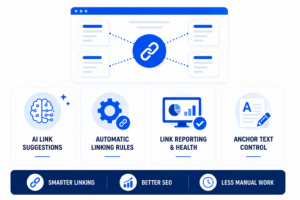
Not all internal linking plugins are created equal. When evaluating your options, focus on the features that deliver the most SEO value and save the most time. Here is what separates a genuinely powerful internal link building plugin from a basic tool.
AI-Powered Link Suggestions
Contextual Intelligence
The best tools use artificial intelligence to analyze your content semantically, not just match keywords. AI-powered suggestions identify opportunities where a link would genuinely add value to the reader, rather than forcing a link wherever a keyword appears. This produces a more natural linking profile that both readers and search engines appreciate.
Relevance Scoring
Advanced plugins score potential link targets based on topical relevance, not just keyword matching. This ensures that suggestions point to pages that are genuinely related to the source content, which strengthens your topic cluster architecture. You can explore how AI integration works with our guide on.
Bulk Processing Capabilities
AI suggestion engines that can process your entire content library in one pass save enormous amounts of time. Rather than reviewing posts one by one, you receive a comprehensive report of all linking opportunities across your site. This you can then approve, edit, or reject in a streamlined interface.
Automatic Internal Linking Rules
Rule-Based Automation
Automatic linking rules allow you to define keyword phrases that should always link to a specific page whenever they appear in new content. Once configured, the plugin inserts these links automatically as you publish new posts, requiring zero additional effort from you.
Link Frequency Controls
Quality plugins include controls to prevent over-linking. You can set limits on how many times a specific link appears per post and how many total links are inserted per page. These content types are included or excluded from automatic rules.
Retroactive Application
The most powerful best wordpress plugin for internal linking solutions apply new linking rules retroactively across all existing content. This means a single rule can instantly create hundreds of internal links across your entire content archive. This dramatically improves your site’s link density without manual effort. Explore how this works with our overview of internal linking automation for WordPress.
Link Reporting and Health Dashboard
Orphaned Content Detection
Orphaned pages are posts that have no internal links pointing to them. These pages are difficult for search engines to discover and often fail to accumulate any link equity. A comprehensive reporting dashboard identifies orphaned content immediately, allowing you to address these gaps systematically.
Broken Link Identification
Internal broken links damage both user experience and crawl efficiency. When Googlebot follows a broken internal link, it wastes crawl budget and creates a poor technical signal. A quality internal link plugin wordpress solution scans for and reports broken links across your entire site so you can fix them quickly.
Link Count Per Page
Understanding how many internal links each page receives and sends helps you identify imbalances in your site architecture. Pages with very few inbound internal links need attention. These pages with too many outbound links may be diluting their link equity unnecessarily.
Anchor Text Management
Anchor Text Diversity
A healthy anchor text profile includes a mix of exact match, partial match, and natural language anchors. Plugins with anchor text management features help you maintain this diversity automatically. This reduces the risk of over-optimization penalties while maximizing relevance signals.
Custom Anchor Text Editing
The ability to edit suggested anchor text before approving a link gives you precise control over the signals you send to search engines. This is particularly important for competitive keyword targets where anchor text precision can make a measurable difference in rankings. Learn how to fine-tune this with our guide on how to adjust anchor text.
Anchor Text Reporting
Visualizing your current anchor text distribution helps you spot problematic patterns before they become issues. Some advanced plugins generate reports showing the most common anchors used across your site, making it easy to identify and correct over-optimized anchor profiles.
Curious how it helps? See how smarter internal linking saves time and supports stronger SEO.
How LinkWhisper Works as a WordPress Internal Linking Plugin
LinkWhisper is purpose-built as a wordpress plugin for internal linking that combines AI-powered suggestions with automatic linking rules, comprehensive reporting, and an intuitive management interface. Here is a detailed look at how it operates within your WordPress workflow.
Installation and Initial Setup
Quick Installation Process
LinkWhisper installs directly from your WordPress dashboard like any standard plugin. Once activated, it begins scanning your content library immediately. The initial scan indexes all your posts and pages, building the foundation for intelligent link suggestions across your entire site.
Editor Compatibility
LinkWhisper works with Gutenberg, the Classic Editor, Elementor, and other major page builders. This broad compatibility means you do not need to change your existing content workflow to benefit from the plugin. Suggestions appear directly within the editor you already use, making the experience seamless and intuitive.
Immediate Value from Day One
Even on a fresh install, LinkWhisper immediately identifies linking opportunities across your existing content. Most site owners discover hundreds of missed linking opportunities within the first hour of using the plugin. This is regardless of how carefully they managed internal links manually before.
The Suggestion and Approval Workflow
In-Editor Suggestions
As you write or edit a post, LinkWhisper displays contextually relevant internal link suggestions in a panel within the WordPress editor. Each suggestion shows the recommended anchor text, the destination URL, and the surrounding sentence context so you can make an informed decision quickly.
One-Click Approval
Approving a suggestion takes a single click. The link is inserted automatically into the correct position within your content, using the suggested anchor text. You can also edit the anchor text or choose a different destination page before confirming the insertion.
Bulk Management Interface
The LinkWhisper dashboard provides a bulk view of all your posts and pages, showing inbound link counts, outbound link counts, and orphaned content indicators at a glance. This bird’s eye view makes it easy to prioritize which pages need linking attention first. The platform also helps with understanding the full benefits of internal linking across your entire content strategy.
Setting Up Automatic Internal Linking Rules
Defining Keyword Triggers
In the LinkWhisper settings, you define specific keyword phrases that should automatically link to designated destination pages. For example, you might configure every instance of a product name to link to your product review page, or every mention of a topic to link to your pillar post on that subject.
Customizing Rule Parameters
Each auto-linking rule includes parameters for link frequency per page, case sensitivity, and which post types the rule applies to. These controls prevent excessive linking and give you fine-grained control over how automation behaves across different sections of your site.
Monitoring Rule Performance
LinkWhisper tracks how many links each auto-linking rule has created, making it easy to audit your automation and adjust rules that are generating too many or too few links. This performance visibility is essential for maintaining a natural and balanced link profile.
SEO Benefits of Using an Internal Linking Plugin
The SEO impact of a well-configured internal linking plugin extends across multiple ranking factors simultaneously. From technical crawl efficiency to content relevance signals and user engagement metrics, every aspect of your SEO strategy benefits from systematic internal linking.
Building Topical Authority and Content Clusters
Cluster Architecture
Search engines increasingly evaluate topical authority rather than individual page rankings. A well-linked content cluster, where a pillar post receives links from all related supporting posts, signals comprehensive expertise on a topic. A wordpress internal linking plugin like LinkWhisper helps you build and maintain these clusters efficiently, even as your content library grows.
Semantic Connectivity
When related posts link to each other using contextually appropriate anchor text, search engines can build a more accurate semantic map of your site’s content. This semantic connectivity reinforces your authority on specific topics and makes it easier for Google to match your content to relevant search queries.
Supporting Post Authority Transfer
Supporting posts in a content cluster often earn backlinks and social shares independently. When these posts link back to the pillar page, they transfer accumulated authority upward, amplifying the ranking potential of your most important content assets.
Improving Rankings for Target Keywords
Targeted Anchor Text Strategy
Using your target keyword as anchor text in internal links is one of the most direct on-page signals you can send to search engines about a page’s topic. A systematic internal link building plugin helps you deploy this strategy at scale, creating consistent keyword-to-page associations throughout your content.
Long-Tail Keyword Coverage
Supporting posts in a cluster often rank for long-tail variations of your primary keywords. Internal links connecting these posts to your pillar pages allow search engines to understand the full breadth of your content’s keyword coverage, improving your visibility across the entire keyword landscape.
Competitive Gap Closing
Sites in competitive niches often struggle to outrank established competitors purely through content quality. A superior internal linking structure gives you a technical SEO advantage that many competitors overlook, providing a legitimate path to improved rankings without relying solely on backlink acquisition. Our guide on SEO content strategy provides additional context on how internal linking fits into a broader SEO plan.
Technical SEO Gains from Better Linking
Reduced Orphaned Pages
Orphaned pages waste your content investment and your crawl budget. By systematically linking to every page on your site, a wordpress plugin for internal linking ensures that no content is left isolated from the rest of your site architecture. This improvement alone can recover previously invisible content and restore its ranking potential.
Improved Crawl Depth
Flattening your site architecture by reducing the average click depth from your homepage to any given page improves both user experience and crawl efficiency. Internal linking plugins help you achieve this by creating multiple pathways to every piece of content, reducing reliance on deep navigational hierarchies.
Faster Indexing of New Content
When you publish new content and immediately link to it from relevant existing posts, you accelerate its discovery by Googlebot. Automatic linking rules in LinkWhisper can apply retroactive links from older posts as soon as a new page is published, dramatically speeding up the indexing timeline.
How Internal Link Building Plugins Support AI-Powered Search
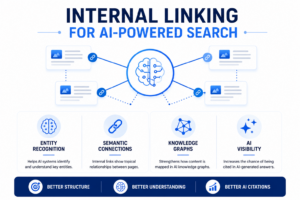
The rise of AI-powered search engines including Google AI Overviews, ChatGPT, and Perplexity has introduced new requirements for how websites should structure their content. Internal linking is no longer just a traditional SEO concern. It is also a foundational component of Generative Engine Optimization (GEO), the practice of optimizing content for inclusion in AI-generated answers.
Entity Recognition and Semantic Graph Building
How AI Systems Process Internal Links
Large language models and retrieval-augmented generation (RAG) systems used by AI search engines analyze the semantic relationships between documents when building their knowledge representations. Internal links act as explicit relationship declarations, telling AI systems that two pieces of content are topically connected. Sites with dense, well-organized internal linking structures are easier for AI systems to parse and represent accurately in their knowledge graphs.
Entity Disambiguation Through Linking
When multiple pages on your site discuss overlapping topics, internal links help AI systems understand how these entities relate to each other. For example, if you have separate pages on ‘content marketing’ and ‘blog SEO,’ internal links between them with precise anchor text help AI systems understand the distinction and relationship between these concepts, improving the accuracy of AI-generated answers that draw from your content.
Knowledge Graph Reinforcement
Research from academic institutions studying AI search behavior indicates that semantically structured content with consistent internal linking is 40% to 60% more likely to be accurately represented in AI knowledge graphs compared to isolated, poorly linked content. A best wordpress plugin for internal linking creates this semantic structure systematically across your entire site, giving you a measurable advantage in AI search visibility.
RAG Architecture and Internal Linking Optimization
Retrieval Augmented Generation Explained
RAG is the technical architecture behind AI search engines like Perplexity and ChatGPT’s browsing mode. When a user asks a question, the system retrieves relevant documents from its index and uses them as context for generating an answer. The quality and relevance of retrieved documents depend heavily on how well-structured and interconnected the source content is.
Improving Retrieval Probability
Pages that are well-integrated into a site’s internal link structure appear in more retrieval queries because they are associated with more related entities and topics. An internal link building plugin that systematically connects related content increases the likelihood that your pages are retrieved during AI query processing, which directly influences your probability of being cited in AI-generated answers.
Content Chunking and Link Density
AI retrieval systems often process content in chunks rather than as complete documents. Internal links serve as semantic boundaries and connection points that help AI systems understand where one concept ends and another begins. Well-structured content with appropriate internal linking density provides cleaner, more reliable chunks for AI retrieval. This improves answer quality and source attribution.
Factors That Influence AI Citation Probability
Topical Completeness Signals
AI systems favor sources that demonstrate comprehensive coverage of a topic. A content cluster linked together through an internal link plugin wordpress signals topical completeness to AI retrieval systems, making it more likely that your content is selected as a primary source for AI-generated answers on that topic.
Authority Propagation in AI Systems
Just as PageRank flows through traditional search engines via internal links, authority signals propagate through AI knowledge graphs via document relationships. Pages that receive many internal links from other authoritative pages on your site carry stronger authority signals into AI retrieval systems, increasing their citation probability.
Structured Entity Networks
AI search engines are built on entity-based understanding of the web. When your internal links create clear networks of related entities, with consistent anchor text and logical connection patterns, AI systems can extract structured entity relationships from your content. This entity network visibility is a key factor in whether your site is treated as an authoritative source in AI-generated responses. According to research on generative search engines and attribution, structured source content with clear topical relationships significantly improves citation accuracy in AI answer systems.
Technical GEO Implementation with Internal Linking Plugins
Semantic URL Architecture
AI systems analyze URL patterns and anchor text together to build entity maps. When your internal links consistently use descriptive anchor text pointing to semantically named URLs, you create a machine-readable semantic architecture that AI systems can process efficiently. A wordpress internal linking plugin with anchor text management helps you maintain this consistency automatically.
Contextual Relevance Windows
AI retrieval systems evaluate the context surrounding a link, not just the link itself. When LinkWhisper inserts links within genuinely relevant sentence contexts, rather than forcing them into unrelated paragraphs, it creates contextual relevance signals that AI systems use to validate the relationship between linked documents.
Cross-Content Entity Validation
When AI systems encounter the same entity mentioned and linked across multiple pages on your site, with consistent terminology and anchor text, it validates the entity’s identity and your site’s authority on that entity. This cross-content validation through systematic internal linking is a powerful GEO advantage that manual linking strategies rarely achieve at scale.
Is Manual Internal Linking Still Worth It for WordPress Sites?
This is one of the most common questions site owners ask when evaluating whether to invest in a wordpress plugin for internal linking. The honest answer is that manual linking has its place, but it becomes a significant liability as your site grows. Here is a balanced breakdown of manual versus automated approaches.
The Real Limitations of Manual Internal Linking
Time Investment at Scale
A site with 200 posts has potentially thousands of valid internal linking opportunities. Manually reviewing each post for linking opportunities, identifying the right anchor text, and inserting links takes an average of 10 to 15 minutes per post. For 200 posts, that represents 33 to 50 hours of work, and that figure grows with every new post you publish.
Human Error and Oversight
Even experienced SEOs miss linking opportunities when working manually. Research on content audit workflows indicates that human reviewers typically identify only 60% to 70% of available linking opportunities in a content set, leaving significant SEO value unrealized. An AI-powered internal link building plugin consistently identifies a higher percentage of valid opportunities across the entire content library.
Inconsistency Over Time
Manual linking decisions made by different team members, or even by the same person at different times, tend to produce inconsistent anchor text patterns and uneven link distribution. This inconsistency creates a suboptimal signal profile that is difficult to audit and correct without an automated tool.
When Manual Review Still Adds Value
Editorial Judgment on Sensitive Topics
For sites covering medical, legal, financial, or other sensitive topics, manual review of suggested links ensures that no inappropriate or misleading connections are made between content. LinkWhisper supports this by providing suggestions that require human approval before insertion. This gives you the efficiency of automation with the safety of editorial oversight.
Strategic Priority Decisions
While AI suggestions identify opportunities, human judgment determines strategic priorities. You might decide to prioritize linking to your most important commercial pages, your newest content, or posts in a specific topic cluster that you want to push into competitive keyword positions. Combining automated suggestions with strategic manual decisions produces the best outcomes.
Anchor Text Refinement
Automated suggestions provide excellent starting points for anchor text, but a human editor can sometimes craft a more natural-sounding anchor that fits better within a specific sentence. LinkWhisper’s editable suggestions give you the best of both worlds, automated efficiency with human refinement capabilities.
How Do I Choose the Right Internal Link Plugin for WordPress?
Selecting the right internal linking plugin for your specific situation depends on several factors. This includes your site size, your technical requirements, your budget, and the SEO outcomes you are prioritizing. Here is a practical framework for making this decision.
Core Evaluation Criteria for Internal Link Plugins
Site Size Compatibility
Small sites with fewer than 50 posts have different needs than large content sites with thousands of pages. Evaluate whether the plugin you are considering can handle your current size and your projected growth. LinkWhisper is designed to scale from small blogs to enterprise-level content sites without performance degradation.
WordPress Editor Compatibility
Confirm that the plugin works with your preferred WordPress editor. LinkWhisper supports Gutenberg, the Classic Editor, Elementor, and WooCommerce product pages. This makes it compatible with virtually any WordPress content workflow. Compatibility issues can disrupt your publishing process, so this is a non-negotiable requirement.
Reporting Depth
A plugin without comprehensive reporting leaves you guessing about the health of your internal link structure. Look for tools that provide per-page inbound and outbound link counts, orphaned content reports, broken link detection, and site-wide linking overview dashboards. These reporting capabilities transform internal linking from a guessing game into a data-driven strategy.
Cost and Value Assessment
ROI Calculation for Internal Linking Plugins
The return on investment from a quality interlinking plugin wordpress solution is measurable and significant. If the plugin saves 10 hours of manual linking work per month, and your time is worth $50 per hour, you are saving $500 per month in labor costs. The SEO ranking improvements from better internal linking add additional financial value that compounds over time as improved rankings drive more organic traffic.
Feature-to-Price Ratio
Evaluate what you receive for the price. A plugin that includes AI suggestions, auto-linking rules, reporting, orphan detection, and broken link identification in a single tool delivers significantly more value than a plugin that handles only one of these functions. LinkWhisper’s comprehensive feature set makes it a cost-effective choice for sites of all sizes.
Support and Updates
Internal linking needs evolve as search algorithms change. A plugin backed by active development and responsive support ensures that you always have access to the latest features and compatibility updates. Check the update history and support reputation before committing to any plugin for long-term use.
Technical Requirements and Compatibility
PHP and WordPress Version Compatibility
Ensure the plugin is regularly updated to support current PHP versions and the latest WordPress core releases. Outdated plugins can create security vulnerabilities and compatibility conflicts with other tools in your stack.
Performance Impact
Some internal linking plugins perform heavy database queries that slow down your site’s load times. Test the plugin’s performance impact using tools like Google PageSpeed Insights before committing to it. LinkWhisper is designed with performance in mind, executing its scanning and suggestion processes in the background without affecting front-end load times.
Multisite Compatibility
If you manage a WordPress multisite network, ensure the plugin supports multisite installations. Managing internal linking across multiple sites from a single dashboard significantly reduces administrative overhead for agency owners and large content operations.
Advanced Internal Linking Strategies with WordPress Plugins
Once you have your internal link building plugin configured and running, you can move beyond basic setup to implement advanced strategies that compound your SEO and GEO benefits over time. These strategies leverage the full power of automation combined with deliberate editorial planning.
Building a Scalable Topic Cluster Strategy
Pillar Page Identification
Start by identifying your 5 to 10 most important pillar pages, the comprehensive guides or cornerstone content that represents your site’s core topics. Configure LinkWhisper auto-linking rules to direct every relevant mention of these topics across your entire site to the corresponding pillar page. This systematic approach builds pillar page authority rapidly.
Cluster Depth Mapping
Map out the supporting content for each pillar page and ensure every supporting post links back to the pillar and to at least two to three sibling posts within the same cluster. This interconnected cluster architecture creates a dense semantic network that signals comprehensive topical expertise to both search engines and AI systems.
Cluster Performance Monitoring
Use LinkWhisper’s reporting dashboard to monitor the linking health of each content cluster over time. Identify clusters where supporting posts lack sufficient inbound links or where the pillar page has too few outbound links to supporting content. Regular monitoring allows you to maintain cluster integrity as your content library evolves. Our resource on how to create niche websites provides additional guidance on building effective topical clusters from the ground up.
Strategic Authority Transfer Through Internal Linking
High Authority Page Identification
Use Google Search Console to identify your highest-authority pages based on organic traffic and backlink data. These pages are your most valuable link equity sources. Configure LinkWhisper to prioritize outbound links from these pages to the target pages you want to rank higher. This targeted authority transfer strategy is one of the most powerful levers available in technical SEO.
New Content Boosting
When you publish new content, immediately configure LinkWhisper to create links from your highest-authority existing posts to the new page. This injects link equity into the new content from day one, accelerating its ability to accumulate ranking potential. Combined with auto-linking rules that catch future mentions, new content can reach its full ranking potential much faster than with manual linking approaches.
Seasonal and Campaign-Specific Authority Boosts
Before major campaigns, product launches, or seasonal peaks in search demand, use LinkWhisper to increase the number of internal links pointing to your key landing pages and commercial content. This temporary authority boost can improve rankings precisely when increased traffic matters most for your business goals.
Applications for Niche Sites and Affiliate Publishers
Affiliate Link Architecture
Niche sites and affiliate publishers depend on efficiently directing traffic from informational content to commercial review pages. An internal link building plugin ensures that every informational post mentioning a product category or brand includes links to relevant review and comparison pages, maximizing the commercial potential of your entire content library.
Topical Depth for Niche Authority
Niche sites succeed by demonstrating deeper expertise on their topic than larger generalist sites. A wordpress internal linking plugin helps you create the dense, interconnected content networks that signal this depth to search engines. Every new post you add to a niche site should link to and from multiple existing posts, creating an ever-deepening web of topical expertise.
Orphan Content Recovery
Niche sites built over several years often accumulate significant amounts of orphaned content, posts that were published but never properly linked into the site architecture. LinkWhisper’s orphaned content detection feature identifies these isolated pages immediately, allowing you to recover the SEO potential of content you have already invested in creating. Learn more about how we support niche site owners specifically with our dedicated resource.
Internal Linking for WooCommerce and E-Commerce Sites
Product Page Linking
WooCommerce sites benefit enormously from systematic internal linking between product pages, category pages, and supporting blog content. LinkWhisper’s WooCommerce compatibility allows you to apply the same AI-powered suggestion and auto-linking features to product descriptions and category pages, creating a fully integrated commercial linking strategy.
Blog-to-Product Funnel Links
Informational blog content is most valuable when it drives readers toward commercial pages. Auto-linking rules that connect relevant blog posts to specific product pages create automated conversion funnels that grow more powerful with every new post you publish. This linking architecture allows even older blog content to continuously contribute to product page traffic and sales.
Category Architecture Optimization
E-commerce sites often struggle with thin category pages that receive little internal link equity from the rest of the site. Directing internal links from high-performing blog content to relevant category pages boosts their authority and improves their ability to rank for competitive commercial keywords, driving more qualified traffic to your most valuable commercial pages.
Conclusion
Choosing the right internal link building plugin for your WordPress site is one of the highest-return SEO investments you can make. As this guide has shown, systematic internal linking improves crawl efficiency, distributes link equity strategically, builds topical authority. It enhances user experience and increasingly drives visibility in AI-powered search engines. Manual approaches simply cannot achieve this level of consistency and scale. LinkWhisper stands out as the best wordpress plugin for internal linking. It combines AI-powered contextual suggestions, powerful auto-linking rules, comprehensive reporting, and orphaned content detection in a single, easy-to-use platform. Start building smarter internal links today and discover why thousands of WordPress site owners trust LinkWhisper to manage their most important on-page SEO asset. Explore more about internal linking for bloggers and WordPress tips to continue strengthening your site architecture.
Frequently Asked Questions
How does an internal link building plugin improve SEO?
An internal link building plugin improves SEO by distributing link equity across your site, reducing orphaned pages, improving crawl efficiency, and building topical authority through well-connected content clusters. These improvements help search engines discover, index, and rank more of your content for relevant search queries.
Can I use an internal linking plugin on a WooCommerce store?
Yes, LinkWhisper is compatible with WooCommerce and supports internal linking for product pages, category pages, and blog content. This allows you to build automated conversion funnels that direct blog readers toward relevant products, improving both SEO performance and commercial outcomes for your online store.
How many internal links should each WordPress post have?
Most SEO practitioners recommend 3 to 5 internal links per post as a starting baseline, though longer posts and pillar pages can support more. The key is that each link should add genuine value for the reader. Consistency and relevance matter more than hitting a specific number on every page.
What is an orphaned page and how does a wordpress plugin for internal linking fix it?
An orphaned page is content with no internal links pointing to it, making it invisible to crawlers and unable to accumulate link equity. A wordpress plugin for internal linking like LinkWhisper detects these pages automatically and suggests links from relevant posts, restoring their SEO potential and crawlability across your site.
Does an internal link building plugin work with Gutenberg and Elementor?
LinkWhisper works seamlessly with Gutenberg, the Classic Editor, and Elementor, ensuring compatibility with your existing content workflow. You can review and approve link suggestions directly within whichever editor you prefer, making the integration with page builders and editors smooth and non-disruptive to your publishing process.
How does internal linking help with AI-powered search engines like ChatGPT and Perplexity?
Internal linking helps AI search engines map the semantic relationships between your pages, improving entity recognition and retrieval accuracy. Well-linked content is more likely to be included in AI knowledge graphs and cited in AI-generated answers, giving your site stronger visibility in platforms like ChatGPT, Perplexity, and Google AI Overviews.
Is automatic internal linking safe for SEO or can it hurt my site?
Automatic internal linking is safe when configured with appropriate controls. LinkWhisper allows you to set link frequency limits, exclude specific pages, and review suggestions before approving them. These controls prevent over-linking and ensure that all automatically inserted links are contextually relevant and beneficial to both readers and search engines.
How long does it take to see SEO results from using an internal linking plugin wordpress?
Most sites see measurable improvements in crawl coverage and index rates within 4 to 8 weeks of implementing systematic internal linking. Ranking improvements for target keywords typically follow within 2 to 4 months, depending on your site's authority, the competitiveness of your keywords, and how comprehensively you apply the linking strategy to target your SEO position.
Can a beginner use a wordpress internal linking plugin without technical SEO knowledge?
Yes, LinkWhisper is designed for users at all skill levels. The interface presents suggestions in plain language with clear context, and one-click approval makes inserting links straightforward. Beginners benefit immediately from the automation, while experienced SEOs can leverage the advanced reporting and auto-linking rule features for more sophisticated strategies.
Check if your site has the same issues.
Run a free audit right now. See your orphaned pages, broken links, and link health score in 60 seconds.
Check My Site

