Contents
- 1 What Is Link Building Software for WordPress?
- 2 What Are Awkward Links?
- 3 Why Internal Links Matter: Link Juice, Explained
- 4 Why Link Whisper Is the Go To Point for Link Building
- 5 What Is Link Building Software for WordPress?
- 6 What Are Awkward Links?
- 7 Why Internal Links Matter: Link Juice, Explained
- 8 Why Link Whisper Is the Go To Point for Link Building
- 9 How Link Whisper Ensures Maximum Linkage
- 10 External Links Inside Link Whisper: Why They Matter
- 11 When to Use Link Building Software for WordPress
- 12 Add an Internal Link in the Block Editor
- 13 Add Internal Links in the Classic Editor
- 14 Add Internal Links in Bulk Across Hundreds of Posts
- 15 Verify the New Links on a Map
- 16 Link Whisper vs Other Link Building Software for WordPress
- 17 Best Free Link Building Software for WordPress
- 18 Use Cases: Agencies and Ecommerce
- 19 Conclusion
- 20 Frequently Asked Questions
- 20.1 1. What is the best free link building software for WordPress?
- 20.2 2. Does Link Whisper do link building, or only internal links?
- 20.3 3. Will auto linking make my posts look spammy?
- 20.4 4. How do I find orphan pages without a crawler?
- 20.5 5. Can it find broken internal links and 404s?
- 20.6 6. Does it work with WooCommerce or Shopify stores?
- 20.7 7. How many internal links should a post have?
- 20.8 8. Will it slow down my site?
- 20.9 9. Is Link Whisper better than Internal Link Juicer?
- 20.10 10. Is Link Whisper worth paying for?
- 21 Keep learning about internal linking
Most advice about link building software for WordPress starts and ends with backlinks. But the links you fully control are the ones inside your own site, and that is where many WordPress sites quietly lose rankings: pages nobody links to, anchors that read like spam, and old links pointing at pages that no longer exist.
This guide explains what the software does, what the latest guidance from Google and SEO experts says, and why Link Whisper has become the go to choice for internal link building. Want to see where you stand first? Run the free internal link checker. It works as a quick internal link audit, flagging orphaned pages, broken links and a link health score in about a minute.
What Is Link Building Software for WordPress?
Google’s AI Mode summary of this topic splits the category in two. Internal linking plugins improve your site structure from inside the WordPress dashboard. External backlink software handles outreach and competitor analysis outside WordPress, using platforms such as Ahrefs, Semrush, Hunter.io and BuzzStream.
Everything in the first group is internal linking software. A good internal linking tool suggests links while you write, reports on what you already have, and repairs what is broken. In plugin form, that is what people mean by an interlinking plugin wordpress sites install to keep their structure healthy. The second group earns links from other websites, and as the same summary notes, plugins cannot safely generate high quality external backlinks from inside WordPress without risking search engine guidelines.
So the practical question is simple: do you want to fix your on-page architecture or run outreach? Start with architecture. It is faster, cheaper and completely in your hands.
What Are Awkward Links?
Awkward links are links that exist but do not help. They show up in a few familiar forms:
- The same exact phrase linked again and again to the same page.
- Vague anchors like “click here” that say nothing about the destination.
- Several links crammed into one sentence or paragraph.
- Links dropped into text that has nothing to do with the target page.
Google’s own link best practices point the other way. Anchor text should be descriptive, concise and relevant to both pages. Avoid keyword stuffing and avoid clustering links together. The page also suggests that if a page seems to have too many links, it probably does. Google expanded this guidance in February 2023, adding advice on anchor text placement and link quality, according to Search Engine Roundtable.
Orphan pages and dead ends
Two quieter problems sit behind awkward links. The first is the orphan page. Google advises that every page you care about should be linked from at least one other page on your site. One 2026 large site guide notes that about a quarter of web pages are reported to have zero internal links, though it warns the original source is unclear, so treat the figure as indicative. A reliable orphan page checker removes the guesswork.
The second is the dead end. Old posts are deleted, URLs change, and links keep pointing at pages that no longer load. A broken internal link checker helps you find broken internal links before readers and crawlers hit them. If you want a website dead link checker that also shows you where new links should go, a traditional broken link checking tool will not do that: it reports errors but does not recommend replacements. Link Whisper’s free internal link checker is a quick first pass.
Why Internal Links Matter: Link Juice, Explained
“Link juice” is the informal name for the authority a page passes along its links. A page that earns attention, through backlinks or strong traffic, can share some of that value with the pages it links to. That is why a strong guide that links to a product page can lift it, and why a page with no inbound links gets nothing.
Three ideas keep this practical:
- Links help Google find and judge pages. Google uses links to discover new pages and as a signal of relevance. John Mueller has put it bluntly: internal linking is “super critical for SEO,” as quoted in the large site guide above.
- Each link shares the value. Every additional link on a page divides the equity it passes, so stuffing a page with links dilutes each one.
- Depth matters. Priority pages should sit within about three clicks of the homepage. Deeper pages get crawled less often and look less important.
Research points the same way. A study from Zyppy of 23 million internal links across 1,800 sites found that more varied anchor text correlated with more clicks, though the authors describe it as correlation, not causation. Ahrefs guidance suggests three to five contextual internal links for a standard article. Google has also said that external links matter less as a ranking factor than they once did, which makes the structure you control inside your own site more valuable.
A proper internal linking analysis therefore asks three questions. Which pages have no inbound links? Which strong pages could pass authority to your money pages? And which links are broken or awkward? Any good internal link analysis tool or seo internal links tool should answer all three.
Why Link Whisper Is the Go To Point for Link Building
Link Whisper was built around one job: helping you link your own content well, from inside WordPress. A Google AI Mode summary of top WordPress internal link builders ranks it Best Overall, citing context aware AI link suggestions inside the editor.
Here is why it earns that spot:
- It works where you write. Suggestions appear in the editor, so adding a wordpress link to internal page content takes one click instead of a search, copy and paste routine.
- It reads context, not just keywords. Matching uses natural language processing instead of raw keyword matching, so suggested anchors fit the sentence.
- It covers the whole job. Suggestions, auto linking, orphan reporting and broken link reporting live in one plugin.
- It keeps you in control. You review links before they go live.
- It is easy to try. A free plugin and free checker tools let you see your own data before you pay.
For anyone searching for the best interlinking seo plugin for wordpress, that combination of discovery, automation and reporting is the reason Link Whisper keeps topping the lists.
What Is Link Building Software for WordPress?
Google’s AI Mode summary of this topic splits the category in two. Internal linking plugins improve your site structure from inside the WordPress dashboard. External backlink software handles outreach and competitor analysis outside WordPress, using platforms such as Ahrefs, Semrush, Hunter.io and BuzzStream.
Everything in the first group is internal linking software. A good internal linking tool suggests links while you write, reports on what you already have, and repairs what is broken. In plugin form, that is what people mean by an interlinking plugin wordpress sites install to keep their structure healthy. The second group earns links from other websites, and as the same summary notes, plugins cannot safely generate high quality external backlinks from inside WordPress without risking search engine guidelines.
So the practical question is simple: do you want to fix your on-page architecture or run outreach? Start with architecture. It is faster, cheaper and completely in your hands.
What Are Awkward Links?
Awkward links are links that exist but do not help. They show up in a few familiar forms:
- The same exact phrase linked again and again to the same page.
- Vague anchors like “click here” that say nothing about the destination.
- Several links crammed into one sentence or paragraph.
- Links dropped into text that has nothing to do with the target page.
Google’s own link best practices point the other way. Anchor text should be descriptive, concise and relevant to both pages. Avoid keyword stuffing and avoid clustering links together. The page also suggests that if a page seems to have too many links, it probably does. Google expanded this guidance in February 2023, adding advice on anchor text placement and link quality, according to Search Engine Roundtable.
Orphan pages and dead ends
Two quieter problems sit behind awkward links. The first is the orphan page. Google advises that every page you care about should be linked from at least one other page on your site. One 2026 large site guide notes that about a quarter of web pages are reported to have zero internal links, though it warns the original source is unclear, so treat the figure as indicative. A reliable orphan page checker removes the guesswork.
The second is the dead end. Old posts are deleted, URLs change, and links keep pointing at pages that no longer load. A broken internal link checker helps you find broken internal links before readers and crawlers hit them. If you want a website dead link checker that also shows you where new links should go, a traditional broken link checking tool will not do that: it reports errors but does not recommend replacements. Link Whisper’s free internal link checker is a quick first pass.
Why Internal Links Matter: Link Juice, Explained
“Link juice” is the informal name for the authority a page passes along its links. A page that earns attention, through backlinks or strong traffic, can share some of that value with the pages it links to. That is why a strong guide that links to a product page can lift it, and why a page with no inbound links gets nothing.
Three ideas keep this practical:
- Links help Google find and judge pages. Google uses links to discover new pages and as a signal of relevance. John Mueller has put it bluntly: internal linking is “super critical for SEO,” as quoted in the large site guide above.
- Each link shares the value. Every additional link on a page divides the equity it passes, so stuffing a page with links dilutes each one.
- Depth matters. Priority pages should sit within about three clicks of the homepage. Deeper pages get crawled less often and look less important.
Research points the same way. A study from Zyppy of 23 million internal links across 1,800 sites found that more varied anchor text correlated with more clicks, though the authors describe it as correlation, not causation. Ahrefs guidance suggests three to five contextual internal links for a standard article. Google has also said that external links matter less as a ranking factor than they once did, which makes the structure you control inside your own site more valuable.
A proper internal linking analysis therefore asks three questions. Which pages have no inbound links? Which strong pages could pass authority to your money pages? And which links are broken or awkward? Any good internal link analysis tool or seo internal links tool should answer all three.
Why Link Whisper Is the Go To Point for Link Building
Link Whisper was built around one job: helping you link your own content well, from inside WordPress. A Google AI Mode summary of top WordPress internal link builders ranks it Best Overall, citing context aware AI link suggestions inside the editor.
Here is why it earns that spot:
- It works where you write. Suggestions appear in the editor, so adding a wordpress link to internal page content takes one click instead of a search, copy and paste routine.
- It reads context, not just keywords. Matching uses natural language processing instead of raw keyword matching, so suggested anchors fit the sentence.
- It covers the whole job. Suggestions, auto linking, orphan reporting and broken link reporting live in one plugin.
- It keeps you in control. You review links before they go live.
- It is easy to try. A free plugin and free checker tools let you see your own data before you pay.
For anyone searching for the best interlinking seo plugin for wordpress, that combination of discovery, automation and reporting is the reason Link Whisper keeps topping the lists.
How Link Whisper Ensures Maximum Linkage
Maximum linkage does not mean more links. It means every important page is reachable, every strong page is passing value to the right places, and nothing is broken. Link Whisper approaches it in stages.
1. Start with your money pages.
Link Whisper’s V4 one click setup reviews your license, your Money Pages and an optional Google Search Console connection, then runs a scan. That points the plugin at the pages that matter most.
2. Get link suggestions, inbound and outbound.
The plugin finds opportunities both ways: links from the post you are writing to older content, and links from older content back to the new post. That second direction is where most manual linking falls apart.
3. Automate the repetition.
The auto linking feature works like an auto internal linking plugin wordpress users can trust. You set a keyword and a target URL, and Link Whisper links past and future mentions. Safeguards keep it natural: one link per post and one link per sentence by default, priority settings, review before insertion, and limits by category or date. The auto linking guide explains each control. In short, it is a wordpress plugin auto internal link setup built to avoid awkward links.
4. Rescue orphan content.
The Orphan Posts Report lists content with few or no inbound internal links, so you can connect it. This is the orphan page checker that lives inside your dashboard.
5. Fix what is broken.
The Broken Links Report scans for broken URLs, lets you filter and review them, and offers replacement suggestions. In Premium, a broken link checker rechecks links over time to reduce false positives. For your content, it does the work of a 404 checker without a separate crawl. A URL changer updates matching URLs across your content when you move pages.
6. See the whole picture.
The Links Report, Domains Report and Visual Sitemaps show how your content connects. Together they make Link Whisper one of the more complete seo tools for internal links you can run from the dashboard.
Not ready to install anything? The free internal link map shows how your pages connect and which sit isolated.
External Links Inside Link Whisper: Why They Matter
Internal links get the attention, but outbound links deserve a place in your audit too. Google’s guidance notes that linking to outside sources can build trust, for example when you cite research, and that you should give readers context about where the link leads. It also recommends the right attribute for the right situation: nofollow when you do not trust a source, sponsored or nofollow for paid links, and ugc or nofollow for user submitted links.
Link Whisper keeps both sides visible. The Links Report shows the internal and external links inside each post, and the Domains Report shows which domains your content links to. The free plugin’s link health report also counts inbound, outbound internal and external links, so you can spot a post that links out ten times and in never.
To be clear about scope, Link Whisper’s suggestions focus on internal links. Earning backlinks from other sites still takes outreach, and the tools named earlier handle that. What Link Whisper gives you is a clean, well connected foundation, so any authority you earn is distributed across your site instead of trapped on one page. If you want to see your own link balance, run the free internal link checker and compare orphaned and broken counts.
When to Use Link Building Software for WordPress
Reach for it at these moments:
- When you can no longer remember what you have published. That is the point where manual linking starts leaking pages.
- After you publish. New posts need links from older ones, which is easy to forget.
- After a migration or URL change. Links break quietly. Run an audit straight away.
- After deleting or merging content. Dead ends appear immediately.
- Before a campaign or product launch. Make sure authority flows to the pages you are promoting.
- On a schedule. A quarterly check keeps small problems from stacking up.
Add an Internal Link in the Block Editor
The block editor handles links inside the block you are writing. Select the words, open the link control from the toolbar or the keyboard, and search your own content by title. You rarely need the full URL, and choosing from the results avoids the typing errors that cause broken links later on your site.
The WordPress documentation for the Paragraph block describes an Insert links tool that adds a hyperlink to the selected text. In practice, select the phrase you want to link, then click the link icon in the toolbar that floats above the block. A small field opens. Type a few words from the title of the target page, and matching posts and pages appear below it. Pick one, and the link is in place.
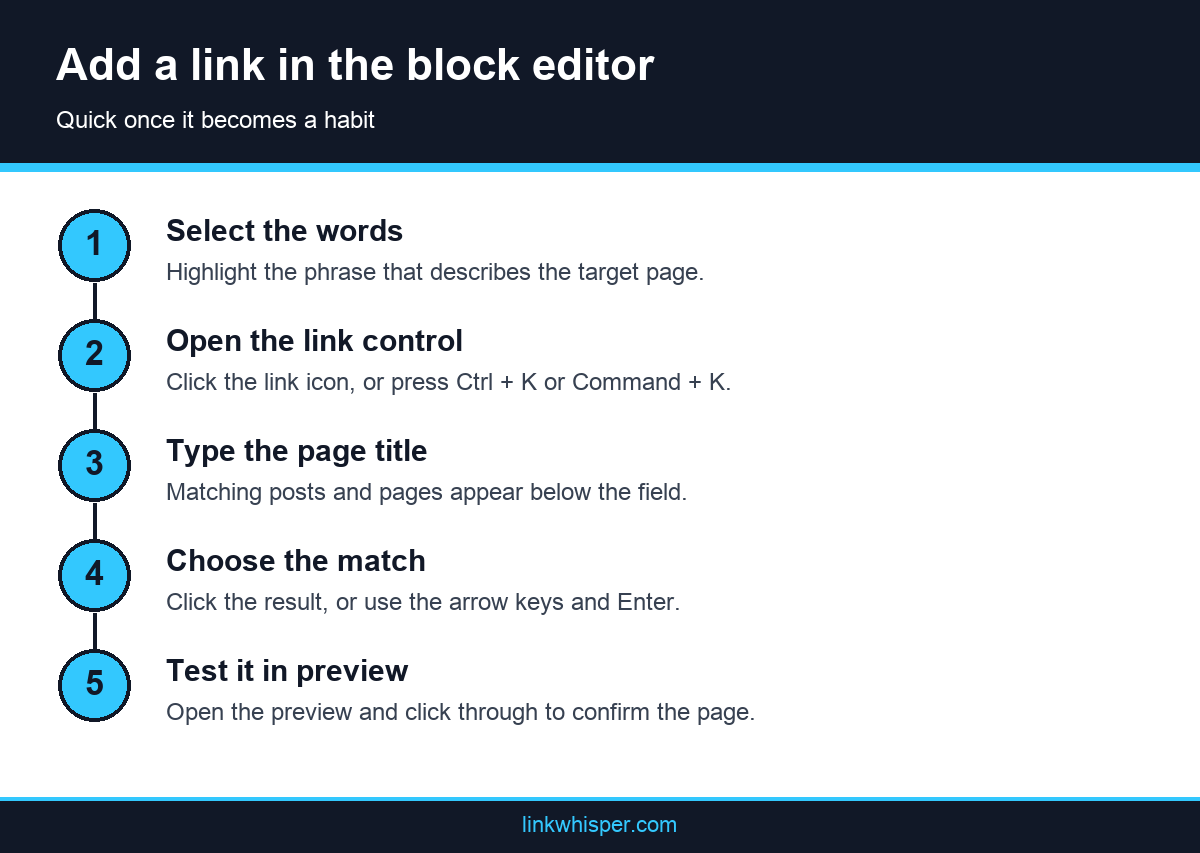
The keyboard route is quicker once it becomes habit. Select the text and press Ctrl + K on Windows or Command + K on a Mac. The same field opens, so your hands never leave the keys. Use the arrow keys to move through the results, then press Enter. The control works the same way in Heading and List blocks, so you do not need to learn anything new for those.
Two details are worth a second of attention. First, choose your words before you link them. Google describes good anchor text as descriptive, reasonably concise and relevant to the page it points to, so a phrase naming the topic beats a vague one. Second, the link settings include an option to open in a new tab. For internal pages, leave that off in most cases, since the same tab lets readers use the back button as they expect.
Add Internal Links in the Classic Editor
The classic editor uses a similar flow with different controls. Owners still running older content, or a plugin that keeps that editor in place, will find a link button in the toolbar and the same keyboard shortcut. The small popup searches your content as you type, so you can pick a page without leaving the post.
Select your text and click the chain icon, labeled Insert/edit link, or press Ctrl + K or Command + K. An inline field appears beneath the selection. Start typing a page title and choose from the suggestions, or paste a full URL if you already have it. Press Enter or click the apply button to finish.
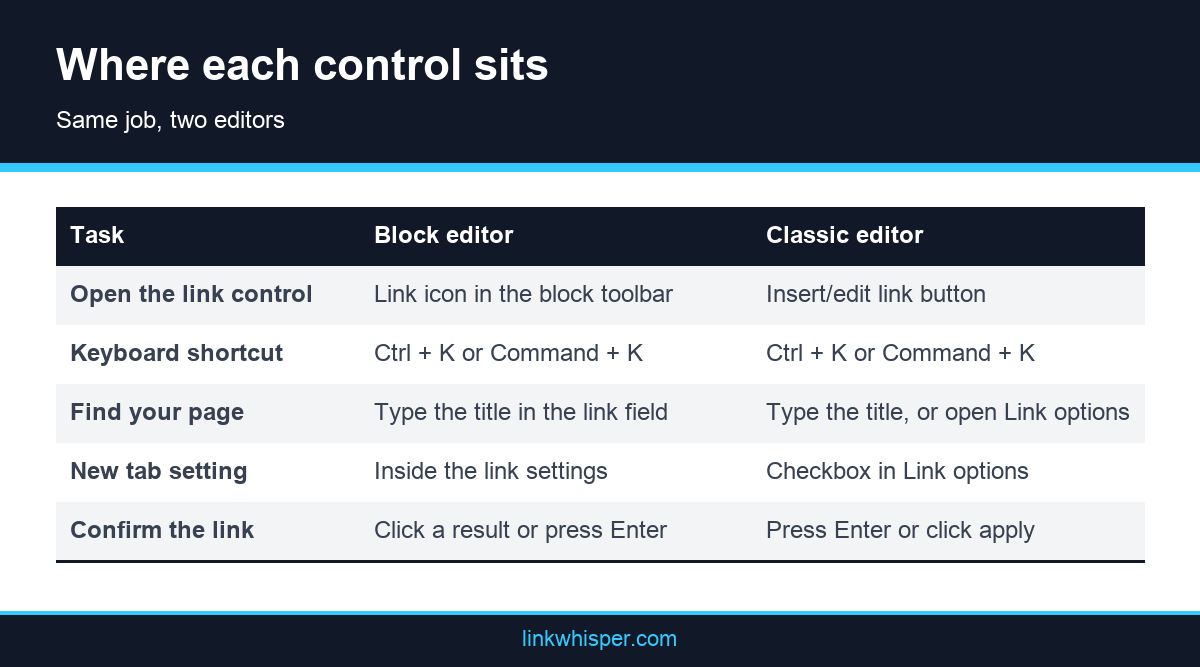
The gear icon beside that field opens a larger Link options panel. It lets you search or browse existing content and tick a box to open the link in a new tab. This panel helps when you remember the topic but not the title, because you can scroll a list of recent content instead of guessing at keywords.
Under the hood, both editors produce the same thing: a plain HTML anchor element with an href. Google says it can generally only crawl a link in that form, so standard editor links are the safe choice. Be more careful with buttons or menus added by a theme or page builder, and check that they output a real link. Elementor and other builders have their own link fields, so follow their documentation for the exact steps.
Add Internal Links in Bulk Across Hundreds of Posts
For a small batch, a spreadsheet works. List the source post, the phrase and the target, then work through it in the editor. Past a few dozen links, a suggestion tool saves real time. Link Whisper reads your published posts and shows ranked suggestions in a panel inside the editor, with anchor text you can edit. By default, you review and approve each one, and it works in Gutenberg, the Classic Editor and Elementor.
For phrases that should always point to one page, keyword rules with a review step are another route. Auto-Linking inserts a chosen link wherever a phrase appears, in past and future posts, with a per post cap, exclusions and an activity log with undo. New installs default to review mode. Start with one narrow rule, and read the results before you add more.
Changing a URL is a separate bulk job. The URL Changer in Link Whisper finds every internal link pointing to a URL, shows the count before you commit, updates them in one operation and logs each change. That beats opening each post, and it leaves you a record if something looks wrong later.
Verify the New Links on a Map
Adding links does not prove the structure improved. A page can gain links from other pages that nobody reaches, and a typo can create a dead end. Verification has two parts: click test the changed posts, then look at the whole site to confirm that your target pages moved out of isolation and into the network.
Start with the plain test. Open a sample of the edited posts in preview or on the live site, click each new link and confirm the right page loads. Read the sentence around it as well. A link that works can still feel forced, and a reader will notice that before any tool does.
When a batch is finished, check the result on a link map. The free Link Whisper tool takes a public URL and draws your structure as a network graph of hub pages, orphaned pages and connections, with no install, in under two minutes. Orphans show as red nodes and stay blurred until unlocked, while hubs show as green nodes ranked by link count. An internal link map tells you about structure, not quality, so it complements the click test instead of replacing it.
Ask three questions of the map. Did your target pages join the network? Are the hubs the pages you actually want to promote? Are any groups of posts sitting apart like islands? For the numbers behind the picture, follow up with a scan for orphaned and deep pages, then repeat the process after your next large batch.
Link Whisper vs Other Link Building Software for WordPress
Here is how the main options compare, with Link Whisper first. The first four rows follow the Google AI Mode summary of top WordPress internal link builders, with extra detail from other roundups.
| Software | Best for | Core feature | Pricing |
|---|---|---|---|
| Link Whisper | Best overall | Context aware AI link suggestions in the editor, auto linking, orphan and broken link reports | Free plugin plus free checker tools; Premium from $77 per year, per roundups |
| Internal Link Juicer | Hands off automation | Auto links configured keywords across your library, with anchor variation and blacklist controls | Free version; Pro for custom taxonomies |
| LinkBoss | Silo and cluster building | AI generated topic clusters and bulk inbound links | Credit based |
| LinkVector | Site wide auditing | Web app that crawls to find orphan pages and weak anchor text | From $9 per month |
Other free options include Web & SEO Autolinker, which scans posts for semantically related links, and the free tiers of Rank Math, Yoast SEO and All in One SEO, which offer on page analysis and basic link management. Active link suggestions in some suites depend on the plan, so check what your tier includes. The free Interlinks Manager is another interlinks manager plugin option for building and reviewing internal links.
For outside links, Ahrefs and Semrush show who links to competitors, while Hunter.io and BuzzStream help with outreach. One caution: network based link plugins such as LexonRank connect sites for automated linking. Evaluate those carefully against Google’s spam policies before you try them.
The pattern is consistent. Single purpose tools do one job well. Link Whisper is the one that handles suggestions, automation, orphan detection and broken link reporting together, which is why it should be your first stop.
Best Free Link Building Software for WordPress
If you are searching for free link building software for WordPress, here is a sensible free stack, in order:
- Link Whisper free plugin. It gives you AI powered internal link suggestions in the editor and a link health report showing orphan content and how links are distributed.
- Link Whisper’s free checker and map. Run the internal link checker and the internal link map to see orphan pages, broken links and your link health score.
- Internal Link Juicer free. Use it if you want hands off keyword automation on a tight budget.
- Your SEO suite. Keep Rank Math, Yoast or All in One SEO for titles, schema and sitemaps.
That makes up the best free link building software for WordPress setup for most sites. Be aware that broken link reporting, auto linking and bulk actions sit in the Premium plans, so treat the free tier as the way to measure the problem and Premium as the way to fix it at scale.
Use Cases: Agencies and Ecommerce
Agencies
Link Whisper lists agencies among its use cases, describing it as a way to manage internal links across client sites. For an agency, the appeal is repeatability: run the same audit on every client, find orphans and broken links fast, and show before and after numbers in reports. Premium also offers cross site linking suggestions between sites running it, which should only be used across sites that you or your client own.
Ecommerce
Online stores have two linking problems at once: thousands of product and category pages, and a blog or guides that should feed them. Google’s guidance for large sites favors linking to canonical category and product pages, not filtered permutations, and keeping them within about three clicks of the homepage.
Here are real examples, with what each one shows. The first two are published Link Whisper case studies, and the rest are real WooCommerce stores, listed by Drip, that show where the same pattern applies. They are not Link Whisper customers, and nothing here implies their current link health.
Bumblebee Linens and MyWifeQuitHerJob.
Steve Chou runs an ecommerce store and a blog. In a Link Whisper case study, he describes using the Links Report to see inbound links to money pages, adding links from relevant pages, and using auto linking for key phrases. He reports 4X traffic across the blog and store, a self reported result.
A Las Vegas gifting store.
A vendor published case study covers a 620 page WordPress site with 236 orphan pages and 90 plus broken links. After reconnecting orphans and fixing links, it reports orphan pages falling from 38% to 11%, crawl depth dropping from 4.8 to 2.9 clicks and organic sessions rising 37%. These figures are self reported.
Atlantic Patio.
Patio furniture in teak, wicker and fire pit tables. Buying guides and material comparisons are natural sources for links to category pages.
Certified Comic Shop.
Graded comics with a blog and podcast. Collector content can link into specific product pages.
Daelmans Stroopwafels.
A specialty food brand founded in 1904. Recipe and gifting posts can route readers to the products behind them.
Garantia.
Planters and growing accessories. How to growing guides pair naturally with product links.
April Soderstrom.
Handmade jewelry. Collection and care content can connect to individual pieces.
For content driven affiliate and product sites, the Niche Pursuits review roundup reports Fire and Saw, a chainsaw site, moving a post from around position 21 to page one after three internal links. It also reports a site owner who published 200 plus articles and linked them all in four days, where manual linking had taken a day per page. Link Whisper pricing also offers a Shopify app for stores outside WordPress.
Conclusion
Every WordPress link to internal page content starts the same way: select the words, press Ctrl + K or Command + K, and search by title. That habit covers daily writing in either editor. For an older archive, set a target list, work in reviewed batches and confirm the result on a map instead of trusting the count. Before you close this page, open your most important post and add two useful links to it, using these notes on writing anchor wording that describes the page as your guide.
Frequently Asked Questions
1. What is the best free link building software for WordPress?
Start with Link Whisper’s free plugin and free link checker tools, because they show orphan pages and link distribution before you spend anything. Add Internal Link Juicer if you want free keyword automation. Premium unlocks auto linking and broken link reports when you are ready.
2. Does Link Whisper do link building, or only internal links?
It builds internal links, which are the links you fully control. Earning backlinks from other websites is a separate job for outreach tools. Fixing internal structure first means any authority you earn gets distributed properly.
3. Will auto linking make my posts look spammy?
Not with the right controls. Link Whisper defaults to one link per post and one per sentence, lets you set priorities, and lets you review links before they go live.
4. How do I find orphan pages without a crawler?
Run the free internal link checker for a quick view, or use the Orphan Posts Report inside the plugin for ongoing tracking.
5. Can it find broken internal links and 404s?
Yes. The free checker flags broken internal links, and the Premium Broken Links Report scans URLs, suggests replacements and rechecks over time to reduce false positives.
6. Does it work with WooCommerce or Shopify stores?
Link Whisper runs as a WordPress plugin and as a Shopify app, and it has a dedicated WooCommerce internal linking page. Ecommerce owners such as Steve Chou use it to push links to money pages.
7. How many internal links should a post have?
Google gives no ideal number, and Ahrefs suggests three to five contextual links for a standard article. Relevance beats count, which is why Link Whisper suggests links by context.
8. Will it slow down my site?
Link Whisper inserts links into your content, so visitors load normal pages. As with any plugin, compare page speed before and after on a staging copy.
9. Is Link Whisper better than Internal Link Juicer?
They solve different problems. Internal Link Juicer automates links from keywords you configure for each post. Link Whisper finds opportunities you had not planned, reports on orphan and broken links, and automates repeat phrases as well. For discovery plus control, Link Whisper is the stronger choice.
10. Is Link Whisper worth paying for?
If your site is past a few dozen posts, usually yes. Premium starts from $77 per year according to roundups, so confirm on the pricing page. One published case study reports manual linking time falling from 20 hours to under 5 hours a month, and while that is vendor reported, the time saving is the main reason people pay.
Link Whisper tips
Keep learning about internal linking
Get Link Whisper tips and offers in your inbox.
Check if your site has the same issues.
Run a free audit right now. See your orphaned pages, broken links, and link health score in 60 seconds.
Check My Site