
When you think of Link Whisper, you likely think of internal links.
However, as simple as building internal links sounds there’s actually quite a bit of complexity when it comes to natural language processing,and the Link Whisper WordPress plugin helps you create effective links that drive results.
Sometimes we are quiet over here at Link Whisper headquarters and we just silently release new updates each month.
But the reality is that each and every month we are making major innovations and updates to Link Whisper WordPress plugin
Today, we just wanted to share 3 innovations we’ve recently made…that you may not be aware of it up and live already within your Link Whisper plugin.
Related Posts

First, is related posts widgets.
Earlier this year, we released the feature for automatic internal linking WordPress, so your related posts are connected automatically.
No more need for a related posts plugin…this WordPress internal linking plugin does it for you!
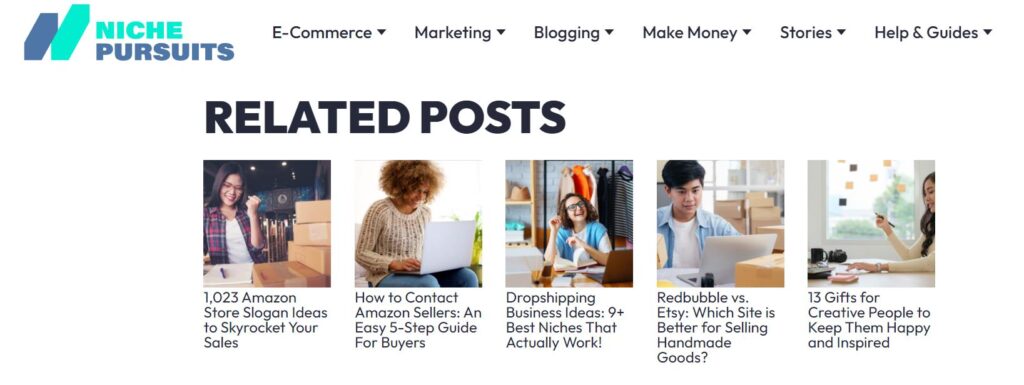
Here’s an example of what the related posts widget looks like on NichePursuits.com (my blog).
Link Whisper was smart enough to know that the blog post people were reading was about WordPress plugin. It recommended 5 other articles using WordPress internal link suggestions automatically!. It also aligns with how SEO strategies focus on meaningful signals over vanity metrics as explained in this SEO metrics breakdown.
Once turned on in the Link Whisper settings, the work begins. Here,automatic internal linking WordPress will power Related Posts across your site. It also helps improve your site structure.
Not only does this provide additional internal links that Google can crawl and use to index your site faster, but it will also lead to more pageviews as users click and read related posts.
If you are a Link Whisper user, just head over to Link Whisper in your sidebar, click settings. Choose Related Post Settings as shown here making it easier to scale internal linking:
If you aren’t a Link Whisper premium user yet, go ahead and get your copy of Link Whisper right here.
Accessible Links
Second, is accessible links.
Making your website useful and accessible to all users, including those with disabilities, is an important concern.The WordPress internal linking plugin ensures every link is structured and easy to navigate.
Some users may use screen readers or other ways to browse the web due to visual disabilities.
And in fact, there are laws on the books in the US and other countries that require governments and contractors to make their website “accessible” to all users.
Link Whisper can help make links accessible to all users with the flip of a switch. (We created this innovation of Link Whisper in the last few months).
Link Whisper can mark your links with a visual icon and create preview text that indicates a link goes to an external website (for example).
Here’s what an accessible link looks like using Link Whisper:
(I added the green box and arrow added to point out the link and icon)
If you are already a Link Whisper user, you have full control over how these icons look so they can match the styling of your website.
To turn it on, just head over to Link Whisper > Settings > Advanced Settings Tab
If you don’t currently have Link Whisper, you can get the accessibility links feature up and running today when you check out Link Whisper right here.
Broken YouTube Links
Finally, the next innovation I’d like to highlight is fixing broken YouTube links.
In particular, is broken YouTube embeds! This is a particular difficult issue to solve for some websites.
Because technically when a video is taken down or a YouTube video is changed from public to private by an owner, the link isn’t “broken”.
So, most broken link checkers will not detect that the video is no longer there.
But Link Whisper is smarter than most tools!
Link Whisper will now indicate if your YouTube links or video embeds are no longer working, while improving WordPress internal link suggestion throughout your site.
Then you can simply remove the video or find a relevant replacement and save your readers the annoying experience of seeing a “Video No Longer Available” screen. It improves usability based on these internal linking best practices for users and search engines.
To use the Link Whisper YouTube links feature, you simply navigate to the broken links page: Reports > Broken Links Report.
Then you can simply remove the video or find a relevant replacement and save your readers the annoying experience of seeing a “Video No Longer Available” screen.
To use the Link Whisper YouTube links feature, you simply navigate to the broken links page: Reports > Broken Links Report.
And you can quickly fix or change the broken URLs directly in the Link Whisper report!
If you don’t currently own Link Whisper, you can quickly start finding and fixing your Broken YouTube embeds with Link Whisper right here.
Honestly, this just scratches the surface for all the features we’ve added in the last 12 months.
And we have several more BIG features coming out in the coming month or so.
We are always innovating to make your website easier to optimize and manage.
Thanks again,
Spencer
PS – Be sure to pick up a copy of Link Whisper right here.
Check if your site has the same issues.
Run a free audit right now. See your orphaned pages, broken links, and link health score in 60 seconds.
Check My Site

