
Contents
- 1 Key Takeaways
- 2 Internal Linking for SEO: How Smart Connections Boost Your Site
- 3 Manual Linking vs. Automatic Internal Linking WordPress: What’s Smarter?
- 4 Top Advantages of an Internal Link Building Tool
- 5 Choosing the Best Internal Linking Plugin WordPress
- 6 Benefits of Automatic Internal Linking in WordPress
- 7 Building a Practical Internal Linking Strategy for SEO
- 8 Advanced Strategies for Internal Linking
- 9 Conclusion
- 9.1 What is an internal link building tool?
- 9.2 How does an internal link building tool help internal linking for SEO?
- 9.3 Can I automate internal links in WordPress?
- 9.4 What makes the best internal linking plugin WordPress?
- 9.5 How does the Link Whisper WordPress plugin work?
- 9.6 Is automatic internal linking WordPress safe for large sites?
- 9.7 How often should I audit my website for internal links?
- 9.8 Can internal link tools fix broken links automatically?
- 9.9 Why is descriptive anchor text important?
- 9.10 What’s a practical strategy for linking cornerstone content?
- 9.11
You’ve just finished a post… and now what? It ends with nothing, no links, no direction. That feels frustrating for readers and doesn’t help your SEO either. This is where LinkWhisper for WordPress is your to go solution.
This is where an internal link building tool really helps. It naturally connects your posts, guides readers to the next piece of content, and keeps them engaged. This also strengthens your site without adding extra work for you.
That’s exactly why an Internal Link Building Tool is so valuable. It quietly connects your posts, guiding visitors naturally from one article to another. On WordPress sites, with the help of the best wordpress seo plugins, it enhances content. Whether guides, tips, or reviews, internal linking isn’t just helpful, it’s essential.
Think about a post on “daily haircare routines for hair breakage.” With an internal link building tool, readers can seamlessly click through to “vitamins for stronger hair” or “protective styling techniques.” Each link keeps visitors engaged, improves site navigation, and strengthens your website’s structure without extra effort on your part.
Have you tried the wordpress backlink checker from LinkWhisper?
By turning what used to be a tedious manual task into an automated, smart system, an internal link building tool ensures your content is connected, your readers stay longer, and your site performs better in search engines.
Key Takeaways
- Internal links improve user engagement: Connecting related pages encourages visitors to explore more content naturally.
- Strategic linking boosts SEO: Internal links help distribute page authority and signal search engines about important pages.
- Cornerstone content gains visibility: High-value articles become easier to find when other posts link to them.
- Automatic internal linking wordpress saves time: Tools can suggest or add links automatically, reducing manual work and ensuring consistency.
- Effective anchor text enhances clarity and SEO: Descriptive anchors give context to both readers and search engines.
- Broken links can be detected and fixed efficiently: Maintaining healthy links improves user experience and preserves SEO value.
- Content clusters enhance navigation: Grouping related content creates logical pathways for visitors to explore.
- Regular audits maintain site structure: Updating older posts with links to new content keeps the site organized and discoverable.
- Internal linking contributes to overall site authority: A well-connected website helps both readers and search engines understand content relationships.
Internal Linking for SEO: How Smart Connections Boost Your Site
Think of internal links as the on-ramps and signposts of your website. Using LinkWhisper for WordPress, it can help visitors navigate from one post to the next. Thereby creating a fluid experience. Without these connections, even your most valuable content risks being overlooked. Smart internal linking also signals to search engines which pages are most important, improving rankings and site authority.
On a haircare blog, internal links can direct someone reading about “preventing hair thinning” to posts on “curly hair hydration” or “managing hair breakage naturally.” Without these pathways, visitors might leave after one page, even if the site has valuable content to offer.
For search engines, internal links are clues that indicate which pages are most important and how content topics are connected. A strong internal linking structure distributes authority across your site. It improves crawl efficiency and can elevate the rankings of pages like “curly hair routines” or “hair breakage prevention tips.” According to Internal Linking Strategies and SEO Best Practices, structured internal links also improve crawl efficiency and user navigation.
Websites without organized internal linking risk hiding valuable content from both users and search engines. That’s why an internal link building tool is more than a convenience. It’s a strategy that transforms your website into a coherent, navigable, and authoritative resource.
Manual Linking vs. Automatic Internal Linking WordPress: What’s Smarter?
An internal link building tool scans your website, identifies link opportunities, and even suggests the best anchor text for each link. On a haircare blog, it might connect a post on “protective hairstyles for curly hair” to articles on “reducing frizz naturally” or “hydrating routines for damaged hair.”
Some tools offer automatic internal linking WordPress, instantly connecting new content to related articles. This ensures that no link opportunities are missed and every post contributes to the site’s internal network.
The Internal Link Building Tool also makes choosing anchor text much easier and smarter. Instead of using vague phrases like “click here,” they recommend clear, descriptive text that tells readers exactly what they’ll find when they follow the link. This seo software for wordpress not only improves the user experience but also helps search engines understand the context of your content. It makes your internal linking more effective overall.
How to Improve Internal Link Structure in WordPress
A robust internal link structure isn’t about adding links at random. It’s about creating a roadmap for your readers and search engines. This involves organizing content, prioritizing cornerstone articles, and updating older posts.
Content Clusters and Pillar Pages: Structure Your Site
Organizing content into clusters is like arranging your website into clear, connected sections. Central pillar posts act as the foundation of each cluster, while related articles link to each other, creating a natural and intuitive path for visitors. This approach improves the overall user experience and also strengthens internal linking for SEO, helping ensure that no valuable content gets overlooked.
For example, a haircare website might have clusters on hair loss solutions, curly hair routines, scalp treatments, and product reviews. Linking posts within the same cluster creates a logical flow. Guidance on how internal linking helps search engines discover and index content explains why these connections make orphan pages visible and increase site authority over time.
A post on “hair thinning prevention” might connect to “stress and hair loss” and “nutrition for stronger hair,” making navigation intuitive.
Prioritizing Cornerstone Content for Maximum Impact
Cornerstone posts are the foundation of your website. On a haircare site, posts like “complete guide to scalp health” or “preventing hair breakage” serve as comprehensive hubs. Directing internal links toward these cornerstone pages strengthens their authority and signals importance to search engines.
Updating Older Posts to Boost Internal Linking
Older content can become isolated if not updated. Revisiting posts to link them to newer articles keeps content fresh. A post from a few years ago on “daily haircare routines” might now link to “protective styling for curly hair” or “keratin treatments for stronger strands.” Regularly reviewing older posts not only strengthens internal linking for SEO but also ensures readers discover your most valuable content, keeping them engaged longer.
Top Advantages of an Internal Link Building Tool
Manually adding links is tedious and error-prone. That’s where a quality internal link building tool comes in. The seo software for wordpress identifies opportunities, suggests relevant anchor text, and can even implement automatic internal linking in WordPress, so your content network builds itself while your team focuses on creating valuable posts.
For haircare blogs with hundreds of posts, these wordpress internal linking plugin tool identify meaningful link opportunities and can implement automatic internal linking in WordPress. A post about “hair growth vitamins” might automatically link to “preventing hair thinning” and “scalp care routines,” ensuring content is interconnected without extra effort. The wordpress internal linking plugin not only saves hours of manual work but also strengthens the site’s internal linking, helping important pages gain visibility and authority.
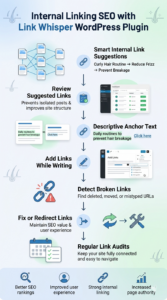
How to Use Link Whisper WordPress Plugin for Internal Linking SEO
A link whisper WordPress plugin provides advanced link suggestions based on content relevance. On a haircare blog, it might connect a post on “curly hair routines” to “reducing frizz naturally” and “protecting strands from breakage.”
Reviewing Suggested Links for Maximum Relevance
The best internal linking plugin wordpress highlights potential internal links, ensuring posts don’t remain isolated. For haircare websites, this is critical because the niche often includes diverse topics like styling, nutrition, and product reviews. Regularly reviewing these suggestions also ensures that your internal linking strategy stays aligned with your site’s SEO goals.
Selecting Descriptive Anchor Text
Choosing descriptive anchor text is essential. Phrases like “daily routines to prevent hair breakage” improve clarity and SEO, unlike generic anchors such as “click here.” Well-chosen anchor text also helps search engines understand the context of the linked page, boosting its relevance and authority.
Adding Links During Content Creation
Integration with WordPress editors allows internal link suggestions to appear as you write, turning internal linking into a natural part of content creation. This approach by linkwhisper for wordpress keeps your content interconnected from the start, reducing the need for manual linking later and maintaining a consistent internal link structure.
How to Find and Fix Broken Internal Links in WordPress
Broken links are like potholes on your website as they disrupt the user experience and can hurt SEO. Link Whisper WordPress plugin automatically scans your site for broken links, letting you fix or redirect them efficiently and keep your content network intact. On a haircare site, broken links might occur when old posts like “postpartum hair loss remedies” are removed. Keeping links updated also improves user experience, making it easier for visitors to discover related content.
Automatically Detecting Broken URLs
LinkWhisper for WordPress scans your website for links that no longer work, whether the page was deleted, moved, or mistyped. This automatic detection saves time compared to manual checking. This also ensures that your internal linking remains strong, preventing dead ends that frustrate visitors.
Repairing or Redirecting Broken Links
Once broken links are identified, they can be fixed or redirected to the most relevant content. This not only preserves the SEO value of existing links but also keeps readers engaged. It guides them to the right pages without confusion.
Regularly Auditing and Fixing Broken Internal Links for SEO
Broken links can appear over time as new content is added or old pages are removed. Regular audits, combined with automated suggestions, ensure your site stays fully connected. Ongoing maintenance strengthens internal linking and guarantees that all pages remain discoverable and easy to navigate.
Choosing the Best Internal Linking Plugin WordPress
Not all internal linking plugins are created equal. The best internal linking plugin WordPress does more than suggest links. It integrates with your editor and provides contextually relevant recommendations. It also offers analytics to monitor your internal linking strategy. This ensures internal linking is both efficient and effective, saving time while strengthening the site’s authority.
On a website with hundreds of articles, older posts can easily become isolated. The best internal linking plugin wordpress identifies meaningful connections, linking older guides to newer content and keeping the entire site interconnected.
Seamless Integration for Smooth Content Linking
Smooth integration ensures link suggestions appear exactly where you’re creating content, making it easy to incorporate internal links. This keeps the workflow efficient, allowing writers to focus on content while naturally connecting related pages.
On a health and wellness blog, a post about “vitamin D benefits” can link seamlessly to “immune system support,” helping readers discover related content without extra effort.
Relevance-Based Link Recommendations
Top plugins provide suggestions based on context, connecting related topics naturally. A post about “scalp exfoliation techniques” might link to “reducing dandruff” or “improving scalp circulation.” It creates a logical path for readers.
This approach enhances internal linking for SEO and guides visitors through complementary content without disrupting their experience.
Analytics and Reporting for Smarter Decisions
Tracking which pages are well-linked and which need attention is key. Analytics dashboards allow monitoring of internal links, identifying posts with few inbound links, and uncovering opportunities to strengthen the site’s structure.
On a haircare website, an older post on “daily haircare routines” might have very few internal links. Linking it from newer articles like “protective styling tips” or “keratin treatments for stronger strands” gives the post more visibility. It also encourages readers to explore related content, keeping them engaged longer. At the same time, it helps search engines understand how your content is connected, improving your overall SEO.
Automating Internal Linking Without Losing Control
Automation features allow links to be added based on relevance or anchor text preferences. This saves time while letting editors maintain control over the context and quality of the links. On a large site, mentions of “haircare tips” in older posts can automatically link to a new guide on “preventing hair breakage.” It keeps content connected and improves internal linking for SEO across the board.
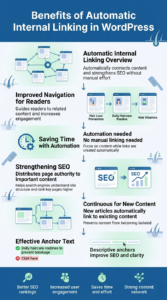
Benefits of Automatic Internal Linking in WordPress
Automatic linking is a game-changer for websites with lots of content. Internal Link Building Tool like Link Whisper saves time, strengthen SEO, and improve user navigation. On haircare blogs, automatic links ensure new posts immediately connect to relevant articles, keeping your content network strong without manual effort.
Automatic linking guides visitors through your content naturally. For instance, a post on “hair loss prevention” can automatically link to related articles like “daily haircare routines” or “vitamins for stronger hair.” This creates a smooth reading journey, encouraging visitors to explore multiple pages. Better navigation increases engagement, keeps visitors on your site longer, and improves overall user experience.
Saving Time with Automation
Manual internal linking can be tedious and inconsistent, especially for sites with hundreds of posts. Automation through link whisper wordpress plugin ensures that every article is properly connected without requiring extra work. Writers can focus on creating new content while the tool handles linking in the background. This helps in maintaining a consistent internal link structure across the site.
Strengthening SEO with Automatic Links
Internal links aren’t just for readers. They also help search engines understand your site structure. Automatic linking distributes page authority to cornerstone content, helping Google and other search engines recognize your most important posts. On a haircare blog, linking posts about “scalp care tips” or “hair growth vitamins” to cornerstone guides ensures key content ranks higher and attracts more traffic. Automatic internal linking wordpress creates a web of authority that improves overall site SEO. Insights from How Internal Links Improve SEO and Page Authority show that distributing page authority through internal links can elevate the ranking of cornerstone content across a website.
Continuous Linking for New Content
As your website grows, new posts are constantly published. Link Whisper WordPress plugin automatically suggests links from these new articles to relevant older posts. This keeps all your content interconnected and prevents older posts from becoming isolated. This also ensures every page contributes to your site’s SEO goals.
Choosing Effective Anchor Text
Anchor text should describe the linked content clearly. For haircare websites, descriptive anchors like “daily haircare routines to prevent breakage” or “hair growth vitamins for healthy scalp” are far more effective than generic “click here.”
Building a Practical Internal Linking Strategy for SEO
A strong internal linking strategy does more than connect pages. It guides readers, strengthens SEO, and organizes your content logically. Haircare blogs benefit greatly, as posts on styling, treatments, and product reviews can be linked to create a seamless reading experience. Thoughtful linking ensures visitors explore more content while search engines understand which pages are most important.
Identify and Prioritize Cornerstone Haircare Content
Cornerstone content forms the backbone of your website. On a haircare blog, guides like “preventing hair breakage” or “scalp care routines” act as primary hubs. Linking related posts, such as “protective hairstyles” or “vitamins for hair growth,” to these cornerstone articles improves visibility and SEO authority. Recognizing key pages ensures your most important content is highlighted throughout the site.
Adding Internal Links During Content Creation
Incorporating internal links while writing new posts keeps your content network consistent from the start. A post on “summer haircare tips” can naturally link to evergreen guides like “hydration for dry hair” or “reducing frizz naturally.” Linking during content creation supports internal linking for SEO and ensures readers can navigate related topics effortlessly.
Refreshing Older Haircare Posts to Maintain Link Relevance
Older articles often lose visibility if not updated. Revisiting posts like “everyday haircare routines” to link to newer content, such as “heat-free styling ideas” or “advanced scalp treatments,” can improve them.
You need to re-optimize the same. How would you do that? Looking into such gaps, the wordpress plugin auto internal link from Link Whisper augments the existing content in a scalable manner.
Thereby, older content fulfills user experience gaps and keeps your internal link structure strong. It also helps search engines understand content relationships.
Monitoring and Analyzing Internal Links
Regular audits for the wordpress best seo reveal under-linked posts and opportunities for optimization. Link Whisper highlights missing or weak connections automatically. For example, a post on “postpartum hair shedding” may have few links pointing to it. Adding connections from articles like “diet for stronger hair” or “nighttime haircare routines” increases engagement and SEO value. Ongoing analysis ensures every page contributes to your internal linking strategy.
Combining Automation and Strategy for Maximum Impact
Automation with the help of a WordPress plugin auto internal link simplifies internal linking, but a strategy ensures quality. Link Whisper can automatically suggest links based on relevance, saving time while maintaining control. When combined with strategic planning, automation ensures cornerstone content stays prominent.
Advanced Strategies for Internal Linking
Once you have mastered basic linking, advanced strategies help maximize SEO impact and user engagement. On haircare blogs, thoughtful internal linking guides readers through related topics. It strengthens cornerstone content and ensures content stays relevant over time.
Leveraging Content Hierarchy for Maximum Impact
Cornerstone posts form the top of your content hierarchy, supported by clusters of related articles. For example, a post like “Complete Hair Loss Prevention Guide” can link to supporting content such as “stress and hair loss” or “protective styling routines.” This wordpress best seo structure not only signals importance to search engines but also helps readers navigate a logical flow of related content. Organizing your site with a clear hierarchy ensures cornerstone content receives the authority it deserves.
Using Seasonal Linking to Keep Content Relevant
Posts on “summer hair protection” can link to evergreen guides like “hydration routines” or “scalp care for humid climates.” Similarly, winter-focused articles on “preventing dry hair in cold weather” can connect to “moisturizing hair masks” or “winter styling tips.” Seasonal linking for wordpress plugin for internal linking keeps content timely, encourages engagement, and helps search engines understand topical relationships.
Linking Product Reviews to Actionable Haircare Guides
Product reviews are more valuable when connected to practical tutorials or guides. On a haircare website, a review of “best shampoos for curly hair” could link directly to articles like “daily curl hydration routine” or “styling tips for defined curls.” This approach helps readers move seamlessly from learning about products to applying them in their daily routines. It not only improves user experience but also strengthens your internal linking for SEO.
Cross-Linking Between Related Content Clusters
Beyond cornerstone posts, linking between articles within the same topic cluster enhances user experience. A post on “keratin treatments for stronger strands” could link to “heat styling safety tips” or “choosing the right hairbrush.” Cross-linking under the alerts of the the best wordpress seo plugins, strengthens thematic relevance. Furthermore, improves internal link quity, and boosts SEO for multiple pages at once.
Monitoring Internal Linking Success
Tracking the effectiveness of your internal linking using linkwhisper plugin is crucial for both SEO and user engagement. Link Whisper Analytics tools can show which pages receive internal clicks and which remain underlinked.
On a haircare website, you might monitor cornerstone posts like “preventing hair breakage” or “scalp care routines” to see if they’re effectively driving traffic. If these articles aren’t attracting enough internal clicks, it could indicate the need for additional links from newer or related posts. Regular monitoring ensures your content remains connected, accessible, and optimized for search engines. Meanwhile, it guides readers through your site naturally.
Conclusion
A smart internal link building tool turns a scattered website into a cohesive network. Readers stay longer, discover more content, and your cornerstone posts gain visibility. By combining automation with strategic planning, your content works together to improve internal linking for SEO. It also helps elevate rankings and creates a seamless, professional experience for your audience. Properly connected content using linkwhisper plugin helps visitors discover related information effortlessly. It keeps them engaged longer and ensures that your most valuable pages get the visibility they deserve. It also allows search engines to understand the relationships between your posts, boosting overall site authority and rankings.
Link Whisper simplifies this process by automating link suggestions. It also identifies broken or outdated links, and provides actionable insights to strengthen your site’s internal structure. This not only saves time but also ensures consistency across hundreds of pages, turning scattered content into a coherent, navigable system. Smart internal linking transforms your site into a connected network of valuable content, enhancing user experience and boosting search engine performance.
Frequently Asked Questions
How does an internal link building tool help internal linking for SEO?
It distributes page authority across your site, highlights cornerstone content, and improves site crawlability. This strengthens rankings for key pages while keeping visitors engaged.
Can I automate internal links in WordPress?
Yes. Automation links new posts to relevant content, maintaining a consistent site structure. It reduces manual work and ensures no link opportunities are missed.
What makes the best internal linking plugin WordPress?
The best plugin integrates seamlessly, offers smart link suggestions, and provides reporting to track performance. It also enables updates to older posts to maintain a strong internal link structure.
How does the Link Whisper WordPress plugin work?
Link Whisper analyzes your content, suggests relevant internal links, and provides descriptive anchor text recommendations. This ensures a logical flow between articles, enhancing both user experience and SEO.
Is automatic internal linking WordPress safe for large sites?
Yes. Automatic linking efficiently connects hundreds of posts without errors. It maintains consistency and supports scalable growth as your content library expands.
How often should I audit my website for internal links?
Audits should be conducted regularly, ideally every few months, to identify broken links and under-linked pages. Frequent reviews ensure content remains discoverable and SEO-friendly.
Can internal link tools fix broken links automatically?
Yes. They detect broken URLs and can update or redirect them to relevant content. This preserves SEO value while maintaining a seamless user experience.
Why is descriptive anchor text important?
Descriptive anchor text clarifies what the linked page offers, improving both reader understanding and search engine context. It also encourages users to explore more content.
What’s a practical strategy for linking cornerstone content?
Identify high-value posts, link related articles, refresh older content, and group content into clusters. This strategy strengthens page authority and guides visitors through your site naturally.
Check if your site has the same issues.
Run a free audit right now. See your orphaned pages, broken links, and link health score in 60 seconds.
Check My Site

