
Contents
- 1 Introduction
- 2 Key Takeaways
- 3 Understanding WordPress Internal Linking Fundamentals
- 4 Why WordPress Internal Linking Matters for SEO
- 5 How to Add Internal Links in WordPress
- 6 WordPress Internal Linking Best Practices
- 7 Conducting a Comprehensive Internal Link Audit
- 8 Advanced WordPress Internal Linking Strategies
- 9 Common WordPress Internal Linking Mistakes to Avoid
- 10 Automating WordPress Internal Links
- 11 Conclusion
- 12 Frequently Asked Questions
- 12.1 How many internal links should a WordPress post have?
- 12.2 What is the best way to find internal links to a page in WordPress?
- 12.3 Can too many internal links hurt SEO?
- 12.4 Should I use exact match anchor text for internal links?
- 12.5 How do I fix broken internal links in WordPress?
- 12.6 What is an orphan page in WordPress?
- 12.7 How does internal linking affect WordPress SEO rankings?
- 12.8 Should I link to old or new content in WordPress?
- 12.9 What is the difference between internal and external links?
- 12.10 How can I automate internal linking in WordPress?
Introduction
WordPress internal linking is the foundation of website architecture and search engine optimization success. Every link you create between pages on your WordPress site tells search engines how your content connects, helps visitors discover related information, and distributes authority throughout your site. Studies show that well-structured internal linking can increase organic traffic by up to 40% while reducing bounce rates significantly.
This comprehensive guide reveals everything you need to know about WordPress internal linking from setup to advanced automation. You’ll learn proven strategies used by successful WordPress site owners, discover how to conduct thorough internal link audits, and master techniques that transform your site structure into an SEO powerhouse. Whether you manage a small blog or an enterprise content site, these actionable insights will help you build a robust internal linking system that drives results.
Key Takeaways
- Internal linking boosts SEO and user experience
- WordPress offers multiple linking methods and automation tools
- Strategic anchor text increases ranking potential
- Regular audits prevent broken and orphaned content
- Automation saves 97% of manual linking time
Understanding WordPress Internal Linking Fundamentals
Internal linking forms the connective tissue of your WordPress website. Every hyperlink pointing from one page to another page within your domain creates pathways for users and search engines to navigate your content ecosystem.
What Is Internal Linking in WordPress
Definition and Core Concept:
An internal link connects two pages within the same domain using HTML anchor tags. Unlike external links that point to other websites, internal links keep visitors within your WordPress site while establishing relationships between related content pieces.
Technical Structure:
WordPress stores internal links within post content and custom fields in the MySQL database. The platform uses the wpdb class to manage these connections, creating a network of references that search engine crawlers follow during indexation. Each link consists of three components: the anchor text (visible clickable text), the href attribute (target URL), and optional attributes like rel and title.
Link Types in WordPress:
WordPress supports several internal link variations including contextual links within content, navigation menu links, widget links, and footer links. Contextual links embedded within post content carry the most SEO weight because they appear naturally within relevant text and provide clear context about the linked destination.
Click here: Get the best Link packages for your website
How Internal Links Function in WordPress
Crawl Path Creation:
Search engines discover new content by following links from already indexed pages. When you publish a new WordPress post without internal links pointing to it, crawlers may take weeks or months to find it. Strategic internal linking creates immediate pathways that help search engines discover and index fresh content within hours.
Authority Distribution:
PageRank and link equity flow through internal links according to the original algorithm developed by Google founders. When you link from a high authority page to a newer or lower authority page, you transfer ranking power through that connection. WordPress sites with strategic internal linking distribute this authority more effectively than sites with random or sparse linking patterns.
User Navigation Enhancement:
Visitors follow internal links to discover related content, increasing time on site and reducing bounce rates. WordPress themes display internal links through various methods including inline text links, related post widgets, and navigation menus. Each link creates an opportunity for visitors to explore additional pages relevant to their interests.
The WordPress Database and Internal Links
Storage Mechanism:
WordPress stores post content including internal links in the wp_posts table under the post_content column. The platform preserves the full HTML structure of links including anchor text and attributes. This database architecture allows plugins and themes to query and modify internal links programmatically.
Relationship Mapping:
While WordPress doesn’t natively track bidirectional link relationships, the platform maintains post metadata that plugins can use to build comprehensive link maps. Tools can query the database to identify which posts link to which targets, creating a network graph of your site’s internal link structure.
Performance Considerations:
Large WordPress sites with thousands of internal links may experience database query overhead. Optimizing your internal link structure reduces unnecessary database calls and improves page load speeds. Caching plugins help minimize performance impact by storing rendered content including internal links.
Why WordPress Internal Linking Matters for SEO
Internal links seo WordPress strategies directly impact your search engine rankings and organic visibility. Understanding these benefits helps you prioritize internal linking in your WordPress optimization workflow.
Search Engine Crawling and Indexation Benefits
Crawl Budget Optimization:
Google allocates a finite crawl budget to each website based on site authority and technical health. Strategic internal linking ensures crawlers spend this budget efficiently by creating clear pathways to your most important pages. WordPress sites with poor internal linking waste crawl budget on low value pages while high value content remains undiscovered.
Index Coverage Expansion:
Internal links signal to search engines which pages deserve indexation priority. When you link frequently to cornerstone content from multiple pages, you communicate importance through link frequency and anchor text variations. This internal link strategy approach helps search engines understand your content hierarchy and prioritize indexation accordingly.
Fresh Content Discovery:
New blog posts need internal links from existing indexed pages to enter Google’s index quickly. Without these connections, crawlers may not find new content for weeks. WordPress sites publishing frequent content benefit significantly from automated internal linking that connects new posts immediately upon publication.
PageRank Flow and Authority Distribution
Link Equity Transfer: Every page on your WordPress site accumulates authority through external backlinks and user engagement signals. Internal links distribute this accumulated authority throughout your site according to the classic PageRank algorithm. Strategic linking from high authority pages to important targets amplifies the ranking potential of those targets.
Topical Authority Building:
Clustering related content through internal links helps establish topical authority in specific subject areas. When you consistently link between posts covering related topics, search engines recognize your site as a comprehensive resource. This topical authority building strategy works particularly well for niche WordPress sites competing against larger domains.
Authority Leak Prevention: External links pointing away from your WordPress site transfer authority to other domains. Balancing external and internal links prevents excessive authority leakage while maintaining a natural link profile. Most SEO experts recommend a ratio of three to five internal links for every external link.
User Experience and Engagement Metrics
Bounce Rate Reduction: Internal links provide exit points from every page that lead visitors deeper into your site rather than back to search results. WordPress sites with strategic internal linking see bounce rates decrease by 15% to 30% as visitors discover relevant related content through contextual links.
Time on Site Increase: When visitors follow internal links to multiple pages, total session duration increases significantly. This engagement signal tells search engines your content satisfies user intent. WordPress analytics tools show that users who click internal links spend three to five times longer on sites compared to single page visitors.
Conversion Path Optimization: Strategic internal linking guides visitors through conversion funnels from informational content to commercial pages. WordPress sites selling products or services benefit from linking blog posts to relevant product pages, creating natural pathways that convert readers into customers without aggressive sales tactics.
Technical SEO Advantages
Site Architecture Clarity: Well-structured internal linking creates a clear hierarchy that search engines understand easily. WordPress sites with logical link structures help crawlers identify pillar content, supporting articles, and less important pages. This hierarchical clarity improves overall site performance in search results.
Anchor Text Optimization: Internal links allow you to control anchor text pointing to every page on your WordPress site. This control enables targeted keyword optimization without depending on external webmasters. Strategic anchor text variation signals relevance while avoiding over optimization penalties.
Orphan Page Prevention: Pages without incoming internal links become orphans that exist in your WordPress database but remain invisible to search engines and users. Regular internal link audits identify and eliminate orphan pages, ensuring every published post receives appropriate link attention.
How to Add Internal Links in WordPress
WordPress provides multiple methods for creating internal links ranging from manual insertion to automated systems. Understanding each approach helps you choose the right strategy for your site’s needs.
Manual Internal Linking Methods
Classic Editor Approach: The WordPress Classic Editor includes a link button in the toolbar that opens a link insertion dialog. Click the chain icon, enter your target URL or search for existing posts, add anchor text, and insert the link into your content. This manual method provides complete control over link placement and anchor text but requires significant time investment.
Block Editor (Gutenberg) Process: WordPress Gutenberg Editor streamlines internal linking through its integrated search feature. Highlight text in any paragraph block, click the link icon, and start typing to search published posts and pages. The editor displays real-time suggestions matching your search query, making link insertion faster than Classic Editor workflows.
Custom HTML Method: Advanced users can insert internal links directly using HTML anchor tags in the Code Editor view. This approach provides maximum control over link attributes including rel tags, title attributes, and custom classes. Developers prefer this method when building complex link structures or integrating dynamic content.
WordPress Native Linking Features
Search Functionality:
The WordPress link insertion tool searches your entire content library including posts, pages, and custom post types. Type keywords related to your target page and WordPress returns relevant suggestions ranked by title match. This search feature significantly reduces the time needed to find internal link in WordPress.
Link Preview:
WordPress 5.0 and later versions display link previews showing target page titles and URLs before insertion. This preview functionality helps you verify link accuracy and prevents broken links from typos or incorrect URLs. The preview appears automatically when you paste URLs into the editor.
Recent Posts Suggestions:
The WordPress link dialog shows recently published posts by default, making it easy to link new content to your latest articles. This feature encourages fresh content connections that keep your internal link profile dynamic and current.
LinkWhisper Internal Linking Features
AI-Powered Link Suggestions:
LinkWhisper analyzes your content and automatically suggests relevant internal link opportunities based on semantic similarity and keyword matching. The plugin appears in the WordPress editor sidebar, displaying suggested target pages with recommended anchor text. This intelligent suggestion system identifies connections you might miss through manual review.
Bulk Link Building:
The bulk linking feature processes multiple posts simultaneously, adding internal links throughout your site in minutes rather than hours. You can set parameters for links per post, anchor text variations, and target page priorities. This automation capability reduces manual linking workload by 97% according to user reports.
Broken Link Detection:
LinkWhisper continuously monitors internal links across your WordPress site and flags broken connections immediately. The dashboard displays all broken links with source pages, making repairs quick and efficient. This proactive monitoring prevents the negative SEO impact of broken internal links.
Custom Post Type Internal Linking
WooCommerce Product Links:
WordPress WooCommerce sites benefit from linking product pages to relevant blog content and vice versa. Create contextual links from buying guides to specific products, increasing conversion potential while distributing link equity to commercial pages. WooCommerce internal linking strategies require careful balance between user experience and SEO optimization.
Portfolio and Case Study Connections:
Portfolio custom post types should connect to related service pages and blog posts demonstrating expertise. These strategic connections help potential clients understand your capabilities while improving search visibility for service-related queries. WordPress portfolio plugins often lack robust internal linking features requiring manual management.
Knowledge Base Linking:
Documentation and knowledge base custom post types require extensive cross-referencing through internal links. Visitors searching for solutions should easily find related articles addressing connected issues. WordPress knowledge base plugins support internal linking but benefit from additional optimization through manual review and strategic anchor text selection.
WordPress Internal Linking Best Practices
Implementing proven best practices ensures your WordPress internal links deliver maximum SEO benefit and user experience value.
Strategic Link Placement Guidelines
Contextual Relevance Priority:
Every internal link should connect pages with genuine topical relationships. Forcing unrelated links into content dilutes link value and confuses visitors. WordPress site owners should evaluate whether each link provides value to readers before insertion. Relevant contextual links receive more clicks and transfer authority more effectively than random connections.
Early Content Positioning:
Place important internal links within the first 200 words of your content when contextually appropriate. Search engine crawlers prioritize links appearing early in page structure, giving these connections more weight. WordPress posts with strategic early linking see improved index coverage for linked targets.
Natural Flow Integration:
Internal links should integrate seamlessly into content without disrupting reading flow or appearing forced. Write naturally first, then identify logical opportunities for contextual links during editing. This approach creates authentic connections that benefit users and search engines equally.
Optimal Link Density Standards
Target Ratio Calculation: Industry research suggests optimal internal link density ranges from two to five links per 1000 words of content. WordPress posts falling within this range balance SEO benefits with user experience. Exceeding eight links per 1000 words may appear spammy and reduce link value through dilution.
Distribution Patterns: Spread internal links throughout your content rather than clustering multiple links in single paragraphs. Even distribution keeps readers engaged across the entire post while preventing link-heavy sections that appear unnatural. WordPress content with balanced link distribution performs better in engagement metrics.
Quality Over Quantity: Adding dozens of internal links to every post dilutes the value of each individual link. Focus on selecting the most relevant and valuable connections rather than maximizing link count. High quality strategic links outperform large quantities of weak connections consistently.
Anchor Text Optimization Techniques
Keyword-Rich Anchors: Use descriptive anchor text containing target keywords for your linked pages. Generic phrases like “click here” or “read more” waste anchor text optimization opportunities. WordPress posts with keyword-rich anchors help search engines understand page topics and improve rankings for those terms.
Natural Language Variation: Avoid using identical anchor text repeatedly when linking to the same target page. Search engines interpret anchor text diversity as more natural and trustworthy. Create variations using synonyms, related phrases, and different keyword combinations while maintaining relevance.
Exact Match Moderation: While exact match keyword anchors provide SEO value, overusing them triggers over optimization filters. Mix exact match anchors with partial match and branded anchors to maintain natural link profiles. WordPress sites balancing these anchor text types avoid penalties while maximizing ranking potential.
Link Depth and Site Hierarchy
Three Click Rule: Structure your WordPress site so visitors can reach any page within three clicks from the homepage. This rule ensures important content remains accessible while distributing authority effectively. Sites exceeding this depth may trap valuable content too deep in the hierarchy.
Pyramid Structure Design: Build your internal link architecture like a pyramid with the homepage at the top, category and pillar pages in the middle, and individual posts at the base. Each level should link up to higher authority pages and down to supporting content. This hierarchical structure clarifies site organization for users and search engines.
Breadcrumb Navigation: Implement breadcrumb navigation showing the path from homepage to current page. WordPress breadcrumbs create automatic internal links reflecting site hierarchy while improving user navigation. Most WordPress SEO plugins include breadcrumb functionality that requires minimal configuration.
Linking to High Value Pages
Cornerstone Content Priority: Identify your site’s most important pages and ensure they receive significantly more internal links than standard posts. These cornerstone pieces should appear as link targets throughout your content library. WordPress sites with clearly defined cornerstone content see those pages rank higher consistently.
Conversion Page Emphasis: Commercial pages including product listings, service pages, and lead capture forms deserve strategic internal link attention. Link informational blog content to relevant commercial pages using natural contextual opportunities. This WordPress SEO strategy drives qualified traffic to conversion points.
Evergreen Content Focus: Prioritize internal links to evergreen content that remains relevant over time rather than time-sensitive news posts. Evergreen pages continue providing value and accumulating authority years after publication. WordPress editorial calendars should include regular updates to evergreen content including fresh internal links.
Conducting a Comprehensive Internal Link Audit
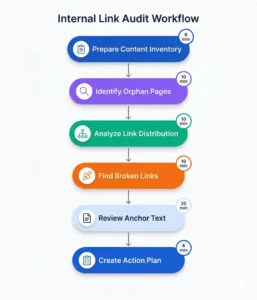
Regular internal link audit procedures identify opportunities and problems within your WordPress site’s link structure. Systematic audits ensure optimal performance and prevent common issues.
Preparing for Your Internal Link Audit
Content Inventory Creation: Begin by cataloging all published posts, pages, and custom post types on your WordPress site. Export a complete list including URLs, titles, publication dates, and word counts. This inventory provides the foundation for analyzing internal link patterns and identifying content requiring attention.
Tool Selection and Setup: Choose appropriate tools for conducting your internal link audit. WordPress plugins provide basic internal link data while external tools offer comprehensive analysis. Configure your selected tools with proper site access and establish baseline metrics before beginning the audit process.
Goal Definition: Establish specific objectives for your internal link audit such as identifying orphan pages, fixing broken links, or improving authority distribution. Clear goals keep the audit focused and measurable. WordPress sites benefit most from audits targeting specific improvement areas rather than general reviews.
Identifying Orphan Pages
Detection Methods: Orphan pages lack incoming internal links making them invisible to search engines and visitors despite existing in your WordPress database. Query your site to identify published posts receiving zero internal links from other content. These orphaned posts represent wasted content investment requiring immediate attention.
Impact Assessment: Evaluate each orphan page’s importance based on target keywords, content quality, and conversion potential. High value orphan pages deserve priority treatment with multiple new internal links. Low value orphans may warrant deletion or consolidation into existing content.
Remediation Strategy: Create internal links to orphan pages from relevant related content using contextual anchor text. WordPress sites should aim for minimum three to five incoming links per page to ensure adequate discovery and authority transfer. Schedule regular orphan page checks to catch new instances before they impact SEO performance.
Analyzing Internal Link Distribution
Link Equity Flow Mapping: Visualize how link equity flows through your WordPress site by mapping internal link patterns. Identify pages receiving disproportionate link attention and pages starving for connections. Balanced distribution ensures all important content receives appropriate authority allocation.
Incoming Link Counts: Generate reports showing incoming internal link counts for every page on your WordPress site. Pages with zero to two incoming links likely suffer from poor visibility and authority. Compare these counts against page importance to identify strategic linking gaps.
Outgoing Link Analysis: Review outgoing internal link counts to identify pages with excessive linking that may dilute link value. WordPress posts with more than eight outgoing links per 1000 words should be evaluated for link quality and relevance. Reduce unnecessary connections while maintaining valuable relationships.
Finding and Fixing Broken Internal Links
Broken Link Detection: Identify all internal links pointing to non-existent pages returning 404 errors. Broken links damage user experience and waste link equity by directing authority to dead ends. WordPress site migrations, permalink changes, and deleted content commonly create broken internal links requiring regular monitoring.
301 Redirect Implementation: Fix broken internal links by implementing 301 redirects from old URLs to current page locations. WordPress redirect plugins simplify this process for non-technical users. Redirects preserve existing link equity while guiding visitors to active content.
Source Page Updates: The optimal fix for broken internal links involves updating source pages with correct target URLs rather than relying solely on redirects. Direct links perform better than redirected connections for both users and search engines. LinkWhisper identifies broken links and allows quick URL corrections throughout your WordPress site.
Evaluating Anchor Text Distribution
Anchor Text Diversity Analysis: Review anchor text used for internal links throughout your WordPress site checking for over-reliance on exact match keywords. Healthy anchor text profiles include brand names, partial matches, generic phrases, and exact match variations. Imbalanced profiles risk triggering over optimization filters.
Target Page Anchor Text Review: Examine all anchor texts pointing to individual pages identifying repetitive patterns or missing keyword opportunities. Each important page should receive links using varied anchor text covering primary keywords, related terms, and natural phrases. This diversity signals authenticity to search engines.
Optimization Opportunities: Identify pages where generic anchor text like “this post” or “here” links to valuable content. Update these weak anchors with keyword-rich alternatives that provide SEO benefit while maintaining natural language flow. WordPress content editors should prioritize anchor text improvements alongside other on-page optimization tasks.
Internal Link Reporting and Metrics
Dashboard Creation: Build reporting dashboards tracking key internal link metrics including total link counts, orphan page numbers, broken link quantities, and average links per post. Regular dashboard reviews reveal trends and alert you to emerging issues requiring intervention.
Benchmark Establishment: Record baseline metrics at the start of your internal linking optimization efforts. Track improvements over time measuring the impact of strategic linking changes. WordPress sites demonstrating consistent internal link metric improvements typically see corresponding organic traffic growth.
Ongoing Monitoring: Schedule regular internal link audits quarterly or monthly depending on publication frequency. Internal link analytics tools provide automated monitoring reducing manual review requirements. Proactive monitoring catches problems early before they significantly impact SEO performance.
Advanced WordPress Internal Linking Strategies
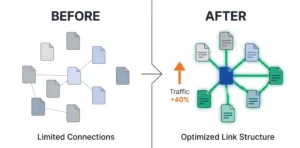
Beyond basic best practices, advanced strategies maximize the SEO power of internal linking for competitive WordPress sites.
Content Clustering and Topic Silos
Silo Structure Design: Organize your WordPress content into topic silos where all posts within a category link extensively to each other while minimizing connections to other silos. This structure concentrates topical authority within specific subject areas. Sites competing in crowded niches benefit significantly from tight silo architectures.
Hub and Spoke Model: Create comprehensive pillar pages serving as hubs for specific topics with supporting posts acting as spokes linking back to the hub. The hub page links to all supporting content, creating bidirectional connections that reinforce topical relationships. This model works exceptionally well for WordPress sites covering multiple distinct topics.
Internal Topic Clusters: Build clusters of three to seven related posts covering different aspects of a topic, with each post linking to all others in the cluster. These tight clusters signal expertise and comprehensiveness to search engines. WordPress sites publishing in-depth content series naturally fit this clustering approach.
Strategic Link Velocity Management
New Content Linking Patterns: Establish consistent internal linking patterns for new WordPress posts, ensuring immediate connections to existing related content. Link from new posts to established authority pages and update older posts with links to fresh content. This bidirectional approach accelerates new content indexation and ranking.
Historical Content Updates: Regularly update older WordPress posts with internal links to newer related content. These updates signal freshness to search engines while improving the link profile of recent posts. Schedule monthly content update sessions focusing specifically on adding strategic internal links to archive content.
Seasonal Link Adjustments: Modify internal link structures seasonally for topics with cyclical interest patterns. WordPress sites covering seasonal subjects should strengthen internal links to relevant content as peak seasons approach. This strategic timing maximizes visibility when search demand increases.
Internal Linking for Different Content Types
Blog Post Interconnection: Standard blog posts should maintain balanced internal linking with three to five contextual links per 1000 words. Connect posts within topic clusters heavily while including strategic links to cornerstone content and conversion pages. WordPress blogs with consistent internal linking patterns throughout their archives outperform sites with sporadic linking.
Pillar Page Link Strategy: Comprehensive pillar pages warrant extensive internal linking both incoming and outgoing. Link to pillar pages from numerous supporting posts while the pillar page links to all relevant supporting content. This creates authority hubs that rank well for competitive head terms.
Product Page Optimization: WooCommerce and ecommerce WordPress sites should link product pages from relevant blog content, buying guides, and comparison posts. Product internal linking requires balance between SEO optimization and natural user experience. Contextual product links within informational content convert better than forced promotional connections.
Advanced Anchor Text Techniques
LSI Keyword Integration: Use Latent Semantic Indexing keywords in anchor text to signal topical relevance without repeating exact match keywords. LSI terms provide variation while maintaining semantic connections to target pages. WordPress content with LSI-rich anchor text avoids over optimization while building comprehensive topical signals.
Branded Anchor Variation: Mix branded anchor text using your site name or company name with keyword-rich anchors. This combination appears more natural and trustworthy to search engines. WordPress sites with diverse anchor text profiles including branded variations perform better in competitive niches.
Long-Tail Anchor Strategies: Use long-tail keyword phrases as anchor text when linking to pages targeting specific long-tail queries. These descriptive anchors provide clear context about linked content while avoiding generic keyword repetition. Long-tail anchors work particularly well for linking to detailed how-to guides and specific product pages.
Internal Linking for Featured Snippets
Structured Content Support: Create internal links between related structured content pieces like lists, tables, and step-by-step guides. Search engines pull featured snippets from well-structured content with strong internal link support. WordPress posts optimized for snippets should link to comprehensive resources providing additional context.
FAQ Internal Connections: Link FAQ sections to detailed posts expanding on each question’s topic. These connections help search engines understand the relationship between quick answers and comprehensive explanations. WordPress FAQ pages with strategic internal links earn more featured snippet positions.
Definition and Glossary Links: Build an internal glossary of industry terms with each definition linking to posts using or explaining those concepts. This creates a hub of interconnected resources that search engines recognize as authoritative. WordPress sites in technical fields benefit significantly from well-linked glossary pages.
Common WordPress Internal Linking Mistakes to Avoid
Recognizing and avoiding common pitfalls protects your WordPress site from internal linking problems that harm SEO performance.
Over-Optimization and Spam Signals
Excessive Link Density: Adding too many internal links to individual posts dilutes each link’s value while creating a spammy appearance. WordPress posts with more than ten links per 1000 words should be reviewed for relevance and value. Quality focused linking outperforms quantity-based approaches consistently.
Repetitive Anchor Text: Using identical anchor text repeatedly when linking to the same page signals manipulation to search engines. Natural content includes varied anchor text even when discussing the same topics. WordPress sites should audit anchor text for repetitive patterns and introduce variations.
Footer Link Abuse: Stuffing dozens of internal links into WordPress site footers appears manipulative and provides minimal SEO value. Limit footer links to essential navigation and legal pages. Focus internal linking efforts on contextual in-content connections rather than sitewide footer placements.
Poor User Experience Practices
Irrelevant Link Insertion: Adding internal links without genuine topical relevance confuses visitors and reduces trust. Every link should provide clear value to readers considering clicking through. WordPress content with forced irrelevant links sees lower click-through rates and higher bounce rates.
Broken Link Negligence: Failing to monitor and fix broken internal links creates frustrating user experiences and wastes link equity. WordPress sites should implement regular broken link checks and immediate repair procedures. LinkWhisper’s automated broken link detection prevents these issues through proactive monitoring.
Link Blindness Patterns: Placing so many internal links in content that visitors ignore them entirely defeats the purpose of internal linking. This “link blindness” occurs when readers learn to skip link-heavy sections. Strategic selective linking maintains user attention and link effectiveness.
Technical Implementation Errors
Incorrect URL Formats: Using relative URLs instead of absolute URLs for internal links can cause problems with content syndication and email sharing. WordPress should consistently use absolute URLs for internal links to prevent broken connections in various contexts. Configure your WordPress site to generate proper link formats automatically.
Missing Title Attributes: While not required, descriptive title attributes on internal links provide accessibility benefits and additional context. WordPress content should include relevant title attributes for important internal links. This small detail improves user experience without requiring significant effort.
JavaScript Link Dependence: Relying on JavaScript for internal links prevents search engine crawlers from following connections. WordPress sites should use standard HTML anchor tags for all internal links ensuring full crawlability. Reserve JavaScript navigation for supplementary user interface features only.
Strategic Planning Failures
Random Link Building: Adding internal links haphazardly without strategic planning wastes opportunities and creates inefficient link structures. WordPress sites benefit from documented internal linking strategies guiding link placement decisions. Plan which pages deserve priority linking and how to achieve optimal distribution.
Neglecting Link Maintenance: Internal link structures require ongoing maintenance as content grows and evolves. WordPress sites failing to update link structures with new content miss opportunities while maintaining connections to outdated resources. Schedule regular link maintenance sessions to keep structures current.
Ignoring Analytics Data: Failing to track internal link performance through analytics prevents informed optimization decisions. WordPress should integrate click tracking for internal links measuring which connections engage users most effectively. Use this data to refine internal linking strategies over time.
Automating WordPress Internal Links
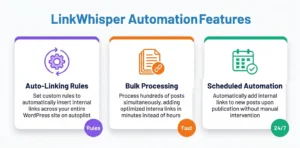
Automation transforms internal linking from a time-consuming manual task into an efficient automated process that scales with your WordPress site’s growth.
Benefits of Internal Link Automation
Time Savings Calculation: Manual internal linking requires five to fifteen minutes per post depending on content length and link complexity. WordPress sites publishing daily content spend hours weekly on linking tasks. Automation reduces this time by 95% or more, freeing resources for content creation and strategy development.
Consistency Improvement: Automated systems apply consistent internal linking rules across all content eliminating the variations that occur with manual linking. Every WordPress post receives appropriate link attention based on predefined criteria. This consistency creates more predictable SEO results and eliminates content that accidentally receives zero internal links.
Scale Management: As WordPress sites grow to hundreds or thousands of posts, manual internal linking becomes impossible to maintain effectively. Automated systems scale effortlessly handling link management for sites of any size. Growing sites benefit most dramatically from automation as link complexity increases exponentially with content volume.
LinkWhisper Automation Features
Auto-Linking Rules: Create custom rules defining when and how LinkWhisper automatically adds internal links to your WordPress content. Specify target pages, anchor text variations, maximum links per post, and targeting criteria. These rules process your entire content library, applying consistent strategic linking without manual intervention.
Bulk Link Processing: Process hundreds of WordPress posts simultaneously, adding optimized internal links across your site in minutes. The bulk processor analyzes content, identifies opportunities, and inserts links following your predefined rules. This feature transforms sites with poor internal linking into well-connected architectures rapidly.
Ongoing Automatic Linking: Configure LinkWhisper to automatically add internal links to new posts as you publish them. This ongoing automation ensures every piece of content receives immediate link attention without requiring manual review. WordPress publishers focusing on content creation benefit significantly from hands-off internal linking.
Setting Up Automated Internal Linking
Rule Configuration: Define your internal linking rules specifying which pages should receive priority linking, preferred anchor text patterns, and maximum links per post. WordPress sites should start with conservative rules and adjust based on results. Well-configured rules produce natural-looking internal links indistinguishable from manual linking.
Target Page Selection: Identify cornerstone content, conversion pages, and other priority targets that should receive frequent internal links. Configure automated rules to favor these targets when relevant opportunities appear. This strategic targeting ensures important pages accumulate authority through consistent internal linking.
Quality Controls: Implement review processes checking automated internal links for relevance and natural integration. While automation handles the heavy lifting, human review ensures quality standards. WordPress sites should audit automated links monthly verifying they maintain contextual relevance and provide user value.
Balancing Automation with Manual Oversight
Hybrid Approach Benefits: Combine automated internal linking for routine connections with manual strategic linking for special cases. This hybrid approach captures efficiency benefits while preserving creative control over critical links. WordPress sites using hybrid strategies achieve optimal results balancing speed and quality.
Manual Review Priorities: Focus manual review efforts on high-value content including pillar pages, conversion pages, and top-performing posts. Let automation handle standard blog post linking while you strategically optimize important pages. This prioritization maximizes your time investment impact.
Continuous Optimization: Monitor automated internal linking performance through analytics identifying which automated links generate clicks and which fail to engage users. Refine automation rules based on this performance data. WordPress sites continuously optimizing automated rules see steady internal linking improvement over time.
Measuring Automation Success
Performance Metrics: Track key metrics including average links per post, orphan page counts, and internal link click-through rates. Compare these metrics before and after implementing automation. WordPress sites typically see dramatic improvements across all metrics within weeks of automation deployment.
SEO Impact Assessment: Monitor organic traffic trends and keyword rankings for pages receiving increased internal links through automation. Most WordPress sites observe ranking improvements for targeted pages within one to three months. Document these improvements to justify continued automation investment.
Time ROI Calculation: Calculate time saved through automation by comparing hours spent on manual linking against automation setup and maintenance time. WordPress internal linking opportunities multiply as sites grow making automation ROI increasingly compelling over time.
Conclusion
WordPress internal linking represents one of the most powerful and underutilized SEO strategies available to site owners. This comprehensive guide has revealed proven techniques for building robust internal link structures that boost search rankings, improve user engagement, and distribute authority effectively throughout your site.
By implementing strategic internal linking practices, conducting regular audits, and leveraging automation tools, you transform your WordPress site into a well-connected content ecosystem that search engines understand and users navigate effortlessly. Whether you manage a small blog or an enterprise content site, these WordPress internal linking strategies provide the foundation for long-term organic growth and improved search visibility.
Start by auditing your current internal link structure, identifying quick wins like orphan pages and broken links, then progressively implement advanced strategies including content clustering and automation. The consistent application of these principles will compound over time, delivering measurable improvements in organic traffic and search engine rankings.
Ready to transform your WordPress internal linking? Explore LinkWhisper’s powerful automation features and discover how effortless internal linking can accelerate your SEO success.
Frequently Asked Questions
What is the best way to find internal links to a page in WordPress?
Use WordPress plugins that analyze your site's link structure showing which posts link to specific pages. LinkWhisper provides comprehensive internal link reports identifying all incoming connections for every page. Google Search Console's internal links report also shows pages with most internal links site-wide.
Can too many internal links hurt SEO?
Excessive internal linking can dilute individual link value and create spammy appearances that search engines penalize. WordPress posts with more than eight links per 1000 words should be reviewed for relevance. Focus on strategic quality connections rather than maximizing link quantities to maintain optimal SEO performance.
Should I use exact match anchor text for internal links?
Mix exact match keyword anchors with partial match, branded, and natural language variations to maintain authentic link profiles. Using identical exact match anchors repeatedly triggers over optimization filters. WordPress sites should vary anchor text while maintaining topical relevance for each internal link.
How do I fix broken internal links in WordPress?
Identify broken links using WordPress plugins or manual checks, then either update URLs to correct destinations or implement 301 redirects from old URLs. LinkWhisper automatically detects broken internal links and allows quick corrections throughout your site. Regular monitoring prevents broken links from accumulating.
What is an orphan page in WordPress?
An orphan page exists in your WordPress database but receives no incoming internal links from other site content. Search engines struggle to discover orphan pages through crawling, severely limiting their visibility. Regular audits identify orphan pages requiring strategic internal links from related content.
How does internal linking affect WordPress SEO rankings?
Internal linking influences rankings by distributing link equity, guiding search engine crawlers, establishing content hierarchies, and improving user engagement metrics. Semantic SEO strategies using internal links help search engines understand topical relationships between pages. Well-structured internal linking consistently correlates with improved organic search visibility.
Should I link to old or new content in WordPress?
Link to both old and new content strategically based on relevance and value. Update older WordPress posts with links to fresh content while linking new posts to established authority pages. This bidirectional approach ensures comprehensive site connectivity and helps search engines discover new content quickly.
What is the difference between internal and external links?
Internal links connect pages within your WordPress domain while external links point to other websites. Internal links improve site structure and distribute authority internally. External links provide additional resources and context. WordPress sites should balance both types, maintaining roughly three to five internal links per external link.
How can I automate internal linking in WordPress?
LinkWhisper provides automated internal linking through customizable rules that add contextual links across your WordPress site. Configure automation parameters including target pages, anchor text preferences, and link density. Automated internal linking eliminates manual work while maintaining natural connection quality.
Check if your site has the same issues.
Run a free audit right now. See your orphaned pages, broken links, and link health score in 60 seconds.
Check My Site

