
Contents
- 1 1. Why Internal Linking for SEO Matters More Than You Think
- 2 2. What Are Internal Links in SEO?
- 3 3. How Internal Linking for SEO Works
- 4 4. AI-Powered Internal Linking
- 5 5. Internal Link Audit for SEO: Find and Fix Gaps
- 6 6. Set Clear Goals for Internal Linking
- 7 7. Anchor Text Best Practices for Internal Linking
- 8 8. Build a Strong Site Structure for SEO
- 9 9. Build Topical Authority with Internal Linking (2026)
- 10 10. Keep Internal Linking Natural and User-Focused
- 11 11. Common Internal Linking Mistakes to Avoid
- 12 12. Measure Internal Linking SEO Results
- 13 13. Crawl Budget Optimization for Large Websites
- 14 14. Internal Linking Best Practices
- 15 15. Key Takeaways: Internal Linking for SEO
- 16 FAQs
- 16.1 What is Internal Linking for SEO and why is it important?
- 16.2 How does Internal Linking for SEO impact search rankings?
- 16.3 How many internal links should be included on a page?
- 16.4 Can WordPress automate internal linking effectively?
- 16.5 What role do pillar pages play in internal linking for SEO?
- 16.6 How frequently should an internal link audit be performed?
- 16.7 How do internal links differ from external links?
- 16.8 How do internal links affect crawl budget?
- 16.9 What are best practices for anchor text in internal links?
- 16.10 When are results from internal linking changes visible?
Internal links are the roads your readers and search engines use to navigate your site. Internal Linking for SEO is one of the most powerful and underrated ranking factors you fully control.
It’s how you:
- Guide users through your content
- Tell Google which pages matter most
- Distribute authority across your site
When your internal links are done right, your site feels connected.
When they’re not? You end up with dozens or even hundreds of pages that Google barely understands.
That’s where most sites struggle.
In this guide, you’ll learn to:
- Build a smart internal linking for SEO strategy that drives results
- Fix orphan pages and weak connections with an internal link checker
- Save hours with automation using a wordpress internal linking plugin or an auto internal linking plugin WordPress
- Measure the real SEO impact of your links
Before you dive in, it’s a good idea to run a quick internal link checker to see where your site currently stands.
1. Why Internal Linking for SEO Matters More Than You Think
Here’s something most SEO guides won’t tell you:
You don’t always need more content or backlinks. Sometimes, smarter internal linking for SEO is all it takes. Improve your site structure, boost link equity, and help search engines rank your pages more effectively.
How Internal Linking Helps Google Crawl and Rank Your Website
Search engines don’t magically find your pages.They follow links. According to Google Search Central, well‑structured internal link architecture ensures crawlers discover and index important content instead of letting it remain hidden.
If a page isn’t connected through your internal linking structure, it might not even get indexed. That’s why running an internal link checker is one of the fastest ways to uncover hidden SEO issues.
2. What Are Internal Links in SEO?
An internal link is a hyperlink that connects one page on your website to another page within the same domain, helping search engines understand your site structure and content relationships.
Types of internal links include:
- Navigational links (header, footer)
- Contextual links (within content)
- Related post links
- CTA (call-to-action) links
Most valuable for SEO: Contextual internal links placed naturally within content, as they pass link equity and improve relevance, crawlability, and rankings.
3. How Internal Linking for SEO Works
Improve Crawlability with Internal Linking
Think of internal links as pathways for Google. Search engines don’t just rely on sitemaps. They follow links to find and index your pages. When your internal linking for SEO is set up properly, none of your important pages get buried.
Pass Link Equity Through Internal Links
Some pages naturally perform better than others. Internal links help pass that authority to pages that need a boost. Using an internal linking plugin can make this process faster and more efficient.
Enhance User Experience with Internal Links
Internal links aren’t just for search engines. They are for your readers too. When you guide users to relevant content, they stay longer and engage more. Running an internal link checker occasionally also helps keep your site clean and easy to navigate.
4. AI-Powered Internal Linking
AI is transforming how internal linking for SEO is done—making it faster, smarter, and more strategic.
Before:
Internal linking was mostly based on simple keyword matching, often missing true content relevance.
Now:
AI-powered tools understand context, intent, and semantic relationships between pages, helping you build a stronger internal link structure.
How This Improves Your Internal Linking Strategy:
- More relevant and accurate internal link suggestions
- Reduced manual effort when adding links
- Faster content optimization workflows with an auto internal linking plugin
Using an internal linking plugin can help automate this process, while an internal link checker ensures your links stay accurate and error-free.
What to Keep in Mind:
AI improves efficiency but it doesn’t replace human judgment. Always review links to make sure they feel natural and add real value to the reader.
5. Internal Link Audit for SEO: Find and Fix Gaps
Start by asking the right internal linking for SEO questions:
- Which pages have no internal links (orphan pages)?
- Which pages need more authority?
- Which pages matter most for internal linking for SEO?
Tools to use:
- Google Search Console
- Screaming Frog
- Link Whisper
An internal link checker makes it much easier to spot broken links, orphan pages, and missed opportunities in minutes not hours.
Focus on fixing critical internal linking gaps and errors:
- Orphan pages
- Low-authority pages
- Missed internal linking opportunities
A quick audit alone can uncover easy SEO wins you’ve been overlooking. It also helps you identify exactly where your internal linking for SEO strategy is falling short and needs improvement.
For a complete workflow on how to implement internal links effectively inside WordPress, follow our step‑by‑step internal linking guide.
6. Set Clear Goals for Internal Linking
Not every page needs equal attention. Focus on what drives results:
- Pages ranking on page 2 (quick SEO wins)
- High-converting pages
- Newly published content
- Pillar pages
When your priorities are clear, your internal linking decisions become faster and more strategic. A strong internal linking for SEO approach is all about focusing on what actually moves rankings and conversions. It is not just adding links everywhere.
7. Anchor Text Best Practices for Internal Linking
Best practices to follow:
- Use descriptive, keyword-rich anchor text that clearly explains the linked page
- Vary your anchor text naturally to avoid repetition
- Always write anchors for users first, then optimize for SEO
What to Avoid in Anchor Text:
- Using generic phrases like “Click here” or vague anchors
- Over-optimizing or repeating the same keywords excessively
- Forcing exact-match anchors unnaturally
SEO Recommendation:
In internal linking for SEO, relevance always matters more than volume. The goal isn’t more links. It is better, more meaningful connections between pages.
Focusing on quality over quantity helps both users and search engines navigate your site more effectively.
8. Build a Strong Site Structure for SEO
Recommended Site Structure for Internal Linking in WordPress:
- Homepage – Your main hub for authority and link equity
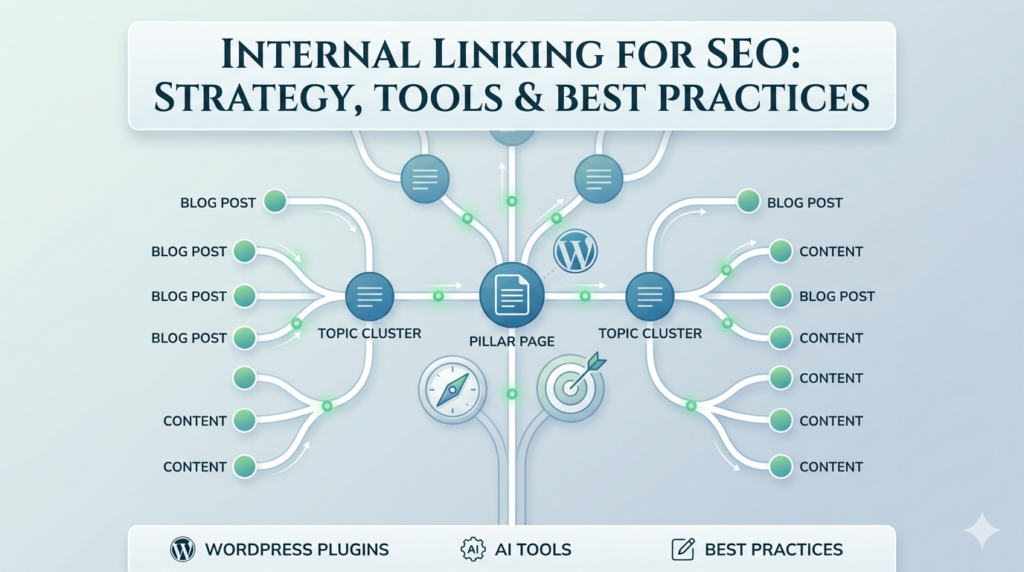
- Pillar pages – Core topic pages that cover key subjects in depth
- Supporting content – Related posts that link back to pillar pages to strengthen topical authority and internal linking for SEO
Hub-and-Spoke Model for Internal Linking in WordPress:
- Hub = Main Topic – The central pillar page covering a key subject in depth
- Spokes = Related Posts – Supporting content that links back to the hub, reinforcing internal linking for SEO and topical authority
A clear site structure not only makes it easier for users to navigate but also helps search engines understand your content hierarchy. Using a WordPress internal linking plugin ensures your links stay consistent and effective as your website grows.
9. Build Topical Authority with Internal Linking (2026)
Google now prioritizes depth, not just individual pages. To build true topical authority:
- Link all related content together
- Connect blog posts to your pillar pages
- Strengthen topic clusters across your site
This approach signals expertise, boosts your Internal Linking for SEO, and improves your chances of ranking for multiple keywords.
Using an auto internal linking plugin makes it easy to scale this strategy without missing important connections. Meanwhile an internal link checker ensures every page is properly linked and contributes to your overall site authority.
LinkWhisper’s automation features let you define rules, bulk process posts, and automatically insert relevant internal links.
10. Keep Internal Linking Natural and User-Focused
Best Practices for Internal Linking for SEO:
- Write first, then add links. Focus on creating great content before thinking about internal links.
- Link only when it adds value. Every link should guide the reader to something genuinely helpful.
- Avoid forcing links for SEO. If a link doesn’t serve your audience, it won’t improve your rankings either.
- Use tools wisely. A wordpress internal linking plugin or an auto internal linking plugin can help suggest links without compromising natural flow. Meanwhile an internal link checker ensures you aren’t missing key opportunities.
Natural internal linking for SEO always performs better over time than mechanical or spammy link placement.
11. Common Internal Linking Mistakes to Avoid
Even experienced site owners slip up with internal linking. Here are the top pitfalls and how to fix them:
- Orphan pages : Pages with no inbound links get ignored by Google. Running an internal link checker helps you identify and fix them quickly.
- Too many footer or sidebar links : These carry minimal SEO value. Focus on contextual links within your content instead.
- Generic anchor text : Phrases like “click here” or “read more” waste an opportunity to signal relevance. Use descriptive anchors that tell readers and Google what the page is about.
- Ignoring older posts : Every time you publish new content, check older posts for opportunities to link to it. This strengthens Internal Linking for SEO.
- Broken internal links : Links to deleted or moved pages confuse readers and dilute link equity. Regularly using an internal link checker can detect broken URLs before they hurt your rankings.
Small fixes in these areas can lead to noticeable improvements in SEO, better user experience, and stronger topic authority. If you’re managing a large site, an auto internal linking plugin WordPress can help scale these updates efficiently without missing any important connections.
12. Measure Internal Linking SEO Results
To know if your internal linking efforts are paying off, track key metrics in both Google Search Console (GSC) and GA4:
Google Search Console Metrics for Internal Linking Performance
- Keyword rankings – Are your target pages moving up for priority keywords?
- CTR (Click-Through Rate) – Are more people clicking through from search results?
- Indexed pages – Are previously orphaned or newly linked pages being discovered by Google?
Track Internal Linking Success with GA4 Metrics
- Pages per session – Are visitors exploring more of your content?
- User engagement – Are readers staying longer and interacting with multiple posts?
Tracking these metrics helps you understand what’s working and what needs improvement. Search Engine Land research highlights that internal linking performance can influence index coverage and search visibility metrics. This also reinforces why measurement should be part of your ongoing workflow. Most Internal Linking for SEO changes start showing measurable results within 30–90 days.
Pro tip: Use an auto internal linking plugin WordPress to implement links efficiently, and run an internal link checker regularly to confirm everything is properly connected.
13. Crawl Budget Optimization for Large Websites
If your site has hundreds or thousands of pages, crawl budget becomes an important factor. Here’s how to make the most of it:
- Prioritize important pages. Make sure your high-value content like pillar pages, cornerstone posts, and top-performing articles gets the most internal links pointing to it.
- Reduce low-value pages. Thin content, duplicate pages, or outdated posts can waste crawl budgets. Consider no indexing or consolidating them.
- Improve crawl efficiency through better linking. A well-structured internal linking system ensures search engines spend time on the pages that truly matter.
A strong Internal Linking for SEO setup not only helps with rankings but also guides search engines to crawl your site more effectively. Using an internal linking plugin makes maintaining this structure easier. Meanwhile an internal link checker helps you spot gaps or orphan pages.
14. Internal Linking Best Practices
To make your internal links truly effective:
- Link with purpose, not randomly. Every link should guide the reader to relevant content and support your SEO goals.
- Use strong, relevant anchor text. Descriptive anchors help Google understand the linked page and improve rankings.
- Maintain a clear site structure. A hub-and-spoke or topic-cluster setup strengthens Internal Linking for SEO and signals topical authority.
- Audit links regularly. Catch orphan pages, broken links, or outdated connections using an internal link checker. WordPress internal linking complete guide shows how to use LinkWhisper to identify and fix orphan pages and broken internal links. This helps nothing get left out of your SEO strategy.
- Measure performance and refine. Track rankings, CTR, and user engagement to see what’s working and adjust your strategy.
For larger sites or frequent publishing schedules, an auto internal linking plugin WordPress can automate repetitive tasks, surface relevant link suggestions. It helps keep your internal linking strategy consistent across your site.
15. Key Takeaways: Internal Linking for SEO
- Internal linking for SEO is fully within your control. Unlike backlinks, you don’t need permission from anyone else to guide link equity across your site.
- The right tools make execution faster and easier. Using a wordpress internal linking plugin can streamline your workflow and keep your strategy consistent.
- Topical authority is critical for rankings in 2026. Linking related posts to pillar pages and building strong topic clusters signals expertise and trustworthiness to Google.
- Orphan pages can limit your visibility. Pages with no inbound links are invisible to both readers and search engines. Regular audits prevent them from accumulating.
- Consistent tracking drives long-term SEO success. Monitor rankings, CTR, indexed pages, and engagement metrics in GA4 and GSC to refine your internal linking strategy.
When done right, internal linking for SEO becomes one of the simplest yet most powerful ways to improve your site’s rankings, user experience, and topical authority.
FAQs
How does Internal Linking for SEO impact search rankings?
Strategic internal linking signals which pages are most important. It enhances crawlability, strengthens topic clusters, and increases the likelihood of higher rankings.
How many internal links should be included on a page?
There is no fixed number. Links should be relevant, contextual, and provide value to both users and search engines. Avoid excessive or unrelated links.
Can WordPress automate internal linking effectively?
Yes. An auto internal linking plugin WordPress can suggest relevant links and reduce manual effort. This ensures consistency across large websites.
What role do pillar pages play in internal linking for SEO?
Pillar pages serve as central hubs for key topics. Linking related posts to pillar pages strengthens topic clusters, improves crawlability, and boosts overall site authority.
How frequently should an internal link audit be performed?
Audits should be conducted regularly, ideally every few months or after major content updates. Using an internal link checker ensures broken or missing links are detected promptly.
How do internal links differ from external links?
Internal links connect pages within the same website. External links point to other domains. Internal links primarily improve site structure, user navigation, and link equity distribution.
How do internal links affect crawl budget?
A well-planned internal linking strategy prioritizes high-value pages. This guides search engine bots efficiently, ensuring important content is crawled and indexed first.
What are best practices for anchor text in internal links?
Use descriptive, contextually relevant anchors. Avoid generic phrases like “click here” and over-optimized keyword anchors. The goal is to clarify the linked page’s topic.
When are results from internal linking changes visible?
Internal linking improvements typically show measurable impact within 30–90 days. Indicators include better crawl coverage, more indexed pages, and improved keyword rankings.
Check if your site has the same issues.
Run a free audit right now. See your orphaned pages, broken links, and link health score in 60 seconds.
Check My Site

