Contents
- 1 What Link Juice Is and How It Actually Flows Through Your Site
- 2
- 3 Orphan Pages: The Pages Your Link Juice Never Reaches
- 4 Broken Links: The Silent Link Juice Leak
- 5 Dead End Pages and Weak Site Structure: Where Authority Stalls
- 6
- 7 Anchor Text and Priority Pages: Directing Link Juice Where It Counts
- 8 How Link Whisper Redirects Link Juice to Pages That Need It Most
- 9 Conclusion
- 10 Frequently Asked Questions
- 10.1 What is link juice in SEO?
- 10.2 How does link juice flow through a WordPress site?
- 10.3 What causes a WordPress site to lose link juice?
- 10.4 How do orphan pages affect link juice?
- 10.5 Can broken links really hurt my rankings?
- 10.6 How many internal links should a WordPress page have?
- 10.7 Does anchor text affect how link juice works?
- 10.8 How is link equity different from link juice?
- 10.9 How do I find every internal linking issue on my site?
- 10.10 Can a plugin fix link juice problems automatically?
Link juice is the ranking authority that flows from page to page through your internal links, and on most WordPress sites, a huge share of it never reaches the pages that need it. Orphan pages sit outside the link structure entirely. The free broken link checker tool send that authority into a dead 404 instead of a live page. Thin site structure lets equity pool on pages that already rank while important pages get nothing. This post breaks down exactly how link juice moves through a WordPress site, where it leaks out, and how Link Whisper closes the gaps automatically.
Key Takeaways
- Link juice passes between pages only through actual internal links, so any page without inbound links receives none, no matter how good the content is.
- Orphan pages, broken links, and dead end pages are the three biggest sources of wasted link juice on WordPress sites.
- Link Whisper finds these leaks and suggests or automates the internal links that redirect authority to the pages you most need to rank.
What Link Juice Is and How It Actually Flows Through Your Site
Link juice is a shorthand term for link equity, the ranking value that one page passes to another through a hyperlink. Google’s own systems evaluate links as one signal among many when working out which pages deserve to rank, and internal links seo strategies exist specifically because internal links are the one link type you fully control. Unlike backlinks, you decide exactly which pages link to which, how many links each page sends out, and what anchor text carries the signal.
Every page on your site has a certain amount of authority, built from backlinks, age, content quality, and engagement. That authority does not stay locked on the page. It flows outward through every internal link on that page, divided roughly across however many links appear. A homepage with strong backlinks that links to twenty pages spreads its authority across all twenty. A homepage that links to three pages concentrates far more juice on each one. This is the physics behind internal linking for SEO, and it explains why the pages closest to your most authoritative pages, usually the homepage and your top posts, tend to rank fastest.
For a full breakdown of how equity moves and how to distribute it deliberately, see our guide on link equity and how to distribute it. This post focuses specifically on where that flow breaks down and how to stop the leaks. Google documents the mechanics of crawlable links directly in its Search Central guidelines, and the core takeaway holds for internal links too: if a link is not there, no authority moves through it.
Think of it like water flowing downhill through pipes. Each internal link is a pipe, and the amount of water, or authority, that reaches the far end depends on how strong the source page is and how many other pipes are competing for the same supply. A brand new post with zero backlinks and one internal link pointing to it starts with almost nothing to work with, no matter how well it is written. That is why link placement, not just content quality, decides how fast a page climbs the rankings.
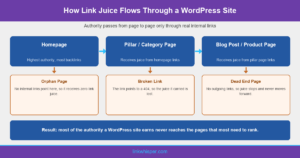
Alt: Infographic showing how link juice flows from a homepage through pillar pages to blog posts, with orphan pages, broken links, and dead end pages marked as the points where authority leaks
Orphan Pages: The Pages Your Link Juice Never Reaches
An orphan page is any page on your WordPress site with zero internal links pointing to it. Search engines can sometimes still find it through your sitemap, but it receives no link juice at all, because link juice only moves through actual hyperlinks. No inbound internal link means no equity, no matter how strong the content is.
Orphan pages are far more common than most site owners realize. New posts get published, promoted once on social media, and then quietly forgotten. Older cornerstone pages get replaced by newer content and lose every internal link that used to point to them. On sites with hundreds of pages, this compounds fast, and our own orphaned content recovery research consistently finds a meaningful share of a site’s total pages sitting with zero inbound internal links.
The fix is straightforward once you can see the problem: find every orphaned page, then add internal links from relevant, already indexed pages that do have authority. Link Whisper’s internal link map visualizes your entire site structure so orphan pages are visible at a glance, and the plugin’s orphaned content recovery workflow suggests exactly which existing pages should link to them, restoring the flow of link juice a page needs to rank.
On a typical WordPress site running for two or three years, it is common to find that a meaningful share of published posts have picked up zero fresh internal links since the month they went live. Category pages get restructured, old campaigns get archived, and the links that once pointed to those posts quietly disappear along with them. Nobody notices until traffic on a once solid page quietly drops to nothing, by which point the orphan status has often been in place for months.
Broken Links: The Silent Link Juice Leak
A broken internal link sends link juice into a 404 page instead of a live one. The authority that page was passing along simply disappears. Multiply that across a site with hundreds of posts, plugin updates that change URL structures, and old slugs that got renamed without a redirect, and broken links quietly become one of the largest sources of wasted equity on any WordPress site.
Broken links also waste crawl budget. Every time a search engine bot follows a dead link, it spends part of its limited crawl allowance on a page that returns nothing, time it could have spent discovering and indexing your real content. Our research on dead links bleeding rankings and broken link checker for WordPress both point to the same conclusion: sites rarely know how many broken links they have until they run a proper scan.
Manual link checking does not scale past a handful of pages. Link Whisper’s internal link checker scans your entire site, flags every broken internal link, and lets you fix or redirect it in a few clicks, so the link juice those pages used to carry gets rerouted instead of lost. For a step-by-step process, our WordPress 404 checker guide walks through finding and fixing every error before it costs you rankings.
Not every broken link or dead link will solve on its own. In fact, the Linkwhisper broken internal link checker spots out, automates and helps in the process.. A page removed on purpose, a discontinued product or an outdated offer, should be redirected to the closest live equivalent so the link juice pointing at it keeps flowing instead of dead ending at a 404. Skipping that redirect step is one of the most common ways site owners accidentally throw away authority they already earned, often during a routine site migration or a WooCommerce catalog cleanup.
Dead End Pages and Weak Site Structure: Where Authority Stalls
A dead end page is any page with no outgoing internal links at all. It might receive link juice from other pages, but it never passes any forward, so the flow of authority through your site stops right there. Product pages, thank you pages, and long form posts published without a single link to related content are the most common culprits.
Weak site structure makes the problem worse. If your WordPress site does not use a clear hub and spoke model, with pillar pages linking down to supporting posts and those posts linking back up and sideways to related content, link juice pools randomly instead of flowing toward the pages that matter most for revenue and rankings. Running a proper internal link audit is the only reliable way to see where your structure breaks down.
There is also a volume question. Too few internal links per page starves that page’s neighbors of equity, while stuffing a page with irrelevant links dilutes what each one passes on. Our guide on how many internal links per page lays out a practical range, and Link Whisper’s internal linking analysis tools show exactly how your current structure compares against it using real data pulled from your own site.
Tag pages and thin category archives are common dead ends too. WordPress generates them automatically, and many link out to nothing beyond the individual posts already assigned to that tag, so they receive whatever juice flows in and then just sit on it. Auditing which archive and taxonomy pages exist purely as WordPress defaults, versus which ones are genuinely useful entry points, is a quick way to reclaim authority that is currently going nowhere.
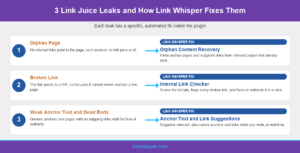
Alt: Infographic listing three link juice leaks, orphan pages, broken links, and weak anchor text, alongside the specific Link Whisper feature that fixes each one
Anchor Text and Priority Pages: Directing Link Juice Where It Counts
Where link juice flows is only half the equation. What it tells search engines when it arrives matters just as much, and that signal comes from anchor text. A link that says click here passes authority with almost no context. A link that follows internal link anchor text best practices, descriptive and keyword relevant, tells Google exactly what the destination page is about and helps it rank for that topic.
Most WordPress site owners link reactively, adding an internal link only when it happens to fit a sentence they are already writing. That approach rarely sends link juice to the pages that actually need it, usually service pages, product pages, or new content still trying to earn its first rankings. Directing equity deliberately means auditing which pages have the least internal support relative to how important they are to your business, then building links toward them on purpose.
Anchor text optimization inside Link Whisper suggests varied, relevant anchor phrases automatically as it recommends links, so you are not stuck reusing the same three anchors across every post. Combined with a clear view of which pages are underlinked relative to their priority, a tool built specifically as the best internal link plugin for WordPress turns anchor text from an afterthought into a deliberate part of your link juice strategy. Moz’s guide to internal linking covers the same anchor text principles from an independent SEO research perspective.
The difference shows up clearly in practice. A post linked a dozen times with the anchor click here gives search engines almost no additional context about what that page covers. The same post linked with varied phrases like internal link audit, seo link checker, and internal linking analysis builds a much richer topical picture, and it spreads ranking potential across several relevant keyword variations instead of one single guess.
How Link Whisper Redirects Link Juice to Pages That Need It Most
Finding orphan pages, broken links, dead ends, thin anchor text manually, is not realistic. For a WordPress site passes even fifty pages, the task is harder. Link Whisper was built specifically to automate that work. The plugin scans your full site, maps every existing internal link, and surfaces internal linking automation suggestions in real time. Furthermore, pulling in relevant existing posts you might have forgotten you even published.
Beyond suggestions while writing, Link Whisper helps freelancers run sitewide reports that surface orphan pages, broken links, and underlinked priority pages in one dashboard. For the WordPress sites,. the linkwhisper free inter links plugin lets you queue fixes in bulk instead of page by page. The internal link analytics and reporting view shows exactly which pages are receiving the most link juice and which ones are starved, so you can rebalance the flow toward whatever you actually want to rank next, whether that is a new service page, a seasonal post, or a page stuck on page two of search results.
The approach differs by site type. Agencies managing client sites need bulk audits across many domains. Bloggers and publishers publishing daily need automation that keeps up without manual review of every post, and WooCommerce stores need link juice directed at category and product pages specifically, not just blog content. See how the approach compares against the closest direct competitor on our Link Whisper versus Internal Link Juicer comparison page, or hand the entire process to our team through done for you linking.
None of this is a one time project either. Every new post changes the shape of the site, adding fresh pages that need inbound links and fresh opportunities for older posts to link forward into them. Link Whisper keeps working in the background as the site grows, rechecking link opportunities and flagging fresh orphan pages and broken links as they appear, rather than requiring a full manual audit every time new content goes live.
Conclusion
Link juice only helps your rankings when it actually reaches the pages that need it, and on most WordPress sites, a meaningful share of it is currently stuck. Orphan pages receive none. Broken links send it nowhere. Dead end pages stop it cold. Weak anchor text wastes what does arrive. Fixing all four does not require a full site rebuild, it requires visibility into where the leaks are and a system for closing them as new content gets published.
Run a free scan with the internal link checker to see exactly how much link juice your site is currently losing, then explore Link Whisper pricing to put the fix on autopilot. Stop wasting link juice. Start directing it toward the pages that need to rank.
Frequently Asked Questions
How does link juice flow through a WordPress site?
Link juice flows from higher authority pages, like your homepage, through internal links to whatever pages they link out to. The more links a page sends out, the more its authority gets divided among them.
What causes a WordPress site to lose link juice?
The three biggest causes are orphan pages with no inbound links, broken internal links pointing to 404 errors, and dead-end pages with no outgoing links. Weak site structure and generic anchor text compound all three.
How do orphan pages affect link juice?
Orphan pages have zero internal links pointing to them, so they receive no link juice at all. They may still get crawled through your sitemap, but they rarely rank well for competitive terms without inbound internal authority backing them up.
Can broken links really hurt my rankings?
Yes. A broken internal link sends the authority it was carrying into a dead 404 instead of a live page, wasting that equity entirely. It also burns crawl budget that search engines could spend indexing real content.
How many internal links should a WordPress page have?
There is no universal number, but pages generally need enough contextual internal links to connect them to related content without stuffing in irrelevant ones just to hit a target. Our knowledge base covers practical ranges by content type.
Does anchor text affect how link juice works?
Yes. Descriptive, keyword relevant anchor text tells search engines what the destination page is about, strengthening the topical signal that travels with the link juice. Generic anchors like click here pass authority with little context.
How is link equity different from link juice?
They describe the same concept. Link equity is the more formal SEO term, while link juice is the common shorthand used across the industry for the ranking value passed between pages through hyperlinks, internal or external.
How do I find every internal linking issue on my site?
Manual review does not scale past a small site. Our guide on finding every weak and broken link walks through a repeatable process, or you can run an automated scan that flags every issue across the site within minutes.
Can a plugin fix link juice problems automatically?
Yes. Link Whisper scans your site for orphan pages, broken links, and underlinked priority pages, then suggests or automates the internal links needed to redirect authority toward the pages that most need to rank higher in search results.
Check if your site has the same issues.
Run a free audit right now. See your orphaned pages, broken links, and link health score in 60 seconds.
Check My Site