Contents
- 1 What Are Internal Links in SEO?
- 2 Why Is Internal Linking Important for SEO?
- 3 Internal Linking vs External Linking: What’s the Real Difference?
- 4 How to Build an Internal Linking Strategy That Google and Your Visitors Will Love
- 5 Internal Linking in SEO Example in WordPress
- 6 Link Juice Isn’t Magic. It’s Simply Authority with Direction.
- 7 Internal Linking Analysis: The SEO Audit Most Websites Never Perform
- 8 Why Broken Internal Links and 404 Errors Can Quietly Hurt Your SEO
- 9 A Link Checker Tool Does More Than Find Broken Links
- 10 Can Auto Internal Link Tools Save Time Without Sacrificing Quality?
- 11 LinkWhisper for WordPress: Is It Really Worth It?
- 12 Internal Link Juicer: Another Helpful Option for Large WordPress Websites
- 13 Choosing the Best WordPress SEO Plugin for Internal Linking
- 14 Your Next Ranking Improvement Might Already Be on Your Website
- 15 Conclusion: Internal Links Are Your Website’s Growth Engine.
- 16 Frequently Asked Questions
- 16.1 What are internal links in SEO, and why do they matter?
- 16.2 Why is internal linking important for SEO if I already have backlinks?
- 16.3 How many internal links should I add to a blog post?
- 16.4 Can too many internal links hurt SEO?
- 16.5 What's the difference between internal linking and external linking?
- 16.6 How do I find orphan pages on my WordPress website?
- 16.7 Is LinkWhisper for WordPress worth using?
- 16.8 How do 404 errors affect internal links SEO?
- 16.9 Should I use an auto internal link plugin or add links manually?
- 16.10 How often should I audit my internal links?
Internal links SEO could be the reason your best content never reaches Page 1.
In fact, internal link SEO isn’t broken on most websites.
It’s missing.
That’s why pages with great content struggle to rank, service pages never receive enough link juice, and visitors leave without discovering what your business actually offers.
The surprising part?
Most websites don’t have a content problem.
They have an internal linking for SEO problem.
Weak site structure, broken navigation, hidden 404 errors, and poor linking between pages make it harder for Google to crawl your website. In fact, it makes it easier for your competitors to outrank you.
Want to know if this is happening on your website?
👉 Run an Internal Linking Analysis or use a 404 Checker to uncover broken paths, orphan pages, and missed linking opportunities in minutes.
Scroll further on, and understand what are internal links in SEO, how LinkWhisper for WordPress, link checker tools, and auto internal link features can simplify optimization, and how to build an internal linking strategy that actually moves rankings—not just pages.
What Are Internal Links in SEO?
An internal link is a hyperlink that connects one page on your website to another page on the same domain.
Unlike backlinks, which come from external websites, internal links remain entirely within your website and help search engines understand relationships between your content.
Imagine your website as a city.
Every webpage is a building.
Internal links are the roads connecting those buildings.
Without roads, visitors—and search engines—have difficulty reaching important destinations.
With well-planned roads, every important location becomes easier to discover.
Examples include linking:
- Blog → Service Page
- Blog → Blog
- Service Page → Case Study
- Product Page → FAQ
- Homepage → Category Pages
Google follows these links to discover new pages, understand topical relevance, and determine which pages deserve greater visibility.
Internal Linking in SEO Example in WordPress
Suppose you publish this article:
Internal Links SEO: The WordPress Guide That Actually Moves Rankings
Within this article, you naturally reference topics like:
- Technical SEO audits
- XML sitemaps
- Keyword research
- Content clusters
- Schema markup
- On-page SEO
- WordPress SEO plugins
Each of these can link to dedicated articles or service pages already published on your website.
For example:
Want to improve your site’s crawlability? Learn how a technical SEO audit identifies hidden issues affecting rankings.
Or:
Before building internal links, ensure your keyword strategy targets the right search intent.
This creates a seamless reading journey instead of forcing users to search for information elsewhere.
Why Is Internal Linking Important for SEO?
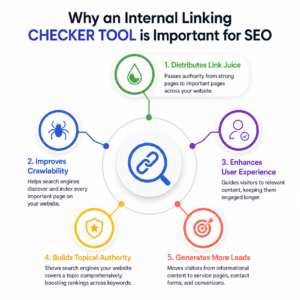
Many businesses think backlinks alone improve rankings.
While backlinks remain important, Google has repeatedly emphasized that your internal linking structure helps it understand your website.
Strong internal linking provides several advantages.
1. Internal Links Distribute Link Juice
One of the biggest benefits of internal links is passing link juice, also known as page authority.
Imagine one of your blog articles attracts thousands of visitors and earns backlinks from reputable websites.
Without internal links, much of that authority remains on a single page.
With strategic internal linking, that authority flows toward:
- Service pages
- Product pages
- Contact pages
- Landing pages
- New blog articles
Instead of one successful page, your entire website becomes stronger.
Think of it as sharing electricity across every room in a building rather than lighting only one room.
2. Internal Links Improve Crawlability
Search engines discover webpages through links.
If an important page has no internal links pointing to it, Google may take longer to find or understand it.
A strong internal linking strategy ensures every important page is connected.
The easier your pages are to reach, the easier they are to crawl and index.
3. Internal Links Improve User Experience
Readers rarely visit only one page.
When your content naturally recommends another helpful resource, visitors stay longer, consume more information, and build greater trust in your expertise.
For example:
A visitor reading about WordPress SEO may also want to learn about:
- Website speed optimization
- Schema markup
- Technical SEO
- Local SEO
- Content strategy
Internal links guide that journey without forcing users back to Google.
4. Internal Links Increase Topical Authority
Google increasingly rewards websites demonstrating expertise around complete topics rather than isolated keywords.
Suppose your website contains:
- 20 articles about WordPress SEO
- 15 articles about Technical SEO
- 10 articles about Local SEO
When these articles link to one another logically, Google recognizes your website as a comprehensive resource.
This strengthens topical authority and improves rankings across multiple keywords.
5. Internal Links Help Generate More Leads
SEO isn’t only about traffic.
It’s about moving visitors toward action.
A visitor who lands on an informational blog should never reach a dead end.
Instead, they should naturally progress toward:
- Service pages
- Pricing pages
- Free consultations
- Product demonstrations
- Contact forms
- Case studies
Internal links create that progression.
Every informational article becomes an entry point into your sales funnel.
Internal Linking vs External Linking: What’s the Real Difference?
If you’ve ever wondered whether internal linking for SEO is the same as getting backlinks, you’re not alone. It’s one of the most common misconceptions among WordPress website owners.
While both use hyperlinks, they serve completely different purposes in your SEO strategy.
Think of your website as a city.
Internal links are the roads connecting different locations within the city. They help visitors move from one destination to another without leaving your website. More importantly, they help search engines discover pages, understand your site structure, and determine which content deserves more visibility.
External links, on the other hand, are like highways leading outside the city. They connect your content to trusted websites, research reports, industry publications, or official resources. Used wisely, they reinforce your credibility and show search engines that your content is supported by reliable information.
The strongest SEO strategies don’t choose one over the other. They use both with a clear purpose.
What Are Internal Links in SEO?
An internal link connects one page on your website to another page on the same domain.
For example, if you’re writing a blog about internal links SEO and naturally link readers to your article on technical SEO, keyword research, or a relevant service page, you’ve created an internal link.
These links help Google:
- Discover new pages faster.
- Understand the relationship between your content.
- Pass link juice from authoritative pages to newer or lower-ranking pages.
- Build topical authority around your primary subject.
- Improve crawling and indexing across your website.
For visitors, internal links create a smoother experience by helping them find related information without returning to search results.
What Are External Links?
External links point from your website to another domain.
For example, if you reference research from Ahrefs, Google’s Search Central documentation, or another trusted industry source, you’re using an external link.
Unlike internal links, external links don’t strengthen your own website architecture. Instead, they support your claims with credible evidence, improve trust, and demonstrate that your content is based on reliable information rather than opinion.
This is particularly important for Google’s E-E-A-T framework, where demonstrating expertise and citing trustworthy sources helps establish content quality.
Why Internal Linking Has a Bigger Impact on Your Rankings
If your goal is to improve organic visibility, internal linking for SEO gives you far more control than backlinks.
You can’t control who links to your website.
But you have complete control over how pages on your own website connect.
A well-planned internal linking strategy helps:
- Distribute link juice to important commercial and service pages.
- Strengthen your site structure, so Google understands your content hierarchy.
- Reduce orphan pages that search engines struggle to discover.
- Encourage visitors to explore more pages, increasing engagement and time on site.
- Guide readers naturally from informational blogs to product or service pages.
In many cases, improving internal links delivers measurable SEO improvements without publishing new content or building additional backlinks.
Why External Links Still Matter
Although they don’t pass authority back to your website the way internal links do, external links still play an important role.
Linking to reputable sources helps validate your content, especially when discussing statistics, research, legal information, medical topics, or technical SEO recommendations.
For example, when explaining why internal linking is important for SEO, referencing studies from Google, Ahrefs, or respected SEO publications strengthens your argument and builds reader confidence.
The key is to link selectively. Every external link should add value, support a claim, or direct readers to authoritative information. Moreover, it should not distract them from your website.
Internal Linking vs External Linking: Which Should You Prioritize?
If you’re publishing content on WordPress, start by optimizing your internal links SEO strategy before chasing more backlinks.
Many websites already have enough content to improve rankings. What they’re missing is a logical internal linking structure that helps search engines understand which pages matter most.
Once your site structure is organized and your internal links connect related topics naturally, external links can further enhance your content by reinforcing its credibility.
The best-performing websites don’t rely on one approach. They use internal links to build authority within their own website and external links to demonstrate expertise through trusted references.
A simple rule to remember: Internal links help Google understand your website. External links help Google trust your content.
How to Build an Internal Linking Strategy That Google and Your Visitors Will Love
Knowing what are internal links in SEO is easy. Building a strategy that genuinely improves rankings is where most websites struggle.
One pattern we’ve noticed while auditing WordPress websites is this: businesses invest heavily in writing blogs, optimizing keywords, and even building backlinks, yet they rarely spend time connecting their own content. Over time, their website becomes a collection of excellent articles that don’t work together.
Think of your website as a conversation. Every page should naturally lead visitors to the next question they have. When pages exist in isolation, search engines have fewer signals to understand your content, and visitors often leave after reading a single article.
A strong internal links SEO strategy changes that. Instead of publishing more content, it helps your existing content work harder by passing authority, improving discoverability, and guiding readers towards your services or products.
The goal isn’t to add more links. It’s to create meaningful connections that make sense to both search engines and real people.
Build Your Site Structure Before You Build More Content
One of the biggest mistakes we see is businesses adding internal links only when they remember to.
A new blog links to an older article. Another article links to a service page. Six months later, no one remembers why those links were added, and the website slowly becomes difficult to navigate.
Instead, start with your site structure.
Imagine someone lands on your website after searching for Internal Links SEO. What should they read next?
Perhaps it’s a guide on Technical SEO. Maybe it’s a page explaining keyword research. Or perhaps it’s your SEO services page if they’re ready to get professional help.
Every page should have a purpose, and every link should help visitors move naturally from learning to taking action.
A useful rule we follow is this:
If a visitor has to guess where to go next, your internal linking needs work.
Google follows the same logic. Well-connected websites are easier to crawl, easier to understand, and often easier to rank.
Don’t Build Random Links. Build Topic Relationships.
One of the biggest shifts in modern SEO is that Google no longer evaluates pages individually. It looks at how your content supports an entire topic.
Let’s say your website focuses on WordPress SEO.
Instead of publishing unrelated blogs, create articles that naturally support one another.
For example, someone reading this guide on internal linking for SEO will probably also benefit from articles covering Technical SEO, XML Sitemaps, Website Crawl Errors, Schema Markup, and On-Page SEO.
Now imagine those articles also link back to this guide.
Instead of five standalone blogs, you’ve created a connected knowledge hub that demonstrates expertise. Search engines understand the relationship between these pages, while readers find answers without returning to Google.
This is exactly how topical authority is built.
Internal Linking in SEO Example in WordPress
Let’s make this practical.
Suppose you’re a digital marketing agency with a WordPress website.
A visitor lands on your blog after searching for Internal Links SEO.
They read the article and understand why internal linking matters.
Now what?
If the article simply ends, you’ve lost an opportunity.
Instead, you could naturally guide them towards related resources.
After explaining link juice, link to your article about Technical SEO.
When discussing site structure, recommend your website architecture guide.
After explaining internal linking analysis, introduce your SEO audit service.
Finally, invite them to analyse their own website using your Link Whisper Tool.
Notice what happened.
The visitor didn’t feel like they were being sold to.
They simply continued learning.
That’s exactly what effective internal linking looks like. Every page answers the reader’s next question while gently moving them closer to becoming a customer.
Curious how well your website is connected?
A surprising number of WordPress websites have orphan pages, broken internal links, or important service pages receiving almost no internal authority.
Run our Link Whisper Tool to discover missed internal linking opportunities, identify pages that need more authority, and strengthen your website’s SEO without publishing another article.
Link Juice Isn’t Magic. It’s Simply Authority with Direction.
The term link juice often sounds more complicated than it really is.
Imagine one of your blogs has attracted thousands of visitors and earned backlinks from reputable websites.
That page now carries authority.
If it doesn’t link to anything important, much of that authority stays on one page.
Now imagine that same article naturally links to your SEO service page, your technical audit page, and another relevant guide.
Some of that authority flows to those pages, helping search engines understand that they also deserve attention.
This is why experienced SEO professionals rarely leave high performing pages untouched. They regularly revisit their best content to ensure it supports newer articles and commercial pages.
Internal linking isn’t just about navigation. It’s about making your strongest pages work for your entire website.
Are You Passing Link Juice to the Right Pages?
Here’s a quick exercise.
Open Google Analytics or Search Console.
Find your five most visited blog posts.
Now ask yourself:
- Do these pages link to your most important services?
- Do they guide visitors towards booking a consultation?
- Do they introduce readers to your cornerstone content?
If the answer is no, you’re probably leaving valuable SEO opportunities on the table.
Sometimes, improving rankings isn’t about writing another article. It’s about helping your best content support the pages that matter most.
Internal Linking Analysis: The SEO Audit Most Websites Never Perform
Ask any experienced SEO consultant what they check first during a website audit, and internal linking is almost always near the top of the list.
Why?
Because the results are often surprising.
We’ve seen websites with hundreds of blog posts where valuable service pages had only one internal link pointing to them. We’ve also found articles receiving thousands of monthly visitors that weren’t linking to a single conversion page.
- Those aren’t content problems.
- They’re internal linking problems.
An internal linking analysis helps you understand how authority flows through your website. It highlights orphan pages, weakly connected content, overlinked pages, broken paths, and opportunities to strengthen your content relationships.
It’s one of the quickest ways to improve SEO using content you already own.
What Should an Internal Linking Analysis Reveal?
A good analysis should answer questions like these.
- Which pages receive the most internal links?
- Which important pages receive the fewest?
- Are there orphan pages that Google may struggle to discover?
- Are visitors reaching your service pages naturally?
- Are old blogs helping newer content rank?
If you don’t know these answers, you’re making SEO decisions without seeing the full picture.
Before you publish your next blog…
Take two minutes to analyse the content you’ve already published.
Our Link Whisper Tool instantly highlights orphan pages, weak internal links, broken paths, and missed linking opportunities, helping you improve rankings with the content you already have.
Why Broken Internal Links and 404 Errors Can Quietly Hurt Your SEO
You can spend weeks creating a great blog, but one broken internal link can interrupt the entire user journey.
We’ve seen this happen more often than people realize. A business redesigns its website, changes a few URLs, or deletes an old service page. Everything looks fine on the surface, but dozens of existing blogs still point to those old pages. Visitors click, land on a 404 Page Not Found error, and leave. Google follows the same path and eventually treats those broken links as a sign of poor website maintenance.
While an occasional 404 error isn’t a ranking killer, hundreds of broken internal links send the wrong signals. They waste crawl budget, prevent valuable link juice from reaching important pages, and create a frustrating experience for users who expected helpful information.
This is why every SEO audit should include a 404 Checker and a 404 Errors Checker. They’re not just tools for fixing broken URLs. They help uncover hidden gaps in your internal linking strategy before they start affecting rankings and conversions.
Don’t Wait for Visitors to Find Broken Links
Most website owners only discover broken links after someone reports them. By then, Google may already have crawled those pages multiple times.
Instead of reacting, make it a habit to scan your website regularly. It’s one of the simplest ways to protect the SEO value you’ve already built.
Before publishing another article, run a quick scan with our Link Whisper Tool. It automatically highlights broken internal links, identifies pages returning 404 errors, and suggests where your internal linking can be strengthened.
A Link Checker Tool Does More Than Find Broken Links
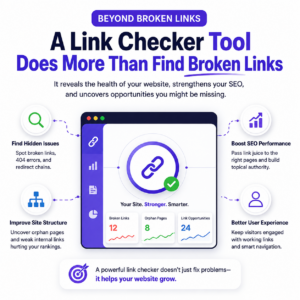
Many people think a Link Checker Tool simply identifies links that no longer work.
In reality, it can tell you much more about the health of your website.
A good internal linking report should reveal whether important pages receive enough internal authority, whether some pages are isolated from the rest of your website, and whether your content is connected in a way that makes sense to both readers and search engines.
Think of it as a health check for your website’s navigation. Just as a doctor looks beyond one symptom to understand your overall health, a comprehensive link checker looks beyond broken links to reveal how effectively your content works together.
One simple insight can often uncover dozens of missed opportunities. For example, if your highest-traffic blog doesn’t link to your most valuable service page, you’re missing an opportunity to guide interested readers towards becoming customers.
That’s why regular internal linking audits often deliver noticeable improvements without requiring new content or additional backlinks.
Can Auto Internal Link Tools Save Time Without Sacrificing Quality?
If your website has twenty blog posts, adding internal links manually is manageable.
If it has two hundred, it becomes a challenge.
This is where an auto internal link solution can make a real difference.
Instead of searching through old articles every time you publish something new, these tools analyse your content and recommend relevant pages based on the context of your writing. They reduce repetitive work, improve consistency, and make it much easier to keep older content connected with new articles.
That said, automation should support your strategy, not replace it.
The strongest internal links are still the ones chosen because they genuinely help the reader. Think of automation as an assistant that finds opportunities. The final decision should always be based on relevance and user intent.
LinkWhisper for WordPress: Is It Really Worth It?
If you’ve searched for internal linking tools, you’ve probably come across LinkWhisper for WordPress website.
It’s popular for one simple reason. It removes much of the manual work involved in maintaining an effective internal linking strategy.
As you write, the plugin analyses your content and suggests relevant pages that could be linked naturally. It also highlights orphan pages, shows which articles have very few internal links, and makes it easier to build stronger topical connections across your website.
For websites that publish content regularly, this can save hours every month.
But here’s something we’ve learned through experience.
No plugin knows your business as well as you do.
A tool can recommend a link based on matching keywords, but only you know whether that page genuinely answers the reader’s next question. That’s why the best results come from combining smart automation with human judgement.
Treat LinkWhisper as a guide, not an autopilot.
When Does LinkWhisper Deliver the Most Value?
We’ve found it particularly useful for websites that already have a growing content library.
If you’re managing dozens or even hundreds of articles, remembering every relevant page becomes almost impossible. LinkWhisper helps uncover linking opportunities that are easy to overlook, ensuring older content continues to support new pages instead of fading into the background.
More importantly, it encourages a habit many websites neglect—reviewing existing content instead of focusing only on publishing something new.
Wondering how well your pages are connected? Instead of guessing, use our Link Whisper Tool to discover internal linking opportunities, identify orphan pages, and strengthen your site’s authority in just a few clicks.
Internal Link Juicer: Another Helpful Option for Large WordPress Websites
Another plugin worth considering is Internal Link Juicer.
Like LinkWhisper, it aims to simplify internal linking for SEO, especially for websites with extensive content libraries. It automatically creates links based on predefined keywords, helping reduce the time spent adding links manually.
For larger websites, this can be a practical way to improve consistency.
However, there’s an important balance to maintain.
Too much automation can create repetitive anchor text or links that feel unnatural within the content. Search engines have become much better at understanding context, and readers quickly notice when links interrupt the flow of an article.
Whether you choose LinkWhisper, Internal Link Juicer, or another solution, always review the suggested links before publishing. Relevance will always outperform quantity.
Choosing the Best WordPress SEO Plugin for Internal Linking
When people compare the best WordPress SEO plugin, they often focus on features like XML sitemaps, meta descriptions, schema markup, or redirects.
Those features are important, but they’re only part of the picture.
An effective SEO plugin for website management should also help you strengthen your internal linking strategy.
Look for features that make it easier to identify orphan pages, monitor internal links, improve site structure, and highlight opportunities to pass link juice to pages that matter most.
The goal isn’t simply to optimise individual pages. It’s to ensure your entire website works as one connected ecosystem.
That’s what helps both users and search engines navigate your content with confidence.
Your Next Ranking Improvement Might Already Be on Your Website
One of the biggest misconceptions in SEO is that every ranking problem requires more content.
In reality, many websites already have everything they need.
The missing piece is how that content connects.
Before investing time in another blog or another backlink campaign, take a closer look at your existing pages.
Are your highest-performing articles supporting your service pages?
Can Google easily discover every important page?
Are visitors naturally guided towards the next step?
If the answer to any of these questions is “no,” improving your internal links SEO strategy could be one of the highest-impact changes you make this year.
Ready to see what’s holding your website back? Use our Link Whisper Tool to analyse your internal links, detect orphan pages and 404 errors, uncover missed linking opportunities, and receive practical recommendations that help improve rankings and user experience—all without creating more content.
Conclusion: Internal Links Are Your Website’s Growth Engine.
Most websites don’t struggle because they lack content. They struggle because their content isn’t connected.
A well-planned internal links SEO strategy helps search engines discover your pages faster, distributes valuable link juice, strengthens your site structure, and creates a seamless journey from your educational content to your products or services. More importantly, it allows you to get more value from the content you’ve already invested time and effort in creating.
Whether you’re managing a small WordPress website or a growing content library with hundreds of pages, regular internal linking analysis, fixing 404 errors, and reviewing your content relationships can unlock ranking opportunities that often go unnoticed.
The best part? You don’t always need more backlinks or another blog post. Sometimes, the biggest SEO gains come from improving what’s already on your website.
Ready to See What’s Holding Your Website Back?
Don’t leave your rankings to guesswork.
Run our Link Whisper Tool to uncover orphan pages, identify broken internal links, detect 404 errors, improve your site structure, and discover internal linking opportunities that can strengthen your SEO without creating more content.
A smarter internal linking strategy starts with understanding your website today.
Frequently Asked Questions
Why is internal linking important for SEO if I already have backlinks?
Backlinks build your website's authority, but internal links decide where that authority flows. Without effective internal linking for SEO, valuable pages may receive little visibility, even if your website has earned quality backlinks. Internal links help Google understand which pages are most important.
How many internal links should I add to a blog post?
There's no fixed number. Instead of focusing on quantity, focus on relevance. Most well-structured articles naturally include 3 to 8 contextual internal links that genuinely help readers explore related topics. Every link should answer the reader's next question rather than being added just for SEO.
Can too many internal links hurt SEO?
Yes. Adding excessive links can dilute link juice, distract readers, and make it harder for search engines to identify your most important pages. Prioritize quality over quantity by linking only where it adds context and value.
What's the difference between internal linking and external linking?
Internal links connect pages within your own website and strengthen your SEO architecture. External links point to trusted websites and support your content with credible references. A healthy SEO strategy uses both, but internal links give you complete control over how authority flows across your website.
How do I find orphan pages on my WordPress website?
Orphan pages are pages with little or no internal links pointing to them. They're difficult for search engines and visitors to discover. Running an internal linking analysis using a Link Checker Tool or Link Whisper for WordPress is one of the quickest ways to identify and fix orphan pages.
Is LinkWhisper for WordPress worth using?
For websites with a growing content library, LinkWhisper for WordPress can save significant time by recommending relevant internal links, identifying orphan pages, and improving your overall internal linking strategy. However, the best results come from combining plugin recommendations with manual review to ensure every link is genuinely helpful.
How do 404 errors affect internal links SEO?
Broken internal links that lead to 404 errors interrupt the user journey, waste crawl budget, and stop valuable authority from reaching important pages. Regularly using a 404 Checker helps identify broken links before they begin affecting rankings or user experience.
Should I use an auto internal link plugin or add links manually?
An auto internal link plugin can save time, especially on large WordPress websites. However, automation should support—not replace—your content strategy. Always review suggested links to make sure they fit naturally within the content and improve the reader's experience.
How often should I audit my internal links?
As a best practice, review your internal links every three to six months or whenever you publish a significant amount of new content. Regular audits help uncover broken links, weak content connections, orphan pages, and missed opportunities to strengthen your site structure and improve rankings.
Check if your site has the same issues.
Run a free audit right now. See your orphaned pages, broken links, and link health score in 60 seconds.
Check My Site