Contents
- 1 What Counts as an Orphaned Page on a WordPress Site
- 2 Why Google Cannot Rank a Page It Cannot Discover
- 3 How Orphaned Pages Multiply With Every Post You Publish
- 4 The Real Cost of Leaving Orphaned Pages Unlinked
- 5 The 3 Step Orphan Page Rescue Framework
- 6 Conclusion
- 7 Frequently Asked Questions
- 7.1 What is an orphaned page in WordPress?
- 7.2 How do orphan pages differ from low ranking pages?
- 7.3 How many orphaned pages does a typical WordPress site have?
- 7.4 Can an orphaned page still show up in Google Search?
- 7.5 Does crawl depth affect how often Google revisits a page?
- 7.6 What causes orphan pages to appear on WordPress sites specifically?
- 7.7 How is anchor text related to fixing orphaned pages?
- 7.8 Do I need to write new content to fix orphaned pages?
- 7.9 How often should I check for new orphan pages?
- 8 Keep learning about internal linking
Most WordPress site owners never see their orphaned pages, and that is exactly the problem. An orphaned page has zero internal links pointing to it, so search engines have no path to crawl it, index it, or rank it, no matter how well the content is written. This happens quietly, with no error message, no broken image, and no 404 to flag it, which is exactly why it goes unnoticed for months. Every post you publish without a deliberate internal linking strategy adds another candidate to that pile. This post covers why orphaned pages are the most common and least diagnosed SEO problem on WordPress sites, what they quietly cost you in rankings and traffic, and a three step rescue framework you can run this week.
Check for Free and Boost your Website
Key Takeaways
- Orphaned pages are invisible to Google because nothing else on your site links to them, not because the content is weak.
- The problem compounds automatically. Every post published without a linking plan creates a new orphan candidate.
- Crawl depth, not content quality, decides whether Google keeps revisiting a page, and orphaned pages have no crawl path at all.
- A short, repeatable rescue process, find, prioritize, reconnect, restores most orphaned pages without writing a single new word.
What Counts as an Orphaned Page on a WordPress Site
An orphaned page is any published URL that has no internal links pointing to it from anywhere else on your site. It can sit in your sitemap, appear in your WordPress dashboard, even rank for its exact title if someone searches for it by name, and still be functionally invisible for every other keyword it was written to target. Search engines rely on links to discover new and existing content, so a page with zero incoming internal links only gets crawled if it happens to sit in an XML sitemap Google chooses to check, which is far less reliable than an actual crawl path, as Moz’s guide to internal linking explains.
WordPress sites accumulate orphans faster than almost any other CMS, because the default publishing flow does not force a linking decision. You write a post, hit publish, and move on. Categories and tags create a loose structural connection, but they rarely pass meaningful link equity the way a contextual link inside another article does. Run an orphan page checker on almost any WordPress site with more than a few dozen posts and you will find pages nobody remembers writing, sitting with zero internal links, zero impressions, and zero rank.
This is different from a page that ranks poorly. A poorly optimized page at least gets crawled and evaluated. An orphaned page frequently does not get evaluated at all, which is why internal linking automation matters more as a WordPress site grows past the size a single person can manually map by memory.
Typical orphan candidates include seasonal posts left over from a past campaign, category and tag archive pages nobody links to directly, old landing pages built for a promotion that ended, and cornerstone guides that got replaced by a newer post without anyone redirecting or relinking the original. Redesigns are especially damaging, since a new menu structure or homepage layout can quietly drop the handful of links an older page relied on to stay reachable. None of this shows up as an error message anywhere in WordPress. The page still loads fine if you type the URL directly, which is exactly why so many site owners assume everything is fine until they check their orphaned content inventory directly.
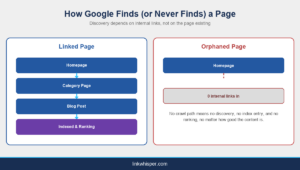
Infographic comparing how a linked page gets discovered and indexed versus an orphaned page with zero internal links that Google never crawls
Why Google Cannot Rank a Page It Cannot Discover
Search engines discover new URLs primarily by following links, whether from external sites or from other pages on your own domain. Google’s own documentation on how crawling works explains that Googlebot follows links to find new content and revisits pages based on how important and how well connected they appear to be. A page with no internal links sends a weak signal on both counts.
This is where crawl depth comes in. Crawl depth measures how many clicks a page sits from your homepage. Pages one or two clicks away tend to get crawled often, because they are easy to reach and usually well connected. Pages four, five, or more clicks deep get crawled far less often, and an orphaned page, with a crawl depth that is effectively infinite because there is no path in at all, may not get crawled again after its first pass, if it gets crawled at all.
Reducing crawl depth is not a cosmetic fix. It changes how often Google revisits a page, how quickly it notices updates, and whether the page gets a fair chance to rank. A Link Map that visualizes your site structure makes crawl depth problems visible in a way a spreadsheet never will, and pairing that with the guidance in how many internal links per page gives you a concrete target instead of a vague instinct.
A common misconception is that submitting a URL in an XML sitemap is the same as linking to it. It is not. A sitemap tells Google a URL exists and asks for a crawl, but it carries none of the contextual signal a real internal link provides, and Google treats sitemap submission as a hint rather than a guarantee of crawling or indexing. Pages that only exist in a sitemap, with no internal links pointing to them, are still functionally orphaned in every way that matters for ranking. If you want the fuller picture of how internal links and crawl signals work together, the internal links SEO guide covers the mechanics in more depth.
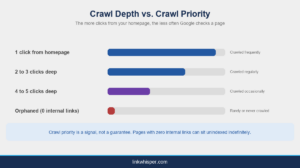
Infographic showing crawl depth versus crawl priority, with orphaned pages rarely or never crawled compared to pages closer to the homepage
How Orphaned Pages Multiply With Every Post You Publish
Orphaned pages rarely appear one at a time. They accumulate as a direct side effect of regular publishing. Every new post competes for the same handful of obvious internal linking opportunities, homepage, category pages, maybe one or two cornerstone guides, while older posts get skipped simply because nobody thought to open them and add a link back. Multiply that pattern across a year of weekly publishing and you end up with a growing backlog that internal linking automation is specifically built to catch before it compounds further.
The problem gets worse on sites that redesign navigation, retire old categories, or migrate content, since any of those changes can silently strip the few internal links an older page did have, turning a previously healthy page into a new orphan overnight. This is closely related to the broken internal links problem, where a link technically exists in the database but points to a moved or deleted URL, which functions exactly like having no link at all from Google’s perspective.
Sites with more than a hundred pages feel this most acutely, which is exactly the audience covered in why every WordPress site with 100 or more pages needs a link management platform. Past a certain size, manual linking simply cannot keep pace with publishing volume, and orphan accumulation becomes the default outcome rather than the exception.
Ecommerce and WooCommerce sites see a sharper version of this problem. A product page or collection built for a seasonal promotion often gets a burst of internal links during the campaign, then loses every one of them the moment the campaign banner comes down and the homepage links to something new. The product page itself frequently stays live, still indexed for now, but with a crawl path that has quietly gone to zero. Store owners running large catalogs, covered in more detail on the for WooCommerce page, tend to accumulate this exact pattern across dozens of seasonal or discontinued product pages every year without ever noticing.
The Real Cost of Leaving Orphaned Pages Unlinked
The most immediate cost is traffic that never materializes. A page that never gets indexed cannot rank, and a page that cannot rank cannot earn a single organic click, regardless of how well it targets a keyword or how much research went into it. That is a direct return on the time spent writing, editing, and publishing, delivering nothing back.
There is a compounding cost too. Every orphaned page is also a page that cannot pass link equity or anchor relevance to any other page on your site. This is because it sits outside the link graph entirely. Good anchor text optimization depends on having a web of contextual links running in both directions between related pages. An orphan breaks that web at exactly the point where it should be reinforcing your topical authority.
Industry analysis from sources like Search Engine Journal consistently flags weak internal linking. In fact, poor crawl efficiency as recurring, fixable causes of stalled organic growth on larger sites. The fix rarely requires new content. It requires connecting the content that already exists, which is a far cheaper problem to solve than most site owners assume, especially compared to the cost of doing without a best internal link plugin built for the job.
There is also an opportunity cost that rarely shows up in a spreadsheet. Every hour spent researching, drafting. Then publishing a page that ends up orphaned is an hour not spent improving a page that could actually rank. Teams that track this properly, using internal linking analysis to see which published pages are pulling their weight and which are sitting outside the link graph, consistently find that a meaningful share of their content budget went into pages nobody besides the author has ever seen in Google Search. Reconnecting those pages is almost always cheaper than producing replacement content from scratch.
The 3 Step Orphan Page Rescue Framework
Fixing orphaned pages does not require a content audit that takes a month. It requires three repeatable steps, find, prioritize, reconnect, run consistently rather than once.
Step one is finding every orphan. A Link Map or orphan pages checker scans your published URLs against your internal link graph and flags every page with zero incoming internal links, which is far faster and more reliable than manually clicking through a site looking for gaps.
Step two is prioritizing what you find. Not every orphan deserves the same attention. Rank the list by search volume, topical relevance to your best performing pages, and conversion potential, then work down that list instead of fixing pages in whatever order they happen to appear.
Step three is reconnecting them. This is where Link Whisper does the actual work, scanning your existing content for relevant context and suggesting contextual internal links back to each orphaned page, so you are not guessing at anchor text or hunting for a place to insert a link by hand. Agencies managing client sites at scale, covered in more detail on the for agencies page, run this exact process across dozens of sites without adding headcount, and site owners who prefer a hands off approach can use the done for you linking service instead of running the process themselves. Whichever route you choose, check current pricing before committing to a plan size that does not match your site.
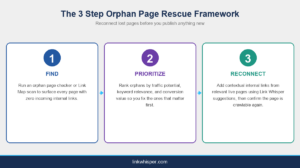
Infographic showing the 3 step orphan page rescue framework: find, prioritize, and reconnect orphaned pages using Link Whisper
Not every internal linking tool handles all three steps equally well. Some only flag broken links, others only suggest anchor text without ever surfacing true orphans. Before you commit to a workflow, it is worth checking a direct tool comparison to confirm the plugin you pick actually finds pages with zero internal links, not just pages with weak ones, since those are two different problems that require different fixes.
For a full click by click tutorial on locating and fixing individual orphan pages, the complete how to guide walks through the process in more depth than this overview covers.
Conclusion
Orphaned pages are not a content quality problem. They are a discovery problem, and discovery is entirely solvable with a deliberate internal linking strategy instead of hope. Every post published without a linking plan adds to the backlog, but the fix is the same three steps every time, find the orphans, prioritize the ones that matter, and reconnect them with relevant context. Start with a free scan using the internal link map tool to see exactly how many pages on your own WordPress site are sitting with zero internal links right now, then let Link Whisper handle the reconnection work so your existing content finally gets the chance to rank it was written for. For teams managing content at scale, the for publishers page covers what that workflow looks like at volume.
Frequently Asked Questions
How do orphan pages differ from low ranking pages?
A low ranking page still gets crawled and evaluated by Google, just poorly. An orphaned page often never gets evaluated at all, because nothing links to it. The problem is discovery, not content quality or optimization.
How many orphaned pages does a typical WordPress site have?
It varies by size, but any WordPress site publishing regularly without a linking plan accumulates orphans steadily. Sites over a hundred pages commonly find dozens once they run a proper internal link audit.
Can an orphaned page still show up in Google Search?
Occasionally, if it sits in an XML sitemap Google happens to crawl, or ranks briefly for its exact title. That is unreliable discovery, not real visibility, and it rarely holds for competitive keywords over time.
Does crawl depth affect how often Google revisits a page?
Yes. Pages closer to the homepage in click distance get crawled and refreshed more often. Orphaned pages sit outside the crawl path entirely, so Google may never revisit them after the first pass, if it crawls them at all.
What causes orphan pages to appear on WordPress sites specifically?
WordPress publishing does not force a linking decision at publish time. Categories and tags create weak structural links, not contextual ones, so pages drift out of the link graph as sites grow and navigation changes.
Reconnecting an orphan is not just adding any link. Relevant, descriptive anchor text helps both users and search engines understand what the linked page covers, which strengthens the page's relevance signal once it is crawlable again.
Do I need to write new content to fix orphaned pages?
No. Most orphan problems are solved by connecting existing content with contextual internal links, not by publishing anything new. It is one of the fastest, lowest cost fixes available on an established WordPress site.
How often should I check for new orphan pages?
Check after every batch of new posts, and at minimum monthly on active sites. Orphans accumulate continuously with regular publishing, so a one time cleanup does not stay accurate for long without ongoing monitoring.
Link Whisper tips
Keep learning about internal linking
Get Link Whisper tips and offers in your inbox.
Check if your site has the same issues.
Run a free audit right now. See your orphaned pages, broken links, and link health score in 60 seconds.
Check My Site