Contents
- 1 Why Internal Linking Analysis Matters More Than You Think
- 2 The Four Data Points That Actually Matter
- 3 How to Run an Internal Linking Analysis on a WordPress Site
- 4 Reading Link Whisper’s Reports: From Numbers to Action
- 5 Choosing the Right Internal Link Checker Tools
- 6 Turning Data Into Rankings
- 7 What is internal linking analysis? Internal linking analysis is the process of reviewing how the pages on your website link to one another, including which pages have no internal links (orphan pages), which pages receive too many, how anchor text is distributed, and how many clicks it takes to reach each page from your homepage. Why does internal linking analysis matter for SEO? Search engines rely on internal links to discover, crawl, and understand the relative importance of your pages. A well-analyzed and optimized internal link structure helps distribute ranking authority to the pages that need it and makes it easier for Google to find and re-crawl your content. How is internal linking analysis different from a general SEO audit? A general SEO audit covers many factors — page speed, backlinks, technical issues, content quality. Internal linking analysis is a narrower, deeper look specifically at how your own pages connect to each other, which a broad audit often only touches on briefly. What is an orphan page, and why is it a problem? An orphan page is a published post or page that has no internal links pointing to it from anywhere else on the site. Because search engines rely heavily on internal links to discover content, orphan pages tend to be crawled less often and can struggle to rank even if the content itself is strong. How often should I run an internal linking analysis? Monthly or quarterly is a reasonable cadence for most sites, though high-publishing-frequency sites may benefit from checking after every few new posts, since each new piece of content changes the overall link graph. What's the ideal crawl depth for important pages? There's no universal number, but as a general guideline, your most important pages should be reachable within two to three clicks from the homepage. Anything beyond four or five clicks deep is worth investigating and shortening. Should every internal link use exact-match keyword anchor text? No. Following anchor text best practices means using a natural mix of exact-match, partial-match, and descriptive or branded phrases. Using the identical keyword phrase for every link to a page can look manipulative and is generally discouraged. Can I do internal linking analysis manually without a tool? On a very small site, yes, but it becomes impractical past roughly 50-100 pages, since you'd need to manually cross-reference every post against every other post. A dedicated internal links tool automates this by scanning your site's database directly. Does fixing internal linking issues really affect rankings? It can, particularly for pages that were previously orphaned or buried deep in the site structure. Improving their internal link support and reducing crawl depth often leads to more frequent crawling and, in many cases, measurable ranking improvement within weeks. What should I fix first after running an internal linking analysis? Start with orphan pages that have commercial intent or existing search demand, then move to broken internal links, then rebalance over-linked pages, and finally review anchor text distribution across your top-priority content.
- 8 Keep learning about internal linking
Most WordPress site owners can tell you their traffic numbers, their top keywords, and their bounce rate off the top of their head. Ask them how many orphan pages sit on their site, or which posts are hoarding all the internal link equity, and you’ll usually get a blank stare. Internal linking analysis is the SEO homework almost nobody does — and it’s quietly deciding which of your pages Google bothers to crawl, index, and rank.
Here’s the uncomfortable part: you already have this data. It’s sitting inside your WordPress database right now, in the form of every link you’ve ever added (or forgotten to add) between your posts and pages. You just haven’t looked at it the right way. This guide walks through what that data actually means — orphan pages, over-linked pages, anchor text patterns, crawl depth — and how to turn those findings into real ranking movement, not just a tidier sitemap.
Why Internal Linking Analysis Matters More Than You Think
Search engines don’t discover your content by magic. Googlebot crawls your site by following links, and the pages it reaches most easily — through short, logical paths from your homepage — are the pages it crawls most often and trusts most. Pages buried five or six clicks deep, with no links pointing to them from anywhere else on your site, get treated like an afterthought. Not because the content is bad, but because your site’s internal architecture never told Google the page mattered.
This is the core idea behind internal linking analysis: it’s not a cosmetic audit, it’s a diagnostic of how authority and crawl attention move through your site. A blog with 400 well-linked posts will often outperform a blog with 1,200 posts and no internal linking strategy, simply because the smaller site distributes its ranking power more efficiently. When you run a proper internal linking analysis, you’re not looking for typos — you’re looking for structural leaks where SEO value is disappearing.
The problem is scale. On a site with a handful of pages, you can eyeball your link structure. Past a hundred posts, manual review stops being realistic, which is exactly why an internal links tool that automates the analysis becomes less of a luxury and more of a requirement.
The Four Data Points That Actually Matter
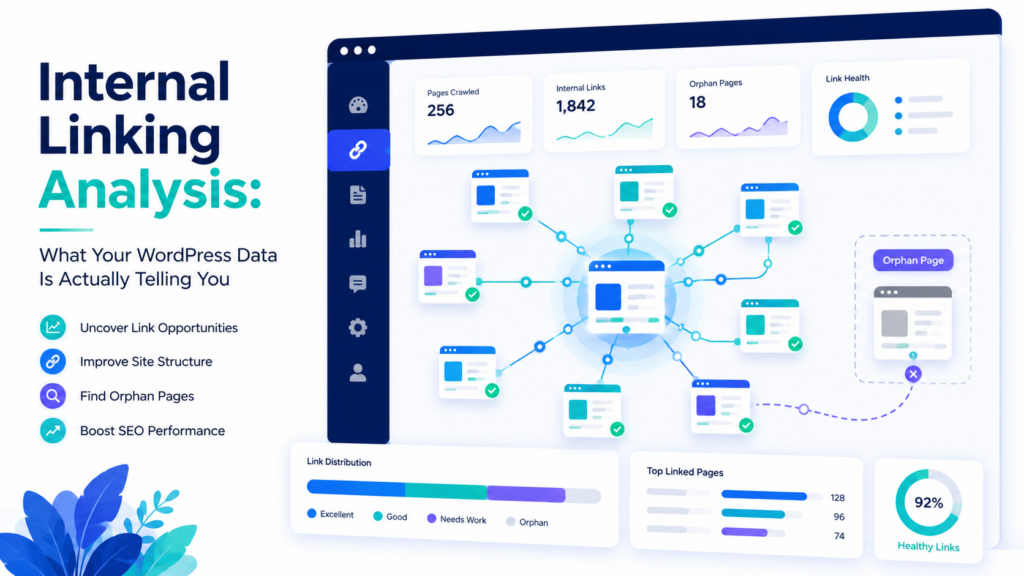
When you open a reporting dashboard for the first time, it’s tempting to get lost in the numbers. In practice, almost every actionable insight comes from four categories of data: orphan pages, over-linked pages, anchor text patterns, and crawl depth. Understand these four, and you understand 90% of what your internal linking analysis is trying to tell you.
Orphan Pages: Content Google Can Barely Find
An orphan page is any post or page with zero internal links pointing to it. It might still show up in your sitemap, and it might even rank for a while on the strength of external signals, but from an internal-authority standpoint, it’s invisible. Nothing on your site is vouching for it.
Orphan pages accumulate quietly. You publish a post, move on to the next one, and never circle back to link older or newer content to it. Multiply that by a few years of publishing and it’s common to find that 10-20% of a mature blog’s content is orphaned. A website internal linking checker that flags these automatically saves you from manually cross-referencing every post against every other post — a task that’s essentially impossible to do by hand at scale.
The fix is usually simple once you know which pages are affected: find two or three topically related posts and add a contextual link to the orphan page from each. You’re not trying to force links everywhere; you’re trying to give the page at least one credible path in from the rest of your site.
Over-Linked Pages: When You’re Diluting Your Own Authority
The opposite problem is just as damaging. Some pages — usually your homepage, a popular pillar post, or a cornerstone service page — end up with dozens or hundreds of internal links pointing to them, often because they’re the easiest thing to link to when you’re writing in a hurry. Meanwhile, the specific, long-tail pages that actually need a boost get ignored.
This isn’t inherently wrong, but it’s a missed opportunity. Every internal link is a small vote of relevance and authority. If you’re spending all your votes on pages that already rank well, you’re not moving the needle on the pages that need it. Good internal linking analysis flags pages that are receiving a disproportionate share of links relative to their actual SEO priority, so you can rebalance where that link equity flows.
Anchor Text Patterns: The Signal You’re Sending With Every Link
Anchor text is the clickable text of a link, and it tells Google (and readers) what the destination page is about. Following anchor text best practices means using descriptive, keyword-relevant phrases rather than generic text like “click here” or “read more” — phrases that carry zero topical signal.
But there’s a balance to strike. Over-optimizing anchor text by using the exact same keyword-rich phrase for every link to a page can look manipulative and, in extreme cases, has been associated with algorithmic scrutiny. A healthy anchor text profile has variation: some exact-match phrases, some partial matches, some natural, branded, or descriptive phrasing. When you review your internal linking analysis, look specifically at anchor text distribution for your most important pages — if every single internal link uses the identical phrase, that’s worth diversifying.
Crawl Depth: How Far Google Has to Dig
Crawl depth measures how many clicks it takes to reach a page starting from your homepage. A page one click away is crawled frequently and considered important by default. A page six or seven clicks deep, reachable only through an obscure archive page, gets crawled rarely, if at all — and Googlebot has a limited crawl budget it’s willing to spend per site.
Reducing crawl depth on your priority pages is one of the highest-leverage things internal linking analysis can reveal. It’s often as simple as spotting the right internal linking opportunities and adding a link from a high-traffic page, a navigation menu, or a relevant hub page, cutting the click-distance from six down to two or three. That single change can meaningfully increase how often a page gets recrawled and reconsidered for ranking.
How to Run an Internal Linking Analysis on a WordPress Site
Running this analysis manually means exporting a list of every published URL, then manually checking each one against every other post for links — a process that scales terribly and invites human error. A dedicated internal link checker tool handles this by crawling your own site’s database directly, which is faster and more accurate than crawling your live pages the way an external seo link checker would.
A practical workflow looks like this:
- Run a full site scan. Let the tool index every post, page, and custom post type so it has a complete picture of your existing link graph.
- Pull the orphan page report first. These are your highest-priority fixes because the pages are currently getting no internal-link support at all.
- Check your most valuable pages for crawl depth. Anything more than three clicks from the homepage deserves a second look.
- Review anchor text distribution on your top 10-20 pages by traffic or revenue potential, and diversify anywhere it looks repetitive or thin.
- Cross-check for broken internal links. A broken link wastes the crawl budget and passes zero equity, so these should be fixed or redirected immediately.
- Re-run the analysis on a monthly or quarterly cadence. Internal linking analysis isn’t a one-time project — every new post changes the link graph, so the picture drifts over time.
Tools built specifically for this, like Link Whisper’s reporting tools, do all six of these steps from inside your WordPress dashboard rather than requiring you to export data to a spreadsheet.
Reading Link Whisper’s Reports: From Numbers to Action
Once you have real data in front of you, the goal is to turn each report into a specific task, not just a number to admire. Here’s how to translate the most common reports into action:
- Orphan Pages report → link-building task list. Treat this as your to-do list for the next content update cycle. Prioritize orphan pages with commercial intent or strong search volume first.
- Link count per page → rebalancing opportunities. Sort by number of inbound internal links. If your top 10 most-linked pages don’t match your top 10 priority pages, that’s a mismatch worth correcting.
- Broken link report → immediate fixes. These are the easiest wins in any internal linking analysis — broken links cost you nothing to fix and actively hurt user experience and crawl efficiency.
- Anchor text report → diversification plan. If a page has 20 internal links and 18 use the identical anchor phrase, spread that variation across future edits rather than rewriting everything at once.
- Crawl depth data → navigation and hub-page decisions. If your best content is buried, consider whether a new hub or category page could shorten the path.
Used this way, an internal linking analysis stops being a report you glance at once and forget, and becomes a recurring input into your content calendar and editorial priorities.
Choosing the Right Internal Link Checker Tools
Not every internal link checker tool is built the same way, and the differences matter more than they might seem at first glance. Some tools only check for broken links, functioning as a narrow seo link checker rather than a full internal linking analysis platform. Others analyze your entire site’s structure, semantic relevance, and link distribution, then suggest specific links as you write.
When evaluating internal link checker tools, look for a few non-negotiables:
- Native WordPress integration, so suggestions appear directly in the editor rather than in a separate dashboard you have to context-switch to.
- Orphan and over-linked page detection, not just broken link scanning.
- Anchor text visibility, so you can actually see and adjust the phrases being used across your site.
- Crawl depth or click-distance reporting, since this is rarely included in basic link checkers.
- Bulk and automated linking options, for sites with large back catalogs where manual fixes aren’t realistic.
A tool that covers all five turns internal linking analysis from a quarterly chore into a five-minute check you can run as often as you publish.
Turning Data Into Rankings
The real payoff of internal linking analysis isn’t the report itself — it’s what you do with it. Fixing orphan pages gives forgotten content a path to be crawled again. Rebalancing over-linked pages redirects authority to where it’s actually needed. Cleaning up anchor text makes your relevance signals clearer instead of repetitive or diluted. Shortening crawl depth gets your best pages recrawled more often, which often precedes a ranking recovery within weeks rather than months.
None of this requires new content. It requires looking at data you already have and acting on it systematically, which is exactly the gap most WordPress sites never close.
Run your link analysis → Link Checker → Plugin
Link Whisper tips
Keep learning about internal linking
Get Link Whisper tips and offers in your inbox.
Check if your site has the same issues.
Run a free audit right now. See your orphaned pages, broken links, and link health score in 60 seconds.
Check My Site