Contents
- 1 What WordPress Breadcrumbs Actually Do for Internal Linking
- 2 Choosing the Right Breadcrumb Type for Your Site
- 3 How to Add Breadcrumbs in WordPress Without Breaking Anything
- 4 Common Breadcrumb Mistakes That Weaken Site Structure
- 5 Where Breadcrumbs Stop and Contextual Links Take Over
- 6 Conclusion
- 7 Frequently Asked Questions
- 7.1 Do WordPress breadcrumbs help SEO?
- 7.2 What is breadcrumb navigation?
- 7.3 Do I need breadcrumb schema as well as visible breadcrumbs?
- 7.4 Can I use Yoast and my theme breadcrumbs together?
- 7.5 Which breadcrumb type is best for a blog?
- 7.6 What happens if a post is in several categories?
- 7.7 Should the last breadcrumb item be a link?
- 7.8 Do breadcrumbs count toward the number of links on a page?
- 7.9 Can breadcrumbs replace contextual internal links?
WordPress breadcrumbs are the small trail of links near the top of a page, and most site owners treat them as decoration. They are actually one of the few internal links that appear on every post automatically, pointing upward through your category structure. Set up well, they tell readers and search engines exactly where a page sits. Set up badly, they leak link equity into thin archive pages. This guide explains what breadcrumbs do for internal linking, which type suits your site, how to add them safely, and where they stop being enough.
Key Takeaways
- WordPress breadcrumbs add a consistent upward internal link on every page, which reinforces your site hierarchy without any manual work.
- Hierarchy breadcrumbs suit almost every blog and store. History breadcrumbs do nothing useful for SEO.
- Breadcrumb navigation supports your structure, but it cannot replace contextual links inside the body of your content.
What WordPress Breadcrumbs Actually Do for Internal Linking
Breadcrumbs are structural internal links. They connect every post to its parent category and the homepage, so the relationship between pages is stated on the page itself rather than implied.
Most internal links are contextual. A writer chooses them one at a time, and coverage depends on who wrote the post. Breadcrumbs work differently. Once enabled, every post links up to its category and every category links up to the homepage. That gives each section of your site a steady flow of internal links from the pages beneath it.
This matters because search engines read those links as a map. A trail such as Home, Guides, Internal Linking states the site hierarchy in a way a crawler can follow. It complements your main navigation menus, which usually only reach the top level of the site.
Readers benefit too. Usability research from the Nielsen Norman Group found that breadcrumbs help visitors understand where they are and move up a level in one click, especially when they arrive from search on a deep page.
There is also a crawl benefit. Because WordPress breadcrumbs sit in the same place on every template, they create a predictable path from any deep post back to its category and the homepage. Pages several clicks from the homepage get a direct route up the tree, which helps new or rarely linked content get discovered and recrawled sooner.
Choosing the Right Breadcrumb Type for Your Site
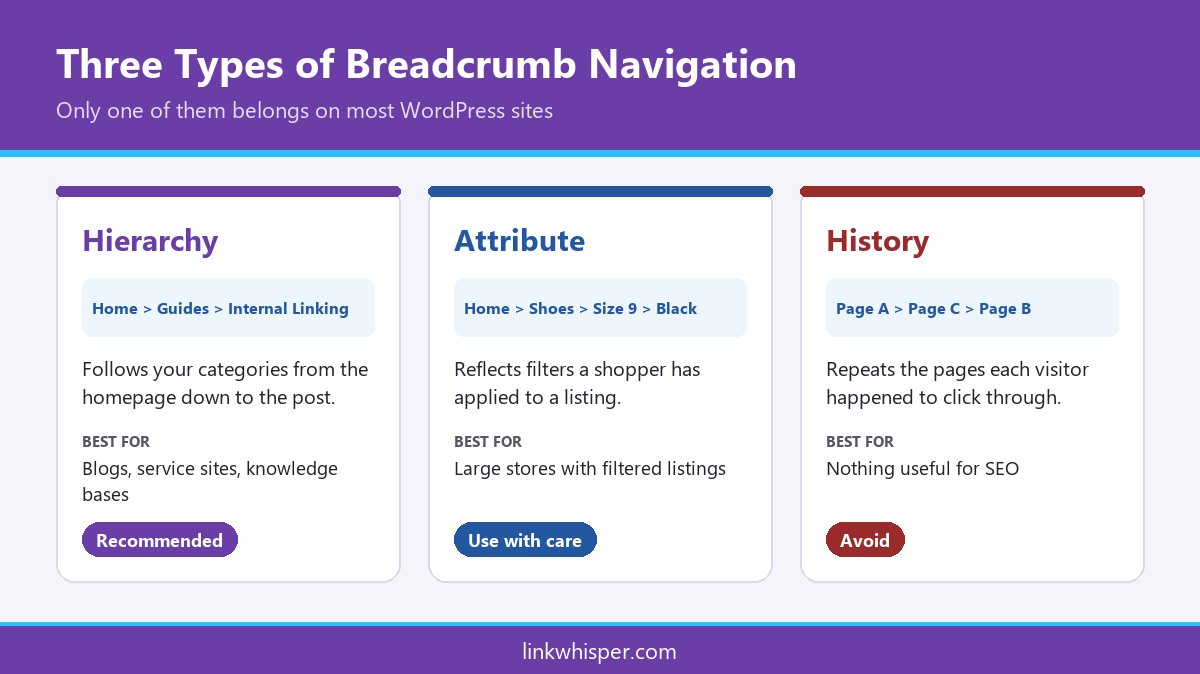
There are three kinds of breadcrumb navigation. Only two of them help with structure, and for most WordPress sites the hierarchy type is the right default.
Hierarchy breadcrumbs follow your categories: Home, then category, then post. They suit blogs, service sites and knowledge bases, and they are what almost every SEO plugin produces by default.
Attribute breadcrumbs reflect filters such as colour or size. They belong on large stores where one product can be reached through several paths, and they need careful handling so filtered URLs do not multiply.
History breadcrumbs simply repeat the pages a visitor clicked through. They change for every person, carry no structural meaning and duplicate the browser back button. Leave them out.
If you are unsure, look at how visitors actually move through your site. A blog where readers go from a post to its topic and then to a related post needs hierarchy breadcrumb navigation. A store where shoppers narrow down by size and colour may need attribute trails on product listings, with hierarchy trails on the products themselves.
How to Add Breadcrumbs in WordPress Without Breaking Anything
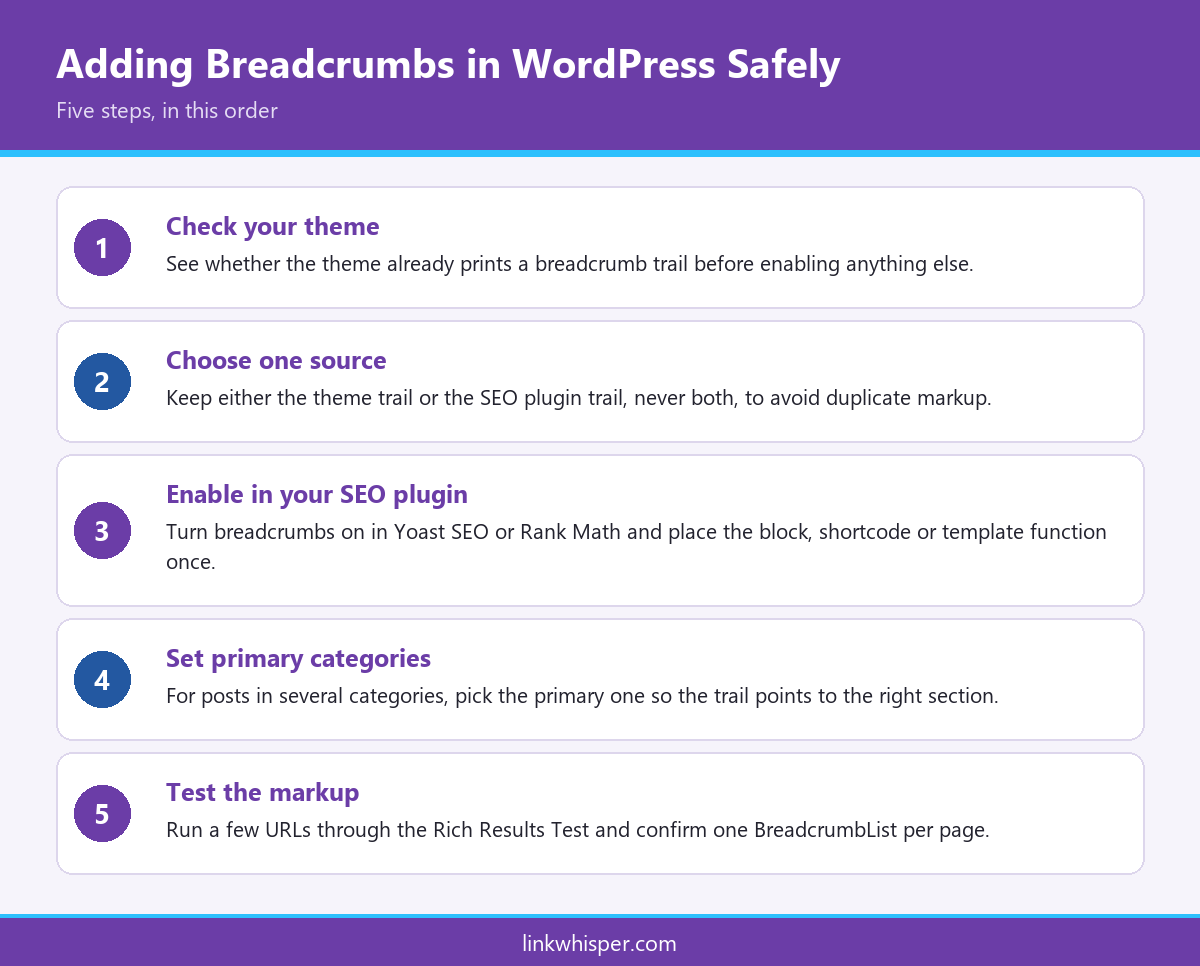
The safest route is to let your SEO plugin generate the trail and its structured data, then place it once in your theme. Doubling up is the most common error.
Start by checking whether your theme already prints breadcrumbs. Many modern themes do. If it does, decide whether to keep the theme version or switch it off in favour of your SEO plugin, because running both produces two trails and two sets of markup.
In Yoast SEO, breadcrumbs are enabled under the plugin settings and added to your templates with its block or template function. Rank Math offers the same through its general settings and a shortcode. Both output the BreadcrumbList format described on schema.org, which Google documents in its breadcrumb structured data guide.
Next, set a primary category on posts filed under more than one category. Without it, the plugin picks one for you and the trail may point readers to the wrong section. Finally, test a few URLs in the Rich Results Test to confirm the breadcrumb schema appears only once.
Placement matters as much as setup. Put WordPress breadcrumbs directly above or below the post title, where readers expect them, and keep the separator simple. Avoid hiding the trail on mobile to save space. The markup may still load, but readers lose the one click route back to the category.
Common Breadcrumb Mistakes That Weaken Site Structure
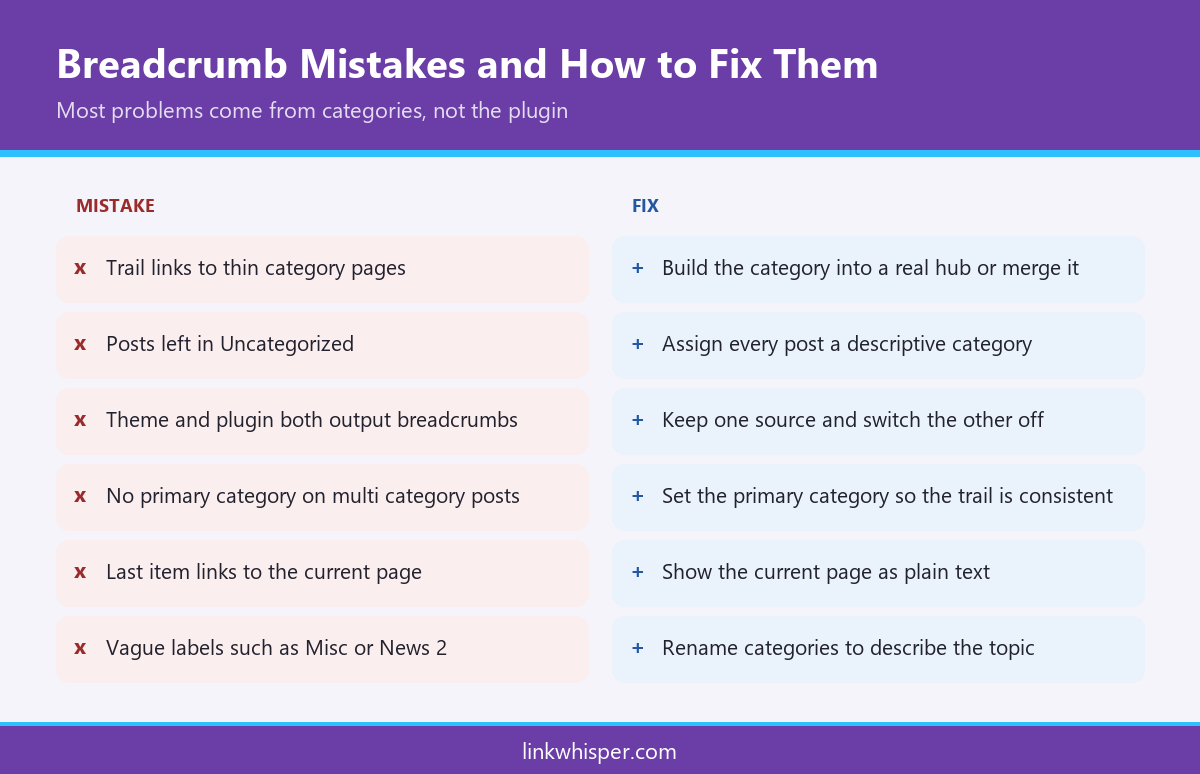
Breadcrumbs only reinforce structure when the categories behind them are clean. Most problems come from the taxonomy, not the plugin.
The first mistake is linking to empty or near empty category pages. If a category holds two posts and no introduction, every breadcrumb pointing to it sends link equity to a weak page. Either build the category into a useful hub with a short introduction and links to its best posts, or merge it into a stronger neighbouring category.
The second is an uncategorised trail. Posts left in the default Uncategorized category produce breadcrumbs that say nothing about the topic. The third is inconsistent depth, where some posts sit three levels down and others sit at the top for no reason.
It is also worth checking that the final item in the trail is the current page as plain text, not a link to itself. A quick way to spot structural gaps is to visualize your link structure and look for sections with few pages feeding into them.
A final check is labels. Breadcrumb schema uses the category name as the label for each level, so a category called Misc or News 2 appears exactly like that to search engines. Rename vague categories to describe the topic, and keep labels short enough to read at a glance.
Where Breadcrumbs Stop and Contextual Links Take Over
Breadcrumbs only ever link upward. They never connect a post to its siblings or to related articles in other sections, which is where contextual linking does the heavy lifting.
A breadcrumb trail can tell Google that a post belongs to a category. It cannot say that two posts in that category answer related questions, or that a guide in one section supports a product page in another. That sideways relationship only comes from links placed inside the content.
This is why sites with perfect breadcrumbs can still have orphaned pages that receive no links from other articles. The breadcrumb links out of the post, not into it.
Treat breadcrumbs as the frame and contextual links as the substance. If you are already adding structured data, the same thinking applies to how schema and internal links work together, where each layer describes a different part of the relationship between pages.
In practice, the two work best together. WordPress breadcrumbs take care of the vertical links automatically, so your time goes into the horizontal links that need judgement: which older posts should point to a new article, and which guides support which service pages.
Conclusion
Breadcrumbs are one of the easiest structural wins in WordPress. Enabled once, they add a consistent upward link to every page and state your hierarchy for readers and search engines alike. The value depends on clean categories, a single source of markup and a sensible primary category on every post. Used alongside good contextual linking, WordPress breadcrumbs give your site a structure that is easy to crawl and easy to navigate. If you want help filling the sideways gaps breadcrumbs leave behind, try Link Whisper free and see which related posts are missing links.
Frequently Asked Questions
Yes, indirectly. They add consistent internal links that reinforce your hierarchy, help crawlers understand page relationships and can appear in search results through breadcrumb markup. They support your rankings over time rather than driving them on their own.
Breadcrumb navigation is a short trail of links, usually above the page title, showing where a page sits in the site structure. A typical trail reads Home, then category, then the current post, with each level clickable.
Ideally yes. The visible trail helps readers, while breadcrumb schema states the same path in a format search engines parse reliably. Most SEO plugins output both together, so enabling breadcrumbs in the plugin usually covers both.
It is best not to. Running both usually prints two trails and outputs duplicate markup. Choose one source, disable the other, then confirm in the Rich Results Test that only one breadcrumb list appears per page.
Hierarchy breadcrumbs suit almost every blog because they follow your categories. Attribute breadcrumbs are for large filtered stores, and history breadcrumbs should be avoided since they change for every visitor and carry no structural meaning at all.
What happens if a post is in several categories?
The plugin picks one category for the trail unless you set a primary category. Setting it yourself keeps the breadcrumb consistent and points readers to the section that best matches the topic of the post.
No. The final item represents the current page, so it should appear as plain text. Linking a page to itself adds no value and can confuse readers who expect the link to take them somewhere new.
Yes, they are ordinary internal links. On most pages they add only two or three links, which is rarely a concern for SEO. See our guide on how many internal links per page for sensible limits.
No. Breadcrumbs only link upward to parent pages and the homepage. Links between related posts still need to be placed inside the content itself, using natural anchor text that describes each destination page accurately and naturally.
Check if your site has the same issues.
Run a free audit right now. See your orphaned pages, broken links, and link health score in 60 seconds.
Check My Site