Contents
- 1 What Does a Broken Link Checker Actually Find?
- 2 7 Things LinkWhisper’s Broken Link Checker Spots
- 2.1 1. Internal links pointing to missing pages
- 2.2 2. Broken external links
- 2.3 3. 404 errors and other HTTP response issues
- 2.4 4. Outdated URLs across published posts
- 2.5 5. Pages containing multiple broken links
- 2.6 6. Links requiring a second verification
- 2.7 7. Broken links that have potential replacement destinations
- 3 5 Ways LinkWhisper’s Broken Link Checking Tool Is Different From Regular Link Checkers
- 4 What Recent SEO Updates Mean for Broken Link Management in 2027?
- 5 How to Check for Broken Links in WordPress Using LinkWhisper
- 6 Keep Your Website Links Working, Without the Manual Effort
- 7 Frequently Asked Questions
- 7.1 1. How do I check for broken links in WordPress without opening every post?
- 7.2 2. Why does my broken link checker report links that actually work?
- 7.3 3. Is there a free broken link checker for WordPress websites?
- 7.4 4. Can I check external links as well as internal links?
- 7.5 5. Does fixing broken links improve Google rankings?
- 7.6 6. How do I find broken links on older WordPress blog posts?
- 7.7 7. Can LinkWhisper automatically replace broken URLs?
- 7.8 8. Can a broken link checker slow down my WordPress website?
- 7.9 9. What should I do with broken links after changing my WordPress URL structure?
- 7.10 10. Should I redirect every 404 error to my homepage?
- 8 Keep learning about internal linking
Broken Link Checker is a huge lifesaver for wordpress users. How many broken links are quietly affecting your website experience while you focus on publishing new content? An outdated URL, a deleted resource or a redirected page can leave visitors clicking through to nowhere. And if your WordPress website has hundreds of articles, finding these issues manually is hardly practical.
That is where a reliable broken link checking tool becomes essential.
The Broken Link Checker by LinkWhisper helps website owners identify problematic internal and external URLs, investigate where they appear and take action without manually inspecting every published post.
But identifying a broken URL is only the beginning. Knowing which page contains it, understanding why it failed and finding an appropriate replacement are what make link maintenance genuinely useful for SEO.
Let’s explore what LinkWhisper‘s broken link checking capabilities can uncover and how they help you maintain a healthier WordPress website.
Key Takeaways
1. Identify broken links before they affect user experience
LinkWhisper’s Broken Link Checker helps uncover missing internal pages, broken external URLs, 404 errors, redirects and outdated links across your WordPress website.
2. Go beyond detecting errors
Unlike basic broken link checkers, LinkWhisper combines source-post identification, response-code filtering, rechecking options and AI-assisted replacement suggestions to make link maintenance easier.
3. Maintain a healthier WordPress linking structure
Regular broken link checks help preserve functional navigation, useful internal linking pathways and a better visitor experience while supporting your website’s long-term SEO health.
What Does a Broken Link Checker Actually Find?
Did you know that a broken link occurs when a hyperlink points to a destination that cannot be accessed successfully? This might happen because a page has been deleted, its URL has changed, a website is no longer available, or a server returns an error.
For WordPress websites, these problems can accumulate as content grows.
Consider publishing 100 articles over a year. Some external resources might disappear, older internal URLs might change, and pages could get deleted during website restructuring. Unless someone checks these links periodically, the problems can remain unnoticed.
A WordPress broken link checker helps identify these issues by examining the URLs connected to your website content.
LinkWhisper takes this further with its Broken Links Report, allowing you to review the affected URLs, their source posts, response codes and available repair suggestions.
7 Things LinkWhisper’s Broken Link Checker Spots
1. Internal links pointing to missing pages
Internal links connect different pages within your website. They help visitors discover related content and allow search engines to understand your website structure.
However, when you delete an article, change a URL or reorganise your website, older links pointing to that destination might stop working.
For example, an article about WordPress SEO might link to an older guide that you have since removed.
LinkWhisper Plugin identifies internal links pointing to missing pages, helping you locate the original article containing the problematic URL.
Instead of searching through your entire content library, you can identify the affected post and decide whether to update the destination, redirect the old URL or remove the link.
Read our insights: Internal Backlink Checker: Best Tools and Techniques
2. Broken external links
External links are valuable when they direct readers towards relevant research, industry resources, statistics or useful third-party information.
But external websites change too.
A research report might disappear, a company might restructure its website, or a previously useful resource might return an error.
LinkWhisper’s Broken Links Report identifies external URLs returning errors, helping you review and replace outdated references.
This is particularly useful for publishers, affiliate websites, bloggers and businesses that regularly reference external resources.
3. 404 errors and other HTTP response issues
Not every link failure is identical.
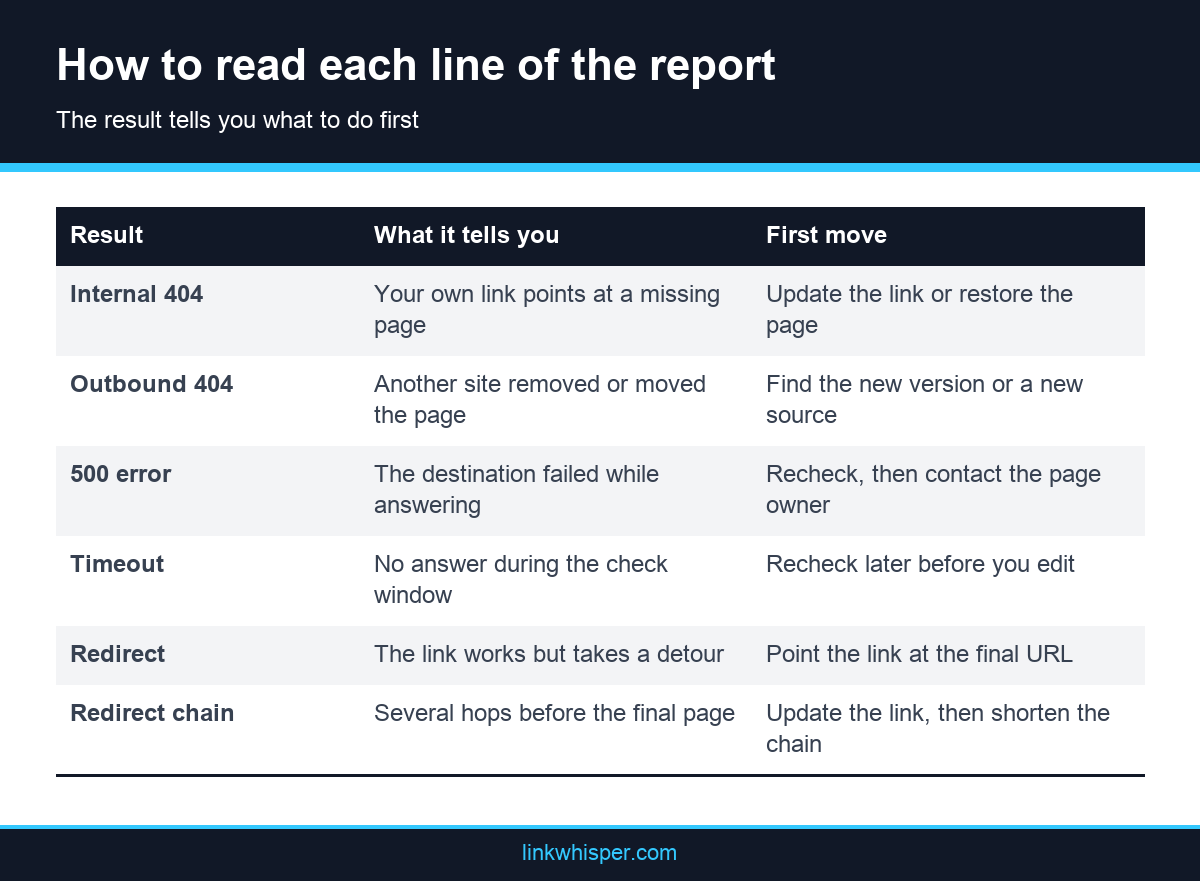
A 404 response generally indicates that the requested resource cannot be found. Redirects, server errors and connection timeouts represent different situations and require different responses.
LinkWhisper lets you filter broken-link findings by status and response-code groups, including true 404 errors, redirects and timeouts.
This distinction matters.
A deleted page with no replacement may need its link removed. A permanently moved resource may need a new destination. A temporary timeout may simply need another check.
Treating every reported URL as a genuine broken link can lead to unnecessary content changes.
4. Outdated URLs across published posts
A website redesign, permalink update or content migration can leave outdated URLs scattered throughout older articles.
Finding these manually can become increasingly difficult as your content library grows.
LinkWhisper helps identify the affected URLs and the posts containing them. You can then edit or replace selected URLs through the report rather than opening every article individually.
This makes it particularly useful when maintaining larger WordPress websites.
Read More: What You Need to Note in 2027 about Interlinks Using the LinkWhisper Plugin for Interlinking
5. Pages containing multiple broken links
Sometimes, the problem is not limited to one URL.
An older resource-heavy article might contain several references that are no longer accessible.
LinkWhisper allows you to filter and search results by URL, post title, post type and other available report criteria.
This helps you identify which articles require attention and prioritise repairs based on the number and importance of affected links.
6. Links requiring a second verification
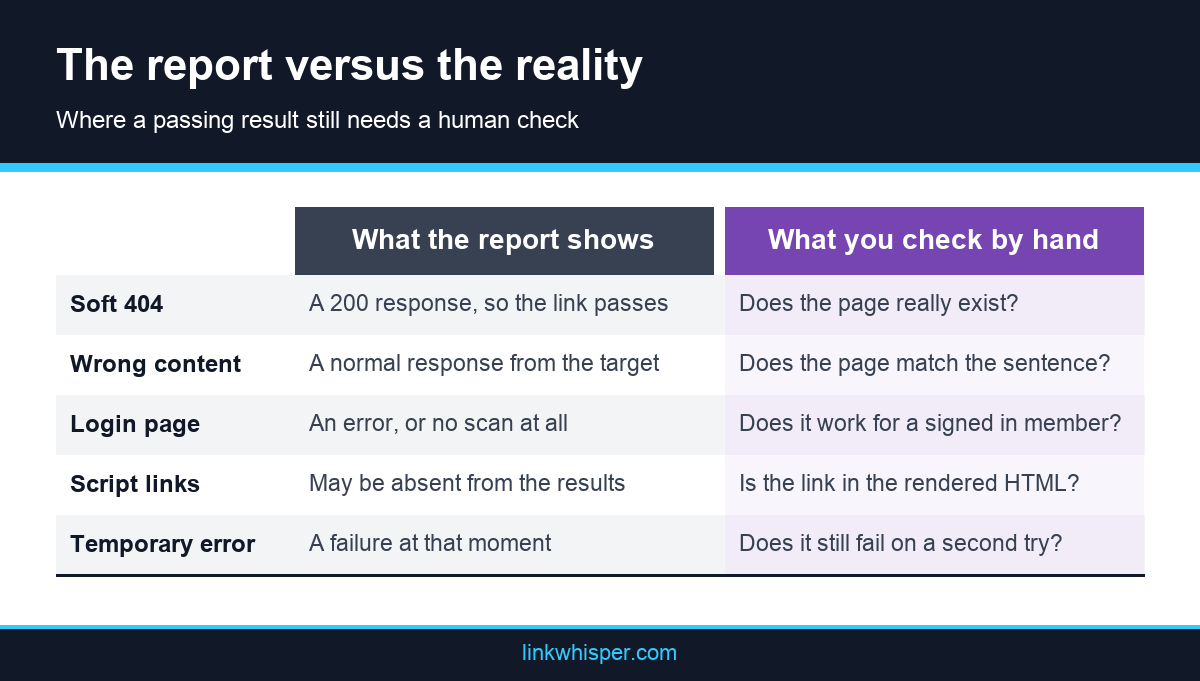
Here is something many website owners overlook: a failed URL check does not always mean the destination has disappeared.
Some websites block automated requests, experience temporary server problems or restrict bot access.
A link checker that treats every failed request as a confirmed 404 can create unnecessary work.
LinkWhisper provides recheck and retry options for eligible URLs, helping you verify uncertain findings before making changes.
You can also snooze or ignore links that do not currently require action.
Read Insights : All about the best interlinking seo plugin for wordpress
7. Broken links that have potential replacement destinations
Finding a broken link is useful. Finding a relevant replacement is even better.
LinkWhisper V4 introduces AI-assisted replacement suggestions within its Broken Links Report.
The tool can search for working replacement destinations and present suggestions for review. You can examine the proposed destination and its confidence level before applying a fix.
AI-assisted replacement searches use LinkWhisper AI credits, and the normal review workflow does not modify your content until you apply the suggested changes.
This helps reduce the time spent researching replacement URLs manually while keeping you in control of the final decision.
5 Ways LinkWhisper’s Broken Link Checking Tool Is Different From Regular Link Checkers
What makes LinkWhisper worth considering when several broken link checker WordPress plugins and online scanning tools are available?
Here are five practical differences.
1. It connects the problem to the original WordPress post.
Instead of simply presenting an inaccessible URL, the report helps you identify the source article containing the link. This makes locating and correcting the problem easier.
2. It distinguishes different types of link issues.
You can review 404 errors, redirects, timeouts and other status groups instead of treating every failed request as identical.
3. It offers multiple repair actions.
You can edit URLs, replace destinations, retry eligible links, snooze findings, ignore results or remove unwanted links and associated text.
4. It includes AI-assisted replacement suggestions.
Rather than leaving you to research every alternative manually, LinkWhisper can search for working replacement destinations and present suggestions with confidence information for review. See if the pricing plans at LinkWhisper can make your broken link fixes journey a breeze.
5. It combines link maintenance with internal linking management.
The Broken Links Report sits within a broader WordPress linking platform that also provides internal link reports, orphan-post identification, auto-linking, link suggestions and site-health information.
This means you can approach link maintenance and internal linking from one WordPress dashboard.
What Recent SEO Updates Mean for Broken Link Management in 2027?
Broken link maintenance is not about chasing an arbitrary SEO score. It is about keeping your website accessible, navigable and technically understandable.
Two Google Search Central recommendations are particularly relevant.
Research insight 1: Important pages need discoverable internal links.
Google recommends ensuring that every page you consider important has a link from at least one other page on your website. It also recommends using descriptive anchor text and crawlable links.
Especially, for Agencies that work on WordPress websites, this makes internal link maintenance important beyond simply fixing 404 errors. When a destination changes or disappears, reviewing the links pointing towards it helps preserve useful content connections.
Research insight 2: Website updates are not reflected instantly in Google Search.
Google explains that, for most websites, updated pages can take three days or more to be checked and indexed. It also recommends using crawlable URL structures and standard links to help Google discover content.
This reinforces why maintaining working URLs matters. Fixing a broken link does not guarantee faster indexing or improved rankings, but it helps keep the pathways connecting your website content functional.
LinkWhisper’s latest upgraded Free Broken Link Checker Tool addresses these practical maintenance requirements through response-code filtering, verification options, source-post identification, and AI-assisted replacement suggestions. Its documentation, updated September 11, 2026, also explains how these repair workflows operate.
How to Check for Broken Links in WordPress Using LinkWhisper
You do not need to inspect every published article manually.
Here is how to get started:
Open your WordPress dashboard and navigate to Link Whisper.
Select the Broken Links Report.
Click Scan for Broken Links to initiate a scan.
Review the reported URLs, source posts and response codes.
Filter results to identify genuine 404 errors, redirects or other issues.
Recheck uncertain URLs before making changes.
Review available replacement suggestions or manually update the affected URLs.
Apply the appropriate changes and run another scan to verify the repairs.
For AI-assisted fixes, review the suggested destinations and estimated credit requirements before applying them.
You can also use the free broken link checker from LinkWhisper as a starting point for identifying website link issues.
For ongoing WordPress link management, the LinkWhisper plugin provides a more comprehensive workflow.
Keep Your Website Links Working, Without the Manual Effort
Your content deserves better than sending visitors to pages that no longer exist. As your WordPress website grows, keeping track of every internal and external link becomes increasingly difficult. That’s why having the right Broken Link Checker matters.
Start with the free Broken Link Checker by LinkWhisper to identify problematic URLs and understand where your website needs attention. And if you’re looking for a more complete solution, explore LinkWhisper for WordPress for smarter internal linking and ongoing link management.
Not sure which plan suits your requirements? Check the LinkWhisper pricing and explore the features available before choosing.
Your next great SEO improvement might not be another article. It might be fixing the links you already have.
Frequently Asked Questions
1. How do I check for broken links in WordPress without opening every post?
A WordPress broken link checker can scan your website and identify problematic URLs. LinkWhisper provides a dedicated Broken Links Report where you can review the affected URLs alongside their source posts and take corrective action. If you are an agency, LinkWhisper has a lot to offer.
2. Why does my broken link checker report links that actually work?
Some websites block automated requests or temporarily restrict access. This can result in timeouts or 403 responses even when a URL works in a normal browser. Recheck uncertain results before removing or replacing links.
3. Is there a free broken link checker for WordPress websites?
Yes. You can start with LinkWhisper’s free broken link checker to examine website links. For ongoing WordPress link management, its plugin offers additional reporting and repair capabilities.
4. Can I check external links as well as internal links?
Yes. LinkWhisper’s Broken Links Report identifies both internal links pointing to missing pages and external links returning errors.
5. Does fixing broken links improve Google rankings?
Not automatically. Fixing broken links improves navigation and helps maintain functional website pathways. However, rankings depend on multiple factors, including content relevance, search intent, technical accessibility and overall website quality.
6. How do I find broken links on older WordPress blog posts?
Run a scan using a WordPress broken links checker and filter the findings by post title or URL. LinkWhisper helps you identify the original articles containing the problematic links, making older content easier to maintain.
7. Can LinkWhisper automatically replace broken URLs?
LinkWhisper offers AI-assisted replacement suggestions. You can review the proposed destinations and apply the fixes. Advanced settings also allow automatic application of recommended fixes when enabled.
8. Can a broken link checker slow down my WordPress website?
It depends on how the scanning process works. WordPress users have raised concerns about server resource consumption, particularly on larger websites with extensive content libraries. Link checking can generate additional server requests, so it is worth considering scan frequency, hosting capacity and the tool’s scanning approach. Avoid running unnecessary scans during peak traffic periods.
9. What should I do with broken links after changing my WordPress URL structure?
Start by identifying the old URLs and the pages linking to them. If a page has moved permanently, set up a relevant 301 redirect to its new location. Also update internal links to point directly to the new URL rather than relying on redirects. Always take a website backup before making bulk URL changes.
10. Should I redirect every 404 error to my homepage?
No. Redirecting every missing URL to your homepage is rarely the best solution. If the original content has a relevant replacement, redirect visitors to that page. If no suitable replacement exists, a genuine 404 or 410 response may be more appropriate. Prioritise URLs that have existing backlinks, traffic or useful internal references before deciding what to do.
Link Whisper tips
Keep learning about internal linking
Get Link Whisper tips and offers in your inbox.
Check if your site has the same issues.
Run a free audit right now. See your orphaned pages, broken links, and link health score in 60 seconds.
Check My Site