
Contents
- 0.1 What is a bad links checker?
- 0.2 Is a bad links checker the same as a broken link checker?
- 0.3 How do redirect chains hurt SEO if the page still loads?
- 0.4 What counts as thin anchor text?
- 0.5 How does circular internal linking waste link equity?
- 0.6 How often should I run an internal link audit?
- 0.7 Can a website dead link checker also catch redirect chains?
- 0.8 What is the fastest way to fix bad links in WordPress?
- 0.9 Does Link Whisper compare to Yoast SEO or Rank Math for internal linking?
- 0.10 Is there a free way to check all bad links on my site?
- 1 Keep learning about internal linking
Run a bad links checker on your WordPress site and the first thing you get back is a list of 404s. That is useful, but it is only part of the picture. A page that returns a 200 status code can still be a bad link. Thin anchor text tells Google nothing about the destination. A link that quietly redirects through two or three hops before it lands is losing link equity with every hop. A closed loop of pages that only link to each other traps that value instead of spreading it. None of this trips a standard broken link checker. This guide covers the link quality problems a simple dead link checker misses, and how to fix all of them systematically.
Key Takeaways
- A real bad links checker flags more than 404s. Thin anchor text, redirect chains, and circular linking all drain link value even when every page loads.
- Redirect chains lose SEO value with every extra hop, even when the final destination returns a healthy status code, which is exactly what a bad links checker should catch and a simple 404 scan will not.
- Circular internal linking traps link equity in a closed loop instead of passing it to pages that actually need it, including orphaned content.
- Link Whisper’s internal link checker tools catch all four issue types in one internal link audit, not just dead pages.
What a Bad Links Checker Should Actually Catch
Most WordPress owners run one bad links checker scan, see zero 404s, and call their internal linking healthy. That is the gap this section closes.
A website dead link checker that only looks for 404 status codes catches the most obvious problem and misses three others that matter just as much for rankings. The first is thin anchor text, links built from words like click here or read more that give Google and readers no context about the destination page. The second is redirect chains, links that resolve eventually but pass through one or more 301 hops on the way, bleeding link equity at every step. The third is circular linking, where a small cluster of pages links only to each other and never routes value out to the rest of the site. The fourth is orphaned content, pages with no internal links pointing to them at all, which search engines struggle to find and rank.
Each of these issues shares one trait: a simple uptime check will not find them. The page loads. The link is technically live. But the SEO value it should be passing is either diluted, misdirected, or trapped somewhere it cannot help the pages that need it most. That is why internal linking for SEO has to be treated as an ongoing audit process, not a one time 404 sweep. A proper internal link audit checks status codes, anchor text quality, redirect depth, and link distribution together, because fixing only one of the four leaves the other three quietly working against your rankings. A genuine bad links checker treats all four as one connected problem instead of four separate tools running on four separate schedules.
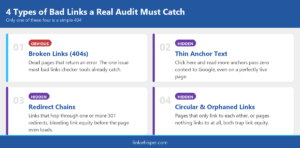
Infographic showing the four types of bad links a bad links checker audit should catch: broken links, thin anchor text, redirect chains, and circular or orphaned links
Thin Anchor Text Is a Bad Link Even When the Page Loads
A link that says click here passes almost no context to Google, no matter how relevant the destination page is, and a proper bad links checker still has to catch it.
Anchor text is one of the strongest signals Google uses to understand what a linked page is about, and generic phrases waste that signal completely. Links built around click here, this page, or read more tell search engines nothing about the destination, even if the page itself is a perfect match for a valuable keyword. This is why anchor text optimization belongs in the same audit as your dead link checks, not as a separate task for later. As Moz’s guide to internal links explains, descriptive anchor text is one of the clearest ways search engines associate a link with the topic it points to.
The fix starts with reviewing your existing internal link anchor text site wide and flagging every generic phrase for replacement with descriptive, keyword relevant text that still reads naturally. A link to a pricing page should use anchor text like pricing plans, not click here. A link to a comparison guide should describe what is actually being compared. This does not mean stuffing keywords into every anchor. It means giving each link enough context to earn its place in the sentence and pass real signal to the page it points to.
Volume matters here too. If you are unsure how many internal links per page you should actually be adding, the answer depends on content length and topic depth, but anchor text quality on those links matters more than hitting an exact number. A page running the best internal link plugin suggestions still needs a human pass to confirm the suggested anchors read naturally in context before you publish. This is exactly the kind of issue a bad links checker should surface automatically, since manually auditing anchor text across hundreds of posts is not realistic for most teams.
Redirect Chains: The Bad Links Your 404 Checker Will Never Flag
A link that redirects twice before loading still works for the reader, but a bad links checker built for link quality will flag it anyway.
A redirect chain happens when a link points to a URL that redirects to another URL, which then redirects again before the page finally loads. Readers rarely notice, because browsers follow the chain automatically. Search engines notice. Google’s own documentation on crawlable links treats each redirect as a separate hop the crawler has to process, and every hop adds latency and dilutes the link equity passed to the final page.
A standard broken link checker wordpress scan will not flag these because the final status code is a healthy 200. You have to check the full redirect path, not just the destination, to catch them. This usually happens after a URL restructure, a permalink change, or a page merge where old links were never updated to point directly at the new destination.
Running a free online broken link checker alongside a redirect path scan gives you the full picture: dead links, redirect chains, and the pages losing equity to both. Once flagged, the fix is simple. Update the internal link to point straight at the final destination URL instead of the redirected one. Link Whisper’s internal link analytics and reporting dashboard tracks which links still route through old redirects so you are not re auditing manually every month. Treating redirect chains as part of the same bad links checker workflow, instead of a separate SEO task, is what keeps them from quietly piling up again next quarter.
Circular Linking and Orphaned Pages Quietly Drain the Rest of Your Site
When five pages only ever link to each other, the other two hundred pages on your site never get their share of link equity, a pattern any thorough bad links checker should surface.
Circular internal linking looks harmless in isolation. A blog post links to a related post, which links back, which links to a third post in the same small cluster. The problem is what does not happen: none of those pages ever route link equity out to newer content, cornerstone pages, or the rest of the site. Value gets trapped inside a closed loop instead of being distributed where it is needed.
The easiest way to spot this is to pull up an internal link map and look for clusters of pages that only reference each other. Orphaned pages are the mirror image of the same problem. An orphaned content recovery scan finds pages with zero internal links pointing to them at all, often older posts that used to rank but were never linked from anything newer. Search engines rely heavily on internal links to discover and re crawl pages, so an orphaned page effectively disappears from your site’s link graph even though the URL still resolves fine.
Fixing both issues by hand across a large site is slow. Internal linking automation tools can suggest relevant outbound links for orphaned pages and flag closed loop clusters automatically, which matters more the larger your site gets. On sites with hundreds of pages, internal hyperlinks between related content consistently move the needle on rankings faster than chasing another backlink, but only when that link equity is actually flowing to where it is needed instead of circling the same five pages. Treating circular clusters and orphaned pages as part of the same bad links checker workflow keeps equity moving instead of pooling in the same handful of posts.
How to Run a Complete Bad Links Checker Audit With Link Whisper
One scan, four issue types, a clear fix list. Here is the process.
A complete audit checks all four issue types in one pass instead of treating dead links, thin anchors, redirect chains, and orphaned pages as separate projects. This is what separates a genuine bad links checker from a plugin that only pings URLs for status codes.
Step one: run Link Whisper’s internal link checker tools across the full site. This surfaces 404s, redirect chains, and orphaned pages in a single scan rather than three separate tools.
Step two: review flagged redirect chains first, since these are the links a basic website dead link checker would mark as healthy. Update each one to point directly at the final destination URL.
Step three: pull the anchor text report and replace generic phrases with descriptive alternatives using the suggested anchor tool inside the LinkWhisper Tool dashboard.
Step four: use the internal link map to find circular clusters and orphaned pages, then add outbound links from those clusters to relevant cornerstone content.
Step five: re run the internal link audit monthly, since new posts, permalink changes, and merged pages create fresh bad links continuously.
The process looks different depending on site type. Agencies managing multiple client sites need the audit to run consistently across every property without manually re checking each one. Bloggers and publishers with large content archives tend to accumulate orphaned pages fastest, since older posts stop getting linked from anything new. WooCommerce stores deal with a different pattern: discontinued product pages that create redirect chains across category and collection links. If auditing hundreds of pages manually is not realistic for your team’s bandwidth, the done for you linking service handles the full process for you.
If you are still comparing tools, the comparison hub breaks down how Link Whisper’s approach to link quality differs from a plugin that only checks for 404s.
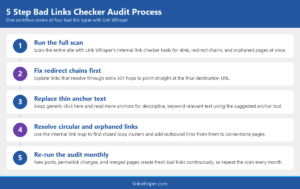
Infographic showing the five step bad links checker audit process using Link Whisper, from full scan to monthly re-audit
Conclusion
A bad links checker that only counts 404s is checking a fraction of what actually affects your rankings. Thin anchor text, redirect chains, and circular internal linking all quietly drain link equity from pages that should be earning it, and none of them show up on a basic dead link scan. Catching all four in one audit, then fixing them systematically, is the difference between internal linking that actually moves rankings and internal linking that just looks clean on a checklist. Check all bad links free with Link Whisper’s Link Checker, see every issue in one report, and fix them with the same plugin built to keep finding new ones.
Frequently Asked Questions
Is a bad links checker the same as a broken link checker?
No. A broken link checker typically flags only dead links returning 404 or 500 errors. A bad links checker also catches links that load fine but still waste SEO value, like redirect chains and generic anchor text.
How do redirect chains hurt SEO if the page still loads?
Each redirect hop dilutes the link equity passed to the final page and adds crawl latency. The reader never notices, but search engines process every hop, so a two step redirect chain passes less value than a direct link.
What counts as thin anchor text?
Generic phrases like click here, this page, or read more count as thin anchor text. They give Google no context about the destination page, even when that page is genuinely relevant to a valuable keyword.
How does circular internal linking waste link equity?
When a small group of pages only links to each other, link equity stays trapped in that cluster instead of reaching cornerstone pages, new posts, or orphaned content elsewhere on the site that actually needs it.
How often should I run an internal link audit?
Monthly is a reasonable baseline for most sites. Permalink changes, merged posts, and new content all create fresh redirect chains and orphaned pages continuously, so a one time audit goes stale fast.
Can a website dead link checker also catch redirect chains?
A basic dead link checker looks at the final status code, so a working redirect chain will not get flagged. You need a tool that traces the full redirect path, not just the destination page.
What is the fastest way to fix bad links in WordPress?
Run a single audit covering 404s, redirects, anchor text, and orphaned pages together, then use the knowledge base setup guides to work through the flagged list by issue type rather than page by page.
Does Link Whisper compare to Yoast SEO or Rank Math for internal linking?
Yoast and Rank Math offer basic internal linking suggestions as part of broader SEO plugins. See the full Link Whisper versus Rank Math AI Link Genius comparison for a feature by feature breakdown of link quality auditing.
Is there a free way to check all bad links on my site?
Yes. Link Whisper's free internal link checker tools scan for broken, redirected, and orphaned links at no cost. For deeper anchor text and reporting features, contact the team to discuss the full plugin.
Link Whisper tips
Keep learning about internal linking
Get Link Whisper tips and offers in your inbox.
Check if your site has the same issues.
Run a free audit right now. See your orphaned pages, broken links, and link health score in 60 seconds.
Check My Site