Contents
- 1 Why the Example Site Changed Its Internal Linking Plugin
- 2 Audit and Record Existing Links Before Anything Moves
- 3 Test the Plugin Migration on Staging, Then Switch
- 4 What Changed After the Rescan: Workflow and Link Coverage
- 5 Conclusion
- 6 Frequently Asked Questions
- 6.1 Will I lose links when I remove an internal linking plugin?
- 6.2 What should an internal link audit record before a switch?
- 6.3 Is Ridge and Trail Journal a real customer?
- 6.4 Do I need a staging site for a plugin migration?
- 6.5 Can I run two linking plugins during the switch?
- 6.6 How quickly can I judge the switch?
- 6.7 Where should I start when comparing Link Whisper alternatives?
- 6.8 Should automatic linking stay on after a switch?
- 6.9 How do I report on the switch to a client or manager?
- 7 Keep learning about internal linking
Changing an internal linking plugin on a live site feels risky, because years of links may depend on how the old tool stored them. This walkthrough follows one owner through that switch, from the first audit to the final rescan. Everything here is illustrative: the site is invented, and every count is an example figure. Our earlier side by side of the main WordPress options covers which tool to choose. This post covers the harder question of how to move without losing links, and what the work changes afterward.
Key Takeaways
- Run an internal link audit and save a record of existing links before you install anything, or you will have no baseline to compare.
- Test your plugin migration on staging first, because only a test shows whether the old tool leaves its links in post content.
- Judge the switch by workflow and link coverage, which you can check right away, and treat rankings as a separate and slower question.
Why the Example Site Changed Its Internal Linking Plugin
Our invented site, Ridge and Trail Journal, is a hiking blog with 640 posts and two part time editors. Its old plugin added links from keyword rules, which suited the early years. As the archive grew, those rules fired on words with two meanings, and nobody could see which posts lacked inbound links.
Remember that this story is illustrative, and no real customer sits behind it. The owner did not blame the old tool, because keyword rules can suit a site with consistent terms. The trouble was fit. Words like trail and pack meant different things in different posts, so some rules placed links that a reader would not expect.
She began by listing Link Whisper alternatives by workflow rather than by feature count. Our overview of how the alternatives differ sorts them by approach: a connected web app, a plugin with audit modules, an AI assisted tool, keyword rules, or linking inside an SEO suite. She then read the Linkilo comparison as one example of a head to head. Vendors write their own comparisons and products change, so she confirmed the details on each vendor’s site.
Her shortlist test had two questions. Could editors review suggestions in the writing screen? Could a report show which posts lacked inbound links? She chose Link Whisper on those two points. Its suggestion panel works in Gutenberg, the Classic Editor and Elementor. Its Links Report sorts posts by most linked, least linked or orphaned.
She also wrote down what the new internal linking plugin did not need to do. Titles, schema and sitemaps stayed with her general SEO plugin. That note kept the comparison short, and it stopped the team from weighing modules they would never open.
Audit and Record Existing Links Before Anything Moves
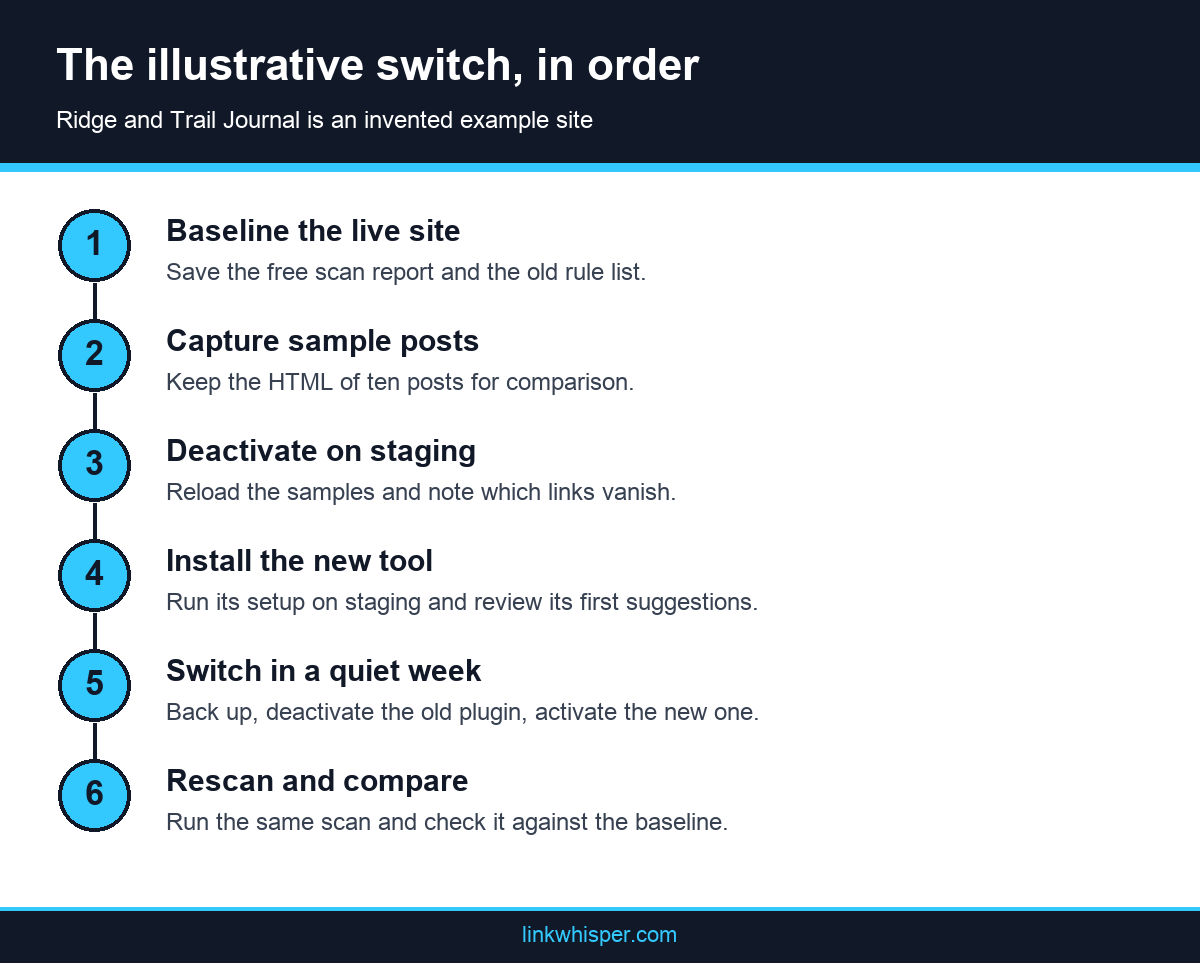
The switch starts with evidence, not installation. The owner ran an internal link audit on the live site, then saved a record of what the old plugin had placed. Without that record, nobody can show later which links survived the move, which ones vanished, and which ones only existed while the old plugin ran.
The first scan used the free site scan from Link Whisper, which needs no install and takes a public URL. It reports pages crawled, orphaned pages, dead end pages, deep pages and a score. She saved the report as her baseline. The tool describes that score as a directional health signal, so she treated it as a signal and not a verdict.
Next, she wrote down what the scan could not tell her. A crawl shows links on the page, but it cannot show which plugin put them there. Her record therefore covered four items, and our fuller audit routine adds more checks if your site needs them.
One more habit helped. She asked both editors to name three posts they considered important, then looked those posts up in the baseline. Two of them had few inbound links, even though the team believed otherwise. That small check showed why a record beats memory, and it gave the later review a clear first target.
- The old rule list, with each keyword, target URL and frequency limit, exported or copied by hand.
- The saved HTML of ten sample posts, chosen across old and new content.
- A short list of rules that still point to pages worth promoting.
- A full backup of the files and database, tested by restoring it to staging.
Test the Plugin Migration on Staging, Then Switch
Staging answers the question no sales page can answer for your site: where do the old links actually live? Some tools may write links into post content, and others may add them when a page loads. Read the documentation first, then deactivate the old plugin on a copy of the site and compare the saved HTML.
The WordPress guide to managing plugins gives the order for removal: deactivate first, then delete. On staging she deactivated only, reloaded her ten sample posts and compared them with the saved HTML. In this invented example, links typed by hand stayed, while rule based links disappeared. Your old plugin may behave differently, so verify it rather than assume it.
That result shaped the plan. Rules that still mattered had to be rebuilt, and rules that caused odd links could simply end. She also opened the staging pages and confirmed that the links she kept were real anchor elements with an href attribute. Google guidance on crawlable links says it can generally crawl only links in that form.
Link Whisper says its own links are written directly to the WordPress database, and that cancelling removes the plugin, not the links. Activation is separate per site, so check how your license treats a staging copy before you activate there. She then repeated the sequence on the live site during a quiet publishing week.
The staging test also changed the calendar. She first allowed one afternoon for the whole move, then spread it across a week so each editor could review early suggestions on familiar posts. An internal linking plugin needs that editorial check, because a suggestion can look fine in a list and still read badly inside a paragraph.
What Changed After the Rescan: Workflow and Link Coverage
The rescan compared the new site state with the saved baseline, and it showed the gaps left by the rules that ended. The larger change appeared in daily work. Editors stopped wondering what a rule had done behind them, and they started making visible choices about each link while writing or revisiting older hiking posts.
The setup wizard scanned the archive and set a baseline score. Editors then worked from the Links Report, starting with posts at the bottom of the inbound count. Link coverage improved steadily through that review, and the orphan list shrank as related posts picked up links. She checked the new structure on a free visual map of the site, which made the remaining isolated posts easy to spot.
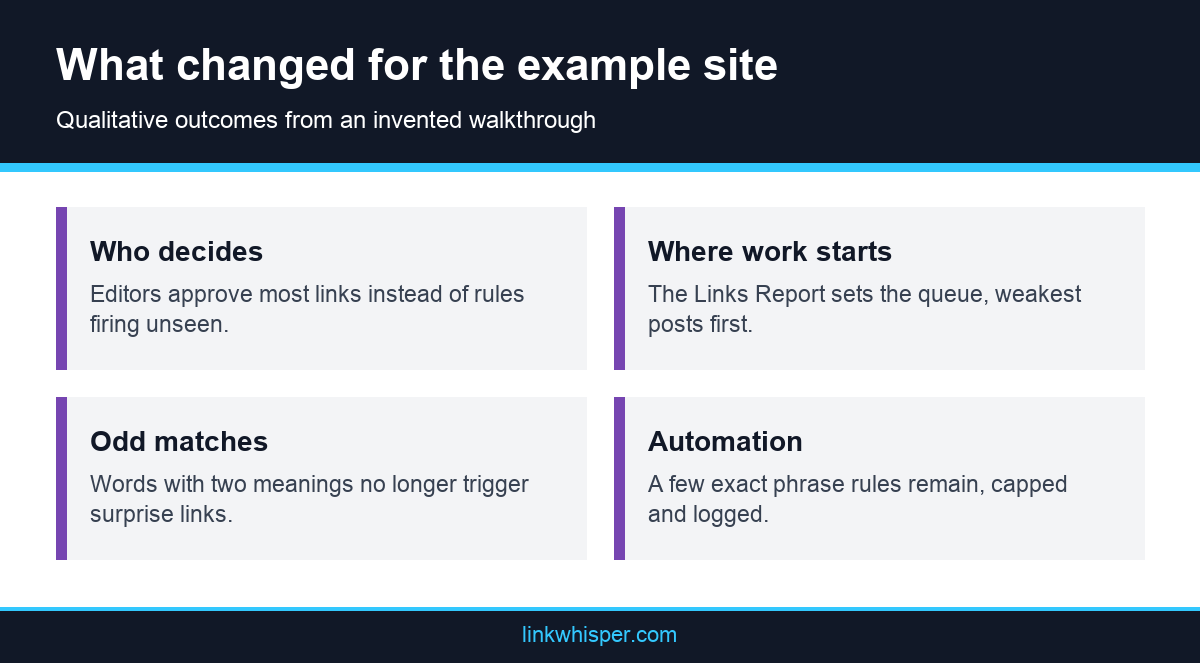
Link Whisper shows suggestions for review by default, and the owner kept that mode for new posts. She rebuilt only a few rules for exact phrases through Auto-Linking, each with a frequency cap and category exclusions. New installs start in review mode, and the activity log offers an undo when a rule misbehaves.
The Broken Links Report also surfaced old targets the rules had hidden. She fixed them in one pass. As for rankings, she made no claim. Structure changes on the day you make them, while search results move later, and no plugin change can guarantee that they will rise.
The team also agreed on a simple rhythm. New posts get links during editing, and each Friday one editor works through a few weak older posts. Nobody planned a second big project, because the report now showed small jobs. For this invented site, that routine mattered more than any single feature of the new internal linking plugin.
Conclusion
A safe switch of internal linking plugin depends on order more than on the product you pick. Record what exists, test removal on a copy, move during a quiet week, then rescan against your baseline. Ridge and Trail Journal is invented, yet the routine applies to any WordPress site with an old tool in place. Before you shortlist anything, write down the two or three workflow questions that matter most to your editors. Then read the current Link Whisper feature list and test those questions on staging.
Frequently Asked Questions
Will I lose links when I remove an internal linking plugin?
That depends on how the plugin stored them, and you should not guess. Deactivate it on a staging copy, reload a few sample posts and compare them with saved HTML before you change anything on the live site.
What should an internal link audit record before a switch?
Record your scan results, the old rule list, the HTML of sample posts and the pages you most want to promote. That record lets you show afterward which links survived and which ones you need to rebuild.
Is Ridge and Trail Journal a real customer?
No. The site, its 640 posts and every event in this story are invented to illustrate the routine. Treat the steps as a checklist for your own site, and do not read them as a reported result.
Do I need a staging site for a plugin migration?
You should use one if your host offers it. A staging copy lets you see what deactivation does without affecting readers. If you have no staging option, take a tested backup and start with a small sample first.
Can I run two linking plugins during the switch?
We advise against it, because two tools can place competing links in the same post and blur your comparison. Finish testing the old plugin, deactivate it, and only then let the new one start making changes.
How quickly can I judge the switch?
You can check link counts and orphaned posts as soon as a rescan finishes. Search results move later and depend on many factors, so keep rankings out of your first judgment and review them over a longer period.
Where should I start when comparing Link Whisper alternatives?
Start with your workflow, not a feature list. Ask where editors write, how much automation you accept and which reports you use weekly. Then test the shortlisted tools on staging and confirm every detail with each vendor.
Should automatic linking stay on after a switch?
Keep it narrow at first. Exact phrases with caps and exclusions are easier to check than broad rules, and you can read how the review and automation settings work before you widen anything on your site.
How do I report on the switch to a client or manager?
Show the baseline, the rescan and the workflow change, and keep rankings as a separate note. A look at what the link reports can show will help you choose which figures to include in that summary.
Link Whisper tips
Keep learning about internal linking
Get Link Whisper tips and offers in your inbox.
Check if your site has the same issues.
Run a free audit right now. See your orphaned pages, broken links, and link health score in 60 seconds.
Check My Site