
Contents
- 1 Key Takeaways
- 2 What an SEO Auto Linker for WordPress Actually Does
- 3 Keyword Rules: Quick to Set Up, Easy to Push Too Far
- 4 Contextual Suggestions: Links Chosen for Meaning
- 5 Auto Linking Mistakes That Create Cleanup Work
- 6 Blending Both Methods and Verifying Every Change
- 7 Conclusion
- 8 Frequently Asked Questions
- 8.1 Why use an SEO auto linker for WordPress at all?
- 8.2 Can keyword rules hurt my rankings?
- 8.3 How many keyword rules should a site start with?
- 8.4 Are contextual suggestions inserted without my approval?
- 8.5 Does an auto linker plugin update older posts?
- 8.6 What should I look for after an automation run?
- 8.7 Where can I read more about automating internal links?
- 8.8 Is automation worthwhile on a small WordPress site?
- 8.9 Do I need to install anything to check my links?
- 9 Keep learning about internal linking
Picking an SEO auto linker for WordPress forces an early decision about how links get chosen. One camp matches fixed phrases. The other reads what each article is actually about. Before any automation touches your posts, run the free Internal Link Checker to record a baseline you can compare against later.
Below, we weigh keyword based linking against contextual suggestions. You will learn what each method does well, where each one slips, and how agencies, publishers and travel bloggers can blend them without cluttering their archives.
Key Takeaways
- Phrase rules give you speed and consistency, yet they cannot tell when a matching word means something else.
- Contextual suggestions weigh the topic of every article, so each link lands where a reader genuinely wants more detail.
- A blended setup works best: a short rule list, editor approved suggestions for the rest, and a link scan after each batch of changes.
What an SEO Auto Linker for WordPress Actually Does
An auto linker plugin adds internal links to your posts so you do not have to edit each one by hand. Tools take one of two routes. They either match phrases from a rule list, or they interpret each article and propose related pages. That choice decides how clean your links stay as the archive expands.
Manual linking breaks down once a site publishes every week. Writers finish a draft, hit publish and move on. The new article sits alone, and nobody returns to older posts to point readers toward it. Months later, your strongest guides are buried several clicks deep.
Automation closes that gap, though it introduces a fresh danger. A plugin that inserts links across the whole site can spread a poor link just as quickly as a good one. So the mechanism behind the tool deserves attention. Rule matching behaves like a search and replace that adds a URL. Contextual matching behaves like a colleague who has read the full archive. Link Whisper, a WordPress plugin, supports both approaches.
Google judges results rather than methods. Its spam policies name keyword stuffing as a problem, and identical anchors repeated across hundreds of pages can start to resemble it. Keep one principle in mind. A link earns its place only when it helps a reader continue their research.
Keyword Rules: Quick to Set Up, Easy to Push Too Far
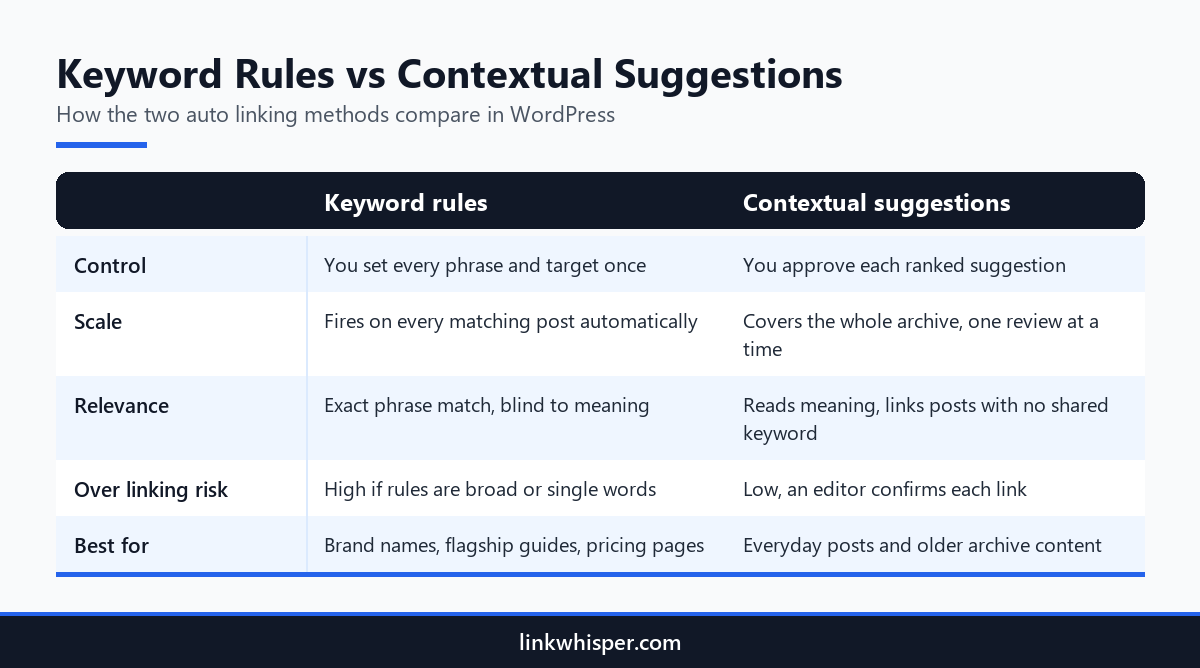
With keyword based linking, you name a phrase and a target page one time, and the plugin links that phrase every time it shows up. This suits product names, service pages and glossary entries. The catch is ambiguity. The same words can mean different things in different articles, and a rule never notices.
The Auto Linking feature in Link Whisper follows this model. Each rule pairs a phrase with a destination URL. When the phrase turns up in a post, the plugin inserts that link. It works on posts already published and on every post you add later. You configure it once and it keeps running.
Rules perform best on terms that carry a single meaning. Think of your brand name, a cornerstone tutorial or your pricing page. They pay off most for publishers with archives of 1,000 or more articles, where one flagship guide can collect links from every relevant mention at once. Rules also stay transparent, because the whole list lives on one screen.
Trouble begins with rules that cast too wide a net. A rule on ‘jaguar’ could link a wildlife article to a car review. A rule on ‘cheap’ might send a recipe reader to your pricing page. Write rules as complete phrases, not single words, and recheck the list each quarter.
Try a simple spot check. Open three random posts that trigger each rule and read the linked sentence aloud. Keep the rule if all three feel natural. Tighten or remove it if even one sounds strange.
Contextual Suggestions: Links Chosen for Meaning
Contextual suggestions come from an engine that interprets what each article covers instead of hunting for exact words. You see a ranked list of related pages and accept the ones that belong. It asks a few extra minutes per post, but the result reads naturally and sends readers to the page they need.
Link Whisper shows its suggestions in a panel within the WordPress post editor, whether you write in Gutenberg, the Classic Editor or Elementor. The list is sorted by relevance, and every suggestion arrives with anchor text already drafted. A single click approves it and places the link in your copy.
Since the engine works from meaning, it can join articles that share no exact phrase. A post on night trains through Europe might link to a guide about rail passes, though the wording never overlaps. That matters for travel bloggers whose old destination guides still sell, especially once partner and booking sites shut down and leave gaps behind.
The cost is attention. A person still reviews each proposal before it goes live. Many teams approve links while polishing a new draft, then set aside a short weekly slot for older content. That habit keeps standards high without creating a separate linking project.
Suggestions also teach. A new writer rarely knows what the archive already covers. Seeing related pages ranked beside the draft reveals existing articles, which cuts down on accidental duplicates.
Auto Linking Mistakes That Create Cleanup Work
Automation amplifies whatever habits you bring to it. One sloppy rule can reach every post in seconds, and hurried approvals can crowd articles with thin links. Spotting the usual errors ahead of time lets you set boundaries before the plugin starts, instead of repairing hundreds of posts after the damage is done.
Mistake one is a rule built on a lone word. Single words appear everywhere and in every sense. Choose phrases specific enough that they only show up when the subject truly matches.
Mistake two is aiming lots of rules at the same destination. If one guide gets linked in almost every paragraph, readers learn to skip links entirely. Share the attention across several useful pages.
Mistake three is identical anchor wording. When every link to a page repeats the same phrase, it reads as mechanical. Suggested anchors vary naturally, since each one is drafted for its own sentence.
Mistake four is forgetting rules once they are live. Teams merge, rename and retire pages all the time. A rule created last spring may now lead to a redirect or a missing page. Put a rule review on the calendar every quarter.
Blending Both Methods and Verifying Every Change
Most sites do best with a mix. A handful of keyword rules handle fixed destinations, and contextual suggestions cover everything else. Verification closes the loop, because any automated process can introduce dead targets, doubled links or pages that still have no internal links pointing in. A fast scan surfaces those issues early.
Begin with a short rule list, reserved for pages whose meaning never shifts. Let suggestions handle the rest. Afterward, read a handful of the edited posts. Check that no paragraph links the same page twice and that every anchor still reads like ordinary prose. An internal link checker tool will also show which pages still have zero links pointing in.
Scale changes the picture for agencies managing linking across many client sites. Every client brings its own rules, its own archive and its own reporting needs. A written process per client keeps standards even. It also lets a new account manager understand the setup in one sitting. When you choose an SEO auto linker for WordPress, confirm it supports that kind of repeatable routine.
Finally, confirm the output. Run the free Broken Link Checker to catch any automated link that now lands on a 404. For a closer look at how phrase matching and meaning based tools differ, see our breakdown of rule based versus contextual linking. Repeat the scan after large edits or URL changes.
Conclusion
A good SEO auto linker for WordPress lets you use both methods instead of picking a side. Phrase rules bring speed and consistency to a small set of fixed pages. Contextual suggestions bring judgment to the rest of your archive. Used together, they keep old and new posts connected without piling identical anchors into every article. Close each automation round with a quick scan so errors never reach readers or search engines. Scan your site free today, then install Link Whisper’s AI linking plugin and put both methods to work.
Frequently Asked Questions
Why use an SEO auto linker for WordPress at all?
Manual linking cannot keep up once you publish often. An auto linker connects fresh posts to related articles and points older content toward new pages. That saves hours of editing and keeps important guides from sinking deeper into the site.
Can keyword rules hurt my rankings?
Careful rules rarely cause harm. A precise phrase that links to the right page helps readers and crawlers alike. Risk grows when broad rules repeat one exact anchor across hundreds of posts, a pattern that can look like keyword stuffing.
How many keyword rules should a site start with?
Keep the first list short. Cover only pages with one clear meaning, such as a cornerstone guide or a pricing page. Watch how those rules behave across your archive for a few weeks before you add any more.
Are contextual suggestions inserted without my approval?
No. Link Whisper lists suggestions in a panel inside the WordPress editor, each with anchor text drafted for you. Nothing goes live until you approve it with one click, so an editor keeps control while skipping most manual work.
Does an auto linker plugin update older posts?
It does. Auto Linking rules in Link Whisper apply to posts already published as well as future ones, and suggestions cover the full archive. Older articles often benefit the most, since they seldom receive new links on their own.
What should I look for after an automation run?
Scan for links pointing at deleted or moved pages, paragraphs that link one page twice, and posts that still have no inbound internal links. Fixing these quickly keeps automated linking clean and protects the reader experience.
Where can I read more about automating internal links?
Our walkthrough on automating internal links in WordPress covers setup, safe rule design and the errors to avoid. Pair it with a regular link audit so your automated links stay accurate as the site grows and changes.
Is automation worthwhile on a small WordPress site?
Yes, provided you publish on a regular schedule. Even a modest archive loses track of its links surprisingly fast. Automation connects each new post from the start, and a small site needs only a few rules, so setup is quick.
Do I need to install anything to check my links?
No. The Internal Link Checker and Broken Link Checker on linkwhisper.com run in your browser with no account and no install. The Link Whisper plugin itself is installed in WordPress when you want ongoing suggestions and reports.
Link Whisper tips
Keep learning about internal linking
Get Link Whisper tips and offers in your inbox.
Check if your site has the same issues.
Run a free audit right now. See your orphaned pages, broken links, and link health score in 60 seconds.
Check My Site