
Contents
- 1 Key Takeaways
- 2 Why Traffic Reports Miss Structural Problems
- 3 Four Signals a Link Scan Reveals
- 4 Sites That Gain the Most From an Internal Link Checker
- 5 From Report to Repairs
- 6 Setting a Schedule for Regular Scans
- 7 Conclusion
- 8 Frequently Asked Questions
- 8.1 What does an internal link checker actually measure?
- 8.2 Can analytics replace a link scan?
- 8.3 How many internal links does a typical article need?
- 8.4 Why do orphan pages struggle to rank?
- 8.5 How often should I scan my site’s links?
- 8.6 Do I have to install the free internal link checker tool?
- 8.7 What should I fix first after an internal link audit?
- 8.8 Will a structure scan also catch broken links?
- 8.9 Does the Link Whisper plugin show link counts?
- 9 Keep learning about internal linking
Traffic reports are good at one thing: counting people who already found you. An internal link checker looks earlier in the chain, at the paths that let search engines and readers reach each page in the first place. You can check how your own pages link together for free in your browser, with nothing to install.
Below, we compare what each view can and cannot see. You will learn which link numbers deserve attention, which kinds of sites gain the most, and how to work through a report in a sensible order.
Key Takeaways
- Traffic data describes the past, while an internal link checker describes the structure that shapes what can be found next.
- Track four numbers in every internal link audit: inbound link counts, orphan pages, low link pages and broken internal links.
- Work from your most valuable pages outward, and Link Whisper can rescan after each round of edits to prove the fixes held.
Why Traffic Reports Miss Structural Problems
A traffic dashboard only wakes up when someone visits. It records sessions, sources and goals, yet it has no idea which pages link to which. That blind spot means a buried article and a well supported one can look identical in your reports until rankings drop and the cause stays hidden for weeks.
Think about what a zero in your traffic report really means. Maybe the page is weak. Maybe nobody can reach it. Analytics cannot tell those two cases apart. Search engines find most URLs by following links from pages they already know. Google says so directly in its documentation on making links crawlable, and it expects a normal anchor element with an href value. A page that nothing links to gives crawlers very little reason to visit.
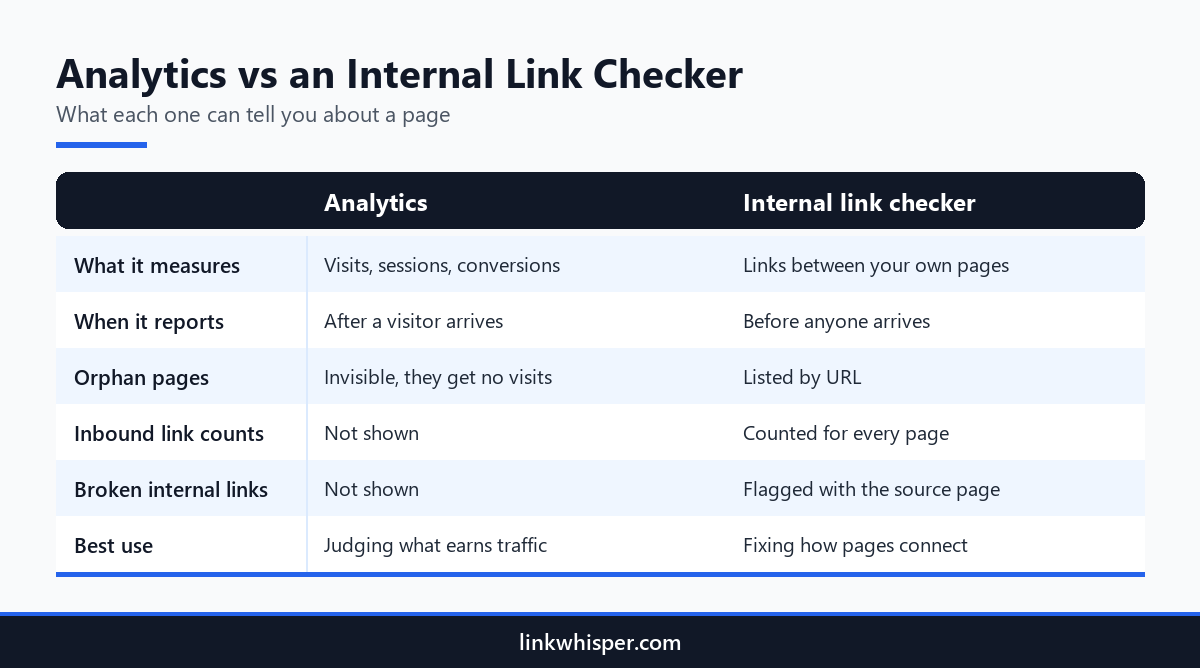
An internal link checker tool flips the viewpoint. Instead of logging arrivals, it reads your published pages and maps how they point at one another. The result is a map of your site, not a diary of visitors. Neither view replaces the other. Traffic data shows where attention lands today. The scan shows whether that attention flows onward to the pages that need it.
Picture two product reviews with matching search demand. The first is linked from fifteen related posts. The second is linked from a single tag page. Your dashboard shows a clear winner and a clear loser, but no reason. The link count supplies the reason and hands you the fix.
Four Signals a Link Scan Reveals
A link scan surfaces four signals that no traffic dashboard reports. Each signal maps to a different repair, so learn what they mean before you edit anything. Together they show where your structure is strong, where it is thin, and where it is quietly broken on a WordPress site that keeps growing every month.
Signal one is the inbound link count for each URL. It tells you how many of your own pages send readers there. A strong article with only one or two links in often underperforms. Signal two is the orphan page. Nothing on your site links to it, so crawlers and readers almost never arrive.
Signal three is the broken internal link, which sends people to a 404 instead of an answer. Pair the structure scan with a sitewide sweep for dead links, which checks internal and outbound URLs in one pass. Signal four is the low link page. It sits one step above orphan status and usually rewards a quick fix during an internal link audit.
Read the four signals together rather than one at a time. A page with plenty of inbound links can still waste value if its key paragraph points at a dead URL. An orphan with excellent content is often the easiest win on the list. Two links from closely related posts can put it back in front of crawlers.
Sites That Gain the Most From an Internal Link Checker
Any WordPress site can learn something from a scan, yet three kinds of publishers usually uncover the widest gaps. They post frequently, seldom return to older work, and rely on search for most of their visitors and revenue. If you recognise your own site here, expect the first report to raise a few eyebrows.
Long running blogs are the textbook example. An evergreen tutorial written years ago may still be your best page on the subject. Yet every new post links to newer neighbours instead. For bloggers sitting on deep archives, a scan usually uncovers dozens of older posts that get no traffic simply because nothing points to them anymore.
Niche and affiliate site owners live or die by topical authority. Their supporting reviews and guides should feed the comparison or roundup that earns commissions. A scan reveals whether those cluster links actually exist. When they are missing, income suffers directly. That is why internal linking for affiliate and niche sites starts with a structural check.
Podcasters and other creators face a slower leak. Each new episode gets a page with show notes, then the following week buries it. Without links back, the catalogue fades from search. This guide for podcasters and creators treats every episode page as an asset that deserves connections.
What unites these groups is output. Every new post pushes older pages further from your linking habits, and without a scan the drift goes unnoticed.
Have you checked our Link Whisper Inter Link Plugin Affiliate programs? Get to be part of Link Whisper to help with WordPress websites link, rank and get visible seamlessly now.
From Report to Repairs
A report is only useful when it changes your next move. Work through it by value rather than by the order the rows appear. Strengthen pages that already bring in traffic or sales, connect the posts that support them, and scan again a week later to confirm that each edit stuck.
Open with the orphans that deserve to rank. Give each one two or three contextual links from related posts that already attract readers. After that, raise the low link pages. Finally, repair broken URLs so fresh links lead nowhere. Our walkthrough on expanding a scan into a complete audit breaks this sequence into detailed steps.
On WordPress, Link Whisper internal linking plugin can handle the ongoing work. Its orphaned post report lists every published post with zero inbound internal links. A suggestion panel inside the post editor ranks related links by meaning and writes the anchor text for you. You approve each one with a single click. The site health score then tracks the share of posts with at least one relevant inbound link.
Log every change with a date. If a page climbs after new links go in, you know the cause. If it stays put, try a more descriptive anchor or a link from a closer topic.
Setting a Schedule for Regular Scans
Structure shifts slightly whenever you publish a post, rename a category or edit a URL. One scan captures a single moment and nothing more. Sites with consistently healthy linking build the check into their routine, usually on a light monthly cycle that sits comfortably beside everyday writing and editing work for the whole team.
Run the internal link checker whenever you finish a batch of new posts, particularly when several cover one topic. Fresh articles tend to launch as orphans, since older pages were written before they existed. Busy sites should add a monthly check on top. Plan an extra scan after any redesign, migration or permalink update, because those events break links in large numbers.
Keep each report and compare link counts from one month to the next. A shrinking count on a key page is an early signal. Usually a related post was removed, merged or rewritten and its links went with it. Spotting that in a routine scan takes minutes. Tracing it after a ranking slump can eat days.
Want to understand link building software for wordpress better? We have more in store for you.
Conclusion
Traffic data and an internal link checker answer separate questions. One counts the people who arrived. The other shows whether your pages can be reached at all. Run a scan, write down your inbound link counts and orphan pages, and repair the posts with the most value first. Repeat the check after each publishing batch so no new article launches alone. Try the free scan today, then bring link suggestions into your WordPress editor when you are ready to scale the work.
Frequently Asked Questions
What does an internal link checker actually measure?
It reads the pages on your site and records which ones link to which. The output lists inbound link counts, orphan pages, thinly linked pages and broken internal links, giving you a structural view that visitor reports simply cannot provide.
Can analytics replace a link scan?
No. Analytics records sessions and conversions once people land on a page. A link scan examines how pages connect before any visit happens. Use both, because a page without inbound links seldom collects enough traffic to register in your reports.
How many internal links does a typical article need?
No universal number exists. Many sites aim for roughly three to eight contextual links on a standard article and more on long guides or hub pages. Let relevance decide, and add a link only when it genuinely helps the reader.
Why do orphan pages struggle to rank?
An orphan page has no internal links pointing to it, so crawlers rarely find it and readers never stumble onto it. This explainer on the hidden cost of orphaned content shows how to locate and reconnect them.
How often should I scan my site’s links?
Scan after each batch of new posts and at least monthly on an active site. Add an extra scan after a redesign, a migration or a permalink change, since those moments produce broken links and orphans much faster than routine publishing.
Do I have to install the free internal link checker tool?
No. It runs in your browser against any public site, and it needs no account. The Link Whisper plugin is a separate WordPress plugin that brings link suggestions, reports and repairs into your dashboard once you install it.
What should I fix first after an internal link audit?
Begin with pages that already bring in visits or sales yet have few inbound links. Reconnect strong orphan pages next. Then clear out broken internal links, and finish with a fresh scan to confirm that every change took effect.
Will a structure scan also catch broken links?
It flags broken internal links and any 404 pages it reaches while crawling. For a focused pass across internal and outbound URLs together, a dedicated broken link scan gives you a more complete list of every link that fails.
Does the Link Whisper plugin show link counts?
Yes. Its link reports show how your posts connect, including how many internal links point to each one. The orphaned post report isolates posts with none, and the site health score tracks posts with at least one relevant inbound link.
Link Whisper tips
Keep learning about internal linking
Get Link Whisper tips and offers in your inbox.
Check if your site has the same issues.
Run a free audit right now. See your orphaned pages, broken links, and link health score in 60 seconds.
Check My Site