
Contents
- 1 Introduction
- 2 Key Takeaways
- 3 Table of Contents
- 4 Understanding Site Structure SEO Fundamentals
- 5 2. WordPress Permalink Structure Best Practices
- 6 3. Building an SEO-Friendly Site Hierarchy
- 7 4. Link Whisper Internal Linking Strategy for Site Structure
- 8 5. Technical SEO for WordPress Architecture
- 9 6. Advanced Site Structure Optimization
- 10 Conclusion
- 11 Frequently Asked Questions
- 11.1 What is the best site structure for SEO?
- 11.2 How does site structure impact SEO performance?
- 11.3 Should WordPress permalinks include categories?
- 11.4 What is the ideal number of categories for WordPress SEO?
- 11.5 How many internal links should each page have?
- 11.6 What tools help optimize WordPress site structure?
- 11.7 How does mobile-first indexing affect site structure?
- 11.8 What are orphaned pages and why do they hurt SEO?
- 11.9 How often should I audit my WordPress site structure?
- 11.10 Can I change my site structure without losing SEO value?
Introduction
Site structure SEO determines how search engines crawl, understand, and rank your WordPress website. A well-organized site architecture creates clear pathways for both users and search engine bots, directly impacting your visibility in search results. Whether you’re building a new WordPress site or optimizing an existing one, understanding how to structure your content hierarchy and internal linking patterns will dramatically improve your SEO performance. This comprehensive guide covers everything from basic WordPress permalink structures to advanced site architecture strategies that maximize crawl efficiency and ranking potential.
Key Takeaways
- Hierarchical structure improves crawlability and user experience
- Strategic internal linking distributes link equity effectively
- Optimized permalinks enhance both SEO and click-through rates
- Shallow site architecture keeps pages within 3 clicks
Table of Contents
- Understanding Site Structure SEO Fundamentals
- WordPress Permalink Structure Best Practices
- Building an SEO-Friendly Site Hierarchy
- Internal Linking Strategy for Site Structure
- Technical SEO for WordPress Architecture
- Advanced Site Structure Optimization
Understanding Site Structure SEO Fundamentals
What Is Site Structure SEO?
Site structure SEO refers to how you organize and connect your website’s pages to create an optimized information architecture. A proper SEO-friendly site structure allows search engines to discover, crawl, and index your content efficiently while helping users navigate your website intuitively.
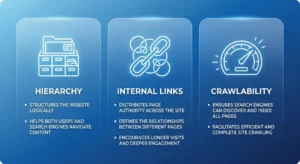
At its core, site structure optimization involves three critical elements: hierarchical organization of content, strategic internal linking patterns, and clean URL architecture. When these elements work together harmoniously, search engines can better understand your site’s topical relevance and authority. Google’s algorithms specifically look for clear content relationships and logical navigation paths when determining how to rank your pages.
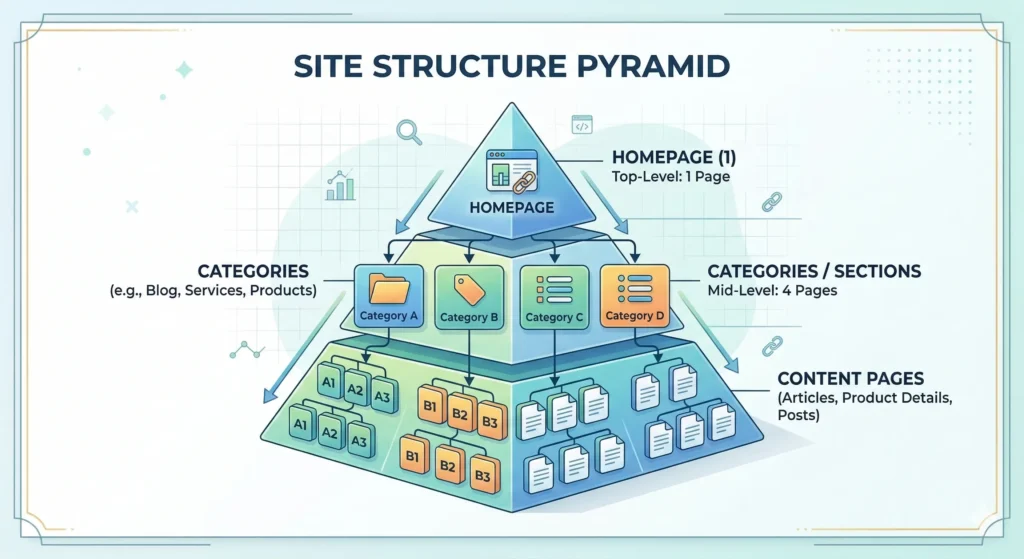
The best site structure for SEO resembles a pyramid, with your homepage at the top, main category pages in the middle tier, and individual content pages at the bottom. This hierarchical model ensures that link equity flows naturally from high-authority pages to supporting content. According to research from Search Engine Land, websites with well-structured architectures see up to 30% better crawl efficiency compared to poorly organized sites.
Why Site Architecture Matters for WordPress
WordPress powers over 43% of all websites globally, making it the world’s most popular content management system. However, its flexibility can become a liability when site owners don’t implement proper structural planning. WordPress’s default settings often create suboptimal URL patterns and weak internal linking structures that dilute SEO potential.
A strategic WordPress site architecture directly impacts your search visibility in multiple ways. First, it determines how quickly search engine bots can discover new content. Well-structured sites with clear navigation hierarchies get crawled more frequently and thoroughly. Second, proper architecture helps search engines understand topical relationships between your pages, which influences ranking for semantic and related keyword queries.
The technical architecture and key components of WordPress include taxonomies (categories and tags), custom post types, and permalink structures that all need careful configuration. When properly implemented, these elements create a robust foundation for internal linking for SEO strategies that amplify your ranking power across your entire domain.
How Search Engines Crawl Your WordPress Site
Search engine bots follow links to discover and index content on your WordPress site. The crawling process starts with your homepage or XML sitemap, then follows internal links to reach deeper pages. Understanding this crawl behavior is essential for optimizing your site structure for maximum SEO impact.
Google’s crawlers allocate a specific crawl budget to each website based on factors like domain authority, site speed, and content freshness. Your site architecture directly affects how efficiently this crawl budget gets utilized. Sites with flat, shallow structures allow bots to reach all important pages within fewer hops, while deep, convoluted architectures waste crawl resources on low-value pages.
The crawl depth concept reveals a critical insight: pages requiring more than three clicks from the homepage receive significantly less crawler attention and ranking power. This explains what is crawl budget becomes such an important consideration for larger WordPress sites with hundreds or thousands of pages. Strategic internal linking helps distribute crawl priority to your most valuable content assets.
2. WordPress Permalink Structure Best Practices
Choosing the Best Permalink Structure for SEO
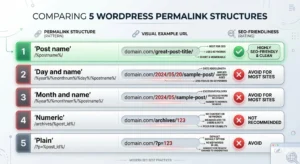
WordPress offers six default permalink structures, but only one or two actually benefit SEO. The optimal choice for most sites is the “Post name” structure (domain.com/post-name), which creates clean, keyword-rich URLs that both users and search engines prefer. This structure provides clear context about page content directly in the URL string.
Why Post Name Structure Wins
The post name permalink structure delivers three significant SEO advantages. First, it allows you to include target keywords naturally in URLs, creating immediate relevance signals for search engines. Second, it produces memorable, shareable links that encourage natural backlinking and social sharing. Third, it eliminates unnecessary date stamps or numbers that can make content appear outdated or less authoritative.
URLs serve as ranking factors in Google’s algorithm, though their weight is relatively modest compared to content quality and backlinks. However, keyword-rich permalinks contribute to click-through rates from search results pages. Users are more likely to click URLs that clearly indicate the content topic, creating an indirect SEO benefit through improved user engagement metrics.
Implementing Custom Structures
For specific use cases, custom permalink structures incorporating categories can enhance your seo friendly site structure. The pattern domain.com/category/post-name works well for magazine-style sites with distinct content sections. This approach signals topical authority within specific subject areas while maintaining clean URL readability.
However, avoid overly complex permalink patterns that create long, nested URL strings. Each additional subdirectory level in your URL structure can dilute perceived page authority and create maintenance headaches if you later reorganize your site’s category structure. Keep permalinks as short as possible while still conveying clear meaning.
Post Name vs. Category Permalinks
The debate between using post names alone versus including categories in permalinks depends on your site’s content strategy and long-term flexibility needs. Pure post name structures offer maximum flexibility, allowing you to reorganize categories without creating broken links or needing redirects. Category-inclusive structures provide stronger topical signals but reduce organizational agility.
When to Include Categories
Category-based permalinks make sense for sites with stable, clearly defined content pillars that won’t change over time. News websites, online magazines, and niche authority sites often benefit from this structure because it creates clear topical silos. For example, a legal blog using domain.com/personal-injury/article-name immediately establishes context and authority within that practice area.
The category structure also supports advanced silo architecture strategies where you want to concentrate link equity within specific topic areas. When combined with strategic internal linking strategies, category-based URLs can amplify topical authority signals to search engines. This becomes particularly valuable for competitive keywords where establishing subject matter expertise is critical.
The Flexibility Advantage of Post Names
Pure post name permalinks eliminate future structural constraints. As your content strategy evolves, you can freely reorganize categories and tags without creating redirect chains or losing accumulated SEO value. This flexibility proves invaluable for growing businesses whose content focus may shift over time.
WordPress’s category system allows you to assign multiple categories to single posts, which creates permalink ambiguity when categories appear in URLs. The platform resolves this by using the first assigned category, but this arbitrary selection can lead to suboptimal URL choices that don’t align with your SEO strategy for website organization.
Avoiding Common Permalink Mistakes
Many WordPress site owners unknowingly sabotage their site structure SEO through permalink configuration errors. Understanding these common mistakes helps you avoid SEO pitfalls that can take months to recover from once established.
Never Change Existing Permalinks
The most damaging mistake is changing permalink structures on an established website without implementing proper 301 redirects. Each URL change without redirects creates a broken link that loses all accumulated SEO value, backlinks, and social shares. If you must change permalinks, use a redirect plugin to map old URLs to new ones permanently.
Avoid Date-Based Structures
Permalinks including dates (domain.com/2026/02/post-name) create artificial obsolescence that hurts evergreen content performance. Users and search engines may perceive dated URLs as outdated, even if the content remains current and valuable. This structure also wastes valuable URL characters that could contain keywords.
Remove Stop Words Strategically
WordPress automatically removes common stop words (and, the, of, etc.) from permalinks, which usually improves URL clarity. However, manually review auto-generated slugs to ensure they remain readable and keyword-relevant. Sometimes removing stop words creates awkward or meaningless URL strings that need manual adjustment.
The structure seo principle emphasizes that every element of your URL should contribute to either user understanding or search engine optimization. Eliminate unnecessary elements while preserving clarity and keyword relevance.
3. Building an SEO-Friendly Site Hierarchy
Creating Logical Category Structures
Your WordPress category structure forms the backbone of your site’s information architecture. Well-designed categories create intuitive navigation paths while establishing topical authority signals that search engines use for ranking decisions. The goal is creating categories that serve both user intent and SEO objectives simultaneously.
The Parent-Child Hierarchy
WordPress supports nested categories with unlimited depth, but restraint produces better results. Limit your hierarchy to two levels maximum—parent categories and subcategories. Deeper nesting creates navigation complexity that confuses users and dilutes link equity distribution across your site.
Think of your category structure as a filing cabinet system. Main categories represent drawer labels (broad topics), while subcategories act as folder dividers (specific subtopics). This organization pattern mirrors how users naturally think about information, making your site more intuitive to navigate while creating clear topical clusters for search engines.
Category Planning Strategy
Start by conducting comprehensive keyword research to identify your site’s core topic areas. These primary topics become your main categories. Each should target a substantial keyword with significant search volume and align with your business goals. Avoid creating categories for keywords you don’t actually plan to pursue in depth.
Your categories should exhibit mutual exclusivity—minimal content overlap between different categories. While some topical overlap is unavoidable, clear category distinctions help both users and search engines understand your site’s organizational logic. This clarity becomes especially important as your site grows to hundreds or thousands of pages.
Implementing Topic Clusters
Topic clusters represent an evolved approach to content organization that aligns perfectly with how modern search engines understand semantic relationships. This model groups related content around central pillar pages, creating powerful topical authority signals that boost rankings for competitive keywords.
Pillar Page Strategy
A pillar page serves as the comprehensive resource on a broad topic, linking out to cluster content that explores specific subtopics in detail. For example, a pillar page about “WordPress SEO” might link to cluster articles about permalinks, site speed, schema markup, and internal linking. This hub-and-spoke model creates clear topical hierarchies that search engines reward.
Building topic clusters effectively requires strategic planning around your primary keyword targets. Each pillar page should target a high-volume, competitive keyword while cluster content targets long-tail variations. The internal linking between pillar and cluster pages creates semantic relationships that amplify ranking power for all pages in the cluster.
Cluster Content Development
Cluster content should dive deep into specific aspects of your pillar topic, providing the detailed information users seek. Each cluster article should link back to the pillar page using relevant anchor text, while also linking to related cluster articles. This interconnected web of internal links signals comprehensive topical coverage to search engines.
The beauty of topic clusters lies in their scalability. As you add more cluster content around existing pillars, you strengthen the entire group’s authority. This cumulative effect makes established topic clusters increasingly easier to rank for new related keywords, creating compounding SEO returns over time.
Maintaining Shallow Architecture
Shallow site architecture keeps all important pages within three clicks of your homepage, maximizing their crawl priority and ranking potential. This flat structure contrasts with deep architectures where pages nest four, five, or more levels from the homepage, receiving minimal crawler attention and authority.
The Three-Click Rule
The three-click rule states that users should reach any page on your site within three clicks from the homepage. This principle serves both usability and SEO objectives. From a technical standpoint, pages closer to the homepage receive more link equity through internal linking. From a user experience perspective, shallow architecture reduces bounce rates and improves engagement metrics.
Calculate your site’s average click depth by analyzing your XML sitemap in Google Search Console. Pages requiring more clicks typically show lower crawl frequency and weaker rankings. If you discover deep pages performing poorly, create strategic internal links from high-authority pages to reduce their click distance from the homepage.
Strategic Link Placement
Maintaining shallow architecture on large WordPress sites requires an intentional internal linking strategy. Your homepage, main navigation menu, and footer links provide the highest-authority entry points for crawlers. Ensure these prime linking locations connect to your most important category pages and pillar content.
Secondary navigation elements like sidebar widgets, contextual content links, and breadcrumbs provide additional pathways that keep your architecture flat. Tools like LinkWhisper automate the process of identifying and creating these strategic connections, ensuring comprehensive site coverage without manual link building overhead.
4. Link Whisper Internal Linking Strategy for Site Structure
Strategic Link Distribution
Internal link distribution determines how authority flows through your site structure, directly impacting which pages rank strongly in search results. Strategic distribution ensures that link equity reaches your most valuable pages while supporting comprehensive site crawlability. The goal is creating a balanced network that serves both user navigation and SEO objectives.
Understanding Link Equity Flow
Link equity, also called “link juice,” flows from page to page through internal links, distributing ranking power across your site. Your homepage typically holds the most authority, as it receives the majority of external backlinks. Internal links from the homepage pass this authority to connected pages, which then pass diminished amounts to pages they link to.
The mathematical concept behind link equity distribution follows a logarithmic decay pattern. Each additional link hop from high-authority pages reduces the passed authority. This explains why maintaining shallow architecture proves so critical—pages closer to authority sources receive more ranking power.
Identifying High-Value Pages
Not all pages deserve equal internal linking attention. Identify your money pages—those targeting commercial keywords or driving business results—and ensure they receive abundant internal links from diverse sources across your site. These typically include service pages, product categories, and commercial blog posts.
Use analytics data to identify pages with strong conversion rates or business impact. These high-performers warrant aggressive internal linking strategies that maximize their search visibility. Similarly, identify pages ranking on page two of search results (positions 11-20) that could jump to page one with additional internal link support.
Anchor Text Optimization
Anchor text—the clickable words in a hyperlink—provides crucial context signals that help search engines understand the target page’s topic. Optimized anchor text distribution balances relevance, natural variation, and user experience to maximize SEO benefits without triggering over-optimization penalties.
Natural Variation Principles
Avoid using identical anchor text for multiple links to the same page. Natural anchor text profiles include brand names, exact match keywords, partial match phrases, generic text (“click here”), and naked URLs. This variation signals organic linking patterns rather than manipulative SEO tactics.
For your primary target keywords, aim for 30-40% of internal links using exact or partial match anchor text. The remaining 60-70% should use brand terms, natural language phrases, and generic text. This ratio provides sufficient keyword signals without appearing spammy to search engine algorithms.
Contextual Relevance
The content surrounding your anchor text matters as much as the anchor text itself. Links embedded within relevant paragraphs pass stronger topical signals than links in navigation menus or footers. Search engines analyze the entire sentence or paragraph context to understand link relevance and authority transfer.
When possible, use longer, more descriptive anchor text phrases that provide clear context. Instead of linking just “WordPress,” use phrases like “WordPress SEO best practices” or “optimizing WordPress site architecture.” These specific phrases help both users and search engines understand exactly what they’ll find at the destination.
Automated Internal Linking Solutions
Manual internal linking becomes increasingly difficult as your WordPress site grows beyond a few dozen pages. Automated solutions provide systematic approaches to maintaining comprehensive internal link networks that support optimal site structure SEO without consuming excessive time.
Benefits of Link Automation
Automated internal linking tools identify relevant linking opportunities across your existing content that you might miss manually. They analyze semantic relationships between pages, suggesting contextually appropriate links that strengthen topical clusters and improve crawlability. This systematic approach ensures no valuable pages become orphaned or isolated.
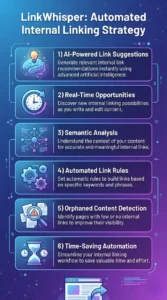
LinkWhisper specifically addresses the challenges of maintaining internal link networks on WordPress sites with hundreds or thousands of pages. The plugin uses AI-powered suggestions to identify relevant linking opportunities as you write new content, while also analyzing existing content to find missed connections. This proactive approach prevents the link decay that naturally occurs as sites grow.
Implementing Automated Rules
Smart automation tools allow you to create rules that automatically insert links based on keyword triggers or topical relationships. For example, you might create a rule that links the phrase “internal linking best practices” to your comprehensive guide whenever it appears in new content. These rules ensure consistency while saving massive amounts of manual linking time.
The key to successful automation is balancing efficiency with quality. Automated suggestions should always receive human review to ensure contextual appropriateness and natural reading flow. The goal is to use automation to surface opportunities, not blindly insert links that disrupt user experience or appear spammy.
5. Technical SEO for WordPress Architecture
XML Sitemap Structure for SEO
Your XML sitemap serves as a roadmap that helps search engines discover and prioritize your site’s pages. A properly structured sitemap organizes URLs hierarchically, indicates update frequencies, and assigns priority values that guide crawler behavior. This technical element plays a crucial role in how effectively search engines index your WordPress site.
Sitemap Hierarchy Best Practices
The sitemap structure for SEO should mirror your site’s information architecture, grouping related URLs into logical sections. WordPress SEO plugins like Yoast or Rank Math automatically generate sitemaps, but understanding their structure helps you optimize crawler efficiency. Separate sitemaps for posts, pages, categories, and media prevent bloated single-file sitemaps that may hit crawler parsing limits.
Prioritize including URLs that drive organic traffic or target valuable keywords. Exclude thin content pages, thank-you pages, and other URLs that don’t merit indexing. Many WordPress sites include thousands of archive, tag, and pagination URLs in their sitemaps, wasting crawl budget on low-value pages. Strategic exclusion concentrates crawler attention where it matters most.
Priority and Change Frequency Signals
XML sitemaps allow priority values (0.0 to 1.0) and change frequency indicators for each URL. While Google has stated these serve as hints rather than directives, proper configuration still provides value. Assign 1.0 priority to your homepage and cornerstone content, 0.8 to category pages, and 0.6 to regular blog posts.
Update the lastmod (last modified) timestamp whenever you make substantial content changes. Fresh timestamps signal to crawlers that pages warrant re-crawling, helping updated content get re-indexed quickly. However, avoid changing timestamps for trivial edits like typo corrections, as this can waste crawl budget on pages without meaningful changes.
Crawl Budget Optimization
Crawl budget represents the number of pages search engine bots will crawl on your site within a given timeframe. While unlimited for small sites, crawl budget becomes a critical constraint for larger WordPress installations with thousands of pages. Understanding crawl budget optimization helps you ensure search engines prioritize your most important content.
Factors Affecting Crawl Budget
Google allocates crawl budget based on your site’s perceived authority, freshness, and technical performance. High-authority sites with frequent updates receive larger crawl budgets. Conversely, slow-loading sites with duplicate content or crawl errors see reduced crawler activity. Your site architecture directly impacts how efficiently your crawl budget gets utilized.
Eliminate crawl budget waste by identifying and fixing common WordPress issues. Pagination URLs often consume disproportionate crawl resources without providing indexation value. Use robots.txt to block crawler access to admin pages, login URLs, and search result pages that don’t merit crawling. These technical optimizations concentrate crawl budget on revenue-generating content.
Monitoring Crawl Patterns
Google Search Console provides invaluable data about how search engines crawl your site. The crawl stats report shows daily crawler requests, downloaded data volumes, and average response times. Analyze these patterns to identify crawl inefficiencies or pages receiving disproportionate attention relative to their SEO value.
Look for sudden crawl rate drops that might indicate technical problems or pages consuming excessive crawl budget without justification. If Google spends significant resources crawling low-value URLs while missing important content, adjust your internal linking and sitemap structure to redirect crawler attention where it matters.
<a id=”url-structure-and-canonicalization”></a>
URL Structure and Canonicalization
URL canonicalization prevents duplicate content issues by specifying the preferred version when identical or similar content appears at multiple URLs. WordPress’s flexibility creates numerous scenarios where the same content becomes accessible through different URL patterns, potentially diluting your SEO efforts.
Common WordPress Canonicalization Issues
WordPress generates multiple URLs for single posts through category archives, tag archives, date archives, and author archives. While these serve legitimate navigation purposes, they create duplicate content from a search engine perspective. Canonical tags tell search engines which version should receive ranking credit, consolidating authority to a single URL.
The default WordPress permalink structure can create trailing slash inconsistencies (domain.com/page vs domain.com/page/) that search engines treat as separate URLs. Ensure consistent trailing slash usage across your site, then use canonical tags to specify your preferred format. Most WordPress SEO plugins handle this automatically, but verify proper implementation using crawl tools.
Implementing Canonical Tags
Every page should include a canonical tag pointing to itself (self-referential canonical) or to the preferred version if duplicates exist. This simple practice prevents accidental duplicate content issues from internal linking variations or parameter-based URLs. WordPress SEO plugins automatically add canonical tags, but custom theme development may require manual implementation.
For paginated content series, use rel=”next” and rel=”prev” tags alongside canonicals to indicate the relationship between pages. This helps search engines understand that pagination represents a single conceptual unit rather than duplicate content. However, Google has deprecated these tags, so their value is diminishing over time.
6. Advanced Site Structure Optimization
Siloing Content Effectively
Content siloing organizes your WordPress site into distinct topical sections with strong internal linking within each silo but limited cross-silo connections. This advanced architectural strategy concentrates topical authority, making it easier to rank for competitive keywords by demonstrating comprehensive expertise within specific subject areas.
Building Effective Silos
Create silos around your most important keyword themes, ensuring each silo contains sufficient content depth to establish authority. A single pillar page with two supporting articles doesn’t constitute a meaningful silo. Aim for at least 10-15 interconnected pieces of content per silo to signal comprehensive topical coverage to search engines.
Silos can be implemented through category structures, subdomain architecture, or subfolder organization. For most WordPress sites, category-based siloing provides the optimal balance of technical simplicity and SEO benefit. Each main category becomes a silo, with posts within that category linking extensively to each other while minimizing links to other categories.
Internal Linking Within Silos
Strategic internal linking reinforces silo boundaries while maximizing authority flow. Pages within a silo should link extensively to each other using relevant anchor text. The pillar page at the silo’s top should link to all major subtopic pages, which then link back to the pillar and to each other in a web of interconnections.
Limit cross-silo linking to situations where genuine topical overlap exists. While some cross-linking is natural and valuable, excessive links between silos dilute the topical focus that makes siloing effective. Think of silos as specialized departments within your organization—they share a common foundation but maintain distinct areas of expertise.
Handling Pagination and Archives
WordPress automatically generates paginated archive pages for categories, tags, authors, and date ranges. While these archives serve navigation purposes, they create SEO challenges through duplicate content and crawl budget waste. Proper pagination handling ensures these utility pages support rather than hinder your site structure SEO.
Pagination Best Practices
Implement View All pages as an alternative to paginated series when content volume permits. A single comprehensive page provides better user experience and consolidates ranking signals compared to split paginated versions. However, View All pages become impractical for categories with hundreds of posts due to performance and user experience concerns.
For necessary pagination, use rel=”next” and rel=”prev” tags (though deprecated by Google) alongside self-referential canonicals on each page. Avoid canonical tags pointing all paginated pages to page one, as this prevents pages two and beyond from being indexed. Each paginated page should be indexable while clearly indicating its position in the series.
Archive Page Optimization
Category and tag archives function as natural landing pages for broad keyword queries. Optimize these pages by adding unique introductory content that provides value beyond simple post listings. A well-optimized category page with 200-300 words of explanatory text can rank independently while serving as a hub for related posts.
However, be strategic about which archives receive optimization attention. Focus on main categories aligned with your keyword strategy while using noindex tags on low-value archives like author pages or date-based archives that don’t target specific keyword opportunities. This selective approach concentrates SEO efforts on archives with business value.
Mobile-First Architecture Considerations
Google’s mobile-first indexing means the search engine predominantly uses your site’s mobile version for ranking decisions. Your WordPress site architecture must prioritize mobile user experience while maintaining the structural elements that support SEO performance. This shift requires rethinking traditional desktop-centric approaches to site organization.
Mobile Navigation Structures
Mobile devices demand simplified navigation hierarchies due to screen size constraints. Implement collapsible menu structures that reveal deeper levels on demand rather than displaying full navigation trees. This progressive disclosure approach reduces initial page complexity while maintaining access to deep content layers.
Ensure your mobile navigation includes breadcrumb trails that help users understand their location within your site hierarchy. Breadcrumbs serve dual purposes: they improve user navigation and create additional internal linking pathways that reinforce your site structure. WordPress breadcrumb plugins make implementation simple while providing schema markup for rich search results.
Performance Impact on Mobile Structure
Mobile users often access your site on slower cellular connections, making performance a critical architectural consideration. Implement lazy loading for images and off-screen content to reduce initial page weight. Consider using a content delivery network (CDN) to serve static assets from geographically distributed servers, reducing latency for global audiences.
Your site’s information architecture affects performance through the number of HTTP requests required to render pages. Minimize the number of navigation elements, scripts, and stylesheets needed for mobile rendering. Each element adds loading time that impacts both user experience and Google’s page experience ranking signals.
Conclusion
Mastering site structure SEO for WordPress requires understanding how architecture, internal linking, and technical optimization work together to create search engine-friendly websites. A well-planned hierarchical structure with strategic internal connections helps search engines crawl your content efficiently while passing authority to your most important pages. Implementing clean permalink structures, maintaining shallow architecture, and building topic clusters establish the foundation for long-term SEO success.
The technical elements—XML sitemaps, crawl budget optimization, and proper canonicalization—ensure search engines can effectively index your content without wasting resources on low-value pages. Advanced strategies like content siloing and mobile-first architecture considerations separate top-performing sites from average competitors. Remember that site structure optimization is an ongoing process, not a one-time setup. As your WordPress site grows, continuously audit your architecture, identify orphaned content, and strengthen internal linking pathways. Tools like LinkWhisper automate many of these maintenance tasks, ensuring your site structure remains optimized as content volume increases. Start implementing these site structure SEO strategies today to build a WordPress architecture that supports sustainable organic growth and competitive search rankings.
Frequently Asked Questions
How does site structure impact SEO performance?
Site structure directly impacts SEO by determining how efficiently search engines can crawl and understand your content. Well-structured sites receive more frequent crawling, better topic comprehension, and stronger internal link equity distribution. Poor structure leads to orphaned pages, wasted crawl budget, and diminished rankings across your entire domain.
Should WordPress permalinks include categories?
Category-inclusive permalinks work best for sites with stable content structures and clear topical divisions. However, pure post name permalinks offer greater flexibility for reorganization without creating broken links. Most WordPress sites benefit from the simple domain.com/post-name structure that prioritizes adaptability over category signals in URLs.
What is the ideal number of categories for WordPress SEO?
Limit your main categories to 5-7 broad topics that align with your primary keyword targets. Too many categories dilute topical authority while confusing users and search engines. Each category should represent a substantial keyword opportunity with sufficient content depth to establish expertise within that subject area.
How many internal links should each page have?
Each page should include 3-5 contextual internal links to related content, plus navigation menu links. Avoid excessive internal linking that appears spammy or disrupts reading flow. Focus on quality connections that genuinely help users discover relevant content while strengthening your site's topical architecture and improving site structure.
What tools help optimize WordPress site structure?
WordPress SEO plugins like Yoast, Rank Math, and All in One SEO handle technical elements like sitemaps and canonicalization. For internal linking optimization, LinkWhisper provides AI-powered suggestions and automated linking rules. Google Search Console reveals crawl patterns and structural issues requiring attention.
How does mobile-first indexing affect site structure?
Mobile-first indexing requires simplified navigation structures optimized for smaller screens and touch interfaces. Your mobile version must include all important content and internal links present on desktop. Implement responsive design that maintains consistent site architecture across devices while adapting presentation to screen size constraints.
What are orphaned pages and why do they hurt SEO?
Orphaned pages lack internal links from other pages on your site, making them difficult for search engines to discover and crawl. These isolated pages receive minimal link equity and often never achieve strong rankings. Regular site audits identify orphaned content requiring strategic internal links to integrate them into your site structure.
How often should I audit my WordPress site structure?
Conduct comprehensive site structure audits quarterly for actively growing sites, or at least twice yearly for established sites. Look for orphaned pages, broken internal links, and changing crawl patterns in Search Console. As content volume increases, previously effective structures may require adjustment to maintain shallow architecture.
Can I change my site structure without losing SEO value?
Yes, but structural changes require careful planning and proper 301 redirects for any URL modifications. Implement changes gradually, monitoring traffic and rankings for unexpected drops. When adding internal links or reorganizing categories, focus on strengthening existing authority rather than completely rebuilding established structures that already perform well.
Check if your site has the same issues.
Run a free audit right now. See your orphaned pages, broken links, and link health score in 60 seconds.
Check My Site

