
Contents
- 1 Introduction
- 2 Key Takeaways
- 3 What Is Internal Linking and Why It Matters for WordPress Sites
- 4 Build a Solid Foundation with Content Silos
- 5 Use Descriptive Anchor Text That Matches User Intent
- 6 Find and Fix Orphaned Pages That Hurt Your Rankings
- 7 Automate Internal Linking to Save Hours Every Week
- 8 Monitor Your Link Health with Regular Audits
- 9 Leverage Contextual Linking for Better User Experience
- 10 Conclusion
- 11 Frequently Asked Questions
- 12 1. What is the best way to add internal link in WordPress?
- 13 2. How do internal links improve WordPress SEO rankings?
- 14 3. Can too many internal links hurt my WordPress site performance?
- 15 4. Should I use exact match anchor text for internal link in WordPress?
- 16 5. How do I find broken internal links on my WordPress site?
- 17 6. What is the difference between dofollow and nofollow internal links in WordPress?
- 18 7. How long does it take to see SEO results from internal linking?
- 19 8. Can internal links help reduce bounce rate on WordPress sites?
- 20 9. Should I update old WordPress posts with new internal links?
- 21 10. What is the ideal internal linking structure for WordPress blogs?
- 22
Introduction
Creating effective internal link in WordPress is one of the most overlooked yet powerful SEO strategies for site owners. Internal links connect your content, help search engines understand your site structure, and keep visitors engaged longer. Whether you’re managing a small blog or a large content site, mastering internal linking can significantly improve your search rankings and user experience. In this guide, you’ll discover seven practical strategies to optimize your WordPress internal linking, automate repetitive tasks, and build a stronger site architecture that drives results.
Key Takeaways
- Internal linking in WordPress improves site structure, helps search engines crawl your content better, and distributes page authority across your website.
- Strategic internal links can increase page views, reduce bounce rates, and guide visitors to your most important content.
- Using a WordPress plugin for internal linking automates the process, saving hours of manual work while maintaining consistency and quality across your site.
What Is Internal Linking and Why It Matters for WordPress Sites
Internal linking is the practice of connecting pages within your own website using hyperlinks. When you create an internal link in WordPress, you’re building pathways that guide both users and search engine crawlers through your content. This creates a web of related information that makes your site easier to navigate and understand.
Internal links serve three critical purposes. First, they help search engines discover and index your pages more efficiently. Second, they distribute link equity (ranking power) across your site, boosting the authority of important pages. Third, they improve user experience by directing visitors to relevant content that answers their questions. For WordPress site owners, effective internal linking can mean the difference between pages that rank well and content that remains buried in search results. Studies show that well-linked pages receive more organic traffic and tend to rank higher than orphaned content with no internal connections.
Consider your website as a city map. Internal links are the roads connecting different neighborhoods. Without clear paths, visitors get lost, and search engines struggle to understand which areas are most important. A strong internal link strategy transforms your WordPress site into a well-organized system where every page has purpose and connection.
Build a Solid Foundation with Content Silos
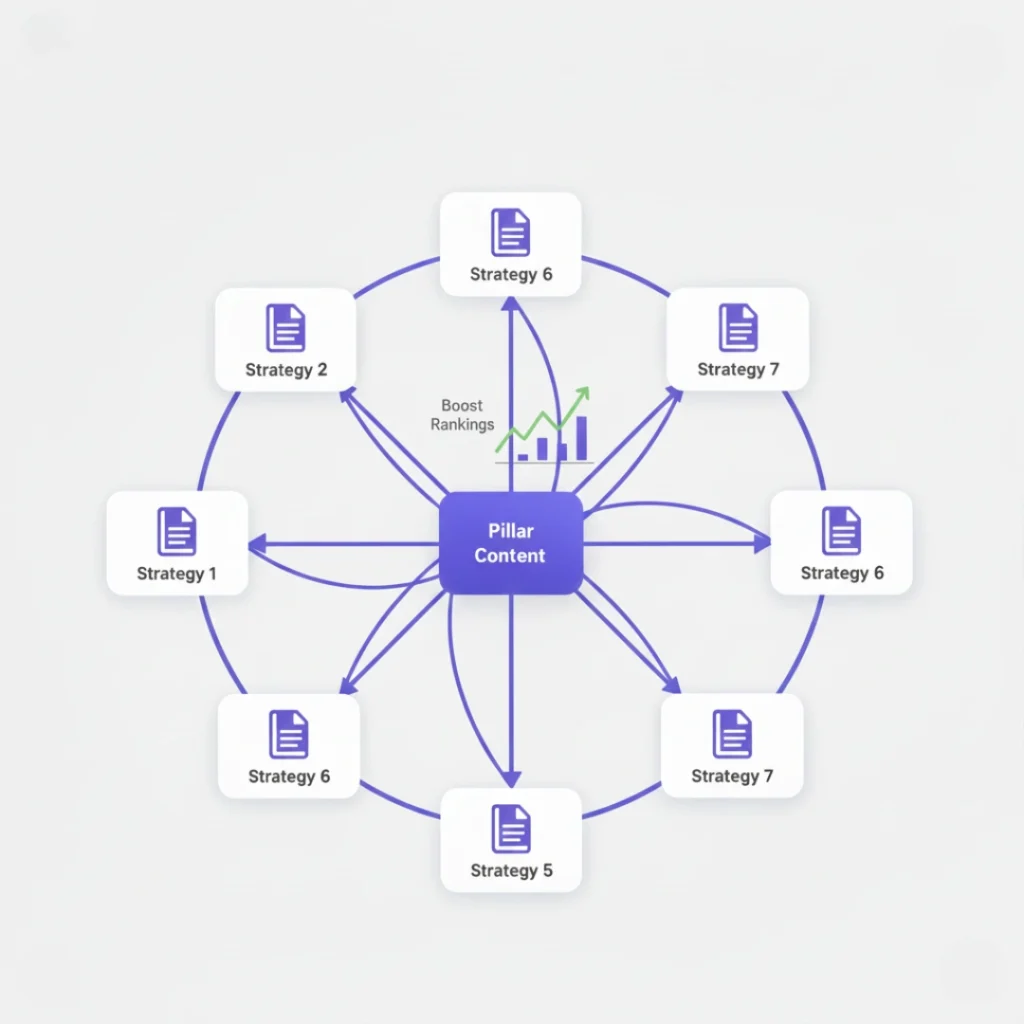
Content silos organize your website into distinct topic clusters, making it easier to create relevant internal link in WordPress structures. A content silo groups related articles under a main pillar page, creating a hierarchy that search engines love. This approach signals topical authority and helps you rank for competitive keywords.
Start by identifying your main topics or categories. For example, if you run a fitness blog, your silos might include nutrition, workout routines, and recovery methods. Create comprehensive pillar pages for each topic, then write supporting articles that dive deeper into specific subtopics. Link these supporting articles to the pillar page and to each other when relevant.
Here’s a practical example:
- Pillar Page: Complete Guide to Home Workouts
- Supporting Article 1: 15 Bodyweight Exercises for Beginners (links to pillar)
- Supporting Article 2: Creating a Home Gym on a Budget (links to pillar and Article 1)
- Supporting Article 3: 30-Minute HIIT Workouts at Home (links to pillar and Article 1)
This structure creates clear pathways for users and search engines. Each supporting article strengthens the pillar page’s authority while benefiting from the pillar’s ranking power. When building silos, aim for 5-10 supporting articles per pillar page, and update your internal links regularly as you publish new content. This methodical approach to internal linking for SEO makes your entire site more competitive.
Use Descriptive Anchor Text That Matches User Intent
Anchor text is the clickable text in a hyperlink, and it plays a crucial role in how search engines interpret your internal links. When you create an internal link in WordPress, choosing the right anchor text helps both users and Google understand what the linked page is about. Generic phrases like “click here” or “read more” waste valuable SEO opportunities.
Effective anchor text is specific, descriptive, and natural. Instead of “check out this article,” use “learn how to optimize your WordPress site speed.” This tells readers exactly what they’ll find and signals relevance to search engines. However, avoid over-optimization by using the exact same keyword-rich anchor text repeatedly, as this can appear manipulative.
Follow these guidelines for better anchor text:
- Be specific: “WordPress security best practices” is better than “security tips”
- Match the destination: The anchor text should accurately describe the linked page’s content
- Vary your phrases: Use synonyms and related terms instead of identical keywords
- Keep it natural: Write for humans first, then consider SEO
A WordPress plugin for internal linking can help you find opportunities to link with relevant anchor text automatically. LinkWhisper, for instance, suggests contextually relevant internal links as you write, making it easier to maintain consistency across hundreds of posts. Using anchor text optimization techniques ensures your internal links work harder for your SEO goals.
Find and Fix Orphaned Pages That Hurt Your Rankings
Orphaned pages are posts or pages on your WordPress site that have no incoming internal links. These isolated pages are difficult for search engines to find and often receive little to no organic traffic. Fixing orphaned content is one of the fastest ways to improve your site’s overall SEO performance.
Orphaned pages occur for several reasons. You might forget to link to new posts from related content, or old articles lose their internal links when you update or delete other pages. Whatever the cause, these pages exist in a vacuum, missing out on the link equity flowing through your site’s structure.
To identify orphaned pages in WordPress, you can use several methods:
- WordPress plugins: Tools like LinkWhisper automatically detect orphaned content and suggest relevant linking opportunities
- Google Search Console: Check your Coverage report for indexed pages with low crawl rates
- Screaming Frog: Crawl your site to identify pages with zero incoming internal links
- Manual audit: Review your older posts to see which ones rarely appear in your internal link structure
Once you’ve identified orphaned pages, prioritize fixing your best content first. Add 2-3 relevant internal links from related posts, update your navigation menus, or feature these pages in your sidebar. This simple action can dramatically improve their visibility. For comprehensive guidance, review how to identify and fix orphaned pages systematically to prevent traffic loss from isolated content.
Automate Internal Linking to Save Hours Every Week
Manual internal linking is time-consuming and inconsistent, especially as your WordPress site grows to hundreds or thousands of posts. Automation solves this problem by suggesting relevant links as you write and applying linking rules across your entire site. A WordPress plugin for internal linking transforms this tedious task into a streamlined process.
LinkWhisper offers several automation features that save significant time. The plugin suggests relevant internal links in real-time based on your content’s context, keywords, and existing site structure. You can accept, reject, or customize suggestions with a single click. For established sites, bulk linking allows you to add internal links to dozens of old posts simultaneously, updating your entire archive in minutes instead of days.
Advanced automation includes automatic linking rules. These rules create links automatically whenever specific keywords or phrases appear in your content. For example, you could set up a rule that automatically links “WordPress SEO tips” to your comprehensive SEO guide every time it’s mentioned. This ensures consistency without manual oversight.
Here’s what automation achieves:
- Saves 3-5 hours per week on manual linking tasks for active bloggers
- Maintains consistency across your entire site with standardized anchor text
- Reduces errors by eliminating forgotten links or broken connections
- Scales effortlessly as your site grows from 50 to 5,000 posts
The key is choosing tools that integrate smoothly with your workflow. Look for plugins compatible with Gutenberg, Classic Editor, and page builders like Elementor. Internal linking automation for WordPress helps you maintain a strong site structure without the manual overhead.
Monitor Your Link Health with Regular Audits
Creating internal link in WordPress is not a one-time task it requires ongoing maintenance. Regular link audits help you identify broken links, spot linking opportunities, and ensure your site structure remains strong as you add new content. A proactive approach prevents small issues from becoming major SEO problems.
Start by checking for broken internal links monthly. Broken links frustrate users and waste the link equity you’ve carefully built. Use tools like WordPress plugins, Google Search Console, or Screaming Frog to scan your site for 404 errors. Fix broken links by updating URLs, redirecting old pages, or removing links to deleted content.
Next, analyze your link distribution. Some pages naturally accumulate more internal links than others, but extreme imbalances can hurt your SEO. Identify pages with too few incoming links and strategically add connections from relevant content. Similarly, review pages with dozens of outgoing links to ensure you’re not diluting their value.
Key metrics to track during audits include:
- Pages with 0-2 incoming internal links: These need immediate attention
- Broken internal links: Fix these within 48 hours of discovery
- Pages with 20+ outgoing links: Review for relevance and quality
- Click-through rates on internal links: Measure which links drive engagement
Set up a quarterly review schedule to examine your entire internal linking structure. Track improvements in organic traffic, time on site, and pages per session as indicators of success. Using internal link analytics and reporting tools gives you the data needed to refine your strategy and demonstrate ROI.
Leverage Contextual Linking for Better User Experience
Contextual internal links appear naturally within your content, directing readers to related information at the moment they need it most. Unlike sidebar links or footer navigation, contextual links feel organic and encourage deeper engagement with your WordPress site. These links have higher click-through rates and keep visitors browsing longer.
Place internal links where they add genuine value to readers. If you’re explaining advanced SEO concepts, link to your beginner’s guide for readers who need foundational knowledge. When mentioning a tool or technique, link to your detailed tutorial. The goal is to anticipate questions and provide immediate answers through strategic linking.
Research shows that contextual links receive 3-4 times more clicks than navigational links. Readers trust recommendations that appear naturally in content more than promotional-looking links in sidebars. This trust translates into longer session durations, lower bounce rates, and higher conversion rates for monetized content.
Implement contextual linking effectively:
- Link early: Include important internal links within the first 200 words when relevant
- Link to depth: Connect to detailed guides, not just category pages
- Provide context: Use sentences that explain why readers should click
- Test placement: Position links where readers naturally pause to consider next steps
A balanced approach includes 3-5 contextual internal links per 1,000 words of content. More than this can feel forced and reduce click-through rates. Remember that quality matters more than quantity, each link should serve a clear purpose for your readers. Understanding internal linking opportunities helps you place contextual links where they’ll make the biggest impact.
Conclusion
Mastering internal link in WordPress doesn’t require technical expertise or endless hours of manual work. By implementing these seven strategies building content silos, using descriptive anchor text, fixing orphaned pages, automating repetitive tasks, conducting regular audits, and leveraging contextual linking you create a site structure that serves both search engines and human visitors. The result is improved rankings, increased organic traffic, and a better user experience across your entire WordPress site. Start with one strategy today, measure your results, and gradually expand your internal linking system. Ready to transform your WordPress internal linking? Explore how a WordPress plugin for internal linking can automate these strategies and save you valuable time every week.
Frequently Asked Questions
2. How do internal links improve WordPress SEO rankings?
Internal links help search engines discover and index your pages faster, distribute ranking power across your site, and establish topical authority. They signal content relationships to Google, improve crawl efficiency, and guide search engines to your most important pages for better visibility.
3. Can too many internal links hurt my WordPress site performance?
Excessive internal links can dilute link equity and appear manipulative to search engines. Pages with 50+ links may trigger spam filters and confuse readers. Focus on quality over quantity 3-5 contextual links per 1,000 words provide value without overwhelming visitors or hurting WordPress SEO performance.
4. Should I use exact match anchor text for internal link in WordPress?
Avoid using identical exact-match anchor text repeatedly, as it appears unnatural and manipulative. Instead, vary your anchor text with synonyms, related phrases, and natural language. Mix exact match with partial match and branded anchors to maintain a natural link profile that benefits SEO.
5. How do I find broken internal links on my WordPress site?
Use WordPress plugins, Google Search Console's Coverage report, or crawling tools like Screaming Frog to identify broken internal links. Check monthly for 404 errors, fix them immediately by updating URLs or adding redirects, and avoid bad internal links that frustrate users and waste link equity.
6. What is the difference between dofollow and nofollow internal links in WordPress?
WordPress internal links are dofollow by default, meaning they pass ranking power between pages. Nofollow links don't pass SEO value and are rarely needed internally. Use standard dofollow internal links to distribute authority effectively unless you specifically want to limit crawling to certain pages.
7. How long does it take to see SEO results from internal linking?
Internal linking improvements typically show results within 2-4 weeks as Google recrawls your site. Significant ranking changes may take 2-3 months depending on site size, competition, and existing authority. Consistent internal linking combined with quality content and semantic SEO strategies accelerates results.
8. Can internal links help reduce bounce rate on WordPress sites?
Yes, strategic internal links guide visitors to related content, increasing engagement and time on site. When readers find relevant next steps through contextual links, they explore multiple pages instead of leaving immediately. This reduces bounce rate, improves user experience, and signals quality to search engines.
9. Should I update old WordPress posts with new internal links?
Absolutely. Updating old posts with fresh internal links revitalizes archived content and improves site-wide connectivity. This practice signals activity to search engines, helps distribute authority to newer posts, and creates better user pathways. Regular updates prevent keyword cannibalization and strengthen overall site structure.
10. What is the ideal internal linking structure for WordPress blogs?
The ideal structure combines pillar pages with supporting content in topic clusters, uses descriptive anchor text, includes 3-5 contextual links per post, and ensures every page receives at least 2-3 incoming links. Avoid orphaned pages, maintain shallow site
Check if your site has the same issues.
Run a free audit right now. See your orphaned pages, broken links, and link health score in 60 seconds.
Check My Site

