
Contents
- 1 Table of Contents
- 2 What Is an Internal Link Checker for WordPress?
- 3 Why Internal Linking Matters for SEO and Site Structure
- 4 Best Internal Link Checker WordPress Plugins Reviewed
- 4.1 LinkWhisper: The Definitive Internal Link Checker and Builder
- 4.2 LinkBoss: AI-Powered Semantic Linking
- 4.3 Internal Link Juicer: Keyword-Based Automatic Linking
- 4.4 Linksy: NLP-Based Inbound and Outbound Suggestions
- 4.5 Manual Linking vs Automated WordPress Plugins
- 4.6 Features to Look for in a WordPress Internal Links Plugin
- 5 LinkWhisper: The Best Internal Linking Plugin for WordPress
- 6 How to Use a WordPress Internal Linking Plugin Effectively
- 7 Common Internal Linking Mistakes WordPress Site Owners Make
- 8 What Is the Best Free Internal Link Checker for WordPress?
- 9 How Do I Find and Fix Broken Internal Links in WordPress?
- 10 Conclusion
- 11 Frequently Asked Questions
- 11.1 What is an internal link checker WordPress plugin and why do I need one?
- 11.2 How does an internal link wordpress plugin help improve SEO rankings?
- 11.3 Is LinkWhisper the best internal link plugin for WordPress beginners?
- 11.4 How many internal links should each WordPress post have?
- 11.5 Can a wordpress internal linking plugin fix broken links automatically?
- 11.6 What is an orphan page and how does a plugin internal link wordpress tool help?
- 11.7 How does the internal link checker WordPress feature in LinkWhisper work?
- 11.8 Does a wordpress internal links plugin work with WooCommerce product pages?
- 11.9 How often should I audit my internal links with a wordpress internal linking plugin?
- 11.10 What is the difference between automatic linking rules and AI suggestions in an internal linking plugin?
Internal link checker WordPress tools are no longer optional for site owners who want to compete in today’s search landscape. According to Google’s official documentation on internal links, well-structured internal linking helps Googlebot discover and index pages more efficiently. This directly affects how your content ranks.
Introduction
If you are managing a content-heavy WordPress site, broken internal links, orphaned pages, and poor link architecture can silently kill your organic traffic. This guide covers the best WordPress internal links plugins available, how they work, what features matter most, and why LinkWhisper stands out as a top SEO tool for internal links. This deliveres the most powerful solution for automated internal link management. You will also learn practical strategies for using a wordpress internal linking plugin to strengthen your site structure from the ground up.
Key Takeaways
- Internal link health directly impacts crawlability and SEO rankings
- Automation saves hours of manual linking work per month
- Orphan page detection prevents dead-end content from being overlooked
- Best plugins combine checking, suggesting, and auto-linking in one dashboard
- LinkWhisper is the leading all-in-one internal linking plugin for WordPress
Table of Contents
- Introduction: Why Your WordPress Site Needs an Internal Link Checker
- What Is an Internal Link Checker for WordPress?
- Why Internal Linking Matters for SEO and Site Structure
- Best Internal Link Checker WordPress Plugins Reviewed
- LinkWhisper: The Best Internal Linking Plugin for WordPress
- How to Use a WordPress Internal Linking Plugin Effectively
- Common Internal Linking Mistakes WordPress Site Owners Make
- What Is the Best Free Internal Link Checker for WordPress?
- How Do I Find and Fix Broken Internal Links in WordPress?
- Conclusion
What Is an Internal Link Checker for WordPress?
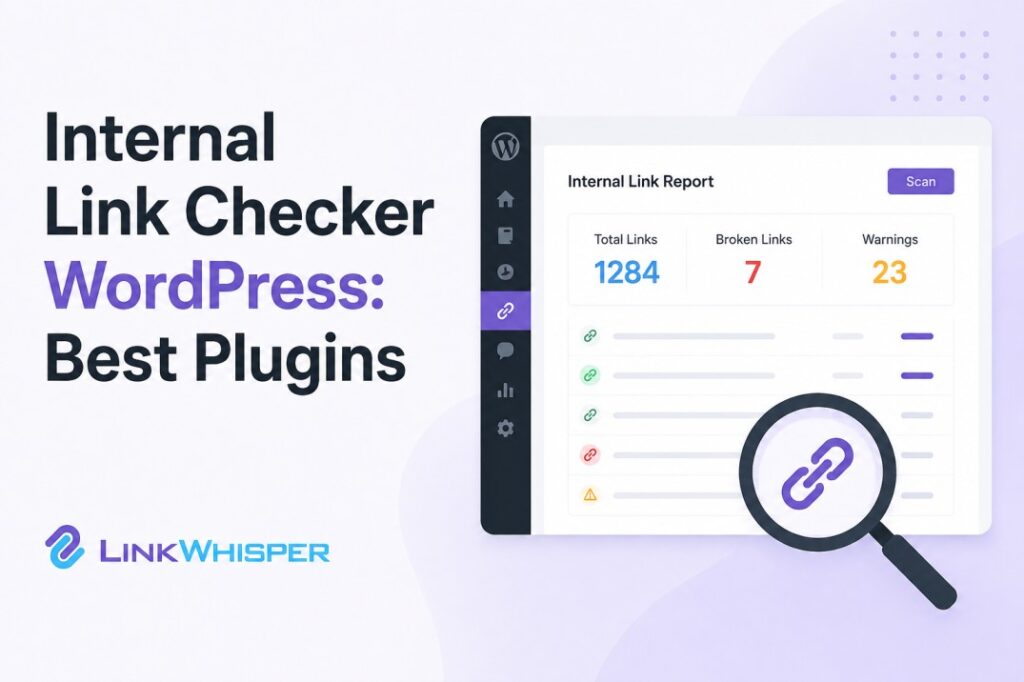
An internal link checker WordPress tool is a plugin or feature that scans your site to identify the current state of all links pointing from one page or post to another page or post within the same domain. These tools examine link health, anchor text distribution, link counts per page, and the presence of broken or redirected links. They give you a centralized view of how your site’s pages connect with each other.
Core Functions of an Internal Link Checker
Link Auditing
A link auditing feature scans every published post, page, and custom post type on your site to catalog all internal links. It records where each link originates, where it points, and whether the destination URL returns a valid HTTP response. This gives you a full picture of your site’s internal link map in one place.
Broken Link Detection
Broken internal links return 404 errors when a user or crawler requests the destination page. A good internal linking plugin flags these automatically so you can fix or redirect them before they damage your crawl budget or user experience. Catching broken links early prevents compounding SEO damage over time.
Orphan Page Identification
Orphaned pages have no internal links pointing to them from any other page on your site. Search engine crawlers discover pages primarily through links, so an orphaned page may never get indexed or ranked. An internal link checker surfaces these isolated pages so you can connect them to relevant content.
Anchor Text Analysis
Anchor text signals topical relevance to search engines. An internal link checker reviews how anchor text is distributed across your site, revealing over-optimized patterns, missing keywords, or generic phrases that weaken your internal link strategy. Balanced anchor text distribution strengthens topical authority.
Types of Internal Link Checker Tools
Standalone Checker Plugins
These plugins focus exclusively on auditing and reporting existing internal links. They produce reports showing link counts, broken links, and pages with too few or too many internal links. They are useful for diagnosing problems but typically do not help you add new links.
All-in-One Linking Plugins
All-in-one plugins like LinkWhisper combine link checking, smart suggestions, automatic link insertion, and bulk link editing in a single dashboard. These tools eliminate the need to switch between multiple plugins and provide a complete workflow for managing your plugin internal link wordpress strategy.
SEO Suite Reporting Features
Some broader SEO tools include basic internal link reporting as part of a larger feature set. These reports are often limited in depth and do not provide actionable suggestions or automation. For serious internal linking work, a dedicated best internal link plugin WordPress solution delivers far more value.
Why Internal Linking Matters for SEO and Site Structure
Internal linking is one of the most underutilized levers in WordPress SEO. Google’s crawlers follow links to discover new content, and the structure of your internal links communicates which pages are most important on your site. A strategic wordpress internal linking plugin helps you intentionally shape how link equity flows across your content.
Crawlability and Indexation Benefits
Crawl Budget Optimization
Google allocates a finite crawl budget to each website, meaning it will not crawl every page on every visit. Internal links guide crawler attention to your most important pages. When you use a wordpress plugin internal links tool to ensure every important page has multiple inbound internal links, you protect those pages from being deprioritized during crawls.
Discovery Speed for New Content
When you publish new content, search engines discover it faster if existing high-authority pages link to it. An internal link checker identifies where new posts lack inbound links and alerts you so you can add connections immediately. This accelerates the indexation timeline for fresh content.
Index Coverage Expansion
Sites with strong internal link structures tend to have higher percentages of their pages indexed. Sparse linking leaves many pages in limbo. A dedicated internal link wordpress plugin ensures that no page goes unlinked and every piece of content has a clear path from your homepage or pillar content.
PageRank and Link Equity Distribution
How PageRank Flows Internally
PageRank, the algorithm Google uses to assess page importance, flows through links. Each page passes a portion of its authority to the pages it links to. By building a strong network of internal links, you distribute ranking power from your highest-authority pages to the ones you most want to rank. This is one of the most direct and controllable SEO levers available.
Silo and Topic Cluster Architecture
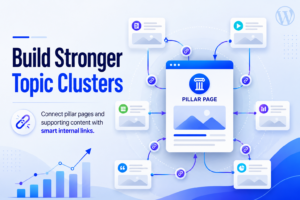
Modern SEO favors topic clusters, where a pillar page covers a broad topic and cluster pages cover related subtopics. Internal links connect cluster pages back to the pillar and to each other, reinforcing topical authority in Google’s eyes. An internal linking plugin helps you visualize and maintain this architecture consistently across a growing content library.
Preventing Authority Leakage
Excessive outbound links and missing internal links can cause authority to flow away from your most important pages. Regularly auditing your internal link structure with a best internal link plugin WordPress tool ensures that link equity is concentrated where it creates the most SEO impact. Strategic pruning and addition of links maximizes the value of every page you create.
User Experience and Engagement Signals
Reducing Bounce Rate Through Relevant Links
When visitors find contextually relevant internal links within your content, they are more likely to continue reading on your site. This reduces bounce rate and increases pages per session, both of which are positive engagement signals. A well-implemented wordpress internal links plugin adds links that genuinely serve the reader, not just the algorithm.
Time on Site Improvement
Strategic internal links guide visitors through a logical content journey, from introductory posts to deeper resources. This keeps users on your site longer and increases the probability of conversion. Internal links act as a built-in recommendation engine, surfacing the most relevant next step for every reader.
Navigation and Content Discovery
Not every visitor arrives at your homepage. Many land on inner pages through search or social media. Internal links act as a secondary navigation system, helping these visitors explore more of your content. An audit tool ensures that every entry point on your site offers clear pathways to other relevant pages.
Wondering how search engines really move through your website? The Link Whisper helps you map and optimize that flow
Best Internal Link Checker WordPress Plugins Reviewed
Choosing the right best internal link plugin WordPress solution depends on your site size, technical comfort level, and whether you need basic auditing or full automation. Below is a structured review of the leading options available for WordPress site owners today.
LinkWhisper: The Definitive Internal Link Checker and Builder
What It Does
This SEO interlinking free tool is the most comprehensive wordpress internal linking plugin available. It combines AI-powered link suggestions, automatic link insertion rules, broken link detection, orphan page reports, and a full link health dashboard in one plugin. It works with Gutenberg, Classic Editor, Elementor, WooCommerce, and all major page builders. Whether you manage a personal blog or an enterprise content site, LinkWhisper scales to your needs.
Key Strengths
The AI suggestion engine analyzes your content and recommends contextually relevant internal links as you write or edit. You can accept suggestions with a single click, making the linking process fast and efficient. The automatic linking rules feature inserts links site-wide based on keywords you define, which means every new post containing a target phrase will automatically link to your chosen destination page without any manual effort.
Link Reporting Dashboard
LinkWhisper’s reporting dashboard shows you every page’s inbound and outbound link counts, flags pages with zero inbound links, and highlights broken links. You can sort and filter by link count, post type, or linking status. This gives you a complete and actionable audit of your entire site’s internal link health without leaving WordPress. You can explore more about improving Google rankings through better internal site structure to understand the full SEO impact of these features.
LinkBoss: AI-Powered Semantic Linking
What It Does
LinkBoss uses NLP and vector embeddings to read your posts, pages, and custom post types as related entities rather than matching on keywords alone. It can build links in bulk across hundreds of pages in a single run and includes silo and archive-silo tools for grouping content by topic.
Key Strengths
Its semantic matching can surface link opportunities even when the destination page does not share an exact keyword with the source content, and an anchor manager helps flag over-used or competing anchor text. Links are written directly into your WordPress database, so they remain in place even if you later deactivate the plugin.
Where It Differs from LinkWhisper
LinkBoss runs much of its analysis through a connected cloud dashboard rather than entirely inside wp-admin, and its broken link detection is lighter than LinkWhisper’s continuous 404 monitoring. Its credit-based pricing model for automatic insertions is also a different structure to budget for compared to LinkWhisper’s flat plugin license.
Internal Link Juicer: Keyword-Based Automatic Linking
What It Does
Internal Link Juicer takes a more manual, keyword-first approach. You assign target keywords to each post or page, and the plugin automatically links any future content that contains those keywords. A free version on WordPress.org covers the basics, with category and tag linking reserved for the Pro upgrade.
Key Strengths
An anchor text diversification feature rotates between multiple phrases for the same keyword so links do not look repetitive to search engines. A statistics dashboard, blacklist and whitelist controls, and a lightweight index keep page load times fast even on larger sites.
Where It Differs from LinkWhisper
Internal Link Juicer does not analyze content semantically the way LinkWhisper’s AI suggestion engine does, so keyword setup is entirely manual and the plugin will not surface a relevant page if you have not already defined a matching keyword for it. It also does not include a built-in broken link or orphan page report, so you would need a separate tool to audit overall link health.
Linksy: NLP-Based Inbound and Outbound Suggestions
What It Does
Linksy combines natural language processing with target keywords to suggest both inbound links (other pages that should link to your new post) and outbound links (places within your new post that should link out). It writes links directly into post content, so they persist even if the plugin is removed later.
Key Strengths
A built-in two-way linking prevention setting stops pairs of posts from endlessly linking back and forth, which can look manipulative to search engines. Linksy also breaks down existing internal and external links on a page so you can review, edit, or remove them from one screen.
Where It Differs from LinkWhisper
Reviewers comparing the two plugins note that Linksy does not currently offer click tracking on internal links, a feature LinkWhisper includes natively. Linksy is a newer entrant to the market, so its broken link detection and bulk-editing tools are less mature than LinkWhisper’s longer-established reporting dashboard.
Manual Linking vs Automated WordPress Plugins
The Cost of Manual Internal Linking
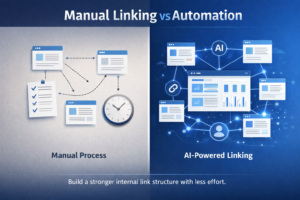
Many site owners start by adding internal links manually. For a site with fewer than 50 posts, this is manageable. But as your content library grows to hundreds or thousands of posts, manually reviewing every article for linking opportunities becomes impractical. A single content audit on a 500-post site can take dozens of hours with a manual approach.
Time Savings with Automation
Automated wordpress plugin internal links tools dramatically reduce the time required to manage internal links. LinkWhisper users report saving hours per week by using AI suggestions and automatic linking rules. Instead of manually searching for relevant posts and inserting links, the plugin surfaces opportunities instantly and handles bulk insertion across your entire archive.
Accuracy and Relevance
Automated tools trained on your site’s content produce contextually relevant suggestions that match the semantic intent of each page. This is superior to random manual linking because the suggestions are based on actual content analysis, not guesswork. The result is a more coherent and strategically sound internal link architecture.
Features to Look for in a WordPress Internal Links Plugin
Broken Link Detection and Alerts
Any serious internal link checker WordPress plugin must identify broken links automatically. Look for tools that send alerts when a link returns a 404 status or is redirected multiple times. Proactive detection prevents broken links from sitting unnoticed for months and damaging your crawl health.
Orphan Page Reporting
The ability to identify pages with zero inbound internal links is critical for comprehensive site health. Orphaned content is essentially invisible to search engines navigating your site through links. A plugin that surfaces these pages lets you prioritize which ones to connect to your main content clusters first. You can learn more about how to find and fix orphan pages in WordPress with a complete step-by-step guide.
Bulk Link Editing
When you change a URL, rebrand a product, or retire a category, you need to update every internal link pointing to the old destination. A bulk link editing feature lets you make those changes across your entire site in minutes rather than hours. This is an essential capability for any site that evolves over time.
Anchor Text Customization
A strong internal linking plugin lets you choose or edit the anchor text for every suggested link. Keyword-rich anchor text reinforces topical relevance, while varied anchor text prevents over-optimization. The best plugins give you full control over anchor text at both the individual link and site-wide rule levels.
Compatibility with Page Builders
Your plugin must work with the editor or page builder you use. The application is build to supports Gutenberg, Classic Editor, Elementor, and WooCommerce product pages natively, ensuring that link suggestions appear regardless of how your content is built.
LinkWhisper: The Best Internal Linking Plugin for WordPress
It can solve the internal linking problem for WordPress sites of all sizes. Unlike general SEO tools that treat internal linking as an afterthought, LinkWhisper was designed from the ground up to make the entire internal link workflow faster, smarter, and more effective. It is the best internal link plugin WordPress users can deploy for both day-to-day linking and large-scale site audits.
AI-Powered Internal Link Suggestions
How the Suggestion Engine Works
LinkWhisper’s AI engine reads the content of the post you are currently editing and compares it against all other published content on your site. It identifies pages with semantically related content and recommends them as internal link targets. Suggestions appear directly within the WordPress editor, so you never have to leave your writing workflow to find linking opportunities.
Contextual Relevance Score
Each suggestion is ranked by contextual relevance, meaning you see the most appropriate linking opportunities first. The engine considers keyword overlap, topic similarity, and existing link patterns to ensure suggestions add genuine navigational and SEO value. This reduces the noise of irrelevant suggestions that waste your time.
One-Click Link Acceptance
Once you see a suggestion you want to use, you accept it with a single click. LinkWhisper automatically inserts the link with the appropriate anchor text into your content. You can also edit the anchor text before accepting, giving you full control while keeping the workflow fast. This single-click approach is what makes LinkWhisper so effective for large content libraries.
Automatic Internal Linking Rules
Setting Up Keyword-Based Rules
LinkWhisper allows you to define automatic linking rules based on keywords or phrases. When any post or page on your site contains that keyword, LinkWhisper automatically inserts a link to your designated destination page. This is ideal for affiliate sites, e-commerce stores, and content hubs where certain keywords should always link to a specific resource or product page.
Rule Frequency and Limits
You can control how many times each rule fires per post and whether it applies to new content, existing content, or both. These controls prevent over-linking and ensure your site-wide link patterns remain natural and editorially sound. Over-linking to the same page with the same anchor text can appear manipulative to search engines, so granular control matters.
Retroactive Linking Across Archives
One of LinkWhisper’s most powerful capabilities is its ability to apply auto-linking rules retroactively across your entire content archive. A rule you set today will find all matching instances across every published post and insert links automatically. For site owners with thousands of posts, this capability alone can transform an underlinked archive into a well-connected content network in minutes.
Link Reporting and Health Dashboard
Inbound and Outbound Link Counts
The LinkWhisper reporting dashboard shows you exactly how many inbound and outbound internal links each page has. You can see at a glance which pages are well-connected and which are isolated. Sorting by inbound link count reveals your orphaned or underlinking content instantly, making it easy to prioritize your linking work.
Broken Link and 404 Reports
LinkWhisper continuously monitors your internal links and flags any that return errors. The 404 report shows which pages contain broken internal links and which specific links are broken, so you can fix them directly from the dashboard. This proactive monitoring prevents broken links from compounding and damaging your site’s crawl health over time. Understanding the difference between 410 and 404 status codes can also help you decide whether to redirect or remove broken link destinations entirely.
Click Tracking and Link Performance
LinkWhisper includes click tracking that shows you which internal links are actually being clicked by your visitors. This data reveals which linking patterns drive engagement and which links are being ignored. You can use this insight to refine your anchor text, reposition links within content, or remove links that add no navigational value to users.
WooCommerce and E-commerce Internal Linking
Product Page Linking
For WooCommerce store owners, internal linking between product pages, category pages, and blog content is critical for both SEO and conversion rate optimization. LinkWhisper supports WooCommerce natively, generating link suggestions for product descriptions, category pages, and supporting blog content. This creates a seamless link architecture that guides shoppers through your catalog while strengthening your e-commerce SEO.
Category and Taxonomy Links
LinkWhisper recognizes WooCommerce taxonomies and can suggest links between product categories, tags, and attributes. This is particularly valuable for stores with large catalogs where manual cross-linking between related categories would take enormous effort. Automated suggestions surface these opportunities instantly.
Blog to Product Page Linking
Many e-commerce brands use content marketing to drive organic traffic. LinkWhisper helps you connect informational blog posts to relevant product pages with automatic linking rules. When a blog post mentions a product keyword, LinkWhisper inserts a contextual link to that product page, improving both the user journey and your internal link structure simultaneously.
How to Use a WordPress Internal Linking Plugin Effectively
Installing a wordpress internal links plugin is only the first step. Getting the most out of it requires a strategic approach to how you use its features. The following workflow will help you maximize the SEO and user experience benefits of your internal linking efforts.
Running Your Initial Link Audit
Step 1: Install and Activate LinkWhisper
After installing LinkWhisper from the WordPress plugin directory or from the LinkWhisper website, activate it and allow it to index your existing content. This initial indexing process scans all your published posts and pages to build a complete map of your current internal link structure. The time this takes depends on your site size.
Step 2: Review the Link Reports Dashboard
Navigate to the LinkWhisper reporting section to see a full breakdown of your site’s internal link health. Look for pages with zero inbound links, pages with unusually high outbound link counts, and any broken links or 404 errors. This initial audit gives you a prioritized list of the most urgent issues to fix first.
Step 3: Fix Orphaned Pages First
Orphaned pages represent the most immediate opportunity for SEO improvement. For each page with zero inbound links, use LinkWhisper’s suggestions to find two to three relevant pages that should link to it. Adding even one or two inbound internal links to an orphaned page can result in faster indexation and improved ranking potential.
Building Topic Clusters with Internal Links
Identifying Your Pillar Pages
Before building your internal link architecture, identify the pillar pages for each major topic on your site. These are typically your most comprehensive, high-value pages that you want to rank for broad, competitive keywords. Every cluster page related to that topic should have at least one internal link pointing back to its pillar page.
Mapping Cluster Content
Use LinkWhisper’s reporting to identify all the posts related to each pillar topic. Check that each cluster post links to the pillar page and that the pillar page links to every key cluster post. This bidirectional linking reinforces the topic cluster structure and maximizes the SEO value of your content hub. You can explore WordPress multi-site SEO structure and cross-site strategy for a deeper framework on building topic clusters across complex site architectures.
Maintaining Cluster Architecture Over Time
As you publish new content, LinkWhisper’s AI suggestions automatically connect new posts to existing cluster content. You do not need to manually search for where new articles fit. The plugin surfaces suggestions that align with your existing topic clusters, making it easy to maintain architectural coherence as your site grows.
Optimizing Anchor Text Across Your Site
Keyword-Rich Anchor Text
When using LinkWhisper’s suggestions, choose anchor text that includes your target keywords for the destination page. Keyword-rich anchor text reinforces the topical relevance of the linked page in the eyes of search engines. Avoid using generic phrases as anchor text for important destination pages.
Anchor Text Variety
While keyword-rich anchor text is valuable, using the exact same phrase for every link pointing to a page looks unnatural. Vary your anchor text by using synonyms, partial phrases, and natural language variations. LinkWhisper allows you to customize anchor text for each suggestion, making it easy to maintain healthy variety across your link profile.
Avoiding Over-Optimization
Over-optimized anchor text, where the same exact keyword phrase is used repeatedly as anchor text for the same page, can trigger algorithmic scrutiny. A healthy mix of exact match, partial match, and branded anchor text creates a natural-looking internal link profile. Use LinkWhisper’s anchor text reports to monitor your distribution and adjust where needed.
Common Internal Linking Mistakes WordPress Site Owners Make
Even experienced WordPress site owners make internal linking mistakes that limit their SEO potential. Recognizing these patterns and knowing how to fix them with the right plugin internal link wordpress tool can significantly improve your site’s performance.
Over-Linking and Under-Linking
The Over-Linking Problem
Adding too many internal links to a single post dilutes the value of each individual link and can create a poor reading experience. When every sentence contains a link, users struggle to identify which links are truly important. Search engines may also discount the value of links on pages with excessively high link counts. A good rule of thumb is to aim for three to five internal links per 1,000 words of content. Tracking this ratio is far easier with an internal link wordpress plugin that reports link counts automatically across every page.
The Under-Linking Problem
The opposite problem is equally damaging. Posts with zero or one internal link fail to pass authority to other pages and offer no navigational value beyond the page itself. Under-linked content is common on sites where internal linking has been neglected, particularly in older posts published before the site owner understood its SEO value. LinkWhisper’s audit reports make it easy to find and fix under-linked content at scale.
Finding the Right Balance
The ideal internal link density depends on your content length, the density of related content on your site, and the specific role each post plays in your topic cluster strategy. LinkWhisper’s reporting helps you identify outliers at both ends of the spectrum so you can calibrate your linking strategy appropriately. A capable plugin internal link wordpress tool surfaces these outliers automatically, saving you hours of manual review every month.
Ignoring Broken Internal Links
Why Broken Links Accumulate
Broken internal links accumulate naturally over time as you delete posts, change URLs, or restructure your site. Without a internal link checker WordPress plugin running continuously, these broken links can go undetected for months or even years. According to web development best practices for links, crawlers that encounter broken links simply stop following that path, which means the pages behind those broken links may not be recrawled.
The SEO Cost of Broken Links
Every broken internal link represents a lost opportunity to pass link equity and guide crawler attention. A page that previously benefited from multiple inbound internal links can lose significant crawl priority if those links become broken. Regular audits with an automated wordpress internal linking plugin prevent this decay from going unnoticed.
Fixing Broken Links Efficiently
LinkWhisper’s broken link report shows you exactly which pages contain broken links and which specific link targets are returning errors. You can update or remove each broken link directly from the dashboard without opening individual posts for editing. This bulk approach to broken link management saves enormous time on large sites.
Linking Without a Strategic Plan
Random vs Strategic Linking
Many site owners add internal links randomly, linking to whatever post happens to come to mind when writing. This produces an inconsistent link architecture where authority flows unpredictably and topic clusters lack clear definition. Strategic internal linking, supported by a best internal link plugin WordPress tool, ensures every link serves a specific architectural purpose.
Failing to Link Deep Pages
Pages buried deep in your site architecture, requiring many clicks to reach from the homepage, often receive the least link equity. Intentionally linking to these deep pages from high-authority content brings them into the active link network and improves their ranking potential. LinkWhisper’s link depth reports help you identify which pages need to be elevated within your link structure.
Not Updating Links After Content Changes
When you update or consolidate content, the internal links pointing to changed pages need updating too. Neglecting this creates redirect chains, broken links, and diluted link equity. A wordpress plugin internal links tool with URL change tracking and bulk editing capabilities ensures your link network stays accurate even as your site evolves. Using strategic internal link building approaches combining LinkWhisper and Ahrefs can help you systematically maintain link quality across all your content.
What Is the Best Free Internal Link Checker for WordPress?
This is one of the most common questions site owners ask when they first start thinking about internal link health. The honest answer is that truly free solutions offer limited functionality, but understanding what is available helps you make an informed decision about when to invest in a premium solution. Many beginners search specifically for a free internal link wordpress plugin before deciding whether a premium upgrade is worth the investment.
Free Internal Link Checker Options for WordPress
Built-in WordPress Link Reports
WordPress itself does not include a native internal link auditing feature. You can see outbound links in the editor, but there is no built-in dashboard showing which pages are orphaned, which links are broken, or how link equity is distributed across your site. For basic sites with fewer than 20 posts, manual review may be sufficient, but it is not scalable. This is why most growing sites eventually adopt a dedicated plugin internal link wordpress solution instead of relying on manual review alone.
Google Search Console as a Supplementary Tool
Google Search Console provides a limited view of your internal links through its Links report. You can see which pages have the most inbound internal links and which anchor texts are used most frequently. However, Google Search Console does not identify broken links, surface orphaned pages, or provide suggestions for improving your link architecture. It is a useful supplement but not a replacement for a dedicated internal link checker WordPress plugin.
When Free Is Not Enough
Free tools typically offer basic auditing without suggestions, automation, or bulk editing. For a growing site, the time you spend manually managing links with free tools far exceeds the cost of a premium solution like LinkWhisper. The ROI calculation favors automation almost immediately for any site publishing content regularly. You can read about the best Ahrefs alternatives for internal link auditing to understand the full landscape of available options and why dedicated plugins outperform free alternatives.
Why Upgrading to a Premium WordPress Internal Links Plugin Makes Sense
Time Value of Automation
Consider that a typical SEO professional spending two hours per week on manual internal linking could instead complete that work in 15 minutes using LinkWhisper’s automation features. Over the course of a year, that represents an enormous time saving that translates directly into additional content creation, strategy work, or client service capacity.
Scale Without Proportional Effort
A premium wordpress internal linking plugin scales with your content without requiring proportionally more effort. Whether you publish 5 posts per month or 50, the automation handles the linking work without additional time investment. Free and manual approaches break down as your site scales, while premium tools become more valuable the larger your content library grows.
Comprehensive Reporting That Drives Decisions
Premium plugins provide the kind of comprehensive reporting that informs strategic decisions. Knowing which pages are orphaned, which links are broken, and how authority is flowing across your site allows you to make targeted improvements that produce measurable SEO results. This level of insight is simply not available through free tools or manual audits.
How Do I Find and Fix Broken Internal Links in WordPress?
Broken internal links are one of the most common and damaging technical SEO issues on WordPress sites. Finding and fixing them quickly is essential for maintaining crawl health, preserving link equity, and delivering a professional user experience.
Finding Broken Internal Links in WordPress
Using LinkWhisper’s Broken Link Report
LinkWhisper’s broken link detection runs continuously in the background, checking the HTTP status of every internal link destination on your site. When a link returns a 404 error or triggers a redirect chain, it is flagged in the reporting dashboard with details about which page contains the broken link and which URL is the broken target. This automated detection means you are always aware of link health issues without running manual audits.
Filtering by Link Status
The LinkWhisper dashboard lets you filter your link report by status, showing only broken links, only redirected links, or only valid links. This filtering capability makes it fast to focus on the specific issues that need attention without wading through hundreds of healthy links. You can prioritize fixing broken links on your highest-traffic or highest-authority pages first for maximum SEO impact.
Using Google Search Console to Cross-Reference
Google Search Console’s Coverage report can reveal pages that are not being indexed, which sometimes indicates that broken link chains are preventing discovery. Cross-referencing your Search Console coverage data with LinkWhisper’s broken link report helps you prioritize which broken links are having the most significant impact on your crawl and indexation performance.
Fixing Broken Internal Links Efficiently
Direct Link Replacement
The simplest fix for a broken internal link is to update it to point to a valid, relevant destination. If the original destination page still exists but at a different URL, update the link target directly. LinkWhisper allows you to update link targets across multiple posts from a single dashboard view, eliminating the need to open and edit each post individually.
Redirect Implementation
If you have deleted a page that many internal links pointed to, implementing a 301 redirect from the old URL to the most relevant existing page is an efficient solution. This preserves the link equity that was flowing to the deleted page and prevents users and crawlers from encountering a dead end. You can use LinkWhisper’s URL changer tool to update all internal links pointing to old destinations in bulk, saving significant time when restructuring your site.
Link Removal for Irrelevant Destinations
In some cases, the best fix for a broken internal link is simply to remove it if the original destination is no longer relevant. Keeping a link to an irrelevant page just to avoid the broken link is worse than having no link at all. LinkWhisper makes it easy to delete specific internal links from your posts without opening the full post editor.
Preventing Future Broken Internal Links
URL Consistency Best Practices
The best way to prevent broken internal links is to maintain URL consistency after publishing. Avoid changing post slugs or page URLs once they have been published and linked to from other content. If a URL change is necessary, implement a 301 redirect immediately and use LinkWhisper’s bulk link editor to update all internal links pointing to the old URL.
Pre-Delete Audit
Before deleting any post or page, use LinkWhisper’s reporting to identify how many internal links point to it. If multiple pages link to the content you are about to delete, either update those links to point to a replacement page or implement a redirect before deleting. This proactive approach prevents broken links from appearing in the first place.
Scheduled Audits as a Maintenance Habit
Even with automation, scheduling a monthly review of your link health dashboard is good practice. LinkWhisper’s continuous monitoring catches most issues automatically, but a regular manual review ensures nothing slips through and that your link architecture is evolving in the direction you intend. Consistent maintenance keeps your site in top technical SEO condition year-round.
Conclusion
Using the right internal link checker WordPress plugin transforms one of the most tedious and neglected aspects of SEO into a streamlined, strategic advantage. From detecting broken links and orphaned pages to automating suggestions and bulk editing your archive, a dedicated wordpress internal linking plugin like LinkWhisper gives you complete visibility and control over your site’s internal link health. Whether you are a blogger, affiliate marketer, or agency managing multiple WordPress sites, investing in the best internal link plugin WordPress offers a reliable path to stronger site architecture, faster indexation, and improved rankings. Start your internal linking audit today with LinkWhisper and see how quickly a well-connected site structure drives measurable SEO results. Learn more about how site owners have achieved a 10x traffic increase through better internal linking and take the next step toward a healthier, more authoritative WordPress site.
Frequently Asked Questions
How does an internal link wordpress plugin help improve SEO rankings?
A internal link wordpress plugin strengthens your SEO by distributing PageRank across your site, reinforcing topic cluster architecture, and ensuring every page is reachable through internal links. Better link structure means better crawl coverage, faster indexation, and stronger topical authority signals for Google.
Is LinkWhisper the best internal link plugin for WordPress beginners?
Yes. LinkWhisper is designed for all skill levels. Its one-click AI suggestions, plain-language reports, and simple dashboard make it accessible for beginners while offering advanced automation features that experienced SEOs using an SEO checklist for WordPress rely on for large-scale site management.
How many internal links should each WordPress post have?
Most SEO best practices recommend three to five internal links per 1,000 words of content. The exact number depends on your content length and how many related pages your site contains. Prioritize relevance and user value over hitting a specific link count on every post.
Can a wordpress internal linking plugin fix broken links automatically?
LinkWhisper detects broken internal links automatically and flags them in your dashboard. While it does not auto-repair links without your input, it surfaces exactly which pages contain broken links and which URLs are broken, making the fixing process fast and requiring minimal manual effort from you.
What is an orphan page and how does a plugin internal link wordpress tool help?
An orphan page has no inbound internal links from any other page on your site. A plugin internal link wordpress tool like LinkWhisper identifies these isolated pages and suggests relevant content to link from, ensuring every page enters your internal link network and remains discoverable by search engines.
How does the internal link checker WordPress feature in LinkWhisper work?
LinkWhisper's internal link checker WordPress feature continuously monitors all published content, tracking HTTP responses for every internal link destination. It reports link counts per page, flags 404 errors and redirect chains, and surfaces orphaned content, all from a single dashboard inside your WordPress admin panel.
Does a wordpress internal links plugin work with WooCommerce product pages?
LinkWhisper works natively with WooCommerce, generating internal link suggestions for product descriptions, category pages, and supporting blog content. This creates strong cross-linking between your store and editorial content, improving both your e-commerce SEO and the overall performance of your site's broader SEO plugin strategy simultaneously.
How often should I audit my internal links with a wordpress internal linking plugin?
Running a full audit monthly is good practice for most sites. LinkWhisper monitors your links continuously and flags new broken links as they appear, so urgent issues are caught immediately. A monthly review of your link health dashboard ensures your architecture evolves intentionally as your site grows with automatic internal linking tools doing the heavy lifting.
What is the difference between automatic linking rules and AI suggestions in an internal linking plugin?
AI suggestions appear as you edit individual posts, recommending specific links based on content analysis. Automatic linking rules insert links site-wide based on keywords you define, applying retroactively to your entire archive. Both features work together in LinkWhisper to give you comprehensive coverage across all your content.
Check if your site has the same issues.
Run a free audit right now. See your orphaned pages, broken links, and link health score in 60 seconds.
Check My Site

