Most orphan pages SEO advice stops at finding the pages, which is the easy part. This case study follows an example site through the decisions that come next. Everything below is illustrative. The site is invented, the counts are example figures, and no real traffic or ranking results are claimed. We start with the map used to find them, then triage each page, reconnect the keepers and scan again. You can run the same routine on any WordPress blog this month, whatever its size or age.
Key Takeaways
- Good orphan pages SEO work starts with triage, because not every unlinked post deserves to come back.
- An internal link map shows the structure, but you still need to compare it with your WordPress post list before you trust the count.
- Link each recovered page from a strong related post, since a link from a buried post leaves crawl depth little better.
Meet the Example Site and Find Its Orphans
Our invented site is Fernhill Garden Notes, a home gardening blog with about 400 posts built up over several years. Its owner suspected that older guides had dropped out of sight after a redesign. The first job was to see the structure as a whole and to stop guessing from memory about which posts were unlinked.
This illustrative example uses invented figures throughout. The owner ran a free internal link map, which draws a site as a network of pages and connections with no plugin to install. Link Whisper says it renders in under two minutes. Hubs appeared around the seasonal planting guides, while orphans showed as red nodes. On the free map those nodes stay blurred until unlocked, so the owner used it to find where the orphans clustered and took the page level list from elsewhere.
That list came from the Orphaned Posts report in the Link Whisper plugin, which scans posts, pages and custom post types and sorts them by publication date. You can reach a similar list by hand with a crawl export and a spreadsheet. It just takes longer. Either way, the example site showed 38 pages with no inbound internal links.
The owner then checked that number against two other lists: the WordPress post list and the XML sitemap. Any crawl based view has limits, so a simple comparison catches pages it cannot see. Our guide to auditing a sitemap explains the second check. Google notes that a sitemap helps search engines discover URLs without guaranteeing that they get crawled or indexed. So a listed page is not a recovered page.
Orphan Pages SEO Triage: Relink, Merge, Redirect or Retire
Reconnecting all 38 pages would have spread links onto content that did not deserve them. The owner put every page through one question first: would a reader searching this topic be glad to land here? The answer sorted the example list into four groups, and each group got a different kind of repair and follow up check.
Before sorting, the owner verified candidates in analytics and Search Console, as our general guide to the recovery steps suggests. Evergreen guides and useful tutorials went straight into the relink group. In this example, 19 pages stayed, including a solid guide to pruning fruit trees that a redesign had left stranded.
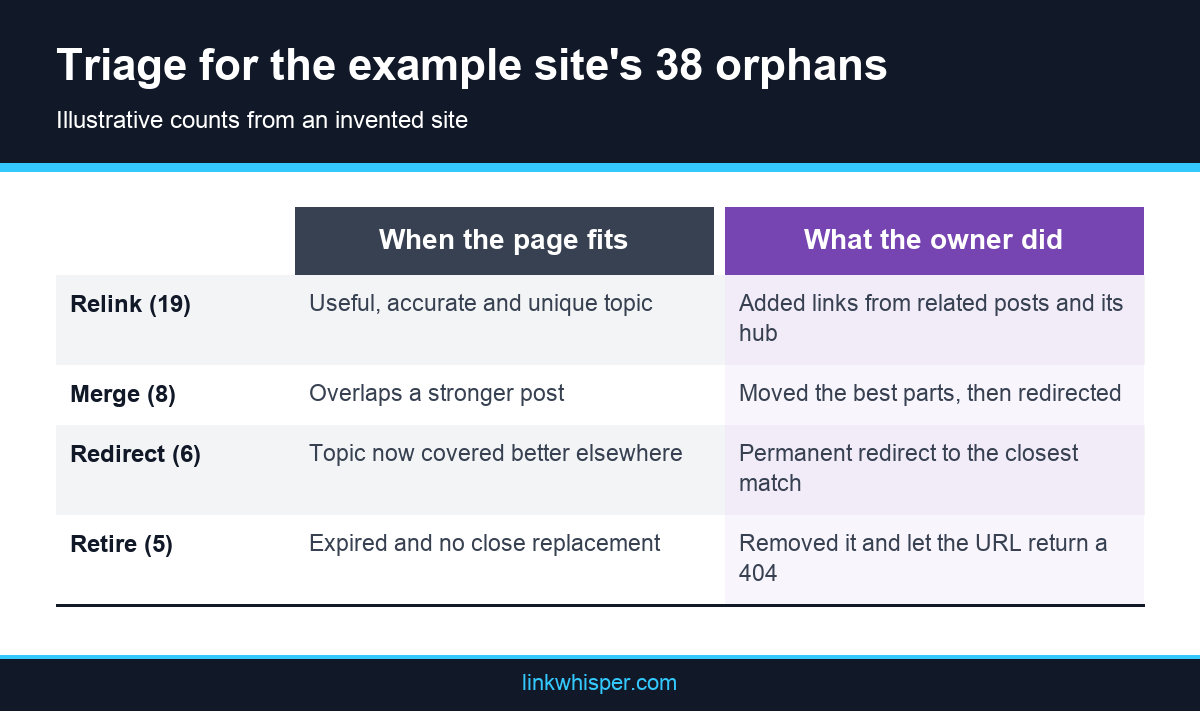
Eight pages overlapped with stronger posts, so the owner merged their best paragraphs into the stronger post. Six others covered a topic now handled better on another page. Google lists removing a page among the sensible reasons for a redirect, and a permanent one signals that the target should be canonical. The merged pages got the same treatment.
Five pages had no sensible replacement, such as notes on a giveaway that ended long ago. Those were retired. The owner resisted sending them to the homepage, because our post on choosing redirect destinations carefully warns that Google can treat that as a soft 404. A clean 404 is the honest result when nothing else fits. Orphaned content is not always a linking problem. Sometimes it is a content decision that nobody got around to making. Orphan pages SEO also depends on honest records, so the owner logged each decision, its date and any target URL in a simple sheet. That log made the later rescan far quicker to read, and it stopped anyone from reversing a choice by accident.
Reconnect the Keepers Without Burying Them
A page with one new link is no longer an orphan on paper, yet it can still be hard to reach. The owner cared about where each link came from as much as whether it existed. Each keeper needed a strong related post, a link from its hub and a sensible route back out to sibling posts.
The pruning guide shows the pattern. The owner opened the main fruit tree hub and added a link where the text mentions winter care. Next came two related posts with real readership, one on apple varieties and one on orchard tools. Each got a link at the point where the topic branched toward pruning. Our recovery guide suggests starting with two to four quality links plus one from the hub, and that is what the example site did.
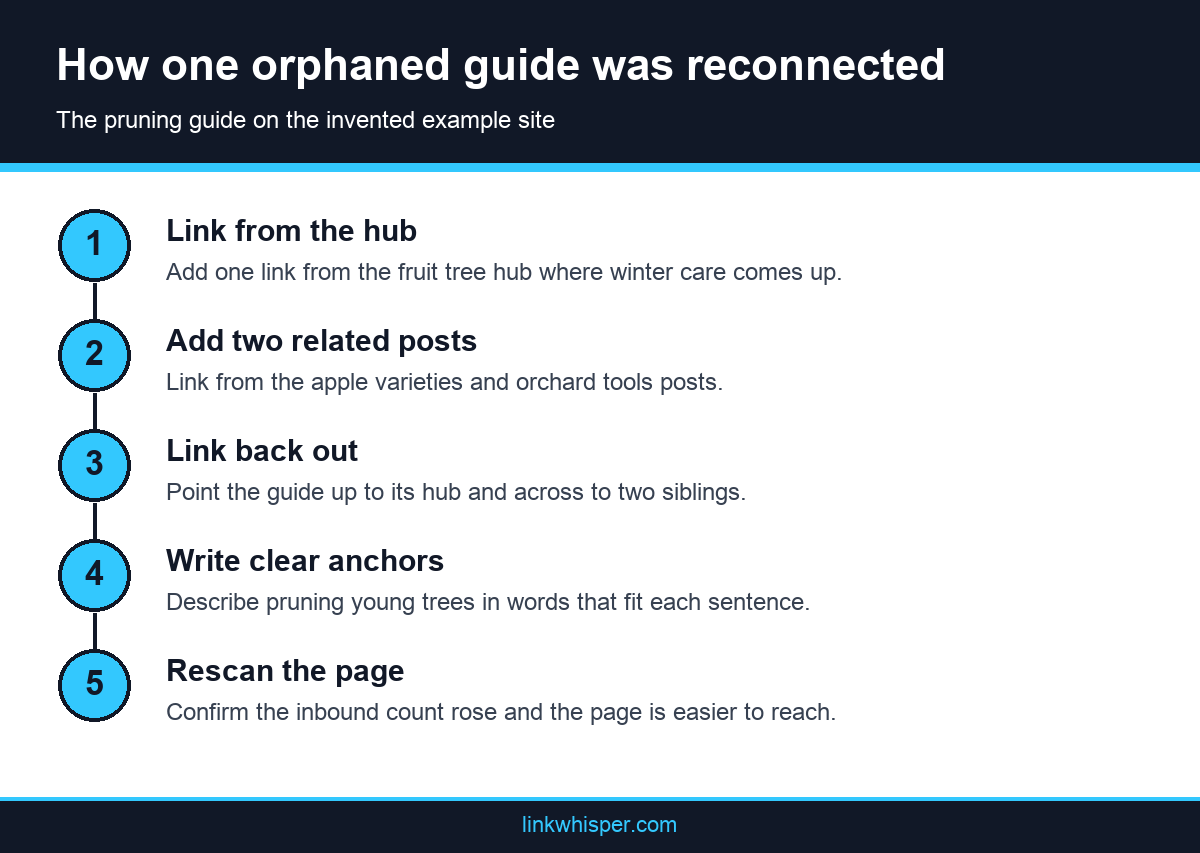
The guide then received its own outbound links: one up to the hub and two across to sibling posts. That triangle gives readers a way onward and reinforces how the topics relate. For more background on why these paths matter, Google states that it uses links to find new pages to crawl and to judge relevance.
Crawl depth shaped the choice of source posts. A link from a forgotten post that sits five clicks from the homepage does little for discovery, so the owner favored posts reachable within a few clicks. Link Whisper’s free checker flags pages at four or more clicks as deep, which gave a practical line to watch. Anchors stayed descriptive and specific, such as “how to prune a young apple tree”. Link Whisper suggestions helped surface candidates, and the plugin’s default suggestion mode meant every link was reviewed before it went in.
Rescan, Read the Outcomes and Stop New Orphans
The repair is not finished until a fresh scan confirms it. On the example site, the rescan caught mistakes that a visual check of each post had missed. The owner then added a small publishing habit, because a site that keeps adding posts will keep creating new orphans unless somebody links each one on its way out.
The second internal link map looked calmer. The red nodes for the keepers had joined their topic clusters, and the retired pages no longer appeared. Our example owner did find two links that pointed at a merged page, so those were edited to the final URL instead of being left on a redirect. We are not reporting any traffic or ranking change here, because the site is invented and because no scan can promise one.
The qualitative outcomes are the point. The owner now knew which pages existed for a reason. Readers could reach the pruning guide from three natural places. The content inventory shrank, and every remaining page had a clear parent. On a real site, watch the same signals the recovery guide names: orphan count, inbound links on recovered pages, crawl depth and later search visibility. Give it a few crawls before you judge anything.
Prevention took one checklist item at a time. Before publishing, link the new post to its hub and add two links to siblings. After publishing, rescan to confirm that at least one inbound link exists. Our note on why unlinked posts struggle to rank is a good one to share with anyone who writes for your site.
Conclusion
Orphan pages SEO work pays off when you treat it as editing, not just linking. Find the pages, check the list, decide what each one deserves, then reconnect the keepers from posts people actually read. A rescan tells you whether the repair held. The site in this walkthrough is invented, but the routine works on any WordPress blog. To run it with reports and suggestions inside your editor, review what the Link Whisper plugin includes, then start with the oldest unlinked post on your own list.
Frequently Asked Questions
What is orphan pages SEO work?
It is the process of finding published pages with no inbound internal links, deciding what each one deserves, and then relinking, merging, redirecting or retiring it. The goal is a site where every kept page has a clear route in.
Is this orphan recovery case study based on a real site?
No. Fernhill Garden Notes is an invented site, and all counts in this walkthrough are example figures. It shows how the routine works and makes no claim about traffic, rankings or revenue for any real website or customer.
How do I find orphaned content for free?
Start with a free visual map of your public site to see the pattern. Then compare a crawl export against your WordPress post list and sitemap. Any published page with no inbound internal link belongs on your list.
Should I redirect every orphan page?
No. Redirect a page only when another page genuinely covers the same need. If a page is useful, relink it. If nothing fits, a plain 404 is often acceptable, and it is better than a misleading redirect.
How many links does a recovered page need?
Our recovery guide suggests starting with two to four quality links from strong related posts, plus one link from the hub. Adjust from there based on performance, and add more only where the topic naturally branches.
Does a sitemap fix an orphan page?
No. A sitemap helps search engines discover a URL, but it does not guarantee crawling or indexing, and it gives readers no route to the page. Keep the sitemap accurate, and add real links from related content as well.
What crawl depth should a recovered page have?
Aim for a page that people and crawlers can reach within a few clicks of the homepage. Link Whisper’s free checker treats four or more clicks as deep, so use that as a practical line to review, not a fixed rule.
Do inbound links from any post count?
They count as links, but relevance and position still matter. Choose posts on a related topic that readers already reach easily. This primer on inbound links explains the terms if you are new to them.
How long does orphan recovery take to show results?
Discovery can improve after the next few crawls, and visibility gains may follow later if at all. Confirm the links with a rescan straight away, then judge search changes over a longer period and against a fair comparison.
Link Whisper tips
Keep learning about internal linking
Get Link Whisper tips and offers in your inbox.
Check if your site has the same issues.
Run a free audit right now. See your orphaned pages, broken links, and link health score in 60 seconds.
Check My Site