Contents
- 1 Fix First: Broken Internal Links on Pages That Matter
- 2 Fix Second: Redirect Chains and Loops
- 3 Fix Third and Fourth: Orphan Pages and Uncrawlable Links
- 4 Fix Last: Weak Anchors, Once Every Path Works
- 5 What an SEO Link Checker Flags That You Can Safely Ignore
- 6 Conclusion
- 7 Frequently Asked Questions
- 7.1 What should an SEO link checker find first?
- 7.2 Is a broken link checker enough for an SEO link check?
- 7.3 What does a link SEO checker add beyond dead URLs?
- 7.4 Do all redirects hurt rankings?
- 7.5 How many redirect hops are too many?
- 7.6 Should I fix every orphan page a scan reports?
- 7.7 How do I know if a link is crawlable?
- 7.8 How do I improve weak anchors without stuffing keywords?
- 7.9 How often should I run an SEO link check?
- 8 Keep learning about internal linking
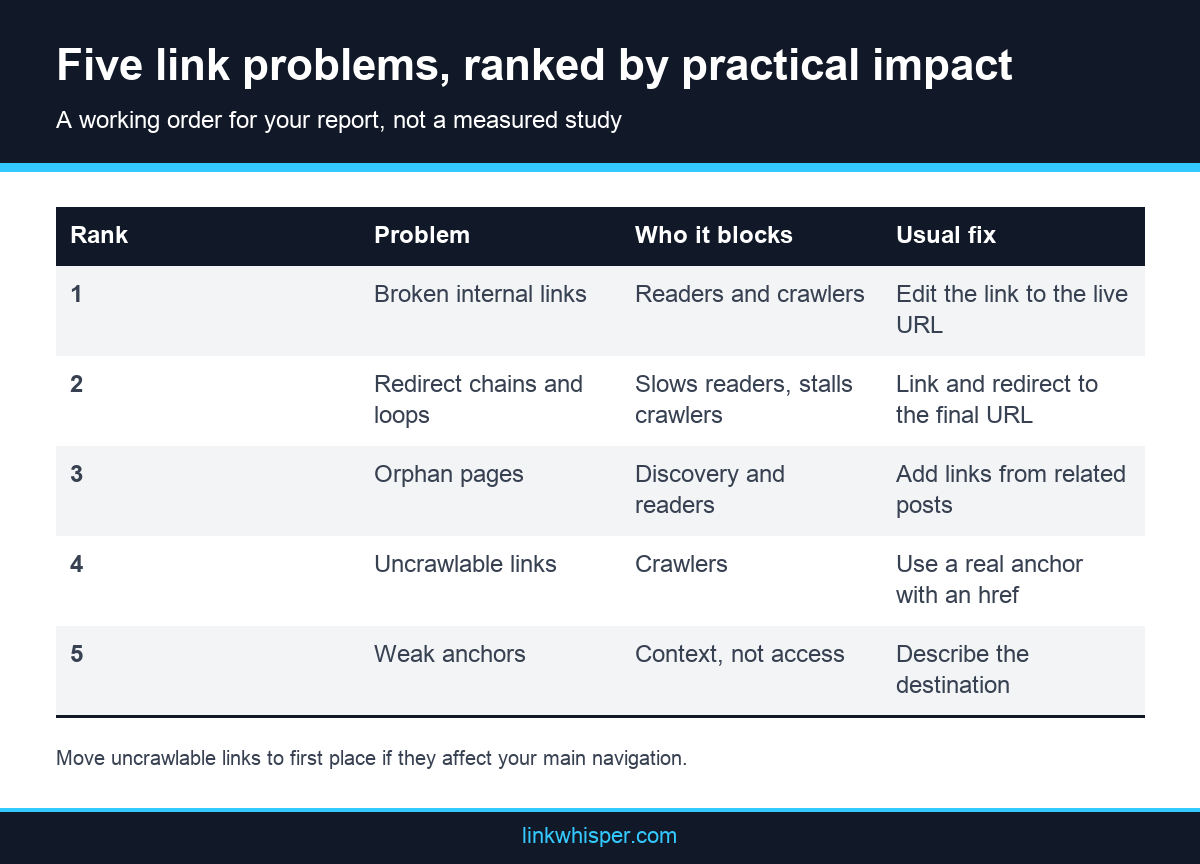
An SEO link checker can hand you hundreds of flagged rows in about a minute, and many of them will never matter. The hard part is deciding what to fix first. Our scoring guide for every WordPress internal link shows how to grade a whole site. This article does a narrower job. It ranks five link problems by how much each one blocks crawlers and readers, then names what you can safely leave alone. The order reflects practical judgment, not a measured study, so adjust it to your own site.
Key Takeaways
- Use an SEO link checker to sort problems, not to collect a score. Broken internal links and redirect chains come first because they affect every click and crawl that passes through them.
- A link SEO checker can flag orphan pages and weak anchors, but only you can decide which pages deserve the work.
- After an SEO link check, a single working redirect, a one off timeout or a small score change rarely needs any action.
Fix First: Broken Internal Links on Pages That Matter
Broken internal links sit at the top because you control them completely and they fail for everyone. A reader hits a dead end, a crawler spends a visit on a missing URL, and the link supports nothing. Few other fixes on a report pay back so directly, and most take only minutes.
Internal links usually break for dull reasons. Someone changed a slug, deleted an old post or merged two articles and never updated the text that pointed at them. The source page still looks fine, so nobody notices until a scan reports the 404. Our scoring guide makes a fair counterpoint: broken links are rarely the biggest problem on an established site. We still start here because a dead link fails on every visit and usually takes minutes to repair.
You can check your links for SEO problems with the free Link Whisper scan, which needs no signup. This broken link checker starts from your public WordPress URL, crawls the pages it can reach in a bounded scan, and reports broken internal and outbound links, redirects, redirect chains and timeouts. Take any partial scan warning seriously, because it means you are looking at an incomplete picture.
Work from your most visited posts and your revenue pages outward. Point each link at the correct live URL, and edit the link itself instead of leaning on a redirect. Our walkthrough for repairing dead internal links covers the mechanics. Broken outbound links come later in the same session. They damage reader trust, yet they do not cut paths inside your own site.
Fix Second: Redirect Chains and Loops
A redirect is not a fault, and a report that treats every redirect as an error will waste your week. Chains and loops are the real targets. A chain adds extra stops between the link and its final page, while a loop never arrives anywhere, so a loop deserves the same urgency as a dead link.
Our older post on whether redirects cost rankings reaches a useful conclusion. Correct redirects are not bad for SEO. Chains, loops, wrong destinations and poor redirect types are where the trouble starts.
Google gives a clear number here. It says Googlebot can follow up to 10 hops, yet it advises redirecting straight to the final destination. The same guidance notes that chains add latency for users and that not all browsers and user agents support long ones. So a two hop chain will not sink a page, but it is still worth cleaning up on links you control.
The fix has two parts. First, update your internal links so they point at the final URL, which removes the hops for those clicks entirely. Second, point each old redirect at the final destination, so outside links benefit too. This explanation of how redirect chains form and slow a site helps if you inherited years of migrations. In Link Whisper, the URL Changer finds every internal link pointing at a URL and updates them in one operation, so you can confirm the count before you commit.
Fix Third and Fourth: Orphan Pages and Uncrawlable Links
These two problems share a symptom: a page exists, but your links do not lead anywhere useful for finding it. Orphan pages have no inbound internal links at all. Uncrawlable links look fine to readers, yet crawlers cannot parse them. An ordinary dead link scan may not raise either problem, so check them on purpose.
Start with orphans, and start with value. A useful guide with no inbound links is a real loss, because readers cannot reach it from your content and you are relying on other routes for discovery. Our primer on what orphaned content is and how to spot it covers the basics. Link each worthwhile page from two or three related posts, and link it back to its topic hub. A sitemap does not replace this work, since it helps with discovery but gives no guarantee of crawling or indexing.
Uncrawlable links are rarer on standard WordPress themes, but they do more damage when they appear. Google says it can generally crawl a link only when it is an anchor element with an href attribute. Elements that act as links through script events may not be parsed. Links that JavaScript inserts are fine as long as they use standard markup.
Test any custom menu, tab, filter or card component. Inspect the element and look for a real href. If JavaScript writes the link, use the URL Inspection Tool to confirm it appears in the rendered HTML. One exception changes the ranking above. If your main navigation or category paging relies on script events, treat it as your first job, because it can hide whole sections of the site.
Fix Last: Weak Anchors, Once Every Path Works
Weak anchors come last because the link still works. Readers arrive, and crawlers still find the page. What suffers is context, since a vague phrase tells nobody what sits on the other side. Rewriting anchors is worthwhile on your important pages, but it should wait until the access problems above are finished.
Google describes good anchor text as descriptive, reasonably concise and relevant to both the linking page and the linked page. It also suggests a simple test: read the anchor alone, out of context, and ask whether it makes sense by itself. You can run that test on your top ten pages in a short sitting.
This is where a broader tool earns its place. A broken link checker stops at dead URLs. A link SEO checker, as our scoring guide describes it, also groups anchors by type and flags pages where one type dominates. Use those flags to choose where to edit. Do not treat them as a mandate to rewrite everything. Forcing the same keyword phrase into every link reads badly and adds nothing for the person clicking.
Edit anchors when you are already inside a post for another reason. Replace the vague phrases first, keep the wording natural within the sentence, and vary it from one linking post to the next.
What an SEO Link Checker Flags That You Can Safely Ignore
Every report mixes real faults with harmless noise, and the noise costs you more than you think. Clearing it first feels productive but changes little. The items below usually deserve a quick look and no further work, although each one has an exception you should rule out before you move on.
A single permanent redirect on a working link is normal, so update it only when you are already editing that post. A temporary redirect can also be correct. Google explains that temporary redirects keep the source page in search results, which is what you want for a short outage. Investigate only when a temporary redirect has quietly become permanent.
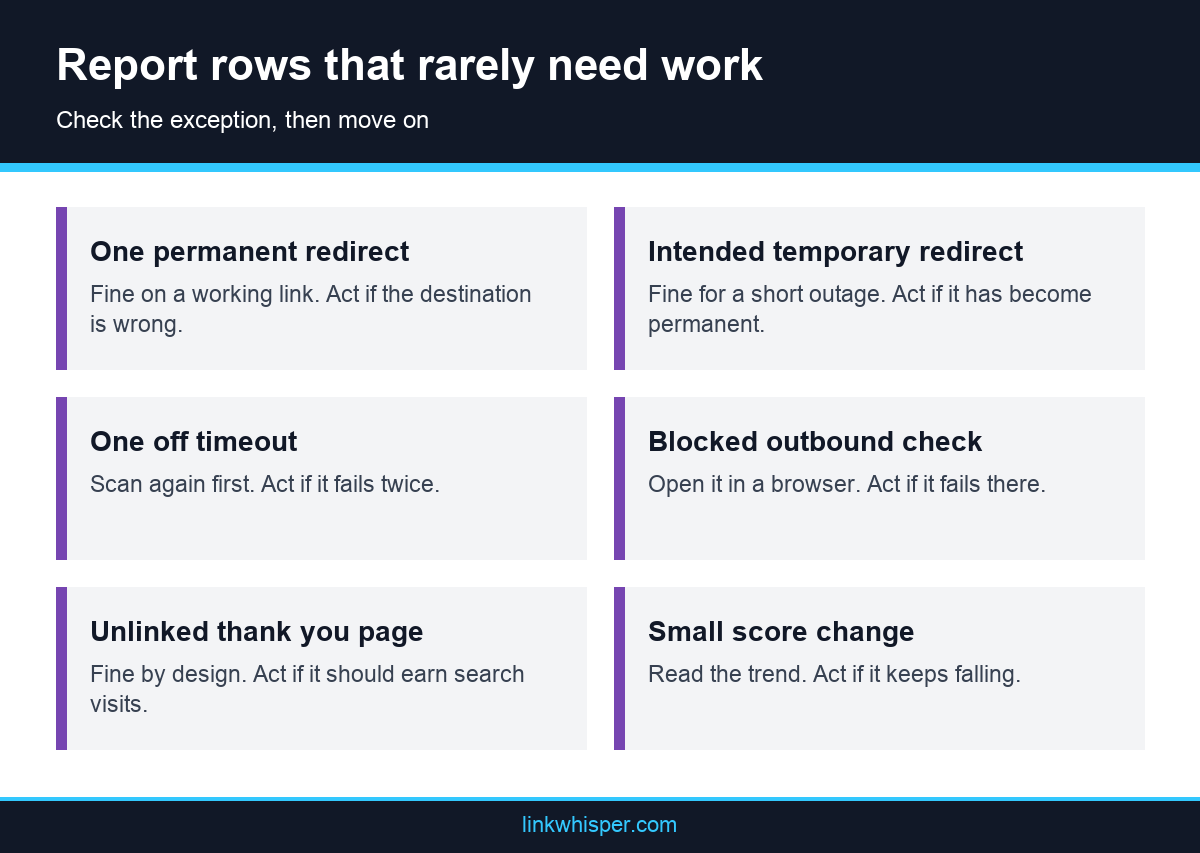
Timeouts deserve a second scan before any action, because the destination simply did not respond during the check window. Outbound links that refuse automated checks may also load fine in a browser, so open a few by hand. Some pages should stay unlinked too, such as thank you pages and campaign landing pages.
Finally, relax about small score movements. The free Link Whisper checker calls its own score a directional health signal, not a promise of a ranking position. Any SEO link checker score works best as a trend you read over time. Fix the top of this list, then scan again and compare.
Conclusion
A good SEO link checker gives you a list, and your job is to turn that list into an order. Fix broken internal links on your important pages. Then clean up chains and loops, reconnect useful orphans, repair any links crawlers cannot parse, and improve weak anchors last. Leave harmless rows alone. If you want reports, one click URL edits and link suggestions inside WordPress, see what the Link Whisper plugin includes, then run your first scan and work from the top of this list.
Frequently Asked Questions
What should an SEO link checker find first?
It should find broken internal links first, because you control them and they fail for everyone. After that, look for redirect chains, orphan pages, links crawlers cannot parse and weak anchors, then adjust the order for your own site.
Is a broken link checker enough for an SEO link check?
It covers dead URLs and redirects well. It will not judge whether useful pages lack inbound links or whether anchors describe their targets, so pair it with a full audit of your internal links.
What does a link SEO checker add beyond dead URLs?
Our Link Whisper guide describes scoring anchor quality, link equity distribution, over linked pages and crawl depth. Those signals show structural weakness that a dead link scan misses, although each result still needs your judgment before you act.
Do all redirects hurt rankings?
No. Correct redirects that reach a relevant final page are normal site maintenance. Problems come from chains, loops, wrong destinations and temporary redirects left in place after a permanent move. Fix those cases and leave the healthy ones alone.
How many redirect hops are too many?
Google says Googlebot can follow up to 10 hops but advises redirecting straight to the final destination. Where that is impossible, it suggests keeping chains low, ideally no more than 3 redirects. Direct links remain the cleaner choice.
Should I fix every orphan page a scan reports?
No. First ask whether the page deserves search visits. Relink the useful ones, merge close duplicates and retire what has no purpose. Thank you pages and campaign landing pages can stay unlinked, because nobody needs to find them through search.
How do I know if a link is crawlable?
Inspect it and look for an anchor element with an href attribute, which Google can generally parse. If JavaScript inserts the link, use the URL Inspection Tool to confirm that it appears in the rendered HTML before you trust it.
How do I improve weak anchors without stuffing keywords?
Describe the destination in words that fit the sentence, and vary the phrasing across linking posts. Our notes on wording internal anchors explain why, and reading each anchor out of context exposes vague ones.
How often should I run an SEO link check?
Run one after any migration, slug change or large content cleanup, then on a schedule that fits your publishing pace. A busy site may scan monthly, while a small blog can usually check less often without much risk.
Link Whisper tips
Keep learning about internal linking
Get Link Whisper tips and offers in your inbox.
Check if your site has the same issues.
Run a free audit right now. See your orphaned pages, broken links, and link health score in 60 seconds.
Check My Site