Contents
Internal linking for local seo gets plenty of coverage from marketing agencies, but almost none of it is written specifically for WordPress. A single-location business can get away with linking a handful of service pages together. A multi-location business, a franchise, a regional service provider, or a company expanding city by city, needs an internal link architecture that actually mirrors its geography. This guide covers exactly what that structure looks like inside WordPress.
Not sure where your own site stands? Run the free internal link checker to see your current link health score before applying the framework below.
Key Takeaways
- Local internal linking needs to mirror your business geography: homepage, service pages, and location pages all connected deliberately.
- New location pages often launch as orphans with almost nothing pointing to them, which is a linking problem, not a content problem.
- Location-specific blog content is one of the best tools for bridging authority into a specific location page.
Why Local Businesses Need a Geographic Link Architecture
A single-location business links a small, stable set of service pages together and largely leaves it there. A multi-location business has a fundamentally different structure: a homepage and core service pages describing what the business does everywhere, and individual location pages describing where and how a customer can get that service in a specific place. This is one of several site types covered in internal linking for different wordpress site types, and it is a structural problem in its own right, distinct from ordinary blog internal linking.
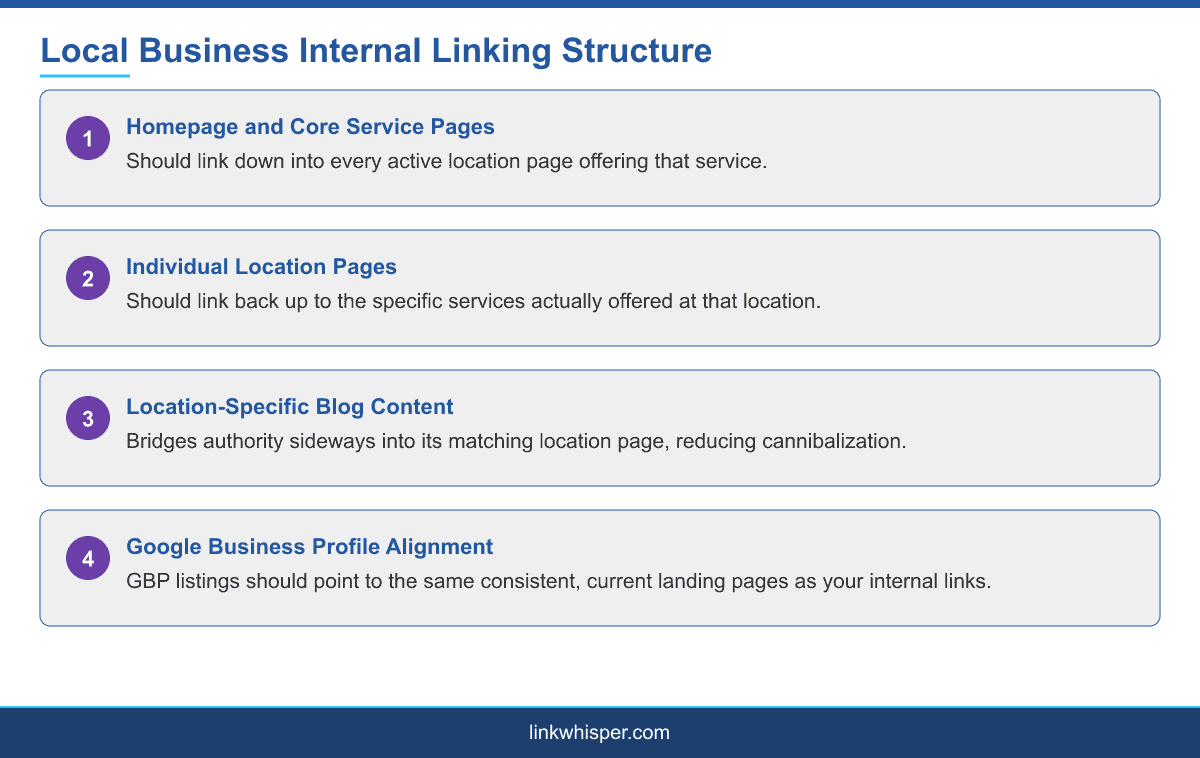
These two layers need to link to each other deliberately. Homepage and core service pages should link down into location pages, giving each one a path from the site authority that accumulates centrally. Location pages should link back up into the relevant services offered at that location, not just to the homepage, since a generic homepage link does little to connect a visitor to the specific thing they came looking for.
The Homepage, Service, and Location Link Pattern
In practice, this means every service page should maintain a current, complete list of the locations offering that service, linked directly, and every location page should link back to each service actually offered there, not the full company-wide service list if a given location does not offer everything.
This sounds straightforward, but it breaks down constantly in practice as businesses expand. A new location launches, and the service pages that should now link to it do not get updated, because updating every relevant service page whenever a new location opens is not typically anyone specific job. The result is a location page that is technically live but nearly invisible from the rest of the site.
The fix is rarely more content. A location page missing internal support usually does not need a longer description or more photos, it needs a deliberate linking pass from the pages that already carry authority on the site: the homepage, the relevant service pages, and any blog content already ranking for that area. Treat every new location launch as a linking task, not just a content task, and build a short checklist so the same service pages get updated every time.
Using Location-Specific Blog Content as a Linking Bridge
Blog content written for a specific metro area is one of the most effective tools for reinforcing a location page, but only if it links to that specific page rather than a generic service page. A post about seasonal maintenance tips for homeowners in one city should link to that city location page, not to the general services page that every other city also links to.
This pattern also helps with a problem that is easy to create by accident: keyword cannibalization between location pages that are all trying to rank for similar service and city combinations. Distinct, location-specific blog content, each piece linking clearly to its own location page, helps search engines understand which page is genuinely the authority for which place, rather than leaving them to guess between several similar pages.
Writing genuinely local content, not just swapping a city name into an otherwise generic template, also gives you more natural, varied language to link with. A post about a specific local regulation, a regional weather pattern affecting the service, or a community event ties the content and the location page together in a way a search engine, and a reader, can tell is not just templated.
For a real example of this pattern working, Link Whisper has documented a case study on internal linking for a USA plumbing website, a genuinely local, service-area business where this kind of structural fix played a meaningful role in recovering search rankings. Businesses operating across multiple countries or languages, rather than just multiple cities within one, should also read internal linking for multilingual wordpress sites, since geographic and language targeting frequently overlap on the same site.
Connecting Internal Links to Your Google Business Profile
Your internal link structure and your Google Business Profile listings should point at consistent, matching landing pages. If a Google Business Profile for one location links to a generic homepage while your internal site structure treats that location as having its own dedicated page, you are sending mixed signals about which page is actually meant to represent that location.
Keeping this consistent matters most at the moment a new location launches or an existing one changes address or service offering, since that is exactly when Google Business Profile listings, location pages, and the internal links connecting them are most likely to drift out of sync with each other.
A simple audit catches most of this drift: pick each active Google Business Profile listing, confirm the website link points to a real, current location page on your site, and confirm that page is itself reachable through at least one internal link from a page with meaningful authority, not just from a footer link buried among dozens of others.
This is also a common blind spot for agencies managing several multi-location clients at once, since each client location count and internal linking maturity differs, and a checklist applied consistently across accounts catches drift that a one-off review would miss.
Conclusion
A multi-location business succeeds or struggles with local SEO based heavily on whether its internal link structure actually mirrors its real-world geography. Homepage and service pages linking down into locations, location pages linking back up into the right services, and location-specific content bridging authority sideways are not complicated ideas, but they require deliberate maintenance as a business grows. Compare internal linking tools built to handle this kind of structure at scale before your next location launch. See our full internal linking automation guide for a step-by-step setup.
Frequently Asked Questions
Why do new location pages struggle to rank?
They often launch as orphan pages with almost nothing on the rest of the site linking to them, which makes them hard for search engines to find and trust quickly.
Should location pages link to every company service?
No, only to the services actually offered at that specific location. Linking to services not available there confuses both visitors and search engines.
How does blog content help multi-location SEO?
Location-specific blog posts that link directly to their matching location page help bridge authority sideways and reduce keyword cannibalization between similar location pages.
What causes keyword cannibalization between location pages?
Multiple location pages targeting similar service and city combinations without clear, distinct internal linking signals to differentiate which page is the real authority for each place.
Should internal links match Google Business Profile listings?
Yes. Internal link structure and Google Business Profile listings should point to the same consistent landing pages to avoid sending mixed signals about a location.
When is internal link drift most likely on multi-location sites?
When a new location launches or an existing one changes address or services, since that is when location pages, GBP listings, and internal links are most likely to fall out of sync.
Does homepage linking matter for local SEO?
Yes. The homepage and core service pages are usually where the most site authority accumulates, so they need to link down into location pages deliberately.
How often should multi-location internal linking be audited?
At minimum whenever a location is added, removed, or changes its service offering, since those events are the most common cause of link structure drift.
Where can I see a real example of this working?
Link Whisper own features page and its published case studies show how automated link suggestions apply to real multi-page site structures.
Check if your site has the same issues.
Run a free audit right now. See your orphaned pages, broken links, and link health score in 60 seconds.
Check My Site