How do I make all links that Link Whisper inserts relative?

  1. Home
  2. Knowledge Base
  3. Managing Links
  4. How do I make all links that Link Whisper inserts relative?
  1. Home
  2. Knowledge Base
  3. Advanced Features
  4. How do I make all links that Link Whisper inserts relative?

How do I make all links that Link Whisper inserts relative?

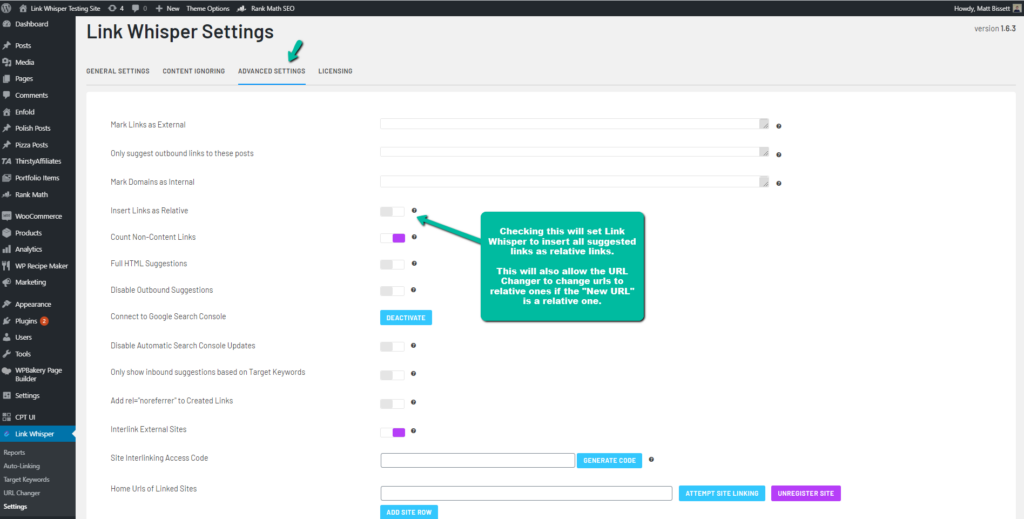
You can set Link Whisper to insert relative links by going to the settings and activating the “Insert Links as Relative” option. Link Whisper will then create all suggested links as relative links.

This will also enable the URL Changer to change absolute urls into relative ones. The “New URL” in the URL Changer must be a relative url for this to work.

The Auto Link inserted links will be unaffected by this setting, and will insert the links that you specify.
Build A Powerful Internal Link Strategy Today

Enter your email & we'll send you 8 tips to build an internal link strategy.

And 3 things you should avoid doing with internal links.

    We won't send you spam. Unsubscribe at any time.

    Was this article helpful?

    Related Articles

    Need Support?

    Can't find the answer you're looking for?
    Contact Support
    Buy Now