
Contents
- 1 Test Suggestion Quality on Posts You Already Know
- 2 Check Inbound Visibility and Plant a Test Orphan
- 3 Decide How Much Control an Internal Links Tool Leaves You
- 4 Ask What the Reports Let You Do Next
- 5 Run a Performance Test on a Copy of Your Site
- 6 Conclusion
- 7 Frequently Asked Questions
- 7.1 What does a good internal links tool do?
- 7.2 How long should a trial take?
- 7.3 Is a free scan enough to choose a tool?
- 7.4 What makes link suggestions good or weak?
- 7.5 Why plant a test post for orphan detection?
- 7.6 Does every internal linking tool need automation?
- 7.7 Should I test on my live site?
- 7.8 How do I compare several tools fairly?
- 7.9 What should I do if a tool fails one test?
- 8 Keep learning about internal linking
Most buyers judge an internal links tool in the first ten minutes, by how clever its first suggestion looks. That test says little. A tool earns its place in month six, when the archive has grown, an editor has left and nobody remembers what links where. Our explainer on what these tools audit covers the categories. This checklist does a different job. It gives you tests for 2026 that you can run during a trial, on your own posts, with a clear pass or fail for each one.
Key Takeaways
- Test any internal links tool on posts you know well, because you can only judge link suggestions when you already know the right answer.
- Plant an unlinked test post to see whether orphan detection works, rather than trusting the feature name on a sales page.
- Check control and exports before you commit, since a tool you cannot audit or undo becomes a risk as your site grows.
Test Suggestion Quality on Posts You Already Know
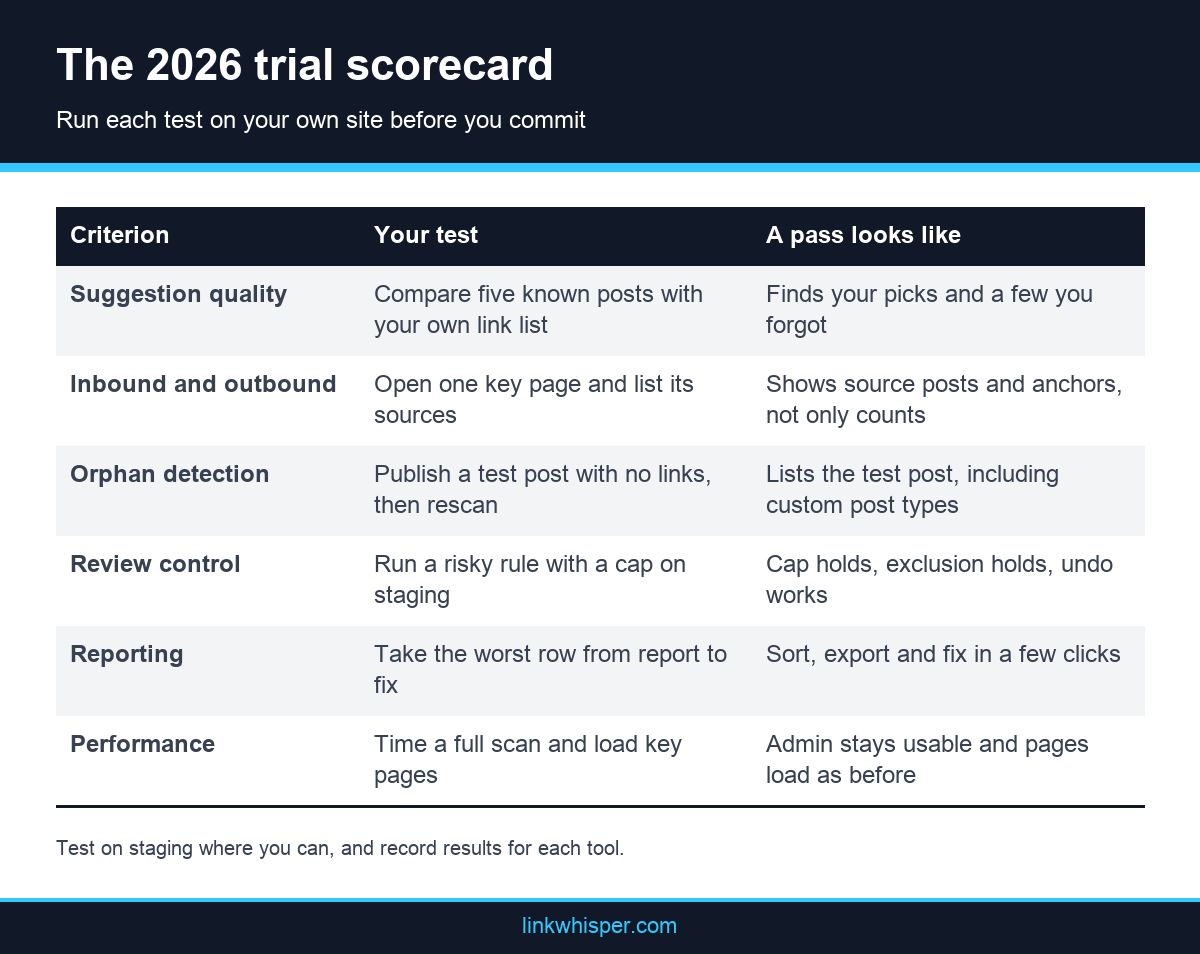
Suggestion quality is the feature everyone mentions and few people measure. The fair test uses your own content, because a demo site always behaves. Choose five posts you know well, write down the links you would add by hand, then compare that list with what the tool proposes for each of those posts.
Pick posts that are hard on purpose. Include one on a word with two meanings, one on a narrow topic with few related pages and one old post nobody has touched in years. Good link suggestions find the pages you listed and a few you forgot. Weak ones match a shared word and miss the idea.
Now read each proposed anchor inside its sentence. Google guidance on anchor text says good anchor text is descriptive, reasonably concise and relevant to the page it sits on and the page it links to. If you must rewrite most anchors, count that as lost time. Also check that you can edit an anchor before you approve it.
Finally, ask what powers the suggestions and what limits apply. Link Whisper, for example, says its AI engine reads every published post, ranks suggestions by relevance and writes the anchor in advance. Those AI suggestions run on a credit allocation, so a buyer should check how that allowance fits the size of the archive. Apply the same question to every internal linking tool on your list. See our guide to linking tools and automation for more background on how the approaches differ.
Check Inbound Visibility and Plant a Test Orphan
Writing help only touches the post on your screen, while most of your site sits in the archive. A strong tool shows inbound and outbound counts for every post and names the pages behind those counts. It also finds posts with no inbound links at all, which you can test by creating one yourself.
Start with one page that matters to your business. Can the tool list its inbound links, the source posts and the anchor text in a single view? A bare number tells you little. You need to see the sources in order to decide what to change. Repeat the check for outbound links on a long post.
Next comes the orphan test. Publish a harmless test post with no links pointing to it, then rescan. A tool that passes lists the post soon afterward. Try one custom post type as well, if your site uses them. A crawler that only follows links can miss a page nobody links to, so ask where each tool gets its list of pages. Google says every page you care about should have a link from at least one other page, and our note on what orphaned content costs you explains the wider problem.
To set a baseline before you install anything, try the free checker first. It takes the public URL of a WordPress site, needs no signup and reports orphaned pages, dead end pages, deep pages and a score. An internal link checker tool like this shows the size of the job. Fixing the issues in bulk belongs to the paid plugin.
Decide How Much Control an Internal Links Tool Leaves You
Automation saves time only when you can see what it did and reverse it. Before you trust any rule across hundreds of posts, run one on a staging copy and try to break it. You are testing four things here: the review step, the frequency limit, the exclusion list and the undo.
First, check the default. Does a fresh install change content by itself, or does it wait for an approval? Link Whisper states that its default suggestion mode shows recommendations that you review individually. Its Auto-Linking feature defaults to a review mode on new installs, and a fully automatic mode can be enabled.
Second, write a rule that you expect to misbehave, using a common word. Set a limit per post and exclude one category. Then check three pages by hand. Did the limit hold? Did the excluded category stay clean? If the tool has an activity log, can you find that exact rule and reverse it without opening each post? Our page on how Link Whisper handles rules and review shows one way to set this up.
Third, read what happens if you leave. Ask whether links remain in your content after you cancel or delete the plugin, and test the answer on staging. Link Whisper says its links are written directly to the database, so cancelling removes the plugin but not the links. Treat any vendor answer as a claim to verify.
Ask What the Reports Let You Do Next
A report earns its place when it leads to a decision. Pretty charts help nobody if you cannot sort, export or act on the rows. Run this test at the end of your trial: open each report, pick the worst row, and see how many clicks stand between that row and the fix.
Look for four abilities. You should be able to sort posts by least linked, export the data, jump to the editor from a row and fix a dead URL from the report itself. Link Whisper offers one reference point. Its Links Report exports to CSV, and its Broken Links Report shows the post and anchor where each link sits. An optional column adds Search Console clicks and average position per post once you connect your account. The page on internal link data and what it shows goes further.
Then test the history. Can you compare this month with last month, or does each scan replace the previous one? A coverage score tracked over time tells you whether your work is holding. A score seen once only tells you where you stand today. Be careful with any single score, too. Use it to compare your site with itself, not to predict a ranking.
Run a Performance Test on a Copy of Your Site
Linking tools read a lot of content, so speed belongs on the checklist. Sales pages rarely describe a shared hosting plan with thousands of posts, so measure on a copy that resembles production. Time the first full scan, watch the admin screens while it runs, and compare front end load times before and after.
Ask how the scan handles a large archive. Link Whisper says its scans run in resumable batches sized to available server memory, which is the kind of detail to look for. A scan that fails halfway and restarts from zero will cost you an afternoon. Also note any task that depends on an open browser tab. Its Search Console download can take 30 to 60 minutes on large sites, and closing the tab cancels it.
Background jobs need the same attention. Automatic broken link checks in Link Whisper use a WordPress Cron event that scans a batch of 10 links every 10 minutes, and you can disable it. Ask each vendor what runs in the background and whether you can turn it off. A good internal links tool should tell you plainly.
Conclusion
A good internal links tool passes tests on your site, not just a feature grid. Run the suggestion test on known posts, plant an orphan, try to break a rule, follow a report row to its fix and time a full scan. Score every candidate the same way, and write the results down so that the choice survives a change of staff. No tool will win every row, so decide which ones matter most for your site. Then see how Link Whisper handles each test and compare it with your scorecard.
Frequently Asked Questions
What does a good internal links tool do?
It proposes relevant links, shows inbound and outbound links for every post, finds posts with no inbound links, lets you review changes and turns its reports into fixes. Test each of these jobs on your own site.
How long should a trial take?
A focused trial can fit into one working week. Spend the first days on suggestions and orphan tests, then move to rules and reports. Time a full scan on staging, and record each result on one scorecard.
Is a free scan enough to choose a tool?
A free scan shows the size of your problem, but it cannot test editing, review or automation. Use one as a baseline, then run the remaining tests inside a plugin before you make any decision about buying.
What makes link suggestions good or weak?
Good suggestions connect pages on the same idea and offer an anchor that reads well in its sentence. Weak ones match a shared word and miss the meaning. Posts you already know make the difference easy to see.
Why plant a test post for orphan detection?
A planted post gives you a known answer. If a tool cannot find a post you just published with no links, you cannot trust its list. Delete the test post afterward, and repeat the check on custom post types.
Does every internal linking tool need automation?
No. Small sites with few authors may do well with suggestions and reports alone. Automation helps once repeated phrases cover many posts, and how keyword rules differ from contextual suggestions can help you make that decision.
Should I test on my live site?
Use a staging copy for anything that writes to content, such as rules and bulk changes. Read only checks, such as a public URL scan, can safely run on the live site. Keep a tested backup in either case.
How do I compare several tools fairly?
Use the same five posts, the same risky rule and the same report task for each candidate. Our overview of the main options and their workflows can help you decide which tools deserve a place on the list.
What should I do if a tool fails one test?
Decide whether that test matters for your site. A weak export may not bother a solo blogger, while it can rule a tool out for an agency. Write down the reason, so that your team can revisit it later.
Link Whisper tips
Keep learning about internal linking
Get Link Whisper tips and offers in your inbox.
Check if your site has the same issues.
Run a free audit right now. See your orphaned pages, broken links, and link health score in 60 seconds.
Check My Site