
Contents
- 1 Key Takeaways
- 2 Table of Contents
- 3 What Are Internal Linking Tools?
- 4 Benefits of Internal Linking Automation
- 4.1 Massive Time Savings and Efficiency Gains
- 4.2 Enhanced Link Equity Distribution
- 4.3 Building Topical Authority Through Clustering
- 4.4 Improved Site Structure and Crawlability
- 4.5 Intelligent Link Suggestions
- 4.6 Automation Rules and Bulk Operations
- 4.7 Link Health and Audit Tools
- 4.8 Reporting and Analytics
- 4.9 Integration and Compatibility
- 5 How to Choose the Right Internal Linking Tool
- 6 Implementation Strategies for Maximum Impact
- 7 Advanced Internal Linking Techniques
- 8 Conclusion
- 9 Frequently Asked Questions
- 9.1 What is an internal linking tool and why do I need one?
- 9.2 How does internal linking automation improve topical authority?
- 9.3 Can internal linking tools fix orphan pages automatically?
- 9.4 What's the difference between AI-powered and rule-based internal linking?
- 9.5 How many internal links should each page have?
- 9.6 Will automated internal linking hurt my SEO if done incorrectly?
- 9.7 How does internal linking affect crawl depth and budget?
- 9.8 Can I use internal linking tools with page builders like Elementor?
- 9.9 How do I measure ROI from internal linking automation?
- 9.10 What's the best internal linking tool for WordPress sites?
Managing internal links manually across hundreds or thousands of pages is time-consuming and error-prone. An internal linking tool from LinkWhisper automates this critical SEO task, helping you build site structure, distribute link equity, and boost rankings without the manual headache. Modern automation solutions can save you 97% of the time you’d spend on manual linking while improving accuracy and consistency across your entire site.
Internal links are the backbone of site architecture, guiding search engines through your content and helping users discover relevant information. Yet most website owners struggle to maintain a healthy linking structure as their sites grow. The solution? Smart automation that handles the heavy lifting while you focus on creating great content.
In this comprehensive guide, you’ll discover how internal linking tools work, why automation matters for SEO success, and which features deliver the best results. Linkwhisper explores everything from AI-powered suggestions to bulk editing capabilities, orphan page detection, and link health monitoring.
Key Takeaways
- Automation saves 97% of manual linking time
- AI-powered tools suggest contextually relevant links
- Link equity distribution improves overall site rankings
- Orphan page detection prevents content from being invisible
Table of Contents
- What Are Internal Linking Tools?
- Benefits of Internal Linking Automation
- Key Features of the Best Internal Linking Tools
- How to Choose the Right Internal Linking Tool
- Implementation Strategies for Maximum Impact
- Advanced Internal Linking Techniques
- Conclusion
- Frequently Asked Questions
What Are Internal Linking Tools?
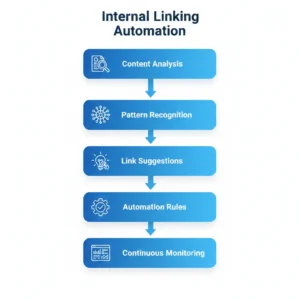
Internal linking tools are specialized software solutions designed to help website owners create, manage, and optimize links between pages on their own domain. These tools range from simple link suggestion plugins to sophisticated AI-powered platforms that automate the entire linking process. They analyze your content, identify relevant connections, and either suggest or automatically insert internal links based on context and SEO best practices.
Core Functionality of Internal Linking Tools
Link Discovery and Suggestion
The foundation of any internal linking tool seo solution is its ability to discover linking opportunities. Advanced tools scan your entire site, analyze content semantically, and identify where links would be most valuable. This goes beyond simple keyword matching to understand context, topic relevance, and user intent.
Modern AI-powered solutions can process thousands of pages in minutes, something that would take weeks manually. They evaluate each page’s content, existing links, and relationship to other pages to generate intelligent suggestions that strengthen your semantic SEO strategy.
Automated Link Insertion
Manual linking requires opening each post, finding relevant anchor text, and adding links one by one. Automation changes this completely. The best internal linking tool solutions can insert links across your entire site based on predefined rules or AI recommendations.
You can set parameters like maximum links per page, preferred anchor text variations, and target pages for specific keywords. The system then applies these rules automatically, ensuring consistency while saving hundreds of hours of manual work. This is particularly valuable for sites with extensive content libraries or frequent publishing schedules.
Link Health Monitoring
Internal link health requires ongoing attention. Links break when pages are deleted or URLs change. Anchor text becomes outdated. Link distribution becomes unbalanced as new content is added. Professional auto internal linking tools monitor these issues continuously and alert you to problems before they impact rankings.
Comprehensive monitoring includes tracking broken links, identifying pages with too few or too many internal links, analyzing anchor text distribution, and measuring crawl depth across your site. This data helps you maintain optimal link equity flow and ensures search engines can efficiently discover all your content.
WordPress-Specific Internal Linking Solutions
Plugin Integration and Compatibility
WordPress powers 43% of all websites, making wordpress internal linking solutions critical for millions of site owners. The best tools integrate seamlessly with WordPress’s core editor, Gutenberg blocks, and popular page builders like Elementor and Divi.
A quality link whisper wordpress plugin approach works directly within your editing interface, providing real-time suggestions as you write. This native integration eliminates context switching and makes link building a natural part of your content creation workflow. You don’t need to leave your editor or learn complex interfaces.
Bulk Editing for Existing Content
Most sites have hundreds of old posts that lack proper internal links. Going through each post individually is impractical. This is where bulk editing features become invaluable for wordpress seo internal links optimization.
Advanced WordPress tools let you select multiple posts and add links across all of them simultaneously. You can target specific keywords, set link limits, and define which pages should receive links. This transforms months of manual work into a task you can complete in an afternoon, dramatically improving your internal link strategy execution speed.
AI-Powered Linking Capabilities
Natural Language Processing
The best ai internal linking tools leverage natural language processing (NLP) to understand content at a deep level. Rather than just matching keywords, NLP analyzes semantic meaning, topic clusters, and content relationships. This enables more accurate and contextually appropriate link suggestions.
AI can identify synonyms, related concepts, and topical connections that humans might miss. It understands that an article about “digital marketing strategies” relates to content about “social media advertising” even without exact keyword matches. This semantic understanding is crucial for building comprehensive topic clusters seo architecture.
Learning from Your Linking Patterns
Advanced ai internal linking tool solutions learn from your decisions over time. When you accept or reject link suggestions, the system adapts to your preferences, site structure, and linking philosophy. This creates increasingly accurate recommendations that align with your specific SEO strategy.
Machine learning algorithms analyze which types of links you prefer, your anchor text style, and how you structure your site hierarchy. Over time, this reduces the need for manual review and increases automation efficiency. The tool essentially becomes an extension of your editorial judgment.
Benefits of Internal Linking Automation
Automation transforms internal linking from a time-consuming chore into a strategic advantage. The right internal linking tool doesn’t just save time—it improves quality, consistency, and results. Organizations using automation report significant improvements in search visibility, user engagement, and operational efficiency.
Massive Time Savings and Efficiency Gains
From Hours to Minutes
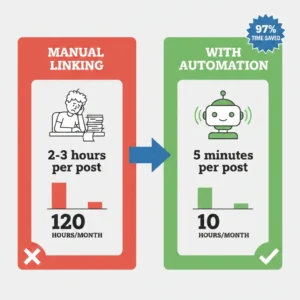
Manual internal linking can consume 2-3 hours per blog post when done properly. You need to identify relevant pages, find appropriate anchor text, insert links, and verify they work correctly. For sites publishing daily, this becomes a full-time job.
Automation reduces this to minutes. An internal linking suggestions tool can scan your content, identify linking opportunities, and insert links in under 60 seconds. For a site with 500 posts, proper internal linking might require 1,000+ hours manually. With automation, you can achieve better results in 10-20 hours total—a 97% time reduction.
Scaling Content Production
Content teams often limit publication frequency because internal linking becomes a bottleneck. Writers finish articles, but the linking process delays publication. Automation eliminates this constraint, enabling you to publish more content without additional overhead.
When you can add comprehensive internal links in minutes instead of hours, you can scale from publishing weekly to daily without increasing your team size. This acceleration directly impacts traffic growth potential and competitive positioning in your niche.
Enhanced Link Equity Distribution
Strategic PageRank Flow
Every internal link transfers link equity (often called “link juice”) from one page to another. Manual linking often creates uneven distribution, with some pages hoarding authority while others receive minimal benefit. This wastes your site’s ranking potential.
Smart automation tools analyze your entire site structure and optimize link distribution strategically. They ensure high-authority pages pass equity to important content that needs ranking boosts. This creates a rising tide effect where improvements in one area lift your entire site’s performance.
According to research by Moz, sites with optimized internal linking structures show 15-20% improvements in rankings for target pages compared to sites with random linking patterns. Automation makes this optimization practical at scale.
Fixing Orphan Pages
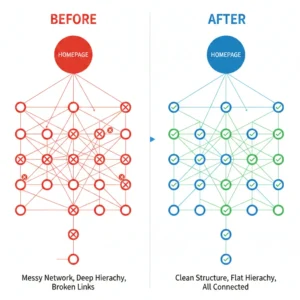
Orphan pages have no incoming internal links, making them nearly invisible to search engines and users. They waste content investment and create ranking opportunities for competitors. Manual audits often miss orphans, especially on larger sites.
The best internal linking tools for seo automatically detect orphan pages seo issues and suggest corrections. They identify isolated content and recommend strategic links to integrate these pages into your site structure. Learn more about what orphan pages are and why they matter for your SEO strategy.
Building Topical Authority Through Clustering
Topic Cluster Architecture
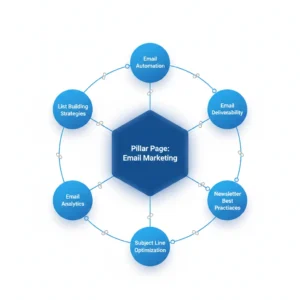
Google increasingly rewards sites that demonstrate comprehensive coverage of topics rather than scattered content on random subjects. Topical authority comes from creating pillar content supported by detailed subtopic articles, all connected through strategic internal links.
Manual cluster creation is complex and time-intensive. An internal linking checker tool automates this by identifying content relationships and suggesting hub-and-spoke linking patterns. It ensures pillar pages link to all relevant subtopic content and that related articles connect to each other, creating semantic networks that signal expertise to search engines.
Sites implementing strong topic cluster strategies using automation report 30-50% increases in organic traffic within 6-12 months. The structure helps search engines understand your expertise and trust your content for related queries. Discover strategies for using internal links to increase topical authority.
Semantic Relationships
Modern search algorithms understand context and meaning, not just keywords. Internal links between semantically related content reinforce topical relationships and help search engines map your content’s subject coverage.
AI-powered best internal linking tools identify these semantic connections automatically. They link articles about “content marketing” with pieces on “blog promotion,” “email newsletters,” and “social media strategy” even when these pages don’t share exact keywords. This creates a rich web of related content that strengthens your authority signals.
Improved Site Structure and Crawlability
Optimal Crawl Budget Usage
Search engines allocate limited crawl budget to each site based on authority and freshness signals. Poor site structure seo wastes this budget on low-value pages while missing important content. Internal links guide crawlers to your most valuable pages efficiently.
Automation tools optimize crawl depth by ensuring important pages are accessible within 3-4 clicks from your homepage. They create efficient paths through your content hierarchy and prevent crawler traps that waste resources. This ensures search engines discover and index your best content quickly.
User Navigation Enhancement
Internal links aren’t just for search engines—they improve user experience by helping visitors discover relevant content. Well-placed contextual links keep users engaged longer and reduce bounce rates, both positive ranking signals.
The seo internal linking tool approach considers both algorithmic and user benefits. It suggests links that search engines value while also making sense to human readers. This dual optimization improves both rankings and engagement metrics that indirectly impact SEO performance.
Key Features of the Best Internal Linking Tools
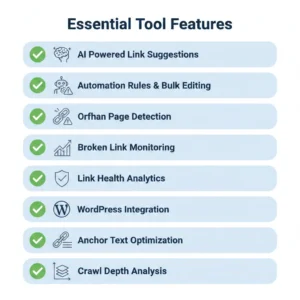
Not all internal linking tools deliver the same value. Understanding essential features helps you identify solutions that provide genuine SEO benefits versus superficial functionality. The right tool should combine power, ease of use, and intelligent automation.
Intelligent Link Suggestions
Context-Aware Recommendations
The most valuable feature of any internal linking tool seo solution is intelligent suggestion capability. Basic tools might suggest links based on simple keyword matches. Advanced systems analyze full content context, semantic relationships, and linking history to provide highly relevant recommendations.
Look for tools that consider multiple factors: topical relevance, current link density, target page authority, user intent alignment, and existing anchor text diversity. These sophisticated algorithms deliver suggestions that genuinely improve SEO rather than just adding links indiscriminately.
Customizable Suggestion Parameters
Every site has unique needs and preferences. The best ai internal linking tools let you customize suggestion parameters to match your strategy. You might want to prioritize linking to specific cornerstone content, avoid over-linking certain pages, or maintain particular anchor text ratios.
Customization options should include maximum links per page, preferred anchor text types (exact match, partial match, branded, generic), target page filters, and suggestion sensitivity. This control ensures automation aligns with your broader SEO goals rather than applying generic best practices.
Automation Rules and Bulk Operations
Rule-Based Automation
Manual review of every link suggestion becomes impractical on large sites. Rule-based automation is essential for scaling your internal linking automation for WordPress efforts. You define rules once, and the system applies them consistently across your entire site.
Common automation rules include: “Always link keyword X to page Y,” “Limit links per page to Z,” “Use varied anchor text for the same target page,” and “Automatically link product names to product pages.” These rules work 24/7, adding appropriate links to new content as you publish it.
Bulk Link Management
Updating links across hundreds of existing posts manually is nearly impossible. An internal link building tool with robust bulk capabilities lets you add, modify, or remove links across multiple posts simultaneously. This is crucial for implementing new topic clusters seo strategies or updating links after site restructuring.
Effective bulk tools provide filtering options (by category, date, author, tags) so you can target specific content sets. You might add links to a new pillar page from all related category articles, or update anchor text across posts linking to a renamed page. These operations take minutes with the right tool versus weeks manually.
Link Health and Audit Tools
Broken Link Detection
Internal links break when pages are deleted, URLs change, or sites are restructured. Broken links waste link equity, frustrate users, and signal poor site maintenance to search engines. An internal link audit feature continuously monitors for breaks and alerts you to problems.
The best systems don’t just identify broken links—they suggest replacements based on content similarity. If you delete a page, the tool recommends alternative pages covering the same topic and offers to update all links automatically. This transforms a complex cleanup project into a few clicks. Check out how to identify bad internal links quickly.
Link Distribution Analysis
Healthy sites maintain balanced link distribution. Some pages naturally accumulate more links than others, but extreme imbalances indicate structural problems. An internal linking checker tool should visualize your link distribution and flag pages with too many or too few internal links.
Distribution analysis helps you identify over-optimized pages that might trigger quality algorithms, under-linked valuable content that deserves more equity, hub pages that could strengthen your topic clusters, and orphaned or nearly-orphaned content needing integration.
Reporting and Analytics
Link Performance Metrics
You can’t improve what you don’t measure. Professional internal linking tools provide detailed analytics on link performance, including click-through rates on internal links, pages gaining or losing internal links over time, anchor text distribution across your site, and correlation between internal links and ranking improvements.
These metrics help you understand which linking strategies work best for your specific site. You might discover that contextual links outperform sidebar links, or that certain anchor text styles drive more engagement. Data-driven optimization beats guesswork every time. Explore internal link analytics and reporting capabilities.
Progress Tracking
Implementing comprehensive internal linking across a large site takes time. Progress tracking shows you how much you’ve accomplished and what remains. This includes total internal links added, percentage of posts with optimal link counts, orphan pages resolved, and broken links fixed.
Visual dashboards make it easy to communicate progress to stakeholders and identify areas needing attention. You can set goals (like “ensure every post has at least 3 relevant internal links”) and track movement toward those targets.
Integration and Compatibility
CMS and Page Builder Support
Your internal linking tool should work seamlessly with your existing technology stack. For WordPress sites, this means compatibility with Gutenberg, Classic Editor, Elementor, Divi, WPBakery, and other popular page builders. Nothing is more frustrating than a tool that conflicts with your editor or requires manual HTML editing.
Beyond basic compatibility, look for tools that enhance your workflow rather than disrupting it. The best solutions integrate directly into your editing interface, providing suggestions and automation features right where you work. This reduces friction and increases adoption across your team.
SEO Tool Integration
Internal linking doesn’t exist in isolation—it’s part of a broader SEO strategy. Tools that integrate with platforms like Google Analytics, Google Search Console, Ahrefs, or SEMrush provide richer insights by combining internal link data with traffic, rankings, and external link metrics.
These integrations help you answer strategic questions: Are pages with more internal links ranking better? Do link equity improvements correlate with traffic increases? Which internal linking patterns drive the best engagement metrics? Integrated data turns correlation into actionable optimization strategies.
How to Choose the Right Internal Linking Tool
Selecting the right internal linking tool requires balancing features, ease of use, pricing, and alignment with your specific needs. The “best” tool varies depending on your site size, technical expertise, budget, and SEO objectives.
Evaluating Based on Site Size and Complexity
Small Sites (Under 100 Pages)
Sites with fewer than 100 pages can potentially manage internal links manually, but automation still offers value through consistency and time savings. For small sites, prioritize tools with simple interfaces, affordable pricing, and basic suggestion features.
You don’t need advanced bulk editing or complex automation rules yet. Focus on tools that make it easy to find internal links to a page and suggest contextually relevant connections as you create content. A lightweight internal link in wordpress plugin often suffices for small sites.
Medium Sites (100-1,000 Pages)
Medium-sized sites reach the tipping point where manual linking becomes impractical. You need automation to maintain consistency and avoid the linking bottleneck slowing content production. At this scale, invest in tools offering both suggestion engines and rule-based automation.
Look for robust internal link audit capabilities to identify gaps in your existing content. Orphan page detection becomes particularly valuable as sites approach 500+ pages where it’s easy to lose track of content. Bulk editing features save significant time when optimizing established content libraries.
Large Sites (1,000+ Pages)
Enterprise-scale sites require industrial-strength solutions. Manual management is completely impossible. You need sophisticated AI-powered suggestion engines, comprehensive automation rules, detailed analytics, and reliable performance at scale.
For large sites, prioritize tools that can process thousands of pages without slowing down, provide advanced filtering and categorization for bulk operations, offer team collaboration features if multiple people manage linking, and deliver enterprise-level support. The best internal linking tools for seo at this level are investments that pay for themselves through efficiency gains.
Identifying Your Feature Priorities
AI and Automation vs. Manual Control
Some site owners want maximum automation—set rules and let the system run. Others prefer more manual control with AI assistance. Understanding your preference helps narrow options. Hands-off operators should prioritize robust automation rules and AI-powered internal linking suggestions tool capabilities that minimize manual review.
If you prefer editorial control, look for tools with excellent suggestion interfaces that make manual review quick and easy. You want AI to do the heavy lifting of finding opportunities, but you make final decisions. The best tools offer flexibility—full automation when you want it, manual control when you need it.
WordPress-Specific vs. Platform-Agnostic
WordPress site owners should strongly consider wordpress seo internal links specialized tools. These integrate deeply with WordPress core, provide native editor experiences, and understand WordPress-specific content structures like custom post types and taxonomies.
Platform-agnostic tools offer more flexibility if you run multiple sites on different CMSs, but often require more technical setup and provide less seamless experiences. For pure WordPress sites, specialized link whisper wordpress plugin solutions typically deliver better user experiences and faster implementation.
Budget and ROI Considerations
Pricing Models
Internal linking tools typically use subscription pricing, often tiered by site count or feature access. Common models include monthly/annual subscriptions ($10-100+ per month), one-time purchases with annual renewal for updates ($100-400), and freemium models with limited free versions.
Consider total cost of ownership, including learning curve time, migration effort if switching tools, and potential need for additional features later. The cheapest option isn’t always the most cost-effective when you factor in functionality limitations and time costs.
Calculating ROI
Measure tool ROI through time savings and ranking improvements. If internal linking currently takes 2 hours per post and you publish 20 posts monthly, that’s 40 hours. At $50/hour value, you’re spending $2,000 monthly on manual linking. A $50/month tool that saves 80% of that time delivers $1,550 monthly value—a 31x ROI.
Beyond time savings, consider SEO impact. If improved internal links seo wordpress structure increases organic traffic by 15%, calculate that traffic value based on typical customer acquisition costs or ad revenue. Even modest ranking improvements often justify tool costs many times over.
Trial and Evaluation Process
Testing Key Workflows
Most quality tools offer free trials. Use this period strategically to test your most important workflows. Create a new post and evaluate suggestion quality and relevance. Run bulk operations on a sample of existing posts. Test automation rules with specific linking scenarios. Check reporting and analytics clarity.
Don’t just click through features—simulate real usage with your actual content. This reveals integration issues, workflow friction points, and whether the tool actually saves time in practice versus theory.
Evaluating Support and Documentation
Even the best tools occasionally require support. During trials, test response times and helpfulness. Check documentation quality—are setup guides clear? Are advanced features explained? Are there video tutorials for visual learners?
Poor support can turn a powerful tool into a frustrating experience. Prioritize vendors with responsive support teams, comprehensive documentation, and active user communities. These resources significantly reduce implementation time and help you maximize tool value.
Implementation Strategies for Maximum Impact
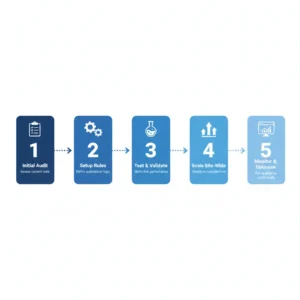
Purchasing an internal linking tool is just the beginning. Strategic implementation determines whether you extract full value or leave benefits on the table. Successful implementation requires planning, phased execution, and ongoing optimization.
Getting Started with Your First Tool
Initial Site Audit
Before automating anything, understand your current state. Run a comprehensive internal link audit to identify existing problems: orphaned content needing integration, pages with excessive or insufficient internal links, broken links requiring fixes, and content clusters lacking proper interconnection.
This audit establishes your baseline. Document metrics like total internal links, average links per page, percentage of orphan pages, and broken link count. These numbers let you measure improvement as you implement automation and prove ROI to stakeholders.
Setting Up Automation Rules
Start with conservative automation rules focused on low-risk, high-value scenarios. Good initial rules include automatically linking brand or product names to key pages, connecting new posts to relevant pillar content, and adding footer or sidebar links to important resources across the site.
Test rules on a small content subset before site-wide application. Verify that links make sense contextually, don’t over-link pages, and maintain natural anchor text. Adjust parameters based on initial results before scaling to your entire site.
Optimizing Your Ongoing Workflow
Integration with Content Creation
The most effective internal link building tool usage integrates linking directly into content creation workflows. Rather than linking as a separate post-publication task, make it part of the writing process. Enable real-time suggestions in your editor so writers see linking opportunities as they type.
Train content creators to review and accept relevant suggestions while drafting. This eliminates the linking bottleneck and ensures new content is properly connected from day one. Writers become better at natural link integration when they see AI suggestions regularly, improving overall content quality.
Regular Maintenance Schedules
Set up recurring maintenance tasks to keep your site structure seo healthy. Weekly tasks might include reviewing broken link reports and accepting or rejecting recent AI suggestions. Monthly tasks could involve analyzing link distribution across new content and updating automation rules based on content strategy changes. Quarterly deep dives should examine overall link equity flow, topic cluster completeness, and crawl depth optimization.
Consistent maintenance prevents the link decay that naturally occurs as sites grow and evolve. Small regular investments keep your internal linking structure healthy rather than requiring periodic crisis interventions.
Team Collaboration and Training
Multi-User Workflows
Sites with multiple contributors need clear workflows for who manages linking. Common models include: writers add initial links, editors review and enhance, SEO specialists handle strategy and automation rules, or distributed responsibility with guidelines for consistent execution.
The best internal linking tool for teams provides role-based permissions and approval workflows. Junior writers might submit link suggestions for review while senior editors auto-approve. Clear division of responsibilities prevents gaps and overlap while maintaining quality standards.
Training and Documentation
Tool effectiveness depends on user adoption. Create internal documentation covering: when and how to use suggestion features, automation rules and their purposes, approval processes for link changes, and best practices for anchor text selection. Include screenshots and examples from your actual content.
Regular training sessions keep skills sharp and ensure new team members understand linking standards. Share success stories—”this post ranked better after we improved internal links”—to build enthusiasm for linking best practices.
Migrating from Manual to Automated Linking
Phased Implementation
Don’t try to automate everything overnight. Phased rollouts reduce risk and allow learning. Phase 1 might focus on new content only, using automation for fresh posts while leaving existing content unchanged. Phase 2 could tackle high-value existing content like cornerstone articles and best-performing posts. Phase 3 completes the migration by optimizing remaining content in batches.
This approach lets you refine processes with each phase, build team confidence gradually, and measure results incrementally. If issues arise, they’re contained to specific content segments rather than affecting your entire site.
Quality Control During Migration
Establish quality checkpoints throughout migration. Sample automated link additions regularly to ensure they maintain your standards. Monitor key metrics like bounce rate, time on site, and engagement to confirm links improve user experience. Track rankings for pages receiving new internal links to validate SEO impact.
Use these checkpoints to adjust automation parameters. If suggestions seem off-target, tighten relevance thresholds. If links appear too sparse, increase density targets. Continuous refinement ensures your wordpress internal linking automation delivers consistent quality.
Advanced Internal Linking Techniques
Once you’ve mastered basic automation, advanced techniques unlock additional SEO value. These strategies require deeper understanding of search algorithms and site architecture but deliver outsized returns for competitive niches.
Strategic Topic Cluster Development
Hub and Spoke Architecture
Advanced topic clusters seo implementation goes beyond basic related content linking. Create comprehensive hub pages (pillar content) covering topics broadly, then develop detailed spoke pages exploring specific subtopics. Strategic internal links connect spokes to hubs and related spokes to each other, forming semantic webs that demonstrate topical authority.
Analyze search intent across your topic to identify gaps in coverage. If your pillar page covers “email marketing” but you lack spoke content on “email deliverability optimization,” that’s a content opportunity. Once created, automation can ensure the new spoke integrates perfectly into your existing cluster structure.
Cross-Cluster Linking
While topic clusters focus internal linking within topics, cross-cluster links connect related but distinct subject areas. A marketing cluster might link strategically to a sales cluster when discussing lead handoff processes. These bridges help search engines understand how your expertise areas interrelate.
Implement cross-cluster linking thoughtfully. Too many connections dilute cluster boundaries and confuse topical signals. The seo internal linking tool should help you identify the 2-3 strongest cross-cluster connections for each pillar page while maintaining clear primary topic focus.
Link Equity Sculpting
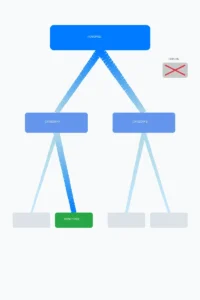
Strategic PageRank Flow
Not all pages deserve equal link equity. Your highest-ROI pages (product pages, service pages, high-converting content) should receive disproportionate internal linking support. Advanced practitioners use link equity sculpting to direct PageRank flow strategically across their sites.
Identify your money pages—those that directly drive business results. Use your internal linking checker tool to analyze how much link equity they currently receive. Then systematically increase internal links to these pages from related content, ensuring links come from contextually relevant sources to maintain quality signals.
Orphan Rescue Operations
Beyond simply identifying orphan pages seo issues, advanced optimization involves strategic orphan integration. Don’t just add any link to fix the orphan status—add links from pages that make semantic sense and pass meaningful link equity. An orphan guide to “advanced WordPress security” should integrate into your WordPress content cluster, not receive a random link from an unrelated topic.
Analyze orphan page content to understand why it became isolated. Sometimes orphans are genuinely low-quality content deserving removal. Other times they’re valuable resources that fell through organizational cracks. Make intentional decisions about whether to integrate, improve then integrate, or prune.
Anchor Text Optimization
Natural Variation Strategies
Over-optimization of anchor text can trigger spam filters. While external link anchor text receives more scrutiny, internal linking anchor text still matters. The best ai internal linking tools help maintain natural variation using exact match keywords sparingly, partial match variations frequently, branded terms regularly, and generic phrases (“learn more,” “click here”) occasionally.
Track anchor text distribution for your most important target pages. If 80% of links use the same exact match keyword, that’s a red flag. Aim for diverse anchor text that looks natural while still providing keyword context. Automation can help enforce variation rules without manual tracking. Learn more about anchor text optimization for internal links.
Contextual Relevance
The best anchor text flows naturally within surrounding content. Advanced internal linking tool implementations consider the full sentence context when suggesting anchor text. A phrase like “explore our email marketing guide” works better than forcing “email marketing” as standalone anchor text in an awkward sentence.
Review AI-suggested anchor text for readability. If suggestions feel forced or disrupt content flow, adjust parameters to prioritize natural language over exact keyword matches. Search engines increasingly value user experience signals, making natural-reading content more important than keyword precision.
Crawl Depth and Budget Optimization
Flattening Site Hierarchy
Sites with deep hierarchies (content buried 6+ clicks from homepage) waste crawl budget and dilute link equity. Strategic internal linking can flatten structure by creating shortcut paths to important deep content. Add contextual links from high-authority pages directly to valuable deep content, bypassing intermediate category layers.
Monitor crawl depth distribution across your site. Ideally, 80%+ of important content should be within 3 clicks of your homepage. Use your internal link building tool to identify pages exceeding this threshold and add strategic links to reduce their depth.
Crawl Priority Signals
Search engines use various signals to determine which pages to crawl most frequently. Internal link counts and link equity received are significant factors. By strategically concentrating links on high-priority pages (frequently updated content, high-converting pages, timely information), you signal to crawlers to check these pages more often.
Implement smart automation rules that adjust link density based on page type. Blog posts might receive 5-8 internal links while cornerstone guides get 15-20. Product pages for in-stock items get more links than discontinued products. This dynamic approach ensures crawl budget focuses on your most valuable content.
Advanced Performance Monitoring
Correlation Analysis
Sophisticated SEO practitioners correlate internal linking changes with ranking and traffic movements. Track which pages received new internal links, when links were added, and subsequent ranking changes for target keywords. Over time, patterns emerge showing which linking strategies drive the best results for your specific site.
Use this data to refine your approach continuously. You might discover that links from your blog drive more ranking impact than links from category pages, or that certain anchor text styles outperform others. Evidence-based optimization beats theoretical best practices.
A/B Testing Link Strategies
For larger sites with sufficient traffic, consider A/B testing different internal linking approaches. Test high link density vs. moderate density on similar pages, contextual links vs. sidebar links, exact match anchor text vs. natural variations, or automated suggestions vs. manual linking.
Controlled experiments provide definitive answers about what works for your audience and niche. While general SEO principles apply broadly, every site has unique characteristics. Testing reveals your specific optimization opportunities.
Conclusion
Internal linking automation represents one of the highest-leverage SEO optimizations available today. The right internal linking tool transforms a time-consuming manual task into an efficient, scalable process that continuously improves your site structure, link equity distribution, and search visibility.
From AI-powered suggestion engines to comprehensive automation rules, modern tools provide everything you need to build world-class internal linking architecture. Whether you’re managing a small blog or an enterprise content library, automation saves time while delivering better results than manual approaches.
The key is choosing a solution aligned with your site size, technical capabilities, and strategic objectives. Start with clear goals, implement systematically, and optimize continuously based on data. As your internal linking structure improves, you’ll see cascading benefits: better rankings, increased organic traffic, enhanced topical authority, and improved user engagement.
Ready to transform your internal linking strategy? Discover how LinkWhisper’s AI-powered automation can help you build a perfectly optimized internal linking structure in a fraction of the time manual methods require. Explore detailed strategies in our guide to internal linking for SEO and learn how to find internal linking opportunities that drive real results.
Frequently Asked Questions
Automation helps build comprehensive topic clusters seo by systematically connecting related content. It ensures pillar pages link to all subtopic articles and related pieces interconnect properly. This creates semantic networks demonstrating deep topic expertise to search engines, significantly boosting topical authority signals that improve rankings for entire content clusters.
Can internal linking tools fix orphan pages automatically?
Yes, advanced tools detect orphan pages seo issues by identifying content with no incoming internal links. They suggest contextually relevant pages to link from, and many can automatically insert these rescue links based on semantic analysis. This transforms isolated content into integrated parts of your site structure, making them discoverable by search engines and users.
What's the difference between AI-powered and rule-based internal linking?
Rule-based linking follows predefined instructions you set, like "always link keyword X to page Y." AI internal linking tools use machine learning to understand content semantically and suggest contextually appropriate links you might not think of manually. The best tools combine both—AI for intelligent suggestions and rules for consistent implementation of your strategy.
How many internal links should each page have?
Most SEO experts recommend 3-8 internal links per 1,000 words of content, though this varies by content type and purpose. Cornerstone content might have 15-20 internal links while shorter posts need fewer. An internal link audit tool helps identify optimal ranges for your specific site by analyzing what works best for your top-performing content.
Will automated internal linking hurt my SEO if done incorrectly?
Poor automation can create problems like over-optimization, irrelevant links, or unnatural anchor text patterns. However, quality internal linking tools include safeguards against these issues. Start with conservative settings, monitor results, and adjust gradually. Most tools err on the side of caution rather than aggressive linking that might trigger common on-page SEO problems.
How does internal linking affect crawl depth and budget?
Strategic internal links reduce crawl depth by creating efficient paths from your homepage to deep content. Instead of crawlers navigating through multiple category levels, direct contextual links provide shortcuts. This optimizes crawl budget by helping search engines discover and index important content faster while spending less time on less valuable pages.
Can I use internal linking tools with page builders like Elementor?
Most quality wordpress internal linking plugins support popular page builders including Elementor, Divi, Beaver Builder, and WPBakery. Check compatibility documentation before purchasing. The best tools integrate directly into your editor interface regardless of which builder you use, providing seamless suggestion and automation features within your existing WordPress SEO workflow.
How do I measure ROI from internal linking automation?
Calculate time saved versus tool cost—if you save 30 hours monthly at $50/hour value, that's $1,500 monthly benefit. Track SEO improvements including ranking increases for target keywords, organic traffic growth to linked pages, and reduced orphan page counts. Many sites see 15-30% traffic increases within 6 months of implementing comprehensive internal linking strategies.
What's the best internal linking tool for WordPress sites?
The best internal linking tool depends on your specific needs, but look for native WordPress integration, AI-powered suggestions, bulk editing capabilities, orphan page detection, and broken link monitoring. LinkWhisper specializes in WordPress with features designed specifically for WordPress content structures, making it particularly effective for WordPress sites of any size.
Check if your site has the same issues.
Run a free audit right now. See your orphaned pages, broken links, and link health score in 60 seconds.
Check My Site

