

Contents
We all know the importance of internal links both from a user perspective and for helping your site rank better in Google.
However, from time to time, you might want to remove unwanted internal links. While the process is fairly simple in WordPress, the harder part can be determining that you have internal links that need to be removed in the first place!
Understanding and auditing your internal link structure with an internal link checker can help you spot which links might be hurting more than helping.
Today I’m going to show you why you might want to remove or change some of your internal links to help you from an SEO perspective. I’ll also show you how to do it manually through WordPress or through an automated fashion using this internal linking tool, Link Whisper.
Why Remove Internal Links?
An internal link is a way to tell Google the exact keyword that you want an article to rank for in Google. You can do this by making the anchor text include the keyword phrase that you hope to rank for.
If you have been blogging for a long time, you might realize that you end up with multiple articles on a similar topic and that you’ve built similar internal links to different content! This is called keyword cannibalization and can make it difficult for Google to determine which of your articles it should rank.
If you’ve seen yourself never really rank for a keyword, even though you might have written a great article and optimized it well, keyword cannibalization and confusing internal links could be the reason.
Before removing links, it’s smart to use an SEO internal link checker to ensure you don’t accidentally break important connections.
The answer to fixing this issue is twofold. First, combine the articles, delete one of them, or optimize one of them for a different keyword.
Second, you should remove or change the “bad” internal links that could be confusing Google. For example, if you have several different internal links with the anchor text “keyword research” pointing to different articles, you should change the internal links to point to the correct article you want to rank.
How to Delete Links in WordPress Manually?
Removing internal links manually in WordPress is not that difficult. Just edit the post where you want to remove the link, highlight the anchor text you want to remove, then click the “unlink” icon.
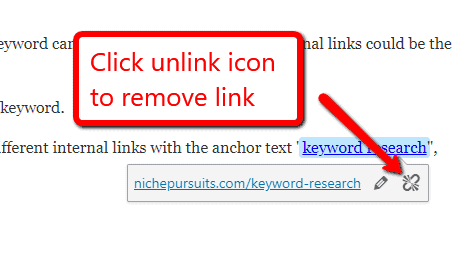
Alternatively, you can click the pencil icon to edit the existing link to a different URL.
How to Use Link Whisper to Help You Remove Internal Links?
But how do you find where you have “bad” links, and is there a way to make it even faster and easier? This is where Link Whisper comes into play.
If you have a large website (or likely even a small one), there is no way you can recall off the top of your head if all your internal links were done properly. Is it possible that you accidentally linked to the wrong article?
WordPress doesn’t have a fast way to check where all your internal links are pointing, but Link Whisper does.
For comprehensive site analysis, try the internal link checker tool for WordPress to quickly see all inbound and outbound links.
Some links might not be relevant anymore and could confuse both users and search engines.
Using an internal link checker for SEO optimization allows you to identify which links might need updating or removal.
Keeping your linking structure clean ensures Google understands your most important content.
The SEO internal link checker plugin helps manage complex sites by highlighting every internal linking opportunity.
Even small websites benefit from audits to prevent broken links or redundant references.
Advanced users can leverage the SEO internal link checker WordPress tool to perform a full audit and maximize SEO benefits.
For a complete guide on how internal link audits boost SEO, check out this helpful resource: Internal Link Audit: The Quiet SEO Lever Most Businesses Miss.
If you want to ensure that a particular article has all “good” internal links pointing to it, pull up the reports page and expand the “inbound internal links” or “outbound internal links.
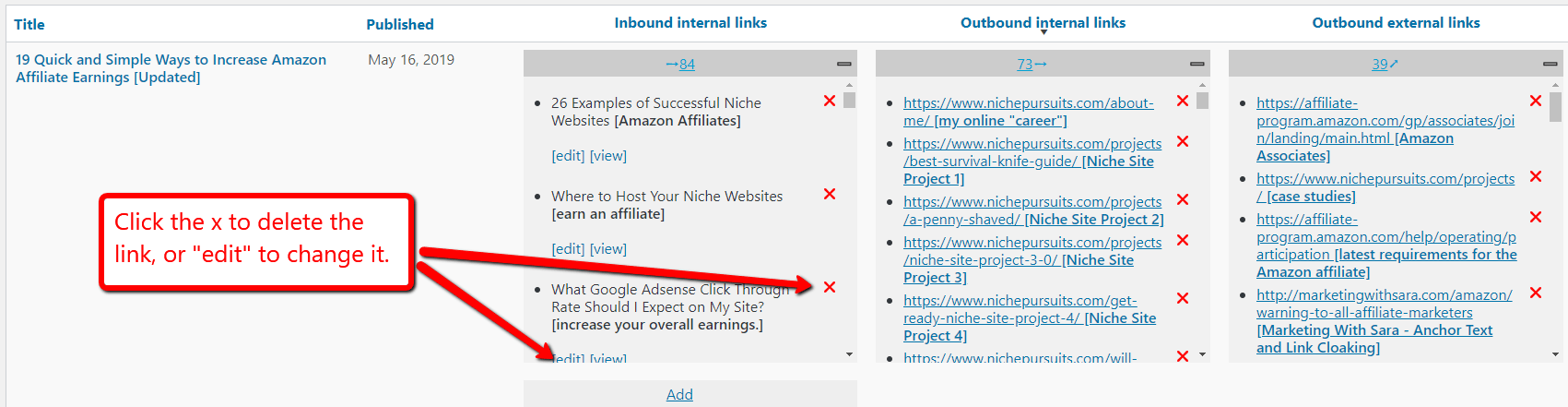
As you can see, using the Link Whisper reports is a powerful and much faster way to see where all your internal links are going to and coming from. This will help you perform an internal link audit to make sure your most important pages are truly optimized.
Watch this video to see how easy Link Whisper makes it to remove internal links.
Check if your site has the same issues.
Run a free audit right now. See your orphaned pages, broken links, and link health score in 60 seconds.
Check My Site

