Contents
Internal linking for woocommerce is not the same job as internal linking for a blog, even though most advice treats it that way. A WooCommerce store has three distinct content types, products, categories, and blog posts, and each one needs its own linking logic. This guide breaks down the three link types that actually move the needle and explains why manual strategies stop working once your catalog grows past a hundred products.
Not sure where your own site stands? Run the free internal link checker to see your current link health score before applying the framework below.
Key Takeaways
- WooCommerce stores need three distinct link types: product to product, product to category, and blog to product.
- Manual internal linking strategies do not scale past a small catalog, which is why automation matters here more than on a typical blog.
- Anchor text variation and structured product taxonomies both play a bigger role in ecommerce internal linking than in blog linking.
Why WooCommerce Internal Linking Is a Different Problem
A blog only has one real content type to link between: articles. A WooCommerce store has at least three, products, categories, and blog posts, and each one plays a different role in the buyer journey. Products need to keep a shopper browsing after they land on one item. Categories need enough internal support to rank and to organize the catalog for both visitors and search engines. Blog posts exist to answer a question, and the best ones end that answer by pointing directly at the product that solves it.
This distinction is not academic. A store that only links blog post to blog post, the pattern most default WordPress SEO advice assumes, leaves its actual revenue-generating pages, the products and categories, almost entirely dependent on navigation menus and search for discovery. Menus can only surface a small slice of a large catalog, which means most products end up relying on category browsing alone to be found by a visitor who did not arrive already knowing what they wanted.
Treating all three the same way, or worse, only linking between blog posts and ignoring the actual storefront, is the most common internal linking mistake on WooCommerce sites. Most generic ecommerce SEO advice covers keyword research and page speed in detail but treats internal linking as an afterthought, which is exactly the gap this guide fills. It is one piece of the broader picture covered in internal linking for different wordpress site types, and Link Whisper own WooCommerce page outlines how the plugin fits into a store workflow specifically.
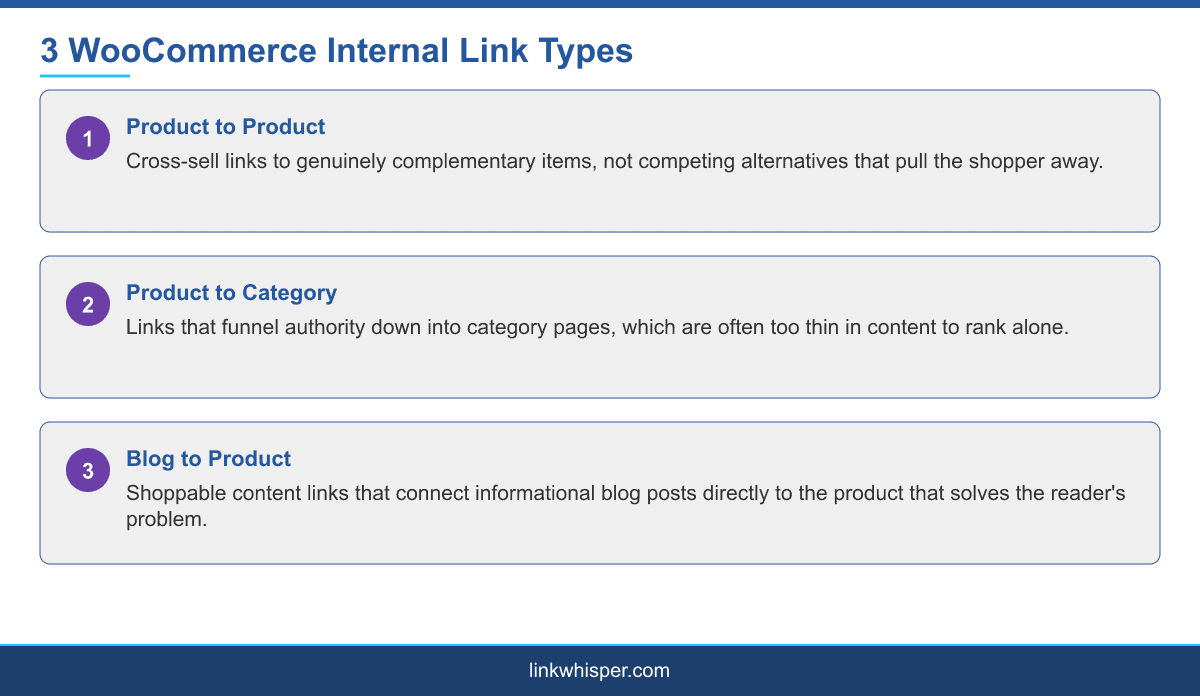
The Three WooCommerce Link Types That Matter
Product to product links are the cross-sell and related-item links that keep a shopper on your site after they have looked at one item. A running shoe product page linking to insoles or performance socks makes sense. That same shoe page linking to five other unrelated shoe styles competing for the same click generally does not.
Product to category links funnel authority down from wherever it accumulates, usually your homepage and your best-performing blog content, into the category pages that need it. Category pages sit in an awkward spot: too thin in content to rank purely on their own words, but too commercially important to leave under-supported.
Blog to product links, sometimes called shoppable content, are the links inside a blog post that lead directly to the product being discussed. A post comparing trail shoes and road shoes should link into both relevant categories or specific products at the exact point in the text where the comparison is made, not bundled into one generic call to action at the end.
These three link types are not equally weighted. Blog to product links usually deserve the most attention because they connect two very different kinds of pages, informational content that ranks for broad research queries and transactional pages that convert, and that connection is exactly what most stores are missing. A store can have a healthy blog and a well-organized catalog and still leave revenue on the table simply because the two never link to each other.
A Practical Approach to Anchor Text on Product Pages
Anchor text discipline matters more in ecommerce than it does on a typical blog, because product pages tend to accumulate links from many different blog posts over time. If every one of those links uses the exact same keyword phrase, the pattern starts to look manipulative to search engines rather than natural. Varying the anchor text, a product name here, a descriptive phrase there, a brand plus category combination somewhere else, reads as organic and holds up better as your content library grows.
This is also where managing product categories and taxonomies properly pays off. A clean taxonomy structure gives you a consistent, logical set of category and tag pages to link into, instead of forcing every internal link to point at individual products because the category structure itself is too shallow to be worth linking to.
A useful test is to pick one of your top ten products and count how many different anchor text variations currently point to it from your own site. If the answer is one, or zero, that page is both under-linked and over-reliant on whatever anchor text does exist. Diversifying that anchor text across a handful of genuinely different phrases, rather than adding more links with the same phrase, is usually the higher-value fix.
Why Automation Changes the Scale Problem
Manually applying these three link types across a catalog of even a few hundred products is not realistic for most teams. Someone has to remember which products are complementary, which categories are under-linked, and which older blog posts should be updated every time a new product launches. That workload grows linearly with catalog size while the team maintaining it usually does not. See our full internal linking automation guide for a step-by-step setup.
It also compounds every time the catalog changes. A new product launch means every related product should potentially update its cross-sell links, a discontinued product means every page linking to it needs a replacement, and a seasonal category that gets promoted for a few months needs a temporary boost in internal support that manual processes rarely keep up with once the initial launch push is over.
This is the specific case where an internal linking plugin earns its place in a WooCommerce workflow: it can scan product descriptions, category pages, and blog content for keyword mentions and surface link suggestions across all three link types without someone manually cross-referencing the catalog. For the broader picture of how linking needs shift across different WordPress site types, see internal linking for different wordpress site types, and if your store also sells to multiple regions, internal linking for local and multi-location businesses and the guide to internal linking and schema markup, which covers product structured data alongside linking, are both worth reading next.
Conclusion
None of the three link types described here require a redesign or a content overhaul. They require a deliberate pass through content you likely already have: product descriptions that already mention complementary items, category pages that already exist but sit under-linked, and blog posts that already answer buyer questions without pointing at the product that solves them. Internal linking on a WooCommerce store is not a smaller version of blog internal linking, it is a different discipline built around three specific link types: product to product, product to category, and blog to product. Get those three right and both your category pages and your blog content start pulling their weight in the buyer journey instead of sitting disconnected from the storefront. If you want to see how automated link suggestions handle a real product catalog, start a free trial.
Frequently Asked Questions
What is the most important internal link type for WooCommerce SEO?
All three matter, but category pages tend to need the most deliberate support since they are too thin to rank on content alone and too commercially important to leave under-linked.
Should every blog post link to a product?
Only where the connection is genuine. A blog post should link to a specific product or category at the point where that product actually answers the reader question, not as a forced afterthought.
How many product to product links should a product page have?
Enough to offer genuinely complementary items, typically three to six, rather than competing alternatives that pull the shopper away from the item they already chose.
Does internal linking help WooCommerce category pages rank?
Yes. Category pages are often too thin in unique content to rank alone, so links from top-selling products and relevant blog posts are a major part of how they earn authority.
Can internal linking plugins read WooCommerce product descriptions?
Link suggestion tools generally scan the same content field product descriptions live in, so detection works the same way it does on standard posts and pages.
Is anchor text variation important for product links?
Yes. Repeating the exact same keyword phrase across every link to a product can look manipulative over time, while natural variation in anchor text holds up better.
How does WooCommerce internal linking differ from a normal blog?
A blog only links articles to articles. WooCommerce needs three distinct link types across products, categories, and blog posts, each with a different purpose in the buyer journey.
Does product taxonomy structure affect internal linking?
Yes. A clean, logical category and tag structure gives you meaningful pages to link into, rather than forcing every internal link to point directly at individual products.
Where should I start if I am new to WooCommerce SEO?
Run an internal link checker against your existing catalog first, to see how thin your current category and blog to product linking actually is before building a manual process.
Check if your site has the same issues.
Run a free audit right now. See your orphaned pages, broken links, and link health score in 60 seconds.
Check My Site