Contents
- 1 Rules 1 to 4: Decide Where Each Article Should Lead
- 2 Rules 5 to 8: Write Anchors and Placements Readers Trust
- 3 Rules 9 to 11: Keep Blog to Product Links Working
- 4 A Worked Example of Shopify Blog to Product Internal Links
- 5 Conclusion
- 6 Frequently Asked Questions
- 6.1 What are Shopify blog to product internal links?
- 6.2 How many product links should one blog post include?
- 6.3 Should I link to a product or a collection?
- 6.4 Which URL should I paste for a product link?
- 6.5 Where should the first product link go in an article?
- 6.6 Is exact match anchor text bad for product links?
- 6.7 What happens to blog links when I delete a product?
- 6.8 Do product pages need links back to the blog?
- 6.9 How often should I review my blog to product links?
- 6.10 Can an app help connect Shopify blog to products?
A shopper who lands on your brewing guide is already curious. Shopify blog to product internal links decide whether that curiosity reaches a product page or quietly ends on the article. This guide sets out 11 rules for adding those links without stuffing keywords into every paragraph. It sits under our complete guide to linking a Shopify store, which covers products, collections and blogs together. Each rule uses one example store, a small shop selling loose leaf tea, so you can picture the pattern on your own catalogue.
Key Takeaways
- Link from the sentence where a reader would naturally want the product, and use anchor text that names the item rather than a sales command.
- To connect Shopify blog to products at scale, pick one main product or collection for each article before you write, then review those links every quarter.
- Good ecommerce internal linking serves the reader first, and product discovery SEO follows when links are descriptive, crawlable and free of dead ends.
Rules 1 to 4: Decide Where Each Article Should Lead
The first four rules happen before you type a single link. They decide which product or collection each article supports and which URL format you paste. Getting these choices right means every later link has a clear purpose, and your blog stops sending readers to random corners of the store or to duplicate product addresses.
Write the main destination at the top of your draft before you start. That one line stops the article from drifting toward five unrelated products. It also helps you see gaps, such as a popular collection that no article supports yet.
Rules 2 and 3 work together. A beginner guide to loose leaf tea might link the collection twice and no single product, because the reader has not chosen yet. A comparison of two specific teas should link both product pages directly. Matching the link type to the reader’s stage is the core habit behind Shopify blog to product internal links that people actually click.
If your blog already has many posts, apply these rules to existing articles first. Older posts often carry the most traffic and the fewest product links, so the gains from fixing them tend to arrive sooner.
- Rule 1: Give every article one main destination. A guide to brewing green tea leads to the green tea collection. A review of a glass teapot leads to that teapot.
- Rule 2: Link to a collection when the reader is still choosing. Early research posts suit a page such as /collections/green-tea, because the reader wants options rather than one item.
- Rule 3: Link to a product when the paragraph names it. If a sentence discusses one specific tea, link its product page at /products/handle so the reader lands on the item itself.
- Rule 4: Paste the canonical product URL. A link copied from a collection page may read /collections/green-tea/products/sencha. Use the /products/sencha form, which is the version most themes canonicalise.
Rules 5 to 8: Write Anchors and Placements Readers Trust
Rules five to eight govern the link itself: the words you highlight, where the link sits and how often it appears. These choices shape whether readers click and whether search engines understand the destination. A descriptive anchor in the right paragraph does more for product discovery than a dozen generic buttons scattered across the post.
Google says descriptive anchor text helps it understand linked pages, and that links should be real <a href> elements. Its link best practices for crawlable links page explains both points. Both points apply directly to Shopify blog to product internal links. For more anchor examples, see our guide to writing anchor text for internal links.
In the Shopify admin, open Online Store, then Blog posts, and select the post. Highlight the words, choose the link button in the rich text editor and paste the URL. Shopify’s help page on writing and editing blog posts shows the editor in detail.
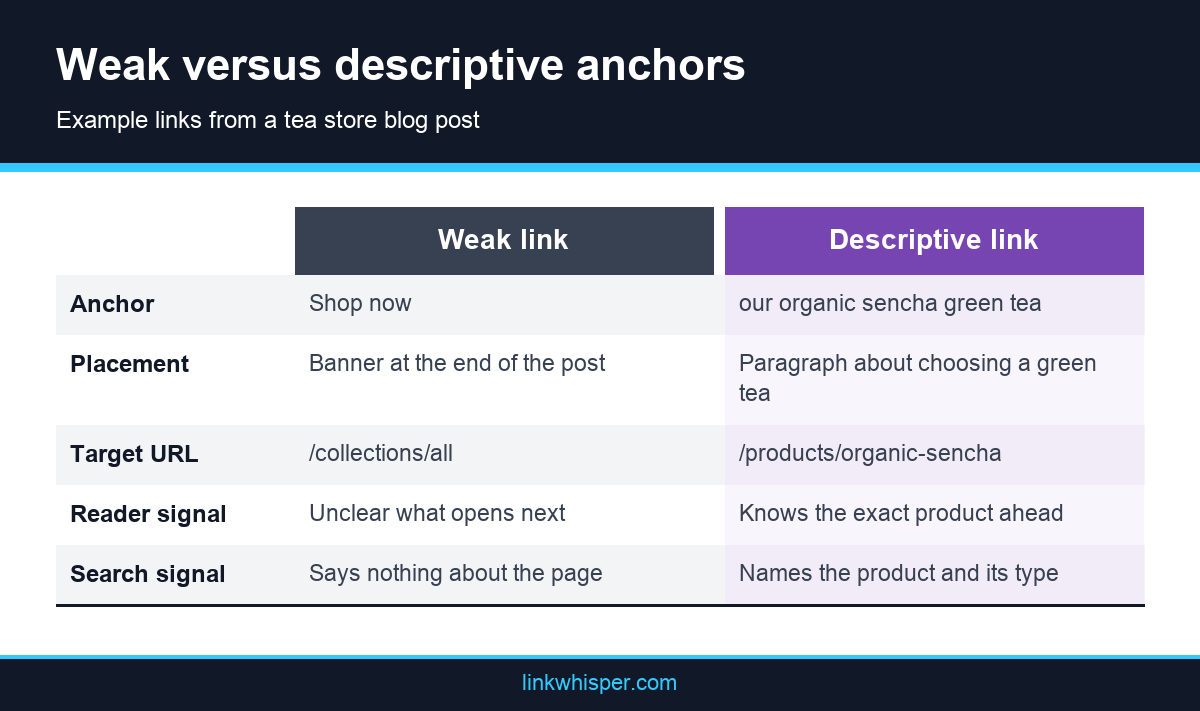
- Rule 5: Write anchors that describe the destination. Our sencha green tea tells readers and Google what waits on the other side. Shop now tells neither.
- Rule 6: Place the first product link where the need appears. Put it in the paragraph where the reader meets the problem the product solves, not only in a closing banner.
- Rule 7: Keep links in proportion. Add a product link only where it helps the sentence. If two product links sit in one short paragraph, cut one.
- Rule 8: Vary the wording across posts. If ten articles link the same teapot with the same phrase, the pattern looks mechanical. Mix the product name, its type and its use.
Rules 9 to 11: Keep Blog to Product Links Working
The last three rules cover maintenance. Products sell out, handles change and articles age, so links that worked at launch can fail months later. A short routine keeps every path open in both directions. Without it, your best performing posts can quietly send readers to an error page instead of a product they want to buy.
Rule 11 is easier when your blog has dozens of posts rather than hundreds. Beyond that point, manual checks start to slip. The Link Whisper app on the Shopify App Store gives context based linking suggestions for products, collections, pages and blog posts, and it scans regularly for broken links.
Whatever tool you use, keep a simple log of each article, its main destination and the date you last checked it. Our explainer on how contextual links differ from menu links shows why links inside articles matter even when your menus are tidy.
When you audit, sort posts by traffic and start at the top. A broken link in a post that few people read can wait a week. A broken link in your most visited guide cannot, because every reader who follows it hits a dead end.
- Rule 9: Link back from products and collections. Add a line in the green tea collection description that points to the brewing guide, so the path runs both ways.
- Rule 10: Check links whenever a handle changes. Shopify offers a redirect checkbox when you edit a handle, but deleting a product creates no redirect. Update any post that pointed at it.
- Rule 11: Review links on a schedule. Each quarter, list posts with no product links and products that no post mentions, then fill the most useful gaps first.
A Worked Example of Shopify Blog to Product Internal Links
Here is how the 11 rules come together on a single post. The example store is invented, but the URL patterns match a standard Shopify theme. Use it as a template: list each paragraph, decide whether it deserves a link, then choose the anchor and the target before you open the editor and start pasting links.
Say the store publishes an article called How to Brew Green Tea Without Bitterness. The main destination, from Rule 1, is the green tea collection. The post explains water temperature, steeping time and teapot choice.
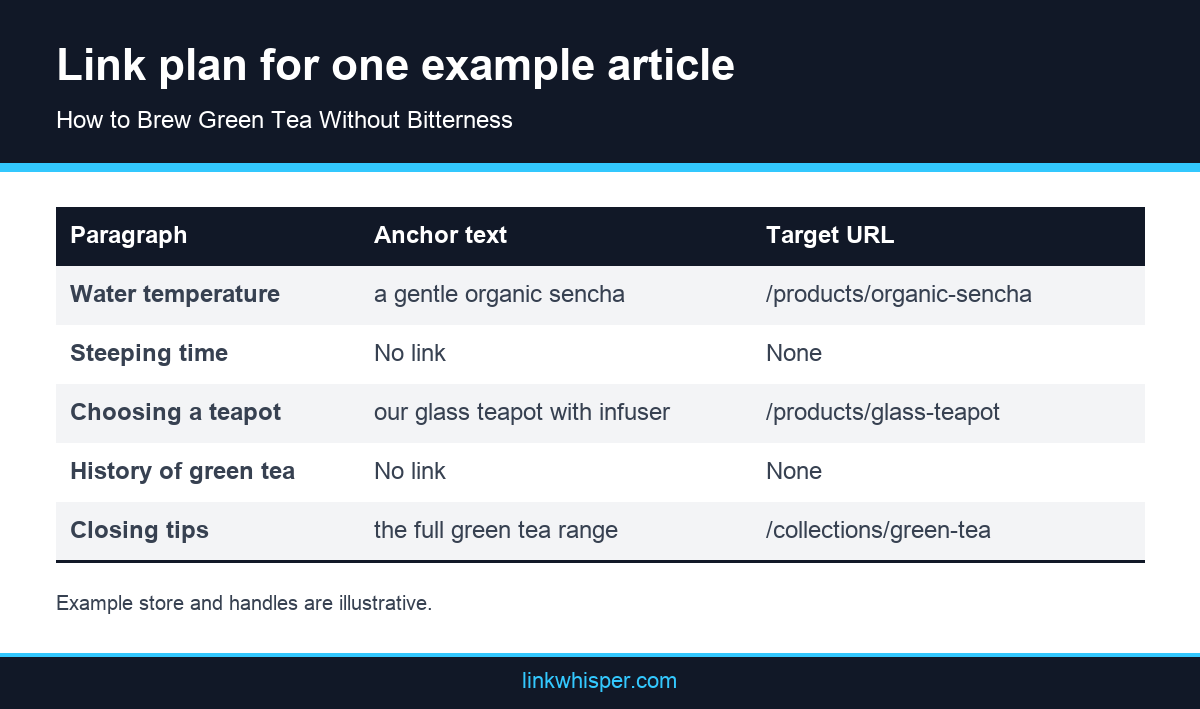
The first product link sits in the temperature paragraph, where a reader wonders which tea to try. A later paragraph about equipment links the glass teapot. The closing paragraph points to the collection again with different wording, which follows Rule 8.
Notice what the plan leaves out. The paragraph on history has no link, because no product fits it. Shopify blog to product internal links work best when every one of them answers a question the reader already has.
To reuse the plan, copy the table into a spreadsheet and add one row per paragraph for your next article. Fill the anchor and target columns before you write the final draft. When the post goes live, open it on your phone and tap each link once. That two minute check catches typos in handles, links to draft products and anchors that read awkwardly on a small screen.
Conclusion
Shopify blog to product internal links are small edits with a large job. They turn helpful articles into routes toward the products those articles describe. Start with Rules 1 to 4 on your five most visited posts, then work through anchors and maintenance. Once the habit is in place, extend it to every new article you publish. For the wider picture of titles, structure and site speed, read our Shopify SEO guide with 12 practical tips and pick one improvement to make this week.
Frequently Asked Questions
What are Shopify blog to product internal links?
They are links inside your Shopify blog articles that point to product or collection pages in the same store. They help readers move from advice to buying, and they help search engines find and understand those pages.
How many product links should one blog post include?
There is no fixed number. Add a product link only where it helps the sentence and answers a question the reader has. A long guide may carry several, while a short post may need only one or two.
Should I link to a product or a collection?
Link a collection when the reader is still comparing options, such as in a beginner guide. Link a product when the paragraph names or reviews that specific item. Many articles use both, at different points in the post.
Which URL should I paste for a product link?
Paste the /products/handle form of the URL. Links copied from a collection page can include the collection path, but most Shopify themes canonicalise products to the shorter version, so the short form is the cleaner choice.
Where should the first product link go in an article?
Place it in the paragraph where the reader first meets the need the product solves. Our guide to link placement and anchors in the body explains why early, relevant placement tends to work better than a footer banner.
Is exact match anchor text bad for product links?
Using the product name is fine. The problem is repeating the same phrase across many posts until it looks mechanical. Mix the product name, its type and its use so each anchor reads naturally inside its sentence.
What happens to blog links when I delete a product?
Deleting a product does not create a redirect, so any article linking to it now sends readers to an error page. Our article on finding and fixing dead links inside a site covers the repair steps.
Do product pages need links back to the blog?
They benefit from them. A short line in a product or collection description pointing to a related guide gives shoppers more context and creates a path in both directions, which supports discovery across the whole store.
How often should I review my blog to product links?
A quarterly review suits most stores. Check for links to sold out or deleted products, changed handles and new products that no article mentions. Busy stores that change their catalogue weekly may need monthly checks instead.
Can an app help connect Shopify blog to products?
Yes. The Link Whisper app for Shopify suggests context based links for products, collections, pages and blog posts. It also offers keyword based automatic linking, detailed linking reports and regular scans for broken links.
Check if your site has the same issues.
Run a free audit right now. See your orphaned pages, broken links, and link health score in 60 seconds.
Check My Site