
Contents
- 1 What is a broken link checking tool?
- 2 How is a broken link checker different from a dead link checker?
- 3 Do small blogs need a paid broken link checking tool?
- 4 What should large WordPress sites look for in internal link checker tools?
- 5 Can a broken link checking tool detect JavaScript rendered pages?
- 6 How often should I run an online broken link checker?
- 7 What is the LinkWhisper Tool and how does it help with broken links?
- 8 Does fixing broken links actually improve WordPress SEO rankings?
- 9 What is the difference between a broken link checking tool and a generic SEO plugin's link feature?
- 10 Should agencies use one broken link checking tool across every client site?
Not every broken link checking tool works the same way. Some scan only external links and completely miss broken internal links. Others cannot read pages that rely on JavaScript, so linked content inside dynamic themes and page builders slips past unnoticed. A number of tools also require you to trigger a fresh scan by hand every time, which means dead links quietly pile up between runs. If you run a WordPress site, the broken link checking tool that fits you best depends heavily on how large your site actually is. If you have already read a flat ranked list of every link checker tool on the market, this guide goes a level deeper. It breaks down what actually works for a small blog, a growing content site, and a large publishing platform, because a workflow built for 30 pages rarely holds up at 3,000.
Key Takeaways
- A broken link checking tool that handles a 30 page blog well often cannot keep up once a site passes a few hundred pages, because shallow crawls and manual re scans do not scale.
- Small sites can often rely on a free online broken link checker or a quick manual internal link audit. Midsize and large WordPress sites need an internal link checker wordpress plugin that reruns automatically and reports on internal, not just external, links.
- Before choosing a dead link checker, confirm it can read JavaScript rendered pages, separate internal from external links, and reschedule scans on its own.
Why Site Size Changes What You Need From a Broken Link Checker
A broken link checking tool that works well for a personal blog with 25 posts is not built for a publisher running 4,000 articles across a dozen contributors. The difference is not just scale. It is what the tool actually checks, how often it rechecks, and whether it can keep up with how the site is built. A small site can absorb a manual scan every few weeks. A large site cannot, because internal links decay constantly as old posts get updated, categories get restructured, and pages get retired without redirects.
Crawl depth matters too. Plenty of tools marketed as a broken link checker only follow links that are present in the raw HTML. If your theme or page builder injects links with JavaScript, which is common on modern WordPress sites built with block based themes and page builder plugins, a crawler that does not render JavaScript will simply miss them. That gap grows with site size, because larger sites tend to lean more heavily on dynamic templates, related post widgets, and JavaScript driven navigation. According to Google Search Central, links need to be in a crawlable format for search engines to follow them at all, and the same rendering gap that trips up Googlebot trips up a shallow link checker.
Reporting depth also has to scale with the site. A single spreadsheet of broken URLs might be fine for 40 pages. It is not workable for a team of editors managing 3,000. Larger sites need internal link analytics and reporting that groups issues by section, priority, or contributor, and ties broken links back to how many internal links each page needs in the first place. If you are still unsure how many internal links your pages should carry before you even start hunting for broken ones, this breakdown is a useful starting point. And broken links are only half the picture. A proper dead link checker should also catch links that technically resolve but redirect through three hops or land on a thin, irrelevant page.
There is also a cost dimension. A broken link checking tool priced per site makes sense for a single blog. It becomes expensive fast for an agency running audits across a dozen client sites, or a network of niche properties. Pricing and scan limits are worth checking as closely as the actual detection accuracy, because the tool that catches every broken link is not useful if scanning a large site burns through your monthly quota in one pass.
[Alt: Infographic comparing what a broken link checking tool should do for a small blog, a midsize content site, and a large publishing platform] | File: infographic-1-broken-link-checker-by-site-size.png
Best Broken Link Checking Tools for Small Blogs Under 50 Pages
If your site is under 50 pages, you do not need an enterprise platform. What you need is something fast, free or low cost, and simple enough to run without a learning curve. A free online broken link checker is often enough at this size, since the total number of links to audit is small and a full scan takes minutes rather than hours.
Link Whisper’s free internal link checker scans your published posts and flags broken or missing internal links directly inside WordPress, which matters more than it sounds. Most free online broken link checker tools only look at external links leaving your site. They tell you nothing about the internal links holding your own content together, and for a small blog, internal linking is often the fastest lever you have for ranking new posts. Pair a link checker with a link map so you can see visually which posts are isolated with no internal links pointing to them at all.
Bloggers do not usually need a scheduled, automated recheck at this size. A monthly manual run is enough to catch drift. What matters more is picking a tool built for bloggers and small publishers rather than a generic enterprise crawler, and one that doubles as a WordPress internal link plugin, since you will get more long term value from a tool that also helps you build new internal links, not just find broken ones.
One thing to avoid at this size is overpaying for enterprise features you will not use, like team permissions, white label reporting, or client dashboards. Those add cost without adding value for a single site blog. Match the tool to where your site actually is today, and upgrade only once your page count and contributor list actually justify it.
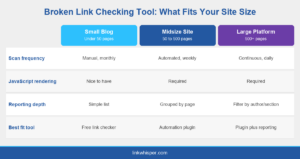
Alt: Infographic comparing what a broken link checking tool should do for a small blog, a midsize content site, and a large publishing platform
Best Broken Link Checking Tools for Midsize Content Sites, 50 to 500 Pages
Once a site crosses roughly 50 pages, manual link audits stop being realistic. This is the tier where internal linking automation starts to pay for itself, because the volume of internal links needed to properly connect your content outpaces what any single editor can track by hand.
At this size, look for a broken link checking tool that reruns on a schedule rather than only when you remember to trigger it, and that separates internal breakage from external breakage in its reporting. Link Whisper’s plugin runs recurring scans across your whole site, flags broken internal links automatically, and suggests replacement anchor text so you are not just deleting dead links, you are fixing the underlying internal linking gap they left behind. This is also the size where it is worth comparing tools directly. If you are weighing Link Whisper against Internal Link Juicer, the biggest practical difference at this tier is recheck automation and how each tool handles orphaned pages that broken links often expose.
Broken links and orphaned content tend to travel together on midsize sites. A page that loses its only internal link because a linking post got edited or deleted effectively becomes orphaned, even though the URL itself still works. A broken link checking tool that only reports dead URLs and ignores this side effect will leave real ranking damage on the table.
Editorial workflow matters just as much as detection at this tier. A midsize site usually has more than one person publishing content, which means broken links get introduced faster than a single editor can catch manually. A tool that assigns or at least flags which post introduced a broken link saves real time when a team, rather than one person, is responsible for fixing them.
Best Broken Link Checking Tools for Large Publishing Platforms, 500 or More Pages
Large WordPress sites, whether that is a publisher, an affiliate network, or an agency managing client sites, need a different class of tool entirely. At this scale, a broken link checking tool has to run continuously in the background, handle thousands of URLs without timing out, and hand editors a report they can actually act on the same day.
Publishers and agencies managing sites with hundreds of contributors need reporting that can be filtered by author, category, or publish date, not just a flat list of broken URLs. Link Whisper’s internal link analytics and reporting dashboard was built for exactly this, showing which sections of a large site are accumulating broken links fastest so editorial teams can prioritize fixes instead of working through a list top to bottom.
At this size, some teams choose not to run the tool themselves at all. If internal link cleanup keeps sliding down the priority list against a backlog of new content, a done for you linking service can run the audits, fix the broken links, and rebuild the internal linking structure without pulling an editor off content production for a week.
Speed also becomes a real constraint at this scale. A scan that takes six hours on a 3,000 page site is not something you can run daily, which means broken links can sit live for a week or more before the next pass catches them. Search Engine Journal has pointed out that broken links and other low value pages waste crawl budget on large sites the same way they waste an editorial team’s time. Confirm any tool you are evaluating can complete a full site scan overnight at minimum, and ideally scan recently updated or recently published pages more frequently than the rest of the archive.
What to Look for in a Broken Link Checking Tool at Any Size
Regardless of how big your site is, a handful of features separate a genuinely useful broken link checking tool from one that gives you a false sense of security. First, confirm it can read JavaScript rendered content, not just raw HTML. Second, confirm it separates internal link checker wordpress results from external link results, since fixing each requires a different workflow. Third, confirm it reruns automatically rather than waiting for you to remember.
Anchor text matters as much as the link itself. A tool that removes a broken link but does not help you replace it with a relevant one leaves you with fewer internal links than you started with. Look for anchor text optimization built into the fix workflow, so every repaired link also strengthens the page it points to. Moz notes that descriptive anchor text helps both users and search engines understand what a linked page is about, which is exactly what gets lost when a broken link just gets deleted instead of replaced.
Finally, compare how different tools approach this problem before committing. Yoast and Rank Math’s AI Link Genius both bolt internal linking features onto a broader SEO plugin, while a dedicated tool tends to go deeper on link specific reporting. And if you just want to test the basics before buying anything, this complete guide to free online broken link checker options is a reasonable place to start.
One more thing worth checking before you commit: does the tool only flag problems, or does it help you fix them inside WordPress without exporting a spreadsheet and manually hunting down every URL in the editor. The gap between finding a broken link and actually fixing it is where most broken link checking tools fall short, regardless of how good their detection is.
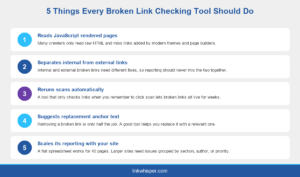
Alt: Infographic listing five things every broken link checking tool should do, from JavaScript rendering support to scaled reporting
Conclusion
The best broken link checking tool for your WordPress site is not a single, universal answer. A small blog needs something fast and free. A midsize content site needs automation and anchor text suggestions. A large publishing platform needs continuous scanning and reporting that scales with a whole editorial team. What stays constant is the underlying problem: broken links quietly cost you rankings and referral traffic the longer they sit unfixed. Try Link Whisper free and run a broken link scan on your actual site today, then keep the plugin running for ongoing checks so new broken links get caught before they cost you anything.
Frequently Asked Questions
How is a broken link checker different from a dead link checker?
The terms are mostly interchangeable in practice, though dead link checker sometimes refers specifically to links that return a permanent error rather than a temporary one. Either way, the goal is catching links before they hurt rankings or user trust.
Do small blogs need a paid broken link checking tool?
Not usually. A site under 50 pages can often rely on a free online broken link checker or a manual monthly review. Paid automation becomes worthwhile once manual checks start taking longer than a few minutes to run properly.
What should large WordPress sites look for in internal link checker tools?
Large sites need recurring automated scans, reporting that can be filtered by section or author, and fast turnaround on large crawls. A tool that takes days to complete a scan cannot keep up with a fast publishing schedule.
Can a broken link checking tool detect JavaScript rendered pages?
Not all of them. Many crawlers only read raw HTML, so links added through JavaScript, common in modern themes and page builders, get missed entirely. Confirm rendering support before relying on any tool for a JavaScript heavy site.
How often should I run an online broken link checker?
Small blogs can run a manual check monthly. Midsize and large WordPress sites should run automated, recurring scans, ideally weekly or after every significant content update, since broken links accumulate faster than most editorial teams notice them.
What is the LinkWhisper Tool and how does it help with broken links?
The LinkWhisper Tool is a WordPress plugin that finds broken and missing internal links, suggests relevant anchor text and target pages, and helps distribute link equity across your site automatically as you publish new content.
Does fixing broken links actually improve WordPress SEO rankings?
Yes. Broken links waste crawl budget, interrupt link equity flow between pages, and create a poor user experience that increases bounce rate. Fixing them consistently supports both search engine crawling and how visitors move through your site.
What is the difference between a broken link checking tool and a generic SEO plugin's link feature?
A dedicated broken link checking tool goes deeper on detection, anchor text suggestions, and recheck automation. General SEO plugins usually offer a lighter, secondary internal linking feature bolted onto a much broader toolset.
Should agencies use one broken link checking tool across every client site?
Yes, when possible. A single tool across every client site keeps reporting consistent, speeds up audits, and makes it easier to spot recurring internal linking problems across an entire portfolio rather than troubleshooting each site from scratch.
Check if your site has the same issues.
Run a free audit right now. See your orphaned pages, broken links, and link health score in 60 seconds.
Check My Site