
Contents
- 1 Key Takeaways
- 2 How AI Search Changed the Job of Internal Links
- 3 Why an Internal Linking Tool for WordPress Matters More, Not Less
- 4 What the Best Internal Link Building Plugin for SEO 2027 Should Do?
- 5 How Automated Internal Linking Software for Bloggers Fits a 2027 Workflow
- 6 Conclusion
- 7 Frequently Asked Questions
- 7.1 What is an internal linking tool for WordPress?
- 7.2 Do internal links help with Google AI Overviews?
- 7.3 How many internal links should a blog post have?
- 7.4 What makes the best internal link building plugin for SEO 2027?
- 7.5 Is automated internal linking safe for SEO?
- 7.6 Can automated internal linking software for bloggers save time?
- 7.7 How do I find orphaned posts in WordPress?
- 7.8 How often should I audit internal links?
- 7.9 Does Link Whisper work with Yoast and Rank Math?
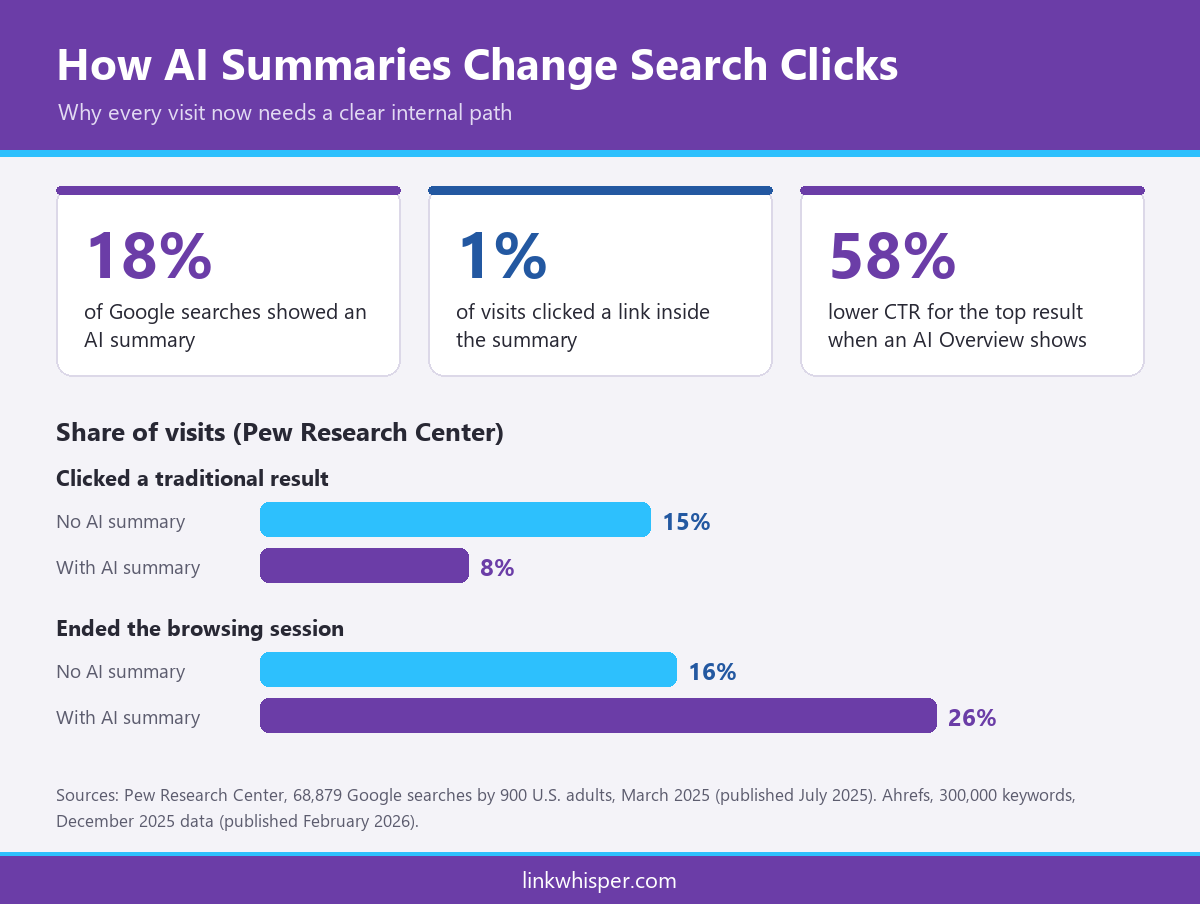
The Search no longer ends with a page of blue links. A Pew Research Center study of real Google searches found that users clicked a traditional result on only 8% of visits when an AI summary appeared, compared with 15% when it did not. That shift makes an internal linking tool for WordPress one of the most practical investments a site owner can make before 2027. Before you change anything, run a free scan of your internal links to see where the gaps are today.
This guide explains why internal links matter in AI search, what a modern plugin should do, and how bloggers can automate the work without losing editorial control.
Key Takeaways
- AI summaries now sit above many results, so every click you earn must lead readers deeper into your site through clear internal paths.
- Google says no special AI optimization is required, but it recommends making content easy to find through internal links, which an internal linking tool for WordPress handles at scale.
- The best internal link building plugin for SEO 2027 combines semantic suggestions, orphan detection and reporting, while automated internal linking software for bloggers removes hours of manual searching.
How AI Search Changed the Job of Internal Links
AI summaries answer many questions directly on the results page. Fewer clicks reach your site, and the visitors who do arrive are worth more. Internal links decide whether those visitors read one page and leave, or continue into the content that turns them into subscribers and customers.
The numbers are hard to ignore. In the Pew study, around 18% of Google searches in March 2025 produced an AI summary. Users clicked a link inside the summary on just 1% of visits. Sessions also ended more often: 26% of the time with a summary, against 16% without one.
Publisher data points the same way. An Ahrefs analysis of 300,000 keywords found that an AI Overview correlated with a 58% lower average clickthrough rate for the top ranking page in December 2025. The first version of that study, run in April 2025, had measured a 34.5% drop.
So the job of internal links has changed. They still help crawlers discover pages. Now they also have to hold attention, because each visitor costs more to win. A reader who lands on one post should find the next logical step within a sentence or two. An internal linking tool for WordPress makes that next step easy to build into every article, not just the ones you remember to update.
Why an Internal Linking Tool for WordPress Matters More, Not Less
WordPress runs a large share of the web, so the way you structure a WordPress site shapes how search systems read it. Internal links are one of the few signals you fully control. A dedicated tool keeps them consistent as your archive grows beyond what anyone can manage by hand.
According to W3Techs usage data, WordPress powers 40.2% of all websites and 58.7% of sites whose content management system is known. That is a crowded field, and competing on fresh content alone gets harder every year.
Scale is the real challenge. A site with a few dozen posts can be linked by hand. Once an archive passes a few hundred articles, nobody remembers every related page, and new posts quietly become dead ends. An internal linking tool for WordPress scans the whole archive each time you publish, so older content keeps earning links instead of slipping out of view.
Google’s guidance on AI features in Search is clear. There are no additional requirements to appear in AI Overviews or AI Mode. The usual fundamentals still apply, including making content easy to find through internal links and allowing crawling in robots.txt.
That is where an internal linking tool for WordPress earns its place. It helps you build an AI-readable site structure where related topics connect logically. The tool surfaces posts with no inbound links, so you can recover orphaned posts before they fade from search. Moreover, it keeps link placement consistent across hundreds of articles, which manual editing rarely achieves. For the strategy behind this, read our guide to internal linking for SEO and GEO.
What the Best Internal Link Building Plugin for SEO 2027 Should Do?
Not every plugin is ready for AI search. The best internal link building plugin for SEO 2027 should understand context, not just keywords. It should also show you exactly where links are missing and let you fix problems in bulk rather than one post at a time.
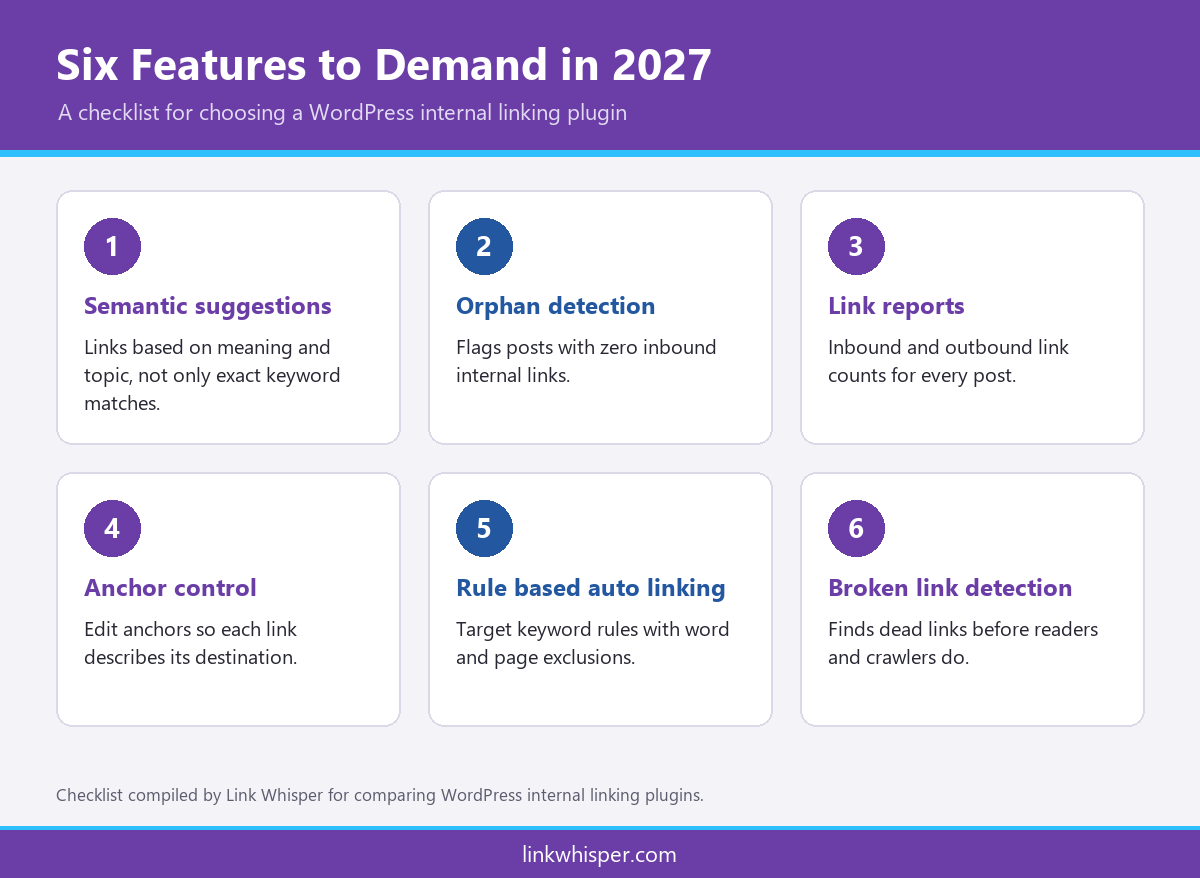
Use this checklist when you compare options:
- Semantic suggestions. The plugin should read meaning and topic relationships, not only exact keyword matches.
- Orphan detection. It should flag posts with zero inbound internal links so no page is left stranded.
- Link reports. You need a clear view of inbound and outbound links for every post on the site.
- Anchor control. Easy anchor editing matters, because good anchor text optimization helps readers and machines understand each page.
- Rule based auto linking. Target keyword rules should add links automatically, with options to exclude words or pages.
- Broken link detection. Dead links waste crawl activity and frustrate readers. You can check your site for dead links free before you shortlist anything.
Link Whisper covers each of these points. Its suggestions appear inside the WordPress editor, and its reports show link counts for every post. The premium version adds keyword based auto linking, broken link detection, and target keyword imports from Yoast and Rank Math. When you shortlist candidates for the best internal link building plugin for SEO 2027, weigh how much repetitive work each one removes from your week. A strong internal linking tool for WordPress should give you back time, not add another dashboard to babysit.
Two practical questions are worth asking before you buy.
- First, how does the plugin behave on a large archive, and does it keep the editor responsive?
- Second, what happens to your links if you stop paying?
Some tools write links into post content, while others inject them on the fly and remove them when switched off. Choose an internal linking tool for WordPress whose links stay with your content.
How Automated Internal Linking Software for Bloggers Fits a 2027 Workflow
AI adoption is rising across businesses, and content teams feel it early. Automated internal linking software for bloggers lets small teams publish faster while keeping site structure tidy. The aim is automation with review, not automation without judgment.
U.S. Census Bureau survey data shows that between 17% and 20% of businesses used AI in a business function from December 2025 to May 2026. Between 20% and 23% expected to use it within six months. In the information sector, current use reached 39.7% by early May 2026.
For bloggers, that outlook points to more AI assisted content competing for the same queries through 2027. Clear internal structure is one of the simplest ways to stand apart. A practical routine looks like this:
- Publish the new post, then accept relevant inbound link suggestions from older articles.
- Set auto-linking rules for your cornerstone topics and review them after the first run.
- Check the orphan report weekly and link any stranded post from related content.
- Review link reports monthly and refresh anchors that no longer match the page.
Automated internal linking software for bloggers handles the repetitive parts of this routine, while you keep the editorial calls. If you run a content site, Link Whisper for bloggers shows how the plugin fits a real publishing schedule. The same routine scales up for publishers with large archives and for niche site owners building topical authority. Pair that with an internal linking tool for WordPress that reports clearly, and your structure improves with every post you publish.
Conclusion
AI search rewards sites that are easy to understand and easy to explore. Fewer clicks reach publishers, so each visit needs to lead somewhere useful. An internal linking tool for WordPress turns that goal into a repeatable process, from semantic suggestions to orphan fixes and clear reports. Start with the checklist above, automate what you safely can, and keep people in charge of the final call. When you are ready to act, compare Link Whisper plans and choose the setup that suits your site.
Frequently Asked Questions
What is an internal linking tool for WordPress?
An internal linking tool for WordPress is a plugin that finds, suggests and manages links between your own posts and pages. It saves manual effort, reduces orphaned content and helps search engines and AI systems understand how your topics connect.
Do internal links help with Google AI Overviews?
Google says no special optimization is needed for AI Overviews or AI Mode. It does recommend standard SEO fundamentals, including making content easy to find through internal links. Strong internal structure helps crawlers discover, understand and connect your pages.
How many internal links should a blog post have?
No fixed number suits every page. Add links wherever they genuinely help readers reach a related topic. Many sites include several contextual links in each long article, then review link reports regularly to spot gaps and weak pages.
What makes the best internal link building plugin for SEO 2027?
Look for semantic link suggestions, orphan detection, clear link reports, anchor text editing, rule based auto linking and broken link checks. The right plugin removes repetitive work while leaving the final editorial decision firmly with you.
Is automated internal linking safe for SEO?
Automated linking is safe when it follows sensible rules and you review the results. Limit how often a keyword links, exclude irrelevant pages and check anchors regularly. Problems usually come from unchecked automation, not from automation itself.
Can automated internal linking software for bloggers save time?
Yes. Bloggers often spend hours searching old posts for link opportunities. Automated internal linking software for bloggers surfaces relevant suggestions in seconds and can add rule based links, freeing time for writing, research and promotion.
How do I find orphaned posts in WordPress?
Use a plugin report that lists posts with zero inbound internal links, or visualise your structure with a free internal link map. Then link each orphaned post from related articles using descriptive, natural anchor text.
How often should I audit internal links?
A monthly review suits most blogs, with a quick weekly check for orphaned posts. Larger publishers may need more frequent audits. Tools with internal link analytics and reporting make each review faster and much easier to repeat.
Does Link Whisper work with Yoast and Rank Math?
Yes. According to its WordPress.org listing, Link Whisper can import target keywords from Yoast and Rank Math. That lets you reuse existing keyword research much better than LinkWhisper alternatives. When you set up automatic internal linking rules seamlessly through the automatic internal link plugin, the results do flow in genuinely.
Check if your site has the same issues.
Run a free audit right now. See your orphaned pages, broken links, and link health score in 60 seconds.
Check My Site