Contents
Internal linking elementor questions usually get answered with a tutorial on how to add a link to a button widget. That is not the real issue. The real issue is technical: Elementor and other visual page builders store a large share of page content as structured widget data rather than in the standard WordPress post content field most link analysis tools rely on. This guide explains what that means for your actual internal linking workflow, not just how to click a link button.
Not sure where your own site stands? Run the free internal link checker to see your current link health score before applying the framework below.
Key Takeaways
- Elementor and Divi store content differently than the standard post content field, which changes how link tools interact with it.
- Link Whisper own documentation confirms it works with Elementor Free and Pro, with link suggestions added through the classic editor meta box.
- Gutenberg, the native WordPress block editor, keeps content closer to the standard field and is generally more straightforward.
Why Page Builder Content Is Technically Different
A standard WordPress post or page stores its content in one field, the post content, which is exactly what most SEO plugins, link analysis tools, and search engines expect to read. Elementor breaks a page into individual widgets, text boxes, buttons, image galleries, each storing its own data separately rather than as one continuous block of post content.
This is not a flaw in Elementor, it is how the builder achieves its flexible drag and drop layout system. But it means any tool built around scanning post content for keyword mentions and internal link opportunities has to work around that structure rather than through it, and not every tool handles that the same way.
This is also why generic tutorials that only cover clicking a link icon on a text widget miss the more useful question, which is how a link suggestion tool that scans your whole site for opportunities is supposed to interact with content that is not stored where it expects to find it. That is a workflow question, not a design question, and it deserves a workflow answer.
How Link Whisper Handles Elementor Content
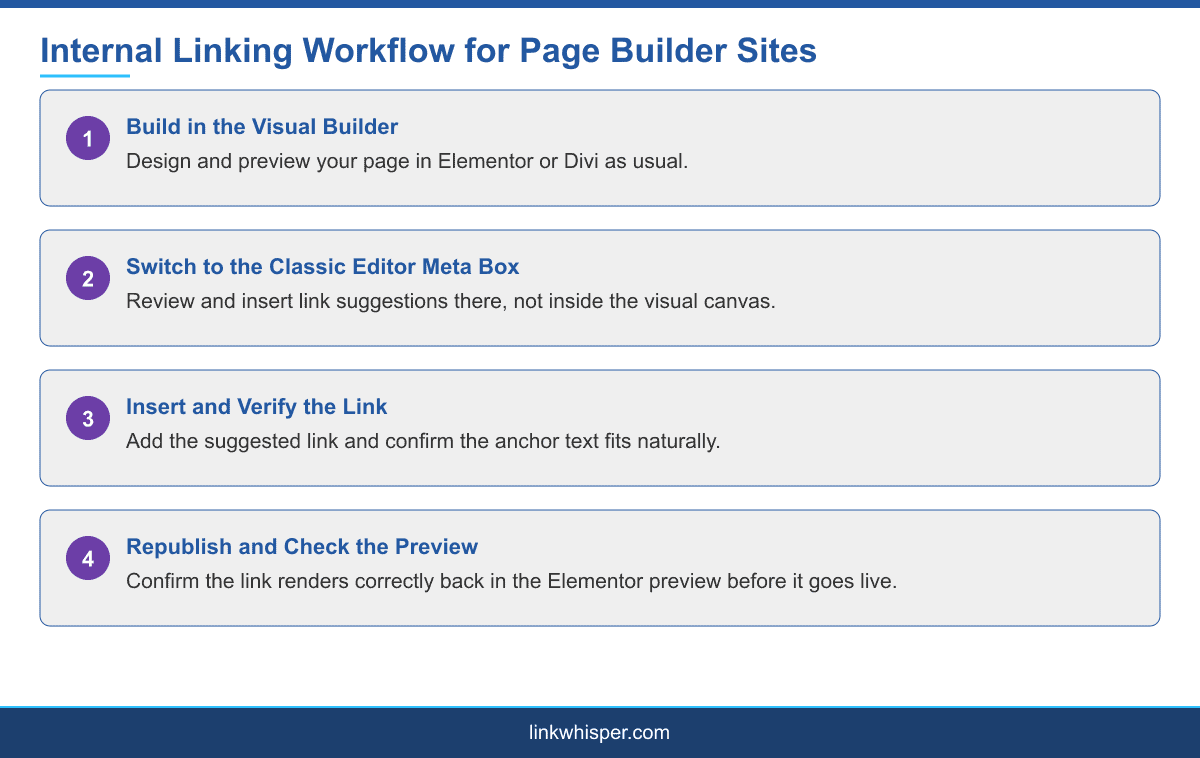
According to Link Whisper own knowledge base, the plugin is compatible with both the free and Pro versions of Elementor. The detail worth understanding is how link suggestions get added: through the classic editor meta box, rather than directly inside the Elementor visual interface itself.
In practice, this means a two-step habit rather than a single inline action. Build and preview your layout in Elementor as usual, then step over to the classic editor meta box specifically to review and insert link suggestions before publishing. It adds a step to the workflow, but it is a small cost next to the alternative, which is skipping internal linking on page builder content entirely, a pattern that shows up often on Elementor-heavy sites simply because the workflow is not obvious at first.
Divi carries a broadly similar caveat as another widget-based visual builder, though the specific technical implementation differs from Elementor, so it is worth testing directly on a Divi site rather than assuming identical behavior.
It is worth being precise about what this does and does not mean for you day to day. It does not mean Elementor sites are somehow disadvantaged for SEO in general, page speed, structured data, and content quality all work the same way regardless of builder. It specifically means the internal linking workflow, the act of finding and inserting a suggested link, happens in a different place than you might instinctively look for it.
Gutenberg Is a Different Case
The native WordPress block editor, Gutenberg, is generally more straightforward for internal linking tools than Elementor or Divi, since block content still lives much closer to the standard post content field most link analysis depends on. Blocks are still structured, but the underlying storage stays within the system link tools already expect.
This is worth factoring in if you are choosing a builder for a new site specifically with internal linking workflow in mind, alongside the more common considerations like page speed and design flexibility. There is no universally correct choice, but knowing the tradeoff in advance avoids surprises later. The official block editor documentation is a good reference if you want to understand exactly how Gutenberg stores content under the hood.
Sites that mix editors, a common pattern where landing pages are built in Elementor but the blog runs on the standard block editor, effectively need both workflows described in this guide. The blog content behaves exactly as expected, while the Elementor-built pages need the classic editor meta box step, so it is worth documenting which pages fall into which category if more than one person manages the site.
A Checklist for Auditing a Page Builder Heavy Site
Start by identifying which pages on your site are built with a page builder versus the classic or block editor, since the workflow differs for each. For Elementor and Divi pages specifically, confirm you are reviewing link suggestions through the classic editor meta box, not assuming the Elementor interface itself will surface them.
Prioritize your highest-traffic and highest-value page builder pages first, since those carry the most to gain from a deliberate internal linking pass, and check that links inserted through the meta box actually render correctly in the Elementor preview before publishing, since page builder rendering can occasionally behave unpredictably with content inserted outside its own interface.
This guide is one piece of the broader picture in internal linking for different wordpress site types, and if your page builder site also serves as a course platform, the internal linking for membership sites guide covers a combination that comes up often, since many course landing pages are built in Elementor specifically for its design flexibility. Visual portfolio and design-led sites, the kind interior designers and similar businesses often run, are especially likely to be built entirely in a page builder for exactly this reason.
Conclusion
Internal linking on Elementor and Divi sites is not fundamentally different in what makes a good link, it is different in where you go to add one. Once that workflow is clear, a page builder site can be linked just as thoroughly as any classic WordPress site, it simply requires the extra step of working through the meta box rather than the visual canvas. Explore the internal link map to see how your existing page builder content is currently connected before making changes. See our full internal linking automation guide for a step-by-step setup.
Frequently Asked Questions
Does Link Whisper work with Elementor?
Yes, with both the free and Pro versions, though link suggestions are added through the classic editor meta box rather than directly inside the Elementor interface.
Why is internal linking harder on page builder sites?
Elementor and Divi store content as structured widget data rather than in the standard post content field most link analysis tools scan, requiring a different workflow.
Is Gutenberg easier for internal linking than Elementor?
Generally yes. Gutenberg keeps block content closer to the standard post content field, while Elementor and Divi store content more separately.
Where do I add internal links on an Elementor page?
Through the classic editor meta box for that page, not directly inside the Elementor visual interface, according to Link Whisper own documentation.
Does Divi have the same internal linking limitation as Elementor?
Divi carries a broadly similar caveat as another widget-based builder, though the exact technical implementation differs, so it is worth testing directly.
Should I avoid Elementor if internal linking matters to me?
Not necessarily. The workflow requires an extra step, but internal linking still works well on Elementor sites once that step is part of your process.
Do internal links added outside Elementor render correctly?
Generally yes, but it is worth checking the Elementor preview after adding a link through the meta box, since page builder rendering can occasionally behave unpredictably.
What kind of WordPress sites are most likely to use a page builder?
Visual portfolio, design, and course landing pages are especially likely, since page builders offer design flexibility that the block editor does not match as easily.
Where should I start auditing internal links on a page builder site?
Start with your best internal link plugin comparison to choose a tool with confirmed page builder compatibility before auditing.
Check if your site has the same issues.
Run a free audit right now. See your orphaned pages, broken links, and link health score in 60 seconds.
Check My Site