Contents
Internal linking for membership sites breaks the core assumption most internal linking advice depends on: that every page is visible to every visitor and to Google. LearnDash and MemberPress sites are built specifically to violate that assumption, with locked lessons, drip-fed content, and prerequisite chains controlling exactly what a learner can reach. This guide covers what internal linking actually means once large parts of your site are deliberately inaccessible.
Not sure where your own site stands? Run the free internal link checker to see your current link health score before applying the framework below.
Key Takeaways
- Locked and drip content cannot carry SEO weight the way a normal blog post can, since neither visitors nor Google can reach it freely.
- Public marketing pages and free preview lessons are your real internal linking priority on a membership site.
- Course landing pages should link to supporting blog content for topical authority, not just to locked lessons.
Why Membership Sites Break the Standard Internal Linking Model
Most internal linking advice, including the general guidance in internal linking for different wordpress site types, assumes a link either leads somewhere useful or it does not, based purely on topical relevance. Membership and course sites add a second variable that most advice never accounts for: whether the destination page is actually reachable by the person, or the search engine, following the link.
A locked lesson linking to another locked lesson technically makes topical sense, but it provides no value to a visitor who cannot see either page, and it passes no meaningful link equity to a page Google cannot crawl in the first place. This is not a minor edge case on these sites, it describes the majority of the content most LearnDash and MemberPress sites contain.
That majority-locked reality is exactly why applying generic internal linking advice to a membership site so often disappoints. A course creator who dutifully adds internal links throughout their curriculum, following advice written for public blogs, ends up building a dense web of connections that neither Google nor a prospective, not-yet-enrolled visitor will ever see. All that effort goes toward strengthening a part of the site that was never going to carry SEO weight in the first place.
What to Do With Locked Versus Free-Preview Content
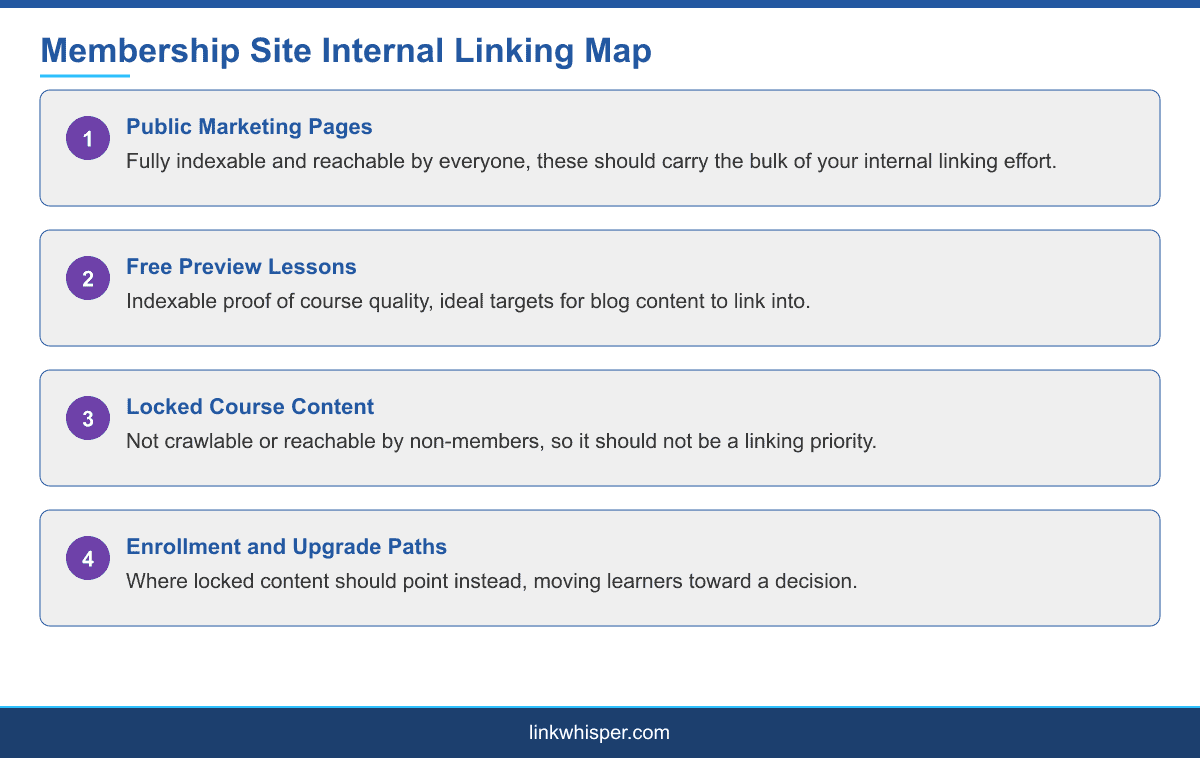
What actually carries SEO weight on a membership site is the small set of pages everyone can see: public marketing pages, the pricing page, and any free preview lessons offered as a taste of the paid curriculum. Those pages deserve the majority of your internal linking effort, since they are the only ones a search engine can index and a first-time visitor can actually reach.
Locked content still matters, but its job changes. Rather than linking outward to other locked lessons, locked content should link toward the enrollment or upgrade path, the page that converts a learner who has hit a wall into a paying member. A locked lesson description that links back to more locked content is missing its actual purpose, which is to move a reader toward a decision, not deeper into content they cannot yet access.
Course sales pages and pricing pages deserve the same internal linking attention any commercial page on an ecommerce or SaaS site would get. They should be linked from your homepage, your public blog content, and any free preview lessons, using anchor text that describes what the course actually teaches rather than a generic phrase like sign up now repeated everywhere.
Using Blog Content to Support Course Landing Pages
Course landing pages benefit enormously from supporting blog content the same way any commercial page does, but the connection has to be deliberate. A blog post covering a topic your course teaches should link directly to the course landing page or a specific free preview lesson at the point where that connection is genuinely useful to the reader, not buried in an unrelated closing paragraph.
This also gives you a natural way to build topical authority around your course subject matter without touching the locked curriculum at all. A cluster of blog posts around a course topic, all linking into the same course landing page with varied, natural anchor text, does more for that page ranking than any amount of internal cross-linking between locked lessons ever could.
A practical approach many course creators overlook: publish a short, free syllabus overview or curriculum summary as a public page, and link both your blog content and your course landing page through it. That single public page becomes a natural hub, giving search engines a complete picture of what the course covers without exposing any of the paid material itself.
A Practical Note on LearnDash and MemberPress
LearnDash structures courses into courses, lessons, and topics, with drip settings controlling when each becomes available. Its own documentation covers how prerequisite and drip settings interact, which is worth understanding before deciding how deeply to link between lessons, since a lesson that unlocks weeks after a learner enrolls is functionally invisible to anyone who is not already enrolled and waiting.
MemberPress works more broadly across any protected content type, not just structured courses, and its documentation covers the access rules that determine what counts as public versus protected on a given site. In both cases, the practical takeaway is the same: know exactly which pages are actually public before building any internal linking plan, rather than assuming a page is reachable just because it exists.
For course builders that also happen to use a visual page builder, and many do, it is worth reading internal linking with elementor and page builders alongside this guide, since course landing pages are frequently built with Elementor or a similar tool.
One more distinction worth making: a membership site selling physical or digital products alongside courses, a common combination, effectively runs two of the site types covered in this series at once. The internal linking for woocommerce guide covers the commerce side, while this guide covers the access-restricted content side, and most combined sites need both approaches applied to their respective sections rather than one blended strategy.
Conclusion
Internal linking on a membership or course site is not about linking more, it is about linking the right pages, the small set that visitors and search engines can actually reach. Public marketing pages, free preview lessons, and course landing pages should carry the bulk of your internal linking attention, with locked content pointed toward enrollment rather than deeper into content nobody outside your membership can see. Explore Link Whisper features to see how automated link suggestions apply to a mixed public and protected content structure like this one. See our full internal linking automation guide for a step-by-step setup.
Frequently Asked Questions
Can locked course content rank in search engines?
No. Content that requires login or payment to access cannot be crawled or indexed by search engines, so it carries no direct SEO value on its own.
What should locked lessons link to instead of other lessons?
The enrollment or upgrade path. A locked lesson description should move a reader toward becoming a paying member, not deeper into content they cannot yet access.
Do free preview lessons help SEO?
Yes. Free preview lessons are indexable and reachable, making them one of the most valuable internal linking targets on a membership site.
How should blog content link to a course?
Link directly to the course landing page or a specific free preview lesson at the point in the post where that connection is genuinely useful to the reader.
Does LearnDash drip content affect internal linking?
Yes. A lesson that has not unlocked yet for a given learner is functionally invisible, so linking heavily between drip-locked lessons provides little practical value.
Is MemberPress different from LearnDash for internal linking purposes?
MemberPress protects broader content types beyond structured courses, but the same principle applies: know exactly which pages are public before planning internal links.
Should course landing pages link out to blog content?
It usually works better the other direction, with blog posts linking into the course landing page, though a course page can link to genuinely supporting free content too.
What internal linking mistake is most common on membership sites?
Linking locked content to other locked content, which provides no SEO value since neither page is reachable by search engines or non-member visitors.
How do I start building an internal linking plan for a membership site?
Use the internal link checker to map which pages on your site are actually public before deciding how to link them together.
Check if your site has the same issues.
Run a free audit right now. See your orphaned pages, broken links, and link health score in 60 seconds.
Check My Site