Contents
- 1 What a General SEO Plugin for Website Owners Does Well
- 2 What a Site Wide Internal Link Check Needs
- 3 A Five Question Test to Run on Your Own Plugin
- 4 Keep Your SEO Plugin and Add the Missing Check
- 5 Conclusion
- 6 Frequently Asked Questions
- 6.1 What should an SEO plugin for website owners handle?
- 6.2 Does Yoast check internal links across my whole site?
- 6.3 Does Rank Math count internal links?
- 6.4 Can I use a linking plugin alongside my SEO plugin?
- 6.5 What is an orphan page?
- 6.6 Does a free internal link checker tool need an install?
- 6.7 What if my plugin passes only part of the test?
- 6.8 Do sitemaps make internal links unnecessary?
- 7 Keep learning about internal linking
Most advice about choosing an SEO plugin for website owners stops at titles, schema and sitemaps. Those jobs matter, and the big plugins handle them well. The question here is narrower: does yours look across every post and tell you which pages have no links pointing at them? Many owners assume so because they see link suggestions in the editor. This article starts from what each type of tool is built for, separates the two jobs and then gives you a short test to run on your own setup.
Key Takeaways
- A general SEO plugin for website owners handles titles, schema and sitemaps, and those jobs should stay there.
- A site wide link check needs a different view: inbound counts for every page, orphans, broken destinations and a report you can sort.
- Whether you rely on Yoast internal linking or Rank Math internal links features, five questions show what your setup really covers.
What a General SEO Plugin for Website Owners Does Well
General SEO plugins earn their place by managing the page level signals that search engines read. They help with titles, meta descriptions, schema markup, XML sitemaps and content analysis. These are broad jobs that touch every post, and a dedicated linking tool does not try to replace any of them. Keep that work where it is.
Yoast and Rank Math are the two names most WordPress owners meet first. A Link Whisper comparison of those two plugins describes both as handling XML sitemaps, with Yoast offering content analysis and Rank Math offering schema settings and a built in redirect manager. That is a lot of useful work, and most of it happens on one post at a time or in one settings screen.
Titles and descriptions shape how a page appears in results. Schema describes what a page is. A sitemap, as Google explains, tells search engines which pages and files you think are important. All of this suits a plugin that sits in your editor and your settings area, because each task has a clear place and a clear finish.
Sitemaps do not replace links, though. Google’s starter guide says it primarily finds pages through links from pages it has already crawled. A page can sit in your sitemap and still have no route from any article a reader might open. That gap is what the rest of this article is about.
What a Site Wide Internal Link Check Needs
An editor suggestion helps with the post on your screen. A site wide check asks a different question about every page at once: how many links point here, from where, and do they still work? Answering that takes a full scan and a sortable report, which is a separate job from suggesting a link while you write.
Editor suggestions are useful, and this is not a complaint about them. For Yoast internal linking, see Yoast’s linking features compared with Link Whisper in our 2023 review. It describes suggestions shown while you write, available in the premium version. It also says they cover only the page you are working on, with no anchor text supplied, so you visit each article in turn. Plugins change, and that review is not new, so check the version you run today.
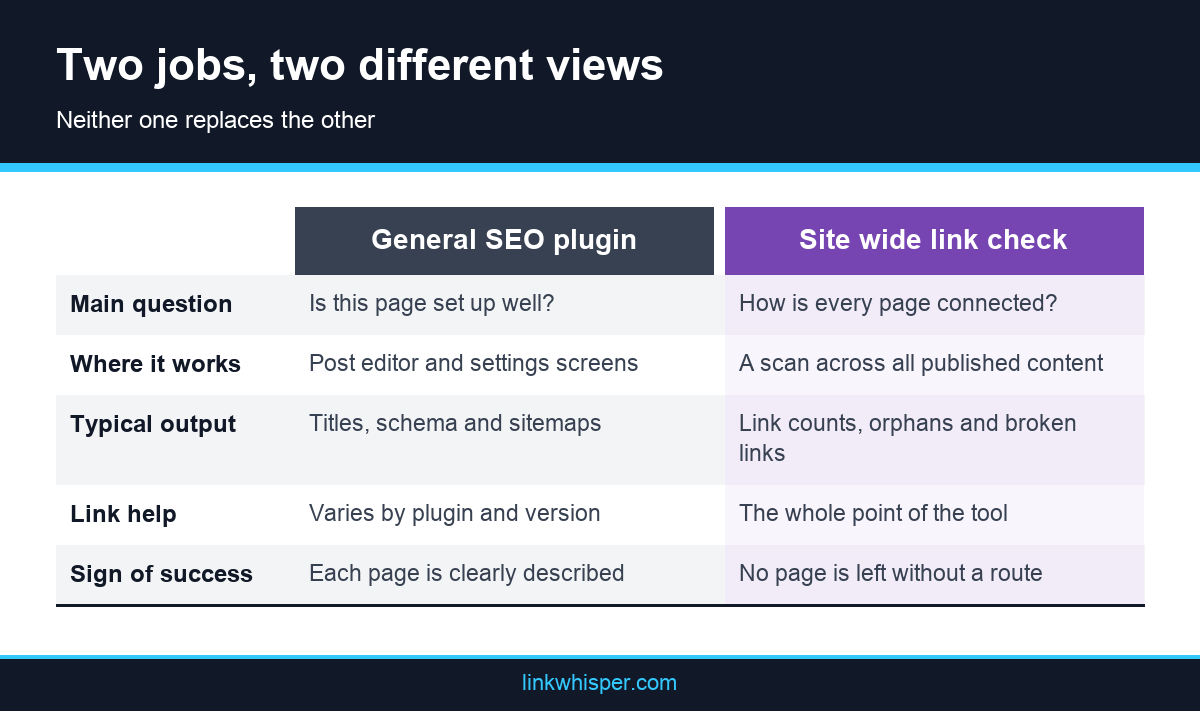
On Rank Math internal links, the comparison mentioned earlier says the plugin offers suggestions in the editor and a Link Counter for the internal and external links in your content. Another Link Whisper overview adds that its linking features depend on the version. Neither description settles what your own copy shows you across the whole site, which is why the test below matters more than any review.
The reason to look wider is simple. Suggestions only help on the posts you happen to open, and the pages most in need of links are often the ones nobody opens. A page with a healthy link count can still be hard to reach if every path to it is buried several clicks deep. Counts, depth and page purpose only make sense when you read them together, across the whole site.
A useful internal link checker tool should answer these questions across every page:
- How many inbound and outbound internal links does each page have, sorted from lowest to highest?
- Which published pages have no inbound internal links at all?
- Which links are broken, and in which post and anchor text do they sit?
- Which pages are buried several clicks away from the rest of the site?
- Which pages send readers onward but receive few links themselves?
A Five Question Test to Run on Your Own Plugin
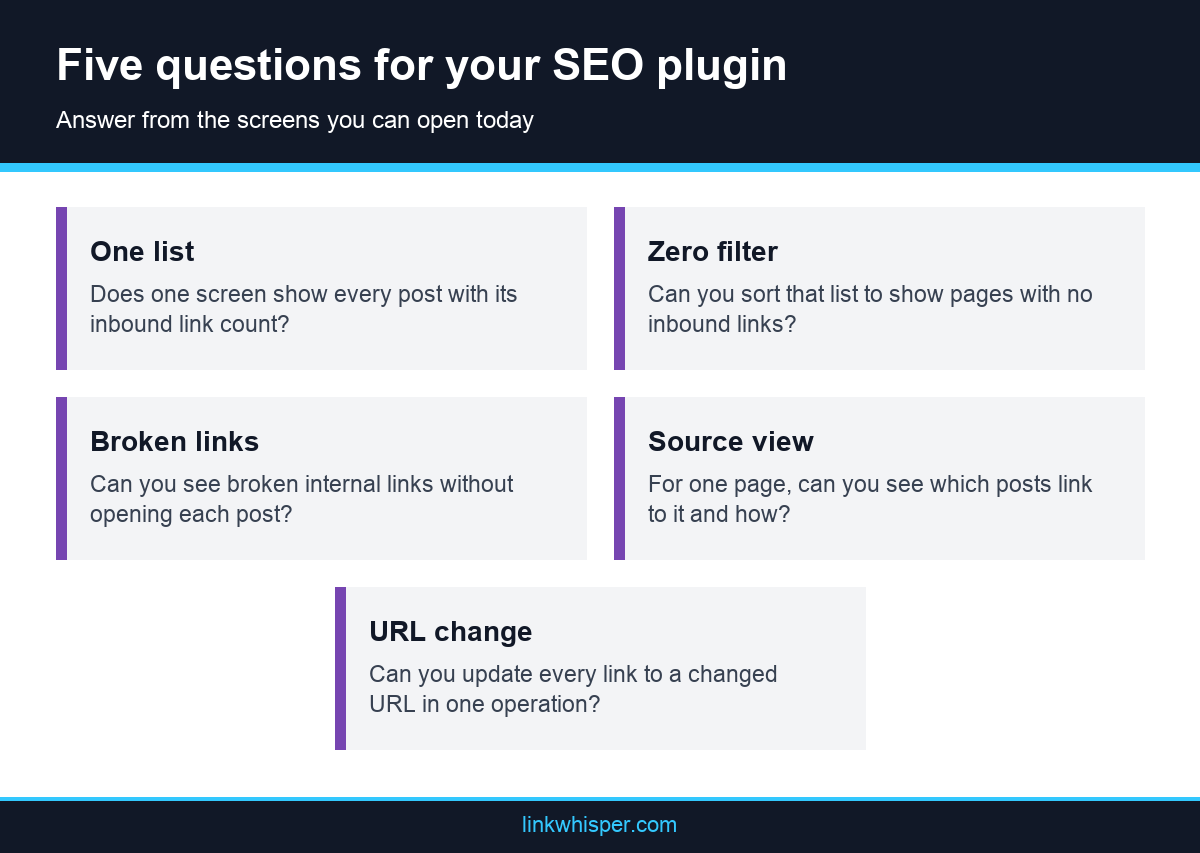
You do not need a new tool to answer this. Five questions, asked inside the plugin you already run, show whether it covers the site wide job. Answer from the screens you can actually open today, not from a feature list, and note any question that leaves you clicking through posts one at a time.
Open your plugin and try each task below without visiting individual posts. Give yourself a yes only if the screen exists and you found it. A feature that lives inside the post editor does not count here, because the point of the test is whether you can see the whole site from one place.
Five yes answers mean your setup already covers this job, and you can stop here. A mix of yes and no shows you exactly which gap to close. Mostly no answers do not mean you chose badly. Your plugin was built for different work.
Then compare your answers with an outside view. The simplest way to see what a dedicated scan finds is the free Link Whisper checker. You enter the public URL of your WordPress site, with no install or account, and it reports pages crawled, orphaned pages, dead end pages, deep pages and a score. The tool itself calls that score a directional health signal, not a promise of a ranking position, so read the page lists first.
- Does one screen list every post with its inbound link count?
- Can you sort that list to show pages with zero inbound internal links?
- Can you see broken internal links without opening each post?
- For one target page, can you see which posts link to it and with what anchor text?
- If a URL changes, can you update every link pointing to it in one operation?
Keep Your SEO Plugin and Add the Missing Check
A low score is not a reason to replace your SEO plugin. The two kinds of tool do different work and can run side by side. Keep titles, schema and sitemaps where they are, and add a link view on top. How far you go depends on site size and how often you publish.
A small site may need nothing more than a free scan and a spreadsheet. Search Console also has a Links report showing how many internal links each page has and which pages link to it. This guide to several ways of checking your link structure notes its limit: it will not show where on the page a link sits or which anchor text it uses.
Larger archives usually need a tool that lives inside WordPress. Link Whisper is the one we know best, so read this as a description rather than a verdict. Its four reports include a Links Report with inbound and outbound counts per post, sortable by most linked, least linked or orphaned, plus a Broken Links Report. It also pulls Yoast SEO and Rank Math focus keywords in as target keywords, so the plugins can share work instead of competing for it. Check compatibility for your own setup before you commit.
Whatever you choose, give every job one home. Let the SEO plugin own page settings and let the link tool own connections. Then rerun the five questions a month later, and see whether the answers changed.
Conclusion
A good SEO plugin for website owners does a lot, and nobody needs to apologize for using one. It may just not answer the site wide question of which pages are connected and which are stranded. Run the five question test this week, write down the answers and compare them with an outside scan. If the gaps are small, carry on as you are. If they are large, add a dedicated link workflow beside the plugin you already trust, and rerun the same test afterward.
Frequently Asked Questions
What should an SEO plugin for website owners handle?
It should cover page level work such as titles, meta descriptions, schema and XML sitemaps, plus content analysis where offered. Treat site wide link checks as a separate question, and test whether your plugin answers it before assuming so.
Does Yoast check internal links across my whole site?
A 2023 Link Whisper review describes Yoast suggestions as working on the page you are editing. Another Link Whisper comparison lists orphaned content detection in Yoast Premium. Features change, so run the five question test on your current version.
Does Rank Math count internal links?
A Link Whisper comparison says Rank Math includes editor suggestions and a Link Counter for the internal and external links in your content. Whether that covers orphans across the whole site depends on your version, so test it directly.
Can I use a linking plugin alongside my SEO plugin?
Yes. Link Whisper says it can complement general plugins such as Yoast SEO and Rank Math, because their core purposes differ. Check compatibility for your setup first, and keep each job in one tool to avoid confusion.
What is an orphan page?
An orphan page is a published page with no inbound internal links. It can still appear in your sitemap, yet readers cannot reach it from your articles. Here is what unlinked content is and how to find it.
Does a free internal link checker tool need an install?
The free Link Whisper scan does not. You enter the public URL of your WordPress site, with no plugin or account, and get results in about 60 seconds. Bulk fixes belong to the paid plugin, not the free scan.
What if my plugin passes only part of the test?
Close the specific gap instead of changing everything. If only orphan detection is missing, a regular outside scan may be enough. If several answers are no and your archive is large, a dedicated linking tool becomes easier to justify.
Do sitemaps make internal links unnecessary?
No. A sitemap lists pages for search engines, while internal links give readers and crawlers a route between them. Google says it primarily finds pages through links, so a sitemap entry works best alongside links from related posts.
Link Whisper tips
Keep learning about internal linking
Get Link Whisper tips and offers in your inbox.
Check if your site has the same issues.
Run a free audit right now. See your orphaned pages, broken links, and link health score in 60 seconds.
Check My Site