
Contents
- 1 Key Takeaways
- 2 Why Broken Links Cost WordPress Sites More Heading Into 2027
- 3 The Four Main Types of Broken Link Checkers
- 4 Which Broken Link Checker Tool 2027 Options Are Worth It?
- 5 Free Tools, Lifetime Deals and Subscriptions
- 6 A Simple Broken Link Routine for 2027
- 7 Conclusion
- 8 Keep learning about internal linking
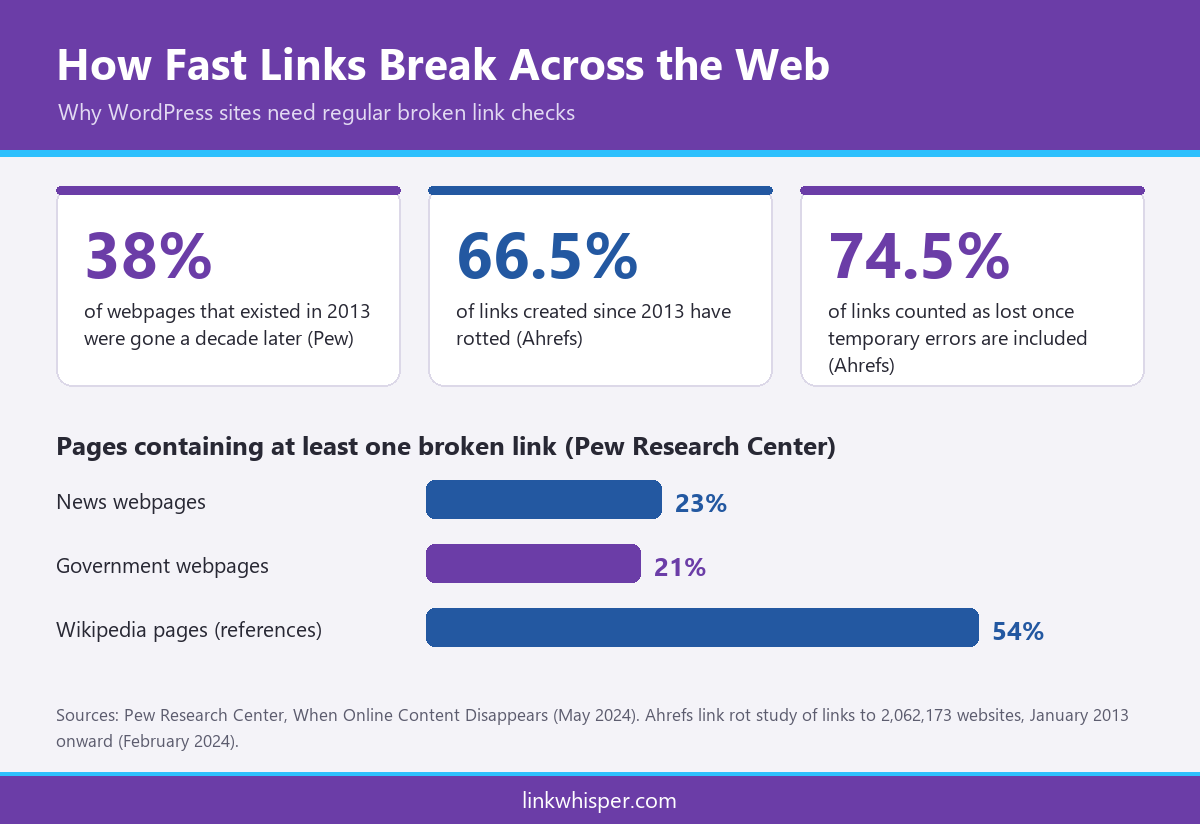
Dead links pile up quietly on every website. A Pew Research Center analysis of digital decay found that 38% of webpages that existed in 2013 were no longer available a decade later, and 23% of news pages held at least one broken link. Choosing the right broken link checker tool 2027 setup is now a routine part of running a healthy WordPress site. If you want a second opinion on your own site, contact the Link Whisper team and we will point you in the right direction.
This guide compares the main types of checkers, explains what each one does well, and shows which features are worth paying for as you plan for 2027.
Key Takeaways
- A broken link checker tool 2027 setup should find broken internal and outbound links, flag redirect chains and soft 404s, and let you fix problems without editing every post by hand.
- Free options cover detection well for small sites, while a WordPress SEO broken link checker 2027 earns its cost through faster fixes and wider link health reporting.
- Before chasing a free broken link checker lifetime deal for WordPress, weigh maintenance, support and what happens to your links if the product stops.
Why Broken Links Cost WordPress Sites More Heading Into 2027
Broken links hurt three things at once: reader trust, crawl efficiency and the flow of link value between your pages. As archives grow, the problem compounds. Every deleted post or changed slug can break links across dozens of older articles.
The wider web shows how fast links decay. An Ahrefs study of links pointing to over two million websites found that 66.5% of links created since 2013 had rotted. Once temporary errors and other issues were counted, 74.5% were considered lost. Your outbound links age the same way, even when your own content stays accurate.
Google is direct about the crawling side. Its crawl budget guidance says a 404 status is a strong signal not to crawl that URL again, while soft 404 pages keep being crawled and waste budget. It also warns that long redirect chains have a negative effect on crawling.
That is why a broken link checker tool 2027 plan should look beyond simple 404s. Redirect chains, soft 404s and timeouts all deserve attention, because each one wastes a visit from a reader or a crawler. For a closer look at error pages, read our guide to finding and fixing 404 errors on WordPress.
The Four Main Types of Broken Link Checkers
Most options fall into four groups. Each suits a different site size, budget and level of technical comfort. The best choice depends on how often you publish and who fixes the problems once they are found.
- Google Search Console. Free and official. Its Page indexing report lists URLs that returned 404 errors in the past month and pages Google treats as soft 404s. It shows what Google found, not every broken outbound link in your posts.
- Desktop crawlers. The Screaming Frog SEO Spider finds broken links and server errors and crawls 500 URLs for free. A paid licence, listed at 245 euros per year, removes that limit. You still make each fix inside WordPress yourself.
- Free WordPress plugins. The Broken Link Checker plugin by WPMU DEV has more than 500,000 active installations. It offers cloud and local scanning engines, email alerts, and edit or unlink actions from its own dashboard.
- Internal linking suites. Link Whisper Premium includes full internal link error reporting, covering broken links and 404 errors, and lets you fix or remove them from its dashboard. The same plugin also handles link suggestions, orphan reports and auto linking.
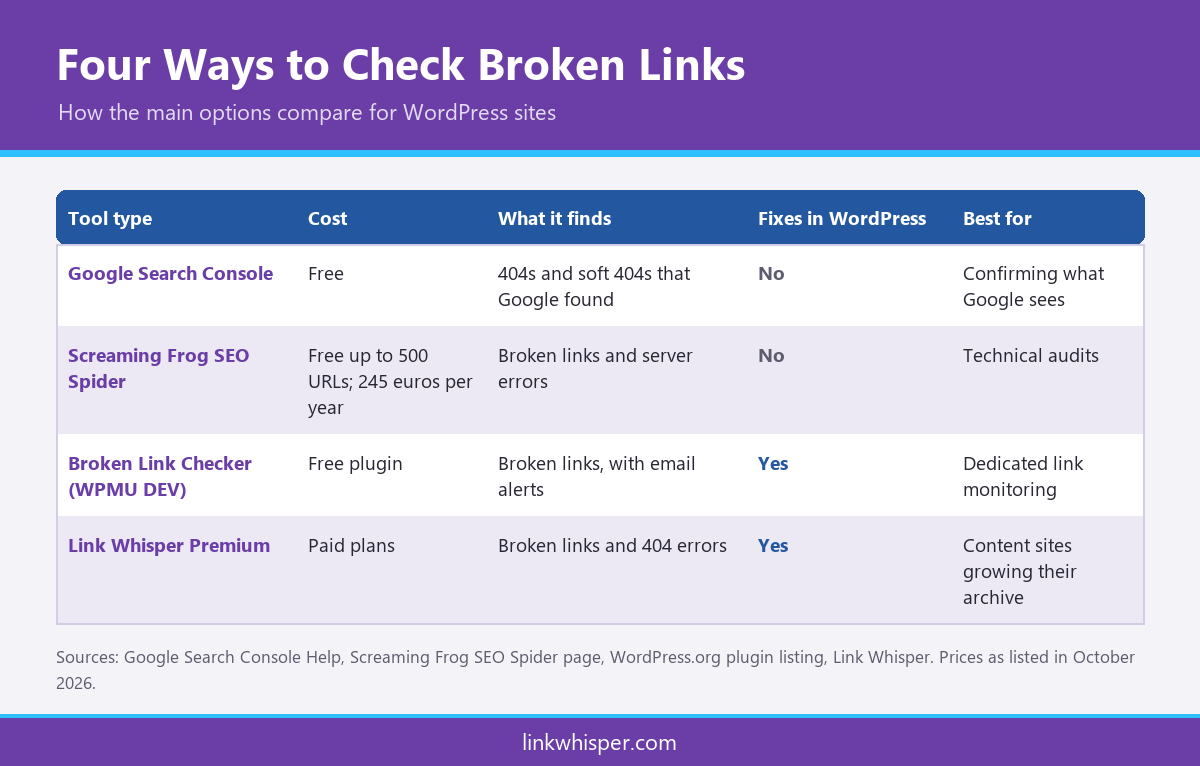
Many site owners combine two groups. Search Console confirms what Google sees, while a plugin handles regular detection and repair. If you are unsure where to start, our guide to matching a checker to your site size walks through small, medium and large sites.
Which Broken Link Checker Tool 2027 Options Are Worth It?
A tool is worth it when it saves more time than it costs and catches problems before readers or crawlers do. Use the criteria below to judge any WordPress SEO broken link checker 2027 shortlist, free or paid.
- Internal and outbound coverage. It should check links to your own pages and to external sites.
- More than 404s. Look for redirect, redirect chain, soft 404 and timeout reporting.
- Fixes inside WordPress. Updating, redirecting or unlinking from one dashboard beats working from a spreadsheet.
- Light server load. Large sites benefit from offloaded scanning so the live site stays fast.
- Verification. Rechecking flagged links cuts false alarms caused by brief outages.
- Scheduling and alerts. Regular scans catch new breakage soon after it happens.
Link Whisper’s free broken link scan needs no signup and returns results in about 60 seconds. It separates 404s from redirects, redirect chains and timeouts, so you can see the size of the problem first. The premium plugin then adds fixes inside WordPress, with flagged links double checked to avoid false alarms. For content sites with large archives, that pairing makes a practical WordPress SEO broken link checker 2027 workflow, because broken link repair sits next to the internal linking work you already do.
Free Tools, Lifetime Deals and Subscriptions
Price matters, but the cheapest option is not always the best value. Many buyers search for a free broken link checker lifetime deal for WordPress, hoping to pay once and forget it. Before you buy, think about who will maintain the tool as WordPress, themes and hosting keep changing.
Free tools are a sensible starting point for small sites. Search Console, a free plugin or a free crawl of up to 500 URLs will catch most problems on a blog with a few hundred posts. As a site grows, the cost shifts from finding broken links to fixing them, and that is where paid tools save the most time.
A free broken link checker lifetime deal for WordPress only pays off if the product keeps receiving updates and support. Ask three questions before you commit. Is the plugin actively maintained? Will it keep working if the vendor changes its pricing? Do your fixes remain if you stop using it?
Link Whisper sells recurring plans rather than lifetime licences. Plans renew monthly, quarterly, half yearly or yearly, and the initial licence purchase carries a 14 day money back guarantee. Links are written directly to your WordPress database, so they stay if you cancel. You can compare Link Whisper plans against the hours your team spends on manual link audits.
A Simple Broken Link Routine for 2027
Tools only help when you use them on a schedule. A light, repeatable routine stops broken links from piling up between larger content audits, and any broken link checker tool 2027 choice works better with one in place.
Public sector web teams offer a useful benchmark. Maryland’s digital standards for website links advise checking high traffic pages for broken links every month and reviewing full link reports quarterly and annually. Most WordPress publishers can adapt the same rhythm:
- Check your top traffic pages and newest posts every month.
- Run a full site scan each quarter, covering internal and outbound links.
- Fix redirect chains and soft 404s, not just hard 404 errors.
- After deleting or moving a post, update every internal link that pointed to it.
- Review the Search Console Page indexing report to confirm Google sees the fixes.
This routine also exposes posts that lose all their inbound links after a cleanup. Our guide to orphaned pages on WordPress explains why those posts struggle to rank and how to reconnect them.
Conclusion
Broken links are a normal side effect of a growing website, but leaving them unchecked costs traffic, trust and crawl efficiency. The right broken link checker tool 2027 choice depends on your site size and who does the fixing. Free options cover detection for smaller sites, while a WordPress SEO broken link checker 2027 inside your dashboard saves the most time on large archives. Start with a free scan, set a monthly routine, and upgrade when manual fixes start eating your week. If you are unsure which route fits your site, ask our team for guidance.
Link Whisper tips
Keep learning about internal linking
Get Link Whisper tips and offers in your inbox.
Check if your site has the same issues.
Run a free audit right now. See your orphaned pages, broken links, and link health score in 60 seconds.
Check My Site