Contents
- 1 What a Broken Link Checker Reliably Catches
- 2 Five Things a Clean Report Can Still Hide
- 3 How to Act on a Report Without Losing a Day
- 4 Keep the Cleanup From Starting Over
- 5 Conclusion
- 6 Frequently Asked Questions
- 6.1 What does a broken link checker actually look for?
- 6.2 Can a scan detect soft 404s?
- 6.3 Should I redirect or update a broken internal link?
- 6.4 How often should I scan for link rot?
- 6.5 Do broken links hurt SEO?
- 6.6 Why does a link work in my browser but fail in the report?
- 6.7 Is a free scan enough for a large site?
- 6.8 Can a scan tell me a link goes to the wrong page?
- 7 Keep learning about internal linking
A clean report from a broken link checker feels like proof that your site is healthy, and that is the trap. The scan answers one narrow question: did this URL return an error when the tool asked for it? It cannot tell you whether the page still says what your sentence promised. This guide covers what the scan catches, the blind spots worth checking by hand and how to work through a report in order. If you are still choosing a product, start with this side by side look at the main options instead.
Key Takeaways
- A broken link checker reliably flags missing pages, server errors, redirects and timeouts, because each one shows up in the server response.
- Soft 404s, wrong destinations, login pages and script generated links need a second check, even when the report looks clean.
- To fix broken links in a sensible order, repair internal 404s first, then dead external references, then redirects and chains.
What a Broken Link Checker Reliably Catches
A scan visits public pages, collects the links on them and requests each destination. It is very good at anything that announces itself in the server response: missing pages, server errors, redirects and slow destinations. Those results are dependable starting points, as long as you read each one as a different kind of problem.
Start with the dead URLs. A 404 means the server cannot find the requested resource, and MDN notes that links leading to one are often called broken or dead links and can be subject to link rot. On your own site they usually come from a deleted post, a changed slug or a typo in the original link. On other sites they come from pages you never controlled. The free Link Whisper scan reports both groups and names the source page beside the problem URL, so you know which post to open.
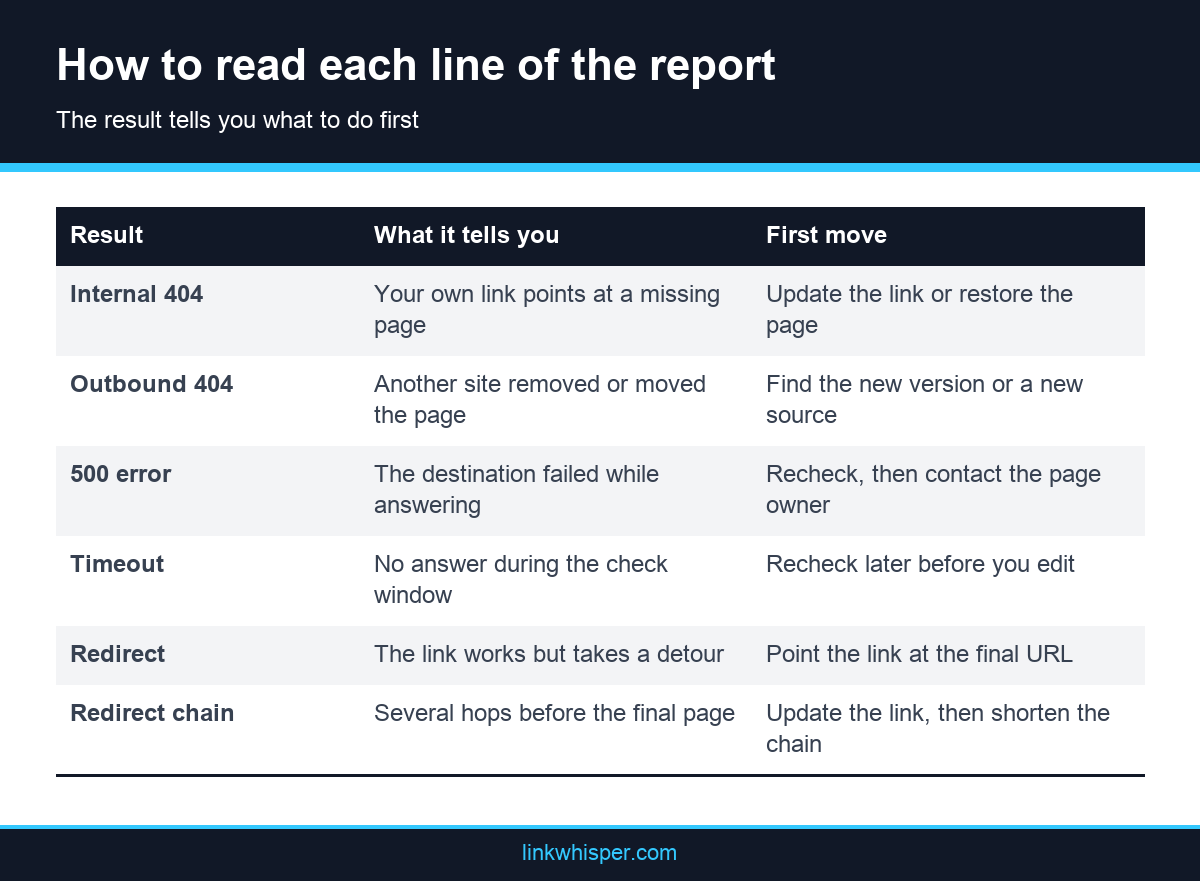
Internal and external results deserve different treatment. An outbound failure annoys a reader and makes an old post look neglected. An internal failure breaks a path you built yourself, which is why internal 404s matter most. For broken links SEO work, that difference sets the order of the whole cleanup, because you fully control one side of the problem and only part of the other.
Server errors and timeouts need a slightly different reading. A 500 says the destination failed while answering. A timeout says it did not answer during the check window, which is not proof that the page is gone. Redirects sit in a third group because they still work. A single redirect may only be outdated, while a run of several hops adds steps that a direct link would avoid.
Five Things a Clean Report Can Still Hide
A passing status code only proves that something answered. It says nothing about whether the answer was the right page. Five gaps come up again and again: soft 404s, links that load the wrong content, pages behind logins, links generated by scripts and temporary errors that vanish by the time you look.
Soft 404s come first. A soft 404 answers with a 200 status even though the page does not really exist, often through a friendly “not found” template. A broken link checker that judges by response code sees a healthy link. Spot these by sampling thin destinations and reading what actually loads.
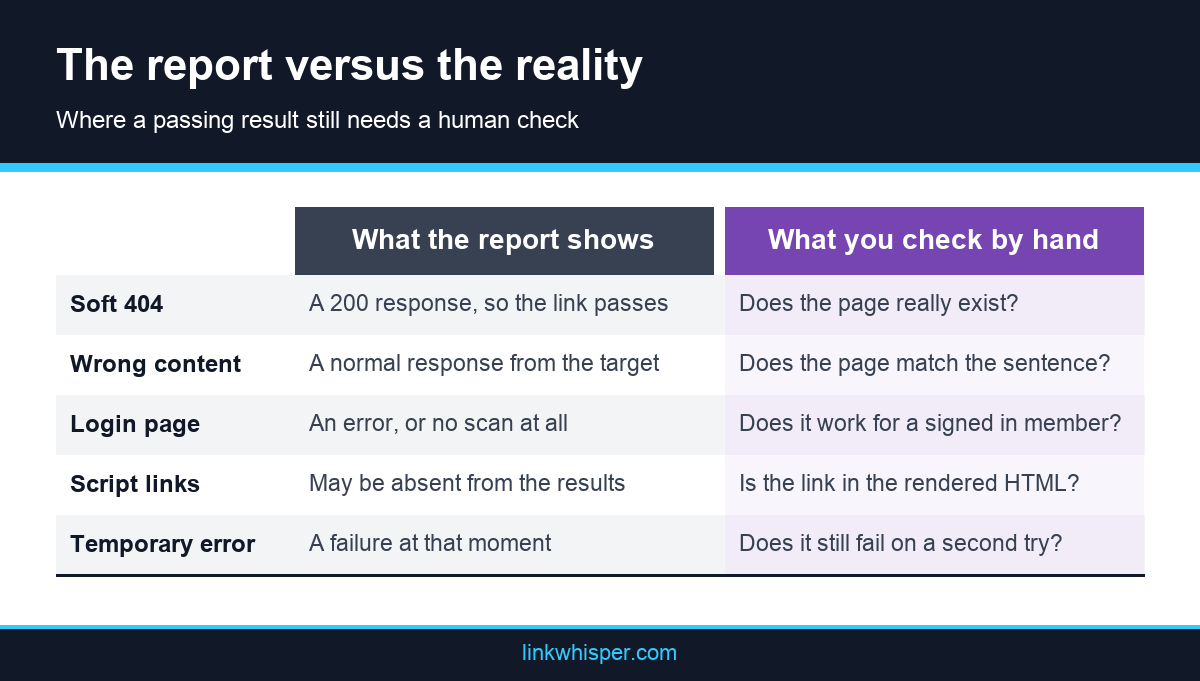
Wrong destinations are harder still. A link to an old buying guide may now land on a rewritten page about something else, or a redirect may send a specific post to a broad category. Everything responds normally, yet the sentence around the link makes a promise the page no longer keeps. Only a reader catches that, so review the links in your top posts whenever you rewrite or merge content.
Pages behind logins are mostly invisible. The free scan starts from the public pages it can reach, so links inside a member area, a course or a client portal never enter it. In the other direction, a public link to a gated page can return an authentication error that looks broken to a crawler and works fine for a signed in member. Decide those cases by hand.
Script generated links split two ways. Google says links inserted with JavaScript are crawlable when they use normal anchor markup with an href, while elements that only respond to script events are not reliably extracted. A scanner that reads plain HTML may not see the first kind, and a crawler may never follow the second. The live test in the URL Inspection tool shows the rendered page when you doubt a template.
Temporary errors create false alarms. Under the HTTP standard, a 503 status signals temporary overload or scheduled maintenance, so a link flagged today may work tomorrow. Some sites also refuse automated requests while serving people normally. Recheck at a different time before you edit. Coverage is the last caveat. The free scan is bounded, and its own guidance says to treat a partial scan warning as a reason to review coverage, not as a claim that every URL is healthy.
How to Act on a Report Without Losing a Day
A long report looks worse than it is, because one deleted page can account for dozens of rows. Work by destination rather than by row, repair your own links before anyone else’s and recheck anything uncertain. That order keeps the cleanup short and stops you from editing links that were never broken.
Group the rows by destination first. Say forty posts point at one deleted guide. That is one decision, not forty. Choose the fix for the destination, then apply it everywhere the link appears. The right repair depends on what happened to the page:
- Moved page: update each link to the new URL, and add a redirect for visitors arriving from elsewhere.
- Deleted page with a close replacement: link straight to the replacement.
- Deleted page with no replacement: remove the link and reword the sentence so it still reads well.
- Dead external source: find the current version or a better source, or cut the claim that depended on it.
- Redirected internal link: point it at the final URL, then tidy any chain behind it.
Keep the Cleanup From Starting Over
One pass through a report does not end the problem, because pages keep moving and other sites keep deleting things. Set a working order you can repeat, know when to rerun the scan and decide who owns the fixes. A small habit after each site change costs far less than another archive wide cleanup.
The order matters. Fix internal 404s on your busiest pages first, update or remove dead external references next, and leave redirects until the urgent work is done. Updating a link beats leaning on a redirect, since readers and crawlers both take the short route. This guide to choosing between a redirect and a corrected URL covers the options in more detail. Then sample the blind spots: read the destinations of the links in your ten most visited posts, and open any page that redirects to a broad category.
Rerun the scan after a migration, a redesign or a change to your URL structure, since those can break many links at once. A free broken link checker gives you the list, while the repair happens in your editor or a plugin. The error report inside Link Whisper shows 404s, redirect chains, 500 errors and timeouts with the post and anchor text, and URLs can be edited from the report. Since version 1.6.8, a WordPress Cron event checks a batch of 10 links every 10 minutes, so new problems surface without a manual run. You can switch that off if you prefer manual scans.
Conclusion
A broken link checker is a fast and honest tool for one job: finding URLs that fail when requested. It is not a content review, and a clean report does not prove that every link still leads somewhere useful. Use the scan to clear the errors, then spend a few minutes on the blind spots in your most visited posts. Pick the section of your site that matters most today, run a free scan of your site and fix the first internal 404 on the list before you close the tab.
Frequently Asked Questions
What does a broken link checker actually look for?
It requests each link found on the pages it can reach and reads the response. Missing pages, server errors, redirects, redirect chains and timeouts all show up, along with the page where each problem link sits.
Can a scan detect soft 404s?
Do not count on it, since a soft 404 answers with a success response. Open thin or redirected destinations yourself and read what actually loads for a visitor, because the status code alone will not reveal the problem.
Should I redirect or update a broken internal link?
Update the link whenever you control it, so readers and crawlers go straight to the final page. Add a redirect when the old URL still gets visitors. This guide on redirecting missing pages covers when that fits.
How often should I scan for link rot?
Scan after any migration, redesign or bulk slug change, then on a schedule that suits your publishing pace. Older posts with outbound references deserve extra attention, because other sites can remove pages at any time without telling you.
Do broken links hurt SEO?
Broken internal links waste paths you built and leave readers at a dead end, so they deserve quick attention. Treat any ranking effect as uncertain, and fix them first for visitors and for clear crawl paths through your site.
Why does a link work in my browser but fail in the report?
Some servers refuse automated requests, slow down under load or ask for a login, so a scan and a person can get different answers. Recheck at a different time, then open the link yourself before you edit anything.
Is a free scan enough for a large site?
It is a useful first look, but the free scan is bounded and may warn that results are partial. Treat that warning as a coverage gap, and use a fuller audit of your site for pages it missed.
Can a scan tell me a link goes to the wrong page?
No. A page that loads normally looks fine to a scan, even when its topic has changed. Only a person reading the sentence and the destination together can judge that, so review key posts after rewrites and merges.
Link Whisper tips
Keep learning about internal linking
Get Link Whisper tips and offers in your inbox.
Check if your site has the same issues.
Run a free audit right now. See your orphaned pages, broken links, and link health score in 60 seconds.
Check My Site