Contents
- 1 Key Takeaways
- 2 Meet the Example Store and Its New URL Plan
- 3 Step One: Map Every Old URL to a New Home
- 4 Step Two: Go Live and Run the 404 Checker
- 5 Step Three: Point Internal Links at Final URLs
- 6 Step Four: Keep Watch for the First Month
- 7 Conclusion
- 8 Frequently Asked Questions
- 8.1 What does a 404 checker actually do?
- 8.2 How many times should a 404 errors checker run during a move?
- 8.3 Is it fine to redirect every retired page to the home page?
- 8.4 Do 301 redirects keep search value after a move?
- 8.5 Why do 404 errors appear after a site migration?
- 8.6 How can I stop redirect chains from forming?
- 8.7 Can Link Whisper fix links when URLs change?
- 8.8 Are the figures in this example real customer results?
- 9 Keep learning about internal linking
Moving a WordPress site to new URLs is when a 404 checker matters most. Old addresses vanish, redirect rules slip, and links inside posts keep aiming at pages that are gone. Before the move, record a baseline with the free Internal Link Checker so you can measure every later change against it.
Here is how it plays out on an example site: a WooCommerce shop selling outdoor gear that switches to a new URL scheme. Every number below is an example figure for this illustrative walkthrough, and each step works on any WordPress site.
Key Takeaways
- Save a complete list of old addresses before the switch, since no 404 checker can flag a missing page you never recorded.
- Treat redirects as a safety net for visitors, then point internal links at the final URLs so the site stays tidy.
- Plan a follow up scan seven days after launch, because some failures only show up once crawlers and partner sites catch up.
Meet the Example Store and Its New URL Plan
Picture an outdoor gear shop on WooCommerce with 450 products, 220 articles and a few campaign pages. The owner wants product addresses that are shorter and easier to read. The content stays the same, but nearly every product URL changes, and that combination is where broken links and slipping rankings usually begin.
Today the products live under /store/ with long names packed with model numbers. After the move they will sit under /gear/ with short, readable names. The articles keep their own addresses, yet most of them recommend products by linking straight to the old paths.
For a shop, every dead product link has a price tag. A hiking guide that sends a reader to an error page loses the sale it was written to earn. Our page for WooCommerce shop owners covers why product links deserve this much care.
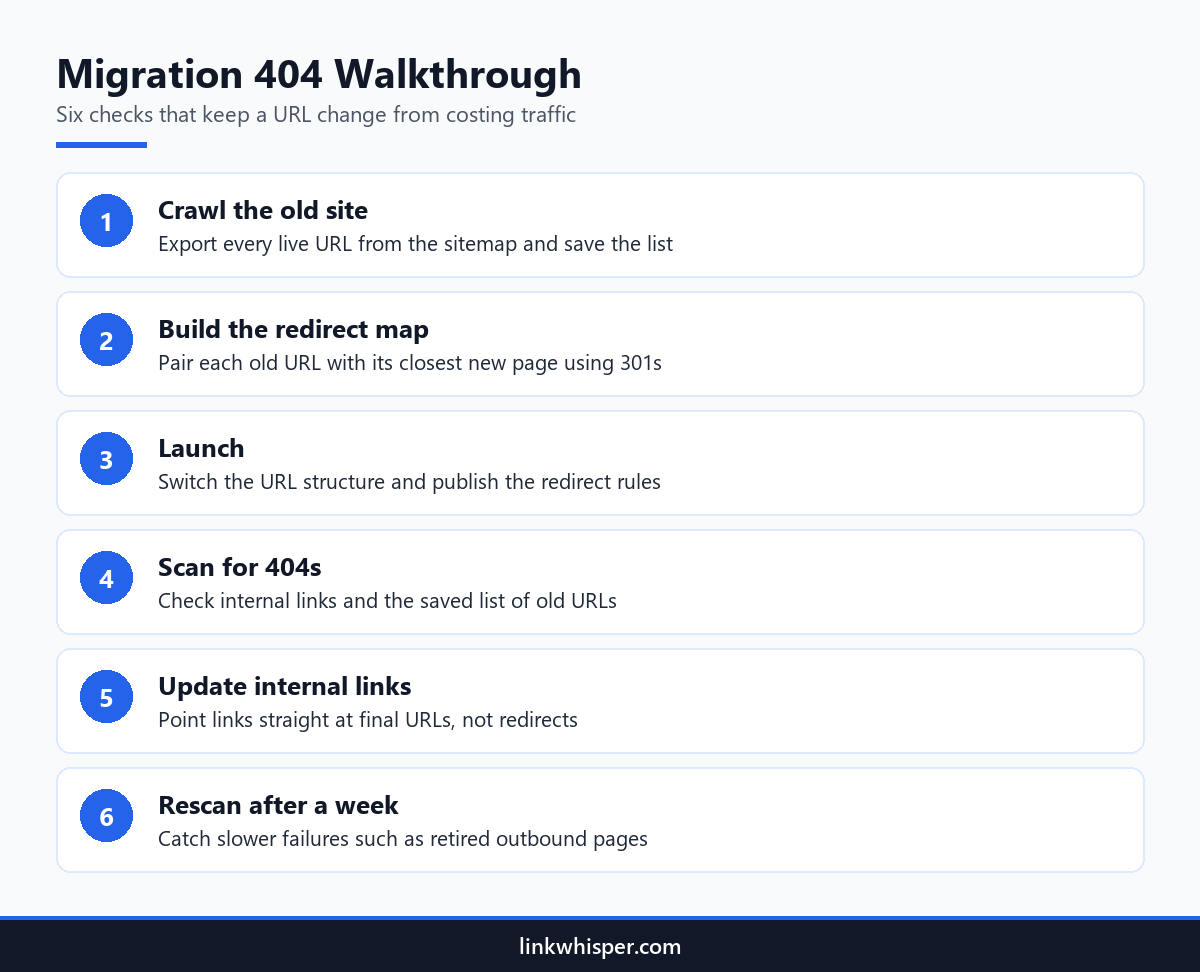
So the first job happens before any setting changes. The owner pulls every address from the XML sitemap, runs a full crawl and saves both in a dated spreadsheet. A 404 checker can only spot what went missing if you kept a record of what was there.
Next comes a short priority list. The owner ranks pages by revenue and visits, then flags the top thirty products and eight buying guides. Those pages get checked first at every stage that follows.
Step One: Map Every Old URL to a New Home
The redirect map is the backbone of the whole migration. It lists each old address next to the page that replaces it. Every row should land somewhere useful, and pages being retired should send people to the nearest relevant page, such as a parent category, instead of dumping everyone on the home page.
In the example, the spreadsheet holds 690 rows. Most products match one new page exactly. Three tents are being dropped, so their old addresses point to the tents category, where shoppers can still find a close alternative.
Each rule uses a permanent 301 status, so search engines know the change is final. Our explainer on mapping old URLs with 301s covers the basics. Google also advises a full mapping in its guide to site moves with URL changes.
An agency handling this move for a client would hand the map over as part of the job. It records what changed, when and why, which settles questions later. Our page for agencies managing client websites shows how teams keep link work repeatable across accounts.
Before launch, the owner scans the map for chains. A rule that lands on another redirect adds a wasted hop to every request. Each row must finish on a live page in one step, and pages that earn links from other sites get a second look.
Step Two: Go Live and Run the 404 Checker
Problems that hid during testing show up on launch day. A typo in one redirect rule, a menu that still uses the old path or a sidebar widget can all send people to error pages. Scanning the moment the new structure goes live lets you repair those faults before shoppers or crawlers stumble into them.
Within the first hour, the owner runs the free Broken Link Checker across the live site. In this example it reports 38 internal links that now hit an error. Nearly all of them trace back to the header menu and two article templates still hard coded with /store/.
Then the owner feeds the saved list of old addresses into a 404 checker. Nine of them fail because their redirect rules contain spelling mistakes. Correcting nine lines takes a few minutes, while leaving them broken could drain search traffic for weeks.
These two scans answer different questions. The first asks whether links inside the site still work. The second asks whether addresses that search engines and customers already know still lead somewhere. A sound migration needs answers to both.
Each repair goes into a simple log next to the error it fixed. When a similar fault appears later, the log points straight at the rule or template to inspect.
Step Three: Point Internal Links at Final URLs
Redirects keep visitors moving, but they only cover the gap. Each internal link that runs through a redirect adds a small wait and creates one more rule that could fail in the future. The tidy fix is to rewrite internal links so they lead directly to the new addresses, then scan the whole site once more.
Link Whisper is a WordPress plugin, and its URL changer suits this job. The owner enters each old address and its replacement, and every matching link updates in one click. Hundreds of article links now reach /gear/ pages directly instead of hopping through a redirect.
Seven days after launch, the owner runs the 404 checker again. This pass finds a different kind of failure. A gear brand removed a product page, so two outbound links in a review now fail. Travel bloggers meet the same issue when tour operators and hotels quietly delete pages they once linked.
Last, the owner checks the fresh crawl against the original spreadsheet. Every old address now resolves to a live page. No internal link lands on an error, and every product still receives at least one internal link.
Direct links also make reports easier to trust. Click data and link counts match the real destination pages, since no redirect sits in between.
Step Four: Keep Watch for the First Month
Launch week is not the finish line. Search engines revisit pages at their own pace, other websites update their links slowly, and a small theme edit can restore an old path without warning. A light routine of weekly scans through the first month catches issues that only surface once normal traffic returns.
The example owner books a recurring weekly check for four weeks. Each session repeats a site crawl and a 404 checker pass on the old list, then lines the results up against the previous week. A fresh batch of errors usually has one source, such as a theme update or a changed menu.
The owner also looks for pages that lost every inbound internal link. During a big move, some links get deleted instead of updated, and good pages quietly become orphans. A product nobody links to is hard to reach, even when its address works perfectly.
Customers often find a dead end before any report does. So the owner adds links to the main gear categories on the custom error page, giving anyone who lands there a quick route back to shopping.
Once the month is over, the checks drop to a monthly rhythm. The site has settled by then, and new issues appear at the normal speed of publishing.
Conclusion
A URL change can leave rankings intact when each stage gets a check. Save the old addresses, map every redirect with care, and run a 404 checker at launch and again seven days later. After that, repoint internal links to the final pages so nothing depends on a redirect. Start with the free scans to set your own baseline, then add the plugin from linkwhisper.com to keep links current inside WordPress long after the move. A few minutes of checking now costs far less than winning back lost traffic later.
Frequently Asked Questions
What does a 404 checker actually do?
It visits a list of URLs and reports any that answer with a not found status. After a migration, it reveals old addresses that lack a redirect and internal links that still point to pages you have removed from the site.
How many times should a 404 errors checker run during a move?
Three runs cover most moves. The first, before launch, records what exists. The second, on launch day, exposes missing or mistyped redirects. The third, about a week later, finds slower failures like deleted partner pages and old templates.
Is it fine to redirect every retired page to the home page?
It is better to avoid that. Send each retired page to the closest match, such as its category or a similar product. Mass home page redirects frustrate visitors, and search engines often handle them the same way as missing pages.
Do 301 redirects keep search value after a move?
A permanent 301 is the accepted signal that a page has moved for good. Even so, update your internal links to the final addresses whenever possible, since direct links load faster and have fewer parts that can break.
Why do 404 errors appear after a site migration?
Most come from redirect rules that are missing or contain typos, menus and templates with old paths written into them, and widgets that were never updated. Outside pages you link to may also vanish around the same time.
How can I stop redirect chains from forming?
Make each rule land on the final address, and never stack a new redirect on top of an older one. Our article on fixing redirect chains shows how chains build up and how to collapse them into single hops.
Can Link Whisper fix links when URLs change?
Yes. The URL changer in the plugin finds every link that points at an old address and updates them all in one click. You avoid opening posts one at a time, and links reach live pages without passing through a redirect.
Are the figures in this example real customer results?
No. They are example figures for an illustrative store, picked to show the rough scale of a typical move. Your own totals will be different, but the order of the steps and the checks at each stage suit most WordPress sites.
Link Whisper tips
Keep learning about internal linking
Get Link Whisper tips and offers in your inbox.
Check if your site has the same issues.
Run a free audit right now. See your orphaned pages, broken links, and link health score in 60 seconds.
Check My Site