Contents
Internal linking for multilingual wordpress sites gets treated as a footnote in most multilingual SEO guides, buried under hreflang tags, canonicals, and geo-targeting settings. It deserves its own attention. The single most common mistake on multilingual WordPress sites is a translated page linking back to the default-language version of another page instead of its own translated equivalent, and that mistake quietly undermines the multilingual setup you already spent time building.
Not sure where your own site stands? Run the free internal link checker to see your current link health score before applying the framework below.
Key Takeaways
- The most common multilingual internal linking mistake is linking to the wrong language version of a page.
- This mistake weakens both user experience and the hreflang signals search engines rely on.
- WPML and Polylang each handle link translation differently, which changes how you audit and fix it.
Why Multilingual Internal Linking Is a Distinct Problem
On a single-language site, a topically relevant internal link is either right or wrong based on content alone. On a multilingual site, a link can be topically perfect and still be wrong, because it sends a reader to a page that exists in the wrong language. A Spanish-language article linking to an English product page technically points somewhere related, but it breaks the experience for a reader who came specifically because your site offered content in their language.
This is easy to overlook because most internal linking workflows are built around finding a topically relevant page, not around checking which language version of that page is correct. A writer working in the Spanish section of a site can pull a link suggestion from the general content pool, and nothing in a typical editor necessarily flags that the suggested page is in the wrong language.
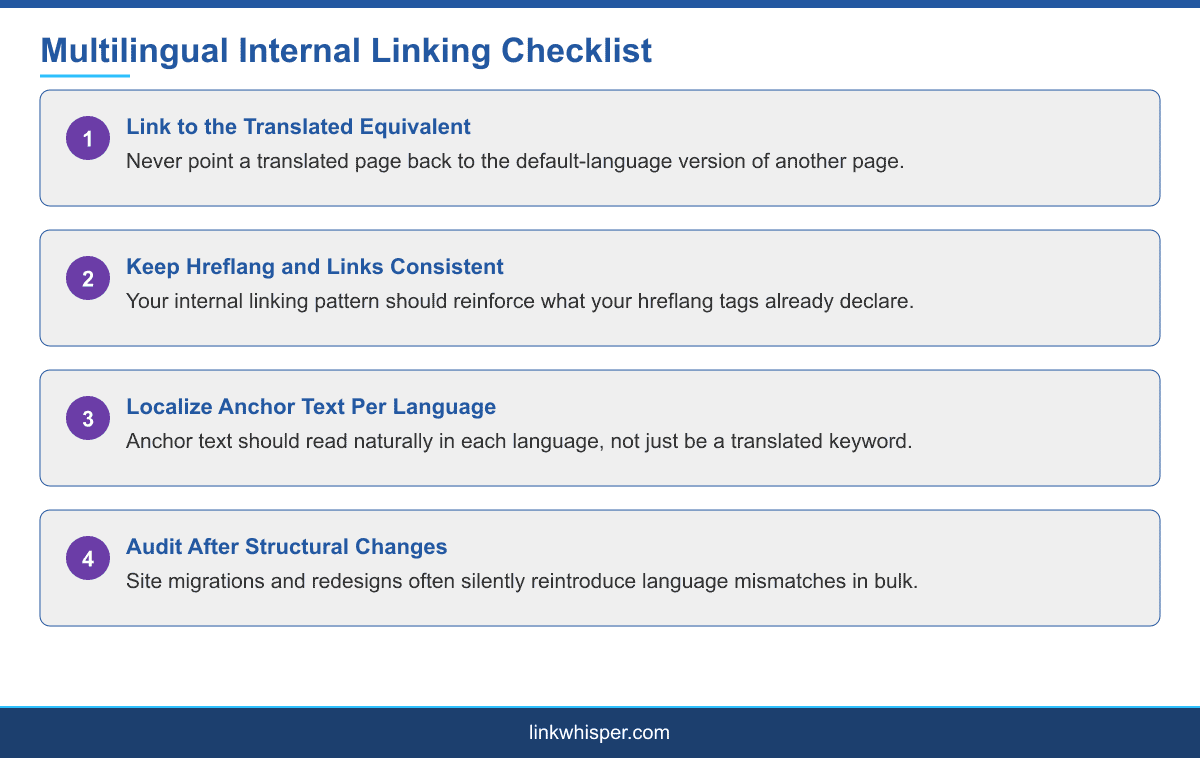
This is a genuinely different problem from the general internal linking advice covered in internal linking for different wordpress site types, since the correctness of a link depends on a factor, language, that a purely keyword-based approach to link suggestions has no reason to check on its own.
How the Language Mismatch Mistake Actually Happens
The mistake usually starts small. A translator or content writer working through a batch of translated posts reuses the internal links from the original-language version rather than re-pointing each one at its translated counterpart, often because the translated version of the target page did not exist yet when the link was first added. Once it does exist, nobody goes back to update the link.
Over time, this creates a pattern where translated pages accumulate links pointing back to the default language, even though the entire rest of the page is in the target language. A reader clicking through experiences a jarring language switch mid-session, and search engines see a site whose internal linking pattern does not match its stated language structure.
Site migrations and redesigns make this worse. When a site restructures its navigation or moves to a new theme, internal links are often rebuilt in bulk from the default-language content tree, silently reintroducing the mismatch across pages that had previously been fixed. Anyone maintaining a multilingual site long-term should expect to re-check this after any significant structural change, not just once during initial setup.
Why This Undermines Your Hreflang Setup
Search engines use hreflang tags together with the actual pattern of internal links between language versions as a kind of consistency check. Hreflang tags declare that a French version of a page exists, but the internal linking pattern across your site is one of the signals that reinforces or contradicts that declaration in practice.
When internal links consistently skip the translated version in favor of the default language, that inconsistency can undermine the confidence a search engine places in either signal. It is not that one broken link ruins a multilingual SEO setup, but a systemic pattern of them, repeated across hundreds of translated pages, is a real and common problem, not an edge case.
There is also a simpler, more immediate cost that has nothing to do with search engines at all. A reader who clicks a link expecting to stay in their language and lands on a page in a language they did not choose is far more likely to leave the site entirely than to hunt for a language switcher and continue browsing. Every one of those exits is a signal search engines can see too, through engagement metrics that factor into how a page performs over time.
This is worth checking directly with a multilingual SEO audit, since WPML own documentation covers exactly how hreflang and page relationships are expected to work together.
How WPML and Polylang Each Handle This
WPML and Polylang both aim to solve language relationships automatically, but they do it differently enough that your fix depends on which one runs your site. WPML ties translated content together through its own translation management system, and links added through its native editing tools generally resolve to the correct language automatically, though links pasted in manually or added through some page builder integrations can bypass that logic.
Polylang links language versions through post relationships and automatically outputs hreflang tag attributes in the page head for all connected translations. The same caveat applies: automatic handling covers links added through Polylang aware tools, not every link manually typed into content.
In both cases, the practical fix is the same. Audit existing internal links by language, using either plugin own reporting where available or a manual content review, and prioritize fixing the highest-traffic translated pages first rather than trying to fix an entire multilingual site at once. Neither plugin can fully prevent a content writer from manually pasting the wrong URL, which means the audit step is not optional even on a site that uses either tool correctly everywhere else.
A Practical Audit Process
Start with your highest-traffic translated pages rather than the whole site. For each one, check every internal link and confirm it points at the translated equivalent of the target page, not the default language version. Where a translated target does not exist yet, decide deliberately whether to link to the default language as a temporary measure, clearly signposted, or hold the link until translation is complete.
Agencies managing multiple multilingual client sites, a common setup for agencies handling international clients, benefit from building this check into a standard onboarding audit rather than discovering the pattern site by site after problems already show up in rankings. It is also worth reviewing this alongside the broader internal linking for different wordpress site types guide and, if your multilingual site also serves multiple physical regions, the guide to internal linking for local and multi-location businesses, since geo-targeting and language targeting frequently overlap on the same site.
Conclusion
None of this requires abandoning WPML or Polylang or rebuilding your multilingual setup from scratch. It requires treating internal link accuracy as part of your translation quality process, not a separate technical concern to handle later. Multilingual internal linking rarely gets the dedicated attention hreflang tags and translation quality receive, even though it directly affects both. The fix is not complicated once you know what to look for: confirm every internal link on a translated page actually points at the translated version of its target, not a default-language shortcut that crept in during content migration or a rushed translation pass. Start with your highest-traffic pages and work outward from there. See our full internal linking automation guide for a step-by-step setup.
Frequently Asked Questions
What is the most common internal linking mistake on multilingual WordPress sites?
Linking to the default-language version of a page instead of its translated equivalent, which weakens both the reading experience and the hreflang signals search engines rely on.
Does WPML handle internal linking automatically?
Links added through WPML native editing tools generally resolve to the correct language, but manually pasted links or some page builder integrations can bypass that logic.
Does Polylang handle hreflang tags automatically?
Yes, Polylang automatically outputs hreflang tag attributes for all connected translations, though internal links still need to be checked separately for language accuracy.
How do I audit internal links across a multilingual site?
Start with your highest-traffic translated pages and manually confirm every internal link points to the translated equivalent of its target rather than the default language.
Should a translated page ever link to the default language version?
Only as a clearly signposted temporary measure while a translation is pending, not as a permanent pattern repeated across the site.
Does internal linking language mismatch actually hurt rankings?
A single instance is minor, but a systemic pattern across hundreds of pages can undermine the consistency search engines expect between hreflang tags and actual linking behavior.
Why do internal linking mistakes happen more often in translated content?
Translators often reuse links from the original-language version before the translated target page exists, and those links rarely get updated once translation is complete.
What should agencies managing multilingual clients check first?
Build a language-accuracy link audit into standard onboarding for any multilingual client, rather than discovering the pattern only after it shows up in ranking issues.
Where can I learn more about internal linking basics before tackling multilingual sites?
Link Whisper own knowledge base covers the fundamentals that this multilingual-specific guide builds on top of.
Check if your site has the same issues.
Run a free audit right now. See your orphaned pages, broken links, and link health score in 60 seconds.
Check My Site