
Contents
- 1 Key Takeaways
- 2 Meet the Example Site and Its Struggling Pillar
- 3 Step One: Draw the Cluster as a Map
- 4 Step Two: Count Inbound Links and Fix Dead Ends
- 5 Step Three: Add Links Up, Down and Across
- 6 Step Four: Scan Again and Judge the Outcome
- 7 Conclusion
- 8 Frequently Asked Questions
- 8.1 What does pillar content mean?
- 8.2 How many internal links should point to a pillar page?
- 8.3 How do pillar pages relate to topic clusters?
- 8.4 Do cluster posts need to link to one another?
- 8.5 Why are broken links so damaging to a pillar?
- 8.6 What is the quickest way to spot orphan posts?
- 8.7 How soon does pillar content improve after new internal links?
- 8.8 Can a WordPress plugin speed up a cluster rebuild?
Pillar content earns its rankings only when the posts around it send links in and receive links back. This case study follows an example site through one complete rebuild of a pillar and its cluster. The work begins with a free check of every internal link on the site and finishes with a cluster that finally pulls in one direction.
Everything below is illustrative. The site is invented, the counts are example figures, and the routine is one you can run on any WordPress blog.
Key Takeaways
- A strong piece of pillar content sits at the centre of three link paths: cluster posts point up, the pillar points down, and related siblings point across.
- Measure before you write, since a cluster with weak rankings usually lacks connections rather than articles.
- Repair broken links to the pillar first, add the missing paths second, and confirm both with a fresh scan.
Meet the Example Site and Its Struggling Pillar
The example site covers beginner backpacking and holds roughly 220 posts. Its flagship piece of pillar content is a long guide to planning a first overnight trip. Twelve cluster posts sit beneath it, covering tents, stoves, water filters and packing lists. The articles are solid, yet the pillar stalls on page two.
The owner is a typical solo publisher. Search traffic to the cluster has flattened, and two of the twelve posts get almost no visits. This pattern is common among niche site owners chasing topical authority. They publish the right articles but never plan how those articles point at each other.
Google’s advice on writing content that puts people first asks whether a page fully satisfies the visitor. Pillar pages meet that bar only when readers can step from the overview into the detail they need. If the supporting posts are buried, the overview feels shallow, however good the cluster behind it.
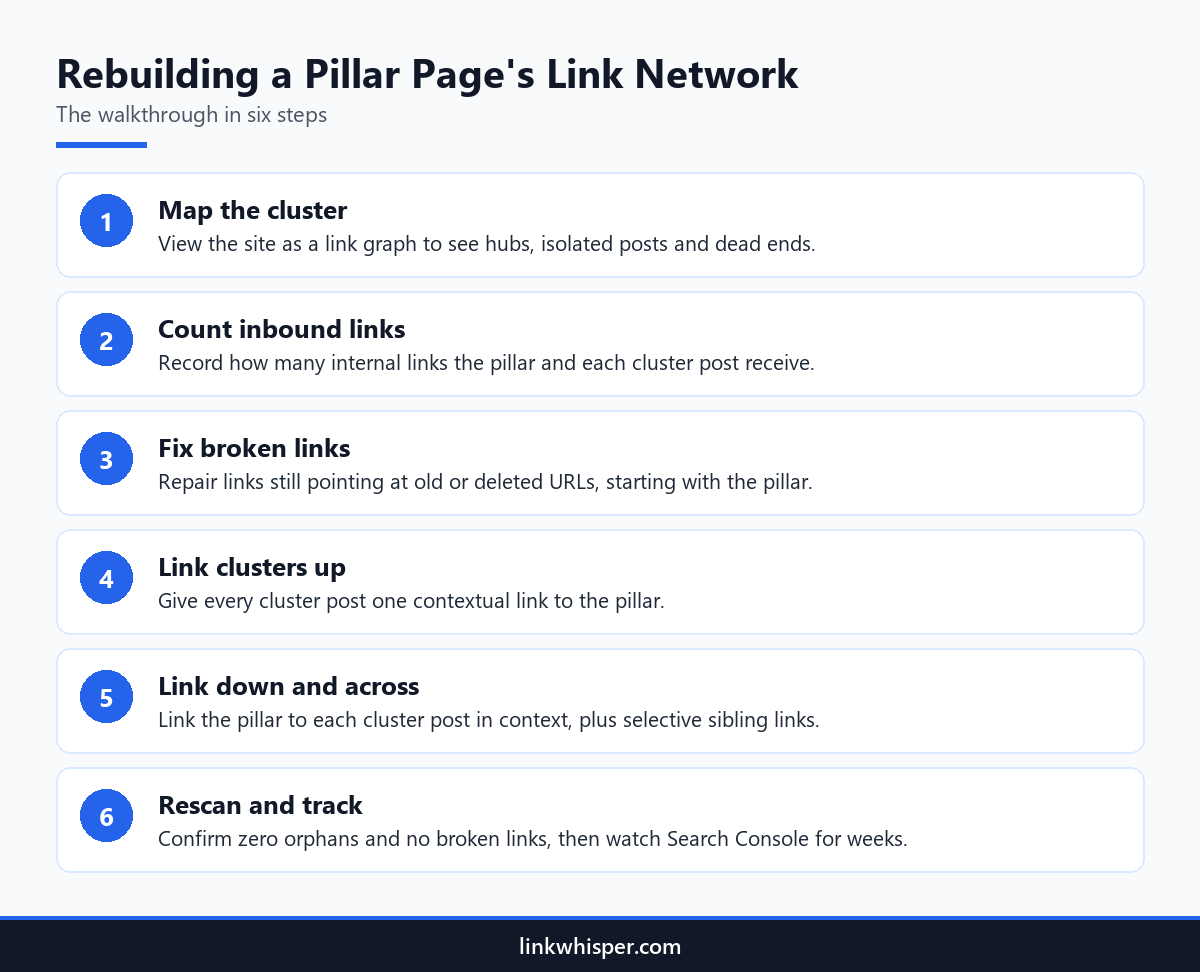
So the plan follows six steps in a fixed order. Map the cluster, count inbound links and fix broken paths. Then link the clusters up, link the pillar down and across, and finish with a rescan. Nothing new gets written until the map shows where the real gaps are.
Step One: Draw the Cluster as a Map
Spreadsheets hide shape, so the first job is a picture. A link graph reveals which hub pages really carry weight, which posts float alone and where readers hit dead ends. For the example site, that picture turns a vague worry about weak linking into three concrete problems to solve this week.
The owner pastes the domain into a free internal link map and waits a minute for the crawl. In this example, the strongest hub pages are the homepage and a gear reviews category. The guide, the site’s main pillar content page, hangs at the edge with five connections. Two cluster posts, on water filters and trail food, have no inbound links at all.
The graph exposes a second habit. Six cluster posts close with a link to an old beginners tag archive. That archive predates the guide, so readers finishing a post about stoves land on a list of headlines rather than the full plan.
Three problems now define the brief. Connect the two orphans, point the archive links at the guide instead, and turn the guide into a genuine hub. Save a screenshot of the graph before touching anything. The comparison later is far more convincing with a clear before image.
Step Two: Count Inbound Links and Fix Dead Ends
A map shows layout, but numbers show weight. This step logs the inbound internal links for the guide and every cluster post, then tests whether each link still resolves. Small sites often lose their best connections this way, because one renamed URL can quietly break every path that once led to the pillar content.
On the example site, the guide receives just five internal links. Most cluster posts receive one, and the two orphans receive none. Those figures say more about the page two ranking than any traffic chart. When the rest of a site rarely mentions a page, search engines have little reason to treat it as the main resource on the topic.
Next, the owner runs the free Broken Link Checker across the whole domain. It flags seven internal links that return a 404. Every one of them targets the guide’s original address. The slug was shortened eighteen months ago, and nobody updated the posts that pointed to it.
Repairing those seven links is the cheapest gain in the project. Each one already sits in relevant text on a related post, so the context is right and only the address is wrong. For the thinking behind grouping related posts this way, see our guide to structuring content silos.
Step Three: Add Links Up, Down and Across
Once the gaps are listed, the rebuild follows one repeatable rule. Each cluster post points up to the guide. The guide points down to each cluster post inside the matching section. Closely related posts point across to each other, so a reader can move sideways without bouncing back to the overview.
Upward links come first. Each cluster post gains one link to the guide, placed where the subject widens. The post on stoves, for instance, notes that cooking is one part of planning a first night outdoors, and that phrase carries the link. A descriptive anchor tells readers exactly where they are going.
Downward links follow. The pillar content guide now links to each cluster post within the section that discusses it, not in a list at the bottom. Sibling links then join pairs that readers naturally read together, such as tents and sleeping bags. Every link sits in a sentence that gives a reason to click.
Inside your dashboard, Link Whisper for WordPress handles the heavy lifting. Its suggestion panel in the post editor ranks related posts by meaning and drafts the anchor text. Its URL changer repoints every old link in one click, and its orphaned post report confirms none slipped through. Bloggers sitting on years of archives face the same drift and can use the same routine.
Hold back, though. One upward link per cluster post is plenty. Linking the same post twice from the guide adds clutter without adding value.
Step Four: Scan Again and Judge the Outcome
A rebuild is only finished when a second scan confirms it. Running the same checks again shows whether the orphans now have links, whether the 404s are gone and how far the guide’s inbound count has climbed. Those structural numbers move the same day. Rankings move later, and no change guarantees them.
In this illustrative rebuild, the second scan finds no orphans in the cluster and no broken links to the guide. The guide now receives twenty four internal links instead of five. Every cluster post has at least three inbound links, one of them from the pillar content page itself.
After that, the owner tracks impressions and average position for the guide in Search Console across the following weeks. If one cluster post still trails, the next experiment is a stronger contextual link from a closely related page. With the structure fixed, further gains depend on content quality and relevance.
Make the routine part of publishing. Every new cluster post needs a link up to the guide and a link down from it on launch day. Skip that habit and the cluster slowly slides back into its old shape.
Conclusion
A pillar content rebuild is mostly a matter of structure, not new writing. Draw the map, count the links, repair the dead ends, then connect each post up, down and across. Close with a second scan so you can see every change in the numbers. This example covered one cluster on one site, yet the same order works across an entire blog. Run a free scan on your own guide and its supporting posts today, then let the plugin suggest the missing links from inside the editor.
Frequently Asked Questions
What does pillar content mean?
It is a broad, thorough page that covers a core subject and points readers to narrower posts on each subtopic. Those narrower posts link back, so the main page becomes the central route through the whole subject for readers and crawlers.
How many internal links should point to a pillar page?
No single number fits every site. As a rule, each cluster post should link to the pillar once, and the pillar should link to every post it summarises. That usually gives the pillar more inbound links than an ordinary article.
How do pillar pages relate to topic clusters?
The pillar page is one overview. The cluster is that overview plus every supporting post and the links joining them. Our explainer on how topic clusters are organised walks through the full model, with planning advice for new sites.
Do cluster posts need to link to one another?
They should when the subjects overlap closely. A sibling link lets a reader continue to the next useful post without returning to the overview. Be selective, because a handful of relevant sibling links beats connecting every post to every other post.
Why are broken links so damaging to a pillar?
A link meant for the pillar that lands on a 404 delivers nothing. Readers hit an error and crawlers reach a dead end, so the pillar loses that vote completely. Changed slugs are the usual cause, leaving several old links behind.
What is the quickest way to spot orphan posts?
Scan the site or open it as a visual link graph. An orphan is any published post with no inbound internal links, and it appears as an isolated dot. Link each one from the pillar and from a closely related post.
How soon does pillar content improve after new internal links?
The structure changes the moment you publish, and a fresh scan proves it. Rankings lag behind, since search engines must recrawl the edited posts first. Judge progress by impressions and average position in Search Console over several weeks, not days.
Can a WordPress plugin speed up a cluster rebuild?
It can. Link Whisper adds a suggestion panel to the post editor with relevant links and drafted anchors you approve in one click. It also lists orphaned posts and repoints every link to a changed URL at once. You stay in control.
Check if your site has the same issues.
Run a free audit right now. See your orphaned pages, broken links, and link health score in 60 seconds.
Check My Site