
Contents
- 1 Key Takeaways
- 2 Questions to Answer Before You Build a Shortlist
- 3 Six Link Whisper Alternatives Side by Side
- 4 Three Ways Tools Add Links: Suggestions, Rules and Batches
- 5 Matching the Tool to Agencies, Publishers and Solo Bloggers
- 6 How Link Whisper Stacks Up as a Plugin Option
- 7 Conclusion
- 8 Frequently Asked Questions
- 8.1 Is a WordPress plugin for internal linking worth it if I already run an SEO plugin?
- 8.2 Which tools do people compare most often with Link Whisper?
- 8.3 Can keyword rule linking hurt my SEO?
- 8.4 What separates Link Whisper from Linkilo?
- 8.5 How do agencies handle internal linking across many client sites?
- 8.6 Does an internal linking tool affect page speed for visitors?
- 8.7 What is a sensible number of internal links per article?
- 8.8 Should links be added automatically or approved one by one?
- 8.9 How can I tell whether a new linking tool is making a difference?
Choosing a WordPress plugin for internal linking gets harder the closer you look, because each option tackles the job its own way. Before you read any feature table, measure what you have now. Our free Internal Link Checker lists the posts nobody links to and the pages that get almost no support.
Those numbers become your scorecard. Below, we walk through six tools that site owners shortlist most often, the logic each one follows, and how agencies and publishers tend to settle on a pick. You will finish with a simple trial to run on your own site.
Key Takeaways
- Internal linking tools follow one of four paths: keyword rules, AI suggestions, features inside an SEO suite, or web based tools that connect to WordPress.
- The right plugin internal link WordPress setup depends on your writing habits, the number of sites you run and your comfort with automation.
- Record your orphaned posts and weak pages before installing anything, so you can prove later whether coverage really improved.
Questions to Answer Before You Build a Shortlist
Most feature tables blur together after the third product page. A sharper filter is how each option slots into your current publishing routine. Ask where link ideas show up, how quickly you reach a useful first result, who decides when a link goes live, and whether the reports reveal the gaps your site really has.
Begin with your writing environment. When link ideas sit beside the draft in the editor, adding them becomes a normal part of finishing a post. A tool you visit in a separate browser tab suits occasional cleanup projects more than everyday writing.
Then decide how much control you want to hand over. Some products propose links and wait for your approval. Others drop a link every time a chosen phrase appears. Plenty of teams combine the two, reviewing ideas on fresh posts and automating a handful of core pages.
Do not ignore onboarding effort. If configuration eats a whole week, the tool usually ends up half used. A good first scan should tell you which articles need support and which ones can pass it along, ideally within a single afternoon.
Finally, judge the reporting. You want clear lists of orphaned posts, thinly linked pages and dead URLs. Our free Broken Link Checker previews that last issue right now. Whichever product wins, add it through the official guide to managing WordPress plugins so you can update or roll back safely.
Six Link Whisper Alternatives Side by Side
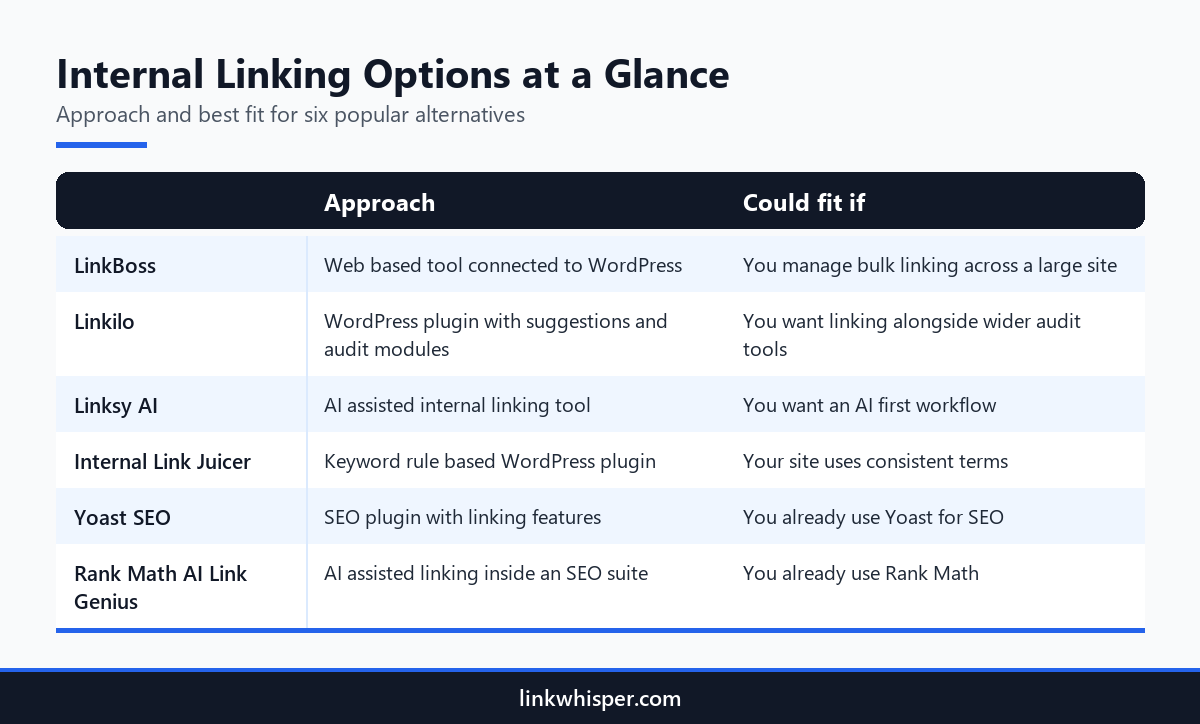
When people research internal linking, the same six names keep landing on their shortlists. The range runs from a plugin built around keyword rules to AI features tucked inside large SEO suites. Every one of them can suit a certain way of working, so focus on fit instead of hunting for one universal winner.
LinkBoss runs as a web based tool that connects to your WordPress site from outside. Owners who want to handle large linking projects from a single dashboard often look at it first. Linkilo installs as a WordPress plugin and combines link suggestions with a wider group of audit modules.
Linksy AI builds its process around artificial intelligence, using it to spot linking opportunities. Internal Link Juicer relies on keyword rules, which can add links on autopilot when your vocabulary stays consistent. Yoast SEO includes linking features within its wider SEO plugin. Rank Math AI Link Genius brings AI assisted linking into the Rank Math suite.
Want a neutral, detailed breakdown? Our roundup of the leading alternatives covers each tool in more depth. If your priority is bulk work across a large archive, read the LinkBoss head to head for a closer look.
Three Ways Tools Add Links: Suggestions, Rules and Batches
Strip away the branding and you find three basic methods for building internal links. You can approve ideas as you draft, let rules insert links on their own, or process the whole archive in large batches. Each method swaps some control for some speed, and understanding that swap simplifies the decision.
Suggestion based tools keep you in charge. They present a ranked shortlist of related articles, and you pick the ones worth linking. Results depend on whether the tool grasps meaning or only matches exact words. Tools that read context tend to propose anchors that sound like natural writing.
Rule based tools win on pace. After you create a rule, every instance of that phrase gains a link, and future posts follow automatically. The danger is too many links, or a phrase linked where it means something else. Keep rules narrow and reserve them for precise terms.
Batch tools land between the two. They let you move through hundreds of articles in a single sitting, which helps when an older archive never received proper links. In practice, most growing sites blend all three methods.
Whatever mix you settle on, inspect the results. Open several freshly linked articles after the first round. Watch for clumsy anchors, the same destination repeated again and again, and links sitting inside headings. Fixing those habits early saves hours of cleanup down the road.
Matching the Tool to Agencies, Publishers and Solo Bloggers
Who manages the site shapes the answer more than any single feature does. A solo writer, an agency juggling client accounts and a publisher sitting on years of content each work with different budgets of time, people and risk. Pick the tool that respects those limits rather than the one with the longest feature list.
Agencies that manage multiple client websites depend on a routine they can repeat from one account to the next. They also need reporting that a client can read without a glossary. When a tool behaves identically on every WordPress install, onboarding new staff gets quicker and output stays consistent.
Publishers sitting on deep content archives think first about volume. Nobody links thousands of stories by hand, so batch suggestions and controlled automation become essential. Even so, editors want the final word on anchors for their flagship pages.
Solo bloggers tend to prefer the simplest tool that still gets results. Link ideas inside the editor match how they already work, since they add links during drafting. A WordPress plugin for internal linking that demands a second login or an export step often gets abandoned within weeks.
Online store owners and niche site builders fall in the middle. Their archives are smaller than a publisher’s, yet each missed link to a product or sales page can cost money. Reports that flag which priority pages lack inbound links serve them best.
How Link Whisper Stacks Up as a Plugin Option
Link Whisper is a WordPress plugin that brings contextual suggestions, optional keyword rules and site wide reporting together. It suits people who like linking during drafting but still need to tidy older content. It will not suit everyone, so measure it against your own baseline just as you would any other candidate.
Open any post and a panel in the editor shows related internal links ranked by relevance, each with anchor text already drafted. A single click approves and inserts a link. The panel works in Gutenberg, the Classic Editor and Elementor.
Past the editor, reports flag orphaned posts and broken links, while the Auto Linking feature handles keyword rules if you want them. When a URL moves, the URL changer updates every link pointing at it in one click. Click tracking reveals which internal links readers really follow.
If you only want a few link ideas each month, the linking features in your SEO plugin might cover you. If linking regularly slows your publishing, a dedicated WordPress plugin for proper internal linking tends to earn back its cost. Plans begin at $97 per year.
Run a straightforward trial. Scan the site, write down your orphan count and your weakest pages, then publish normally for a month with your chosen tool. Scan a second time and compare. Whichever option moves those figures with the least effort deserves a permanent spot.
Conclusion
No single WordPress plugin for internal linking wins for every site, because the right pick mirrors how your team actually publishes. Settle on suggestions, rules, batch passes or a blend, then weigh reporting and team fit. Agencies benefit from repeatable routines, while publishers need scale without losing editorial control. Measure every trial against the baseline you recorded at the start. If contextual suggestions inside the editor sound right, try the Link Whisper plugin on your own site, or begin with a free scan of your internal links today.
Frequently Asked Questions
Is a WordPress plugin for internal linking worth it if I already run an SEO plugin?
It depends on scale. SEO plugins focus on titles, schema, and sitemaps, and a few add light linking help. A dedicated inter linking tool earns its place once you have hundreds of posts, many orphaned pages or little time for manual linking.
Which tools do people compare most often with Link Whisper?
The usual shortlist includes LinkBoss, Linkilo, Linksy AI, Internal Link Juicer, Yoast SEO and Rank Math AI Link Genius. Their main differences come down to method, ranging from keyword rules to AI powered linking inside a wider SEO suite.
Can keyword rule linking hurt my SEO?
Rules are fine when you apply them with care. Limit them to a short list of precise phrases, cap links per post and check the output often. Broad rules on everyday words tend to scatter repetitive, unnatural links across a site.
What separates Link Whisper from Linkilo?
Both install in WordPress and propose internal links. Linkilo packages a wider range of audit modules, whereas Link Whisper focuses on contextual suggestions within the editor. Our Linkilo versus Link Whisper breakdown compares the two in detail.
How do agencies handle internal linking across many client sites?
Most linking tools install on each site separately, so agencies repeat setup for every WordPress install. The real win is a uniform process with readable reports, so every client receives the same standard and every team member follows identical steps.
Does an internal linking tool affect page speed for visitors?
Suggestion tools do most of their processing inside the editor and during background scans, not each time a visitor loads a page. Running large scans during quiet traffic hours keeps server load modest, even on shared hosting.
What is a sensible number of internal links per article?
Three to eight contextual links suits a typical article as a starting point, then adjust for length and purpose. Long guides and hub pages can hold more. Relevance to the reader matters much more than reaching a set count.
Should links be added automatically or approved one by one?
Approve suggestions manually on most posts, since that keeps context and anchors in your hands. Reserve automatic rules for a few precise terms that always lead to the same page. Check automated links soon after setup to fix odd placements.
How can I tell whether a new linking tool is making a difference?
Capture a baseline first: orphaned posts, thinly linked pages and broken links. Repeat the scan after a month of normal publishing. A shorter orphan list and stronger coverage on priority pages show the tool is pulling its weight.
Check if your site has the same issues.
Run a free audit right now. See your orphaned pages, broken links, and link health score in 60 seconds.
Check My Site