
Contents
- 1 Key Takeaways
- 2 Defining an Internal Hyperlink
- 3 Five Kinds of Internal Links You Will Meet
- 4 Smart Placement for Every Link
- 5 Linking Habits for Podcasters and Food Bloggers
- 6 Internal Hyperlink Mistakes That Cost You
- 7 Conclusion
- 8 Frequently Asked Questions
- 8.1 What does an internal hyperlink do?
- 8.2 How are internal links different from external links?
- 8.3 How many internal links belong in one post?
- 8.4 Can internal links improve rankings?
- 8.5 What makes anchor text effective?
- 8.6 Which pages should I add internal links to first?
- 8.7 Are menu and footer links internal links?
- 8.8 What happens when an internal link breaks?
- 8.9 Should an internal link open in a new tab?
Every internal hyperlink is a small road between two pages on your own website. Readers follow these roads to the next useful article, and search crawlers follow them to discover content. Before you change anything, run a free check of the links on your site to get a baseline.
Below you will find what qualifies as an internal link, the types worth knowing, smart placement and the errors that slip in over time. We also look at podcasters and food bloggers, two groups whose archives grow fast. Each tip works on a small blog or a large one.
Key Takeaways
- Any link that points from one page to another page on the same domain is internal, whether it lives in a menu or inside a sentence.
- Links written into body copy send the clearest topical signal, while menus, breadcrumbs and footers mostly describe how the site is organised.
- Clear anchor text, early placement and routine scans for orphans and broken links keep your linking healthy as the archive grows.
Defining an Internal Hyperlink
The test is simple: look at the destination. If the link leads somewhere on the domain you already occupy, it is internal, no matter where it sits on the page. Menus, breadcrumbs, footers and sentences all qualify. Still, the links you write into your articles do far more work than the rest.
Technically, a link is an anchor element carrying an href attribute that names its destination. The anchor element documentation on MDN describes every attribute it supports. Nothing in the markup labels a link as internal. The label comes purely from the destination. Point a podcast episode at your guest archive and the link is internal. Point it at a sponsor’s homepage and it becomes external.
Each internal hyperlink quietly handles several tasks. Readers get an obvious place to go next. Crawlers get a path to pages they have not visited yet. Ranking strength also flows along the link, from well established pages toward newer ones. Remove every path to a page and it becomes an orphan that search engines can easily miss.
Ownership is what makes this worth your time. Other sites decide whether to link to you, and you have little say. Your own pages are different. You choose which posts connect, how many connections each page gets and the wording on every one. Few ranking factors sit so completely under your control.
Five Kinds of Internal Links You Will Meet
Internal links fall into a handful of families, and each family has a different job. Some build the frame of your site, while others guide readers between related ideas. Once you can name the types, you can see which ones your theme already handles and which ones still need your attention as a writer.
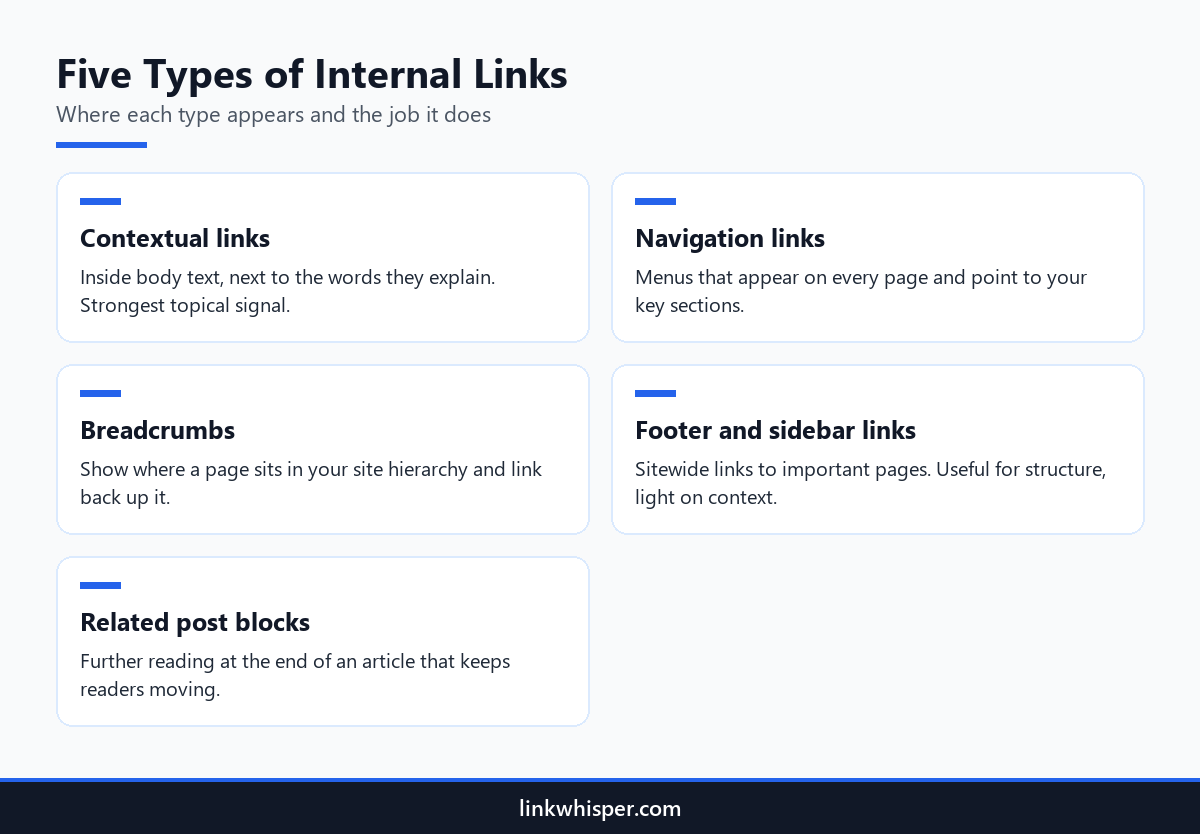
Contextual links live inside paragraphs. A sentence about sourdough starters can point straight to your starter guide, and the words around the link explain the connection. Navigation links fill your header menu and reach the main sections from every page. Breadcrumbs trace the path from the homepage down to the current post. Related post blocks close an article with suggestions for what to read next.
Footer and sidebar links are the fifth family. They repeat across the whole site, so they suit contact pages, policies and cornerstone guides. Because they appear everywhere, though, they tell search engines very little about any one article. Treat them as structure, not as a substitute for links written into your copy.
WordPress themes usually take care of menus, breadcrumbs and related posts automatically. Contextual links are different, since a person has to remember the right older post and add it. A free internal link map of your site makes the gaps obvious. It turns each page into a dot and each internal hyperlink into a line, so crowded hubs and lonely pages jump out.
Smart Placement for Every Link
Where a link sits affects both how many people click it and how strongly it signals a topic. Readers thin out as an article goes on, so early links see more traffic. Links framed by relevant words make the connection clear. Too many links on one page, meanwhile, weaken all of them together.
Put the link you care about most near the top, before attention fades. Attach it to the sentence that introduces the subject, so the click feels like a natural next step. Then space the remaining links through the article. A cluster of five links in one paragraph looks like a list of ads, not advice.
The words you link matter as much as where they sit. Pick a phrase that tells readers what waits on the other side, and vary the wording from post to post. Our tips on writing better anchors show which patterns work and which feel forced. For a typical article, three to eight contextual links is a sensible range, and longer guides can carry more.
Think about placement across the whole site too. Your most visited guides hold the most strength, so let them link down to newer posts that need help. Many writers only link backwards from new posts to old ones, which leaves fresh work isolated. The Link Whisper setup wizard scans every post and builds an internal linking plan, so older pages get a role as link sources too.
Linking Habits for Podcasters and Food Bloggers
Sites that publish in series depend on internal links more than most. Podcasters release episode after episode, and food bloggers add recipe after recipe. Each new page pushes older ones further down the archive. Steady linking keeps those older pages discoverable instead of leaving them to fade behind whatever went up last week.
Take podcasters and content creators first. Show notes are ideal places to link to past episodes on the same theme, to guest profiles and to related transcripts. Skip that step and a popular interview from two years ago has no route back from anything new. Listeners who would enjoy it never see it.
Food bloggers face a different risk. Recipes link to one another easily: a lasagne post points to your homemade pasta guide, and a picnic roundup links every salad it features. Those links are fragile, though. A theme switch or a new permalink structure can break dozens of them at once, sending readers to error pages.
Both groups benefit from one routine. Every time a new piece goes live, open two or three older related posts and add a contextual link to the new one. After any redesign, scan the site for broken links within days. That small habit protects the web of connections you spent years building.
Internal Hyperlink Mistakes That Cost You
Linking problems rarely announce themselves. They creep in one post at a time until hundreds of pages are affected. Vague anchors, links to deleted pages and valuable articles with no inbound links are the usual suspects. The good news is that each one is quick to repair once a report puts it in front of you.
Vague wording tops the list. Anchors like read more or this post give readers and crawlers no clue about the destination. Dead destinations come next. Each broken internal hyperlink strands a visitor on an error page, and the free broken link checker lists them across your site in one pass.
Orphans are the third trap. A new article starts life with zero inbound links, and it stays that way until someone adds them. Link Whisper, a WordPress plugin, includes an orphaned post report and shows ranked link suggestions in a panel inside the post editor. When you change a URL, its URL changer updates every link pointing to it in one click.
The last mistake is stuffing. A short paragraph packed with links makes each one harder to spot and less convincing. Give every link a reason to exist, and let the sentence around it tell readers why the click is worth their time.
Conclusion
Each internal hyperlink you add is a small decision that compounds across your archive. Write links into your sentences, describe the destination clearly and place the important ones early. Connect each new post to older ones, and older ones back to it. Check for orphans and broken links on a schedule, because both pile up when nobody looks. Start with a free scan of your site, then install the Link Whisper WordPress plugin to turn those findings into links with a few clicks.
Frequently Asked Questions
What does an internal hyperlink do?
It connects one page of your website to another page on the same domain. That connection gives readers a next step, lets search engines reach more of your content, and moves ranking strength between related pages across the site.
How are internal links different from external links?
Internal links stay on your own domain, while external links send visitors to other websites. You need both. The difference is control: you decide every internal connection, so those links shape how readers and authority move through your content.
How many internal links belong in one post?
No rule fits every article. Most standard posts work well with three to eight contextual links, and long guides or hub pages can hold more. Add a link whenever it genuinely helps the reader, not to reach a target count.
Can internal links improve rankings?
They can. Internal links help crawlers find and revisit pages, show which topics belong together and pass strength from popular pages to quieter ones. A page that nothing links to is harder for search engines to discover and rank.
What makes anchor text effective?
Effective anchor text tells readers what they will find after the click, using natural wording. Skip vague phrases like read more, and avoid repeating one identical keyword on every link. Varied, descriptive phrases read better and still stay perfectly clear.
Which pages should I add internal links to first?
Begin with orphaned posts and pages that receive only one or two inbound links. This walkthrough on spotting internal link opportunities covers manual methods, and a free link checker reports inbound counts for every page at once.
Yes. Header menus, footers, sidebars and breadcrumbs all point to pages on your own domain, so they count. Because they repeat sitewide, they mostly describe structure. Links written inside your articles carry stronger topical meaning for search engines.
What happens when an internal link breaks?
Visitors reach an error page instead of the content they expected, and crawlers waste visits on a dead end. Broken links often follow deleted posts, changed URLs or theme migrations, so run a scan after every structural change to your site.
Should an internal link open in a new tab?
In most cases, no. Opening internal links in the same tab lets readers use the back button the way they expect. Save new tabs for moments when leaving would interrupt a task, such as completing a long form.
Check if your site has the same issues.
Run a free audit right now. See your orphaned pages, broken links, and link health score in 60 seconds.
Check My Site